
Lechange LOOC Manuel utilisateur

Quick Start Guide
Version 1.0.0

Contents
Quick Start Guide......................................................................................................1
Packing List........................................................................................................11
Product Introduction ...........................................................................................12
Operation with Lechange App.............................................................................33
Installing Device.................................................................................................34
Kurzanleitung............................................................................................................5
Lieferumfang ......................................................................................................51
Produktvorstellung..............................................................................................52
Bedienung über die Lechange-App....................................................................73
Gerät installieren................................................................................................84
Guía de inicio rápido.................................................................................................9
Contenido...........................................................................................................91
Vista general del producto..................................................................................92
Funcionamiento usando la aplicación Lechange..............................................113
Instalar el dispositivo........................................................................................114
Guide de démarrage rapide....................................................................................13
Contenu de l’emballage....................................................................................131
Introduction au produit......................................................................................132

Fonctionnement avec l’application Lechange...................................................153
Installer l’appareil .............................................................................................164
Snelstarthandleiding ...............................................................................................17
Paklijst..............................................................................................................171
Product Introductie...........................................................................................172
Werken met de Lechange-App.........................................................................193
Apparaat Installeren .........................................................................................204
Guida introduttiva....................................................................................................21
Contenuto della confezione..............................................................................211
Presentazione delprodotto................................................................................212
Funzionamento con l'app Lechange.................................................................233
Installazione del dispositivo................................................................................244
Guia de Início Rápido .............................................................................................25
Lista da embalagem.........................................................................................251
Apresentação do produto.................................................................................252
Funcionamento com a Aplicação Lechange .....................................................273
Instalar o dispositivo.........................................................................................274
1
Quick Start Guide
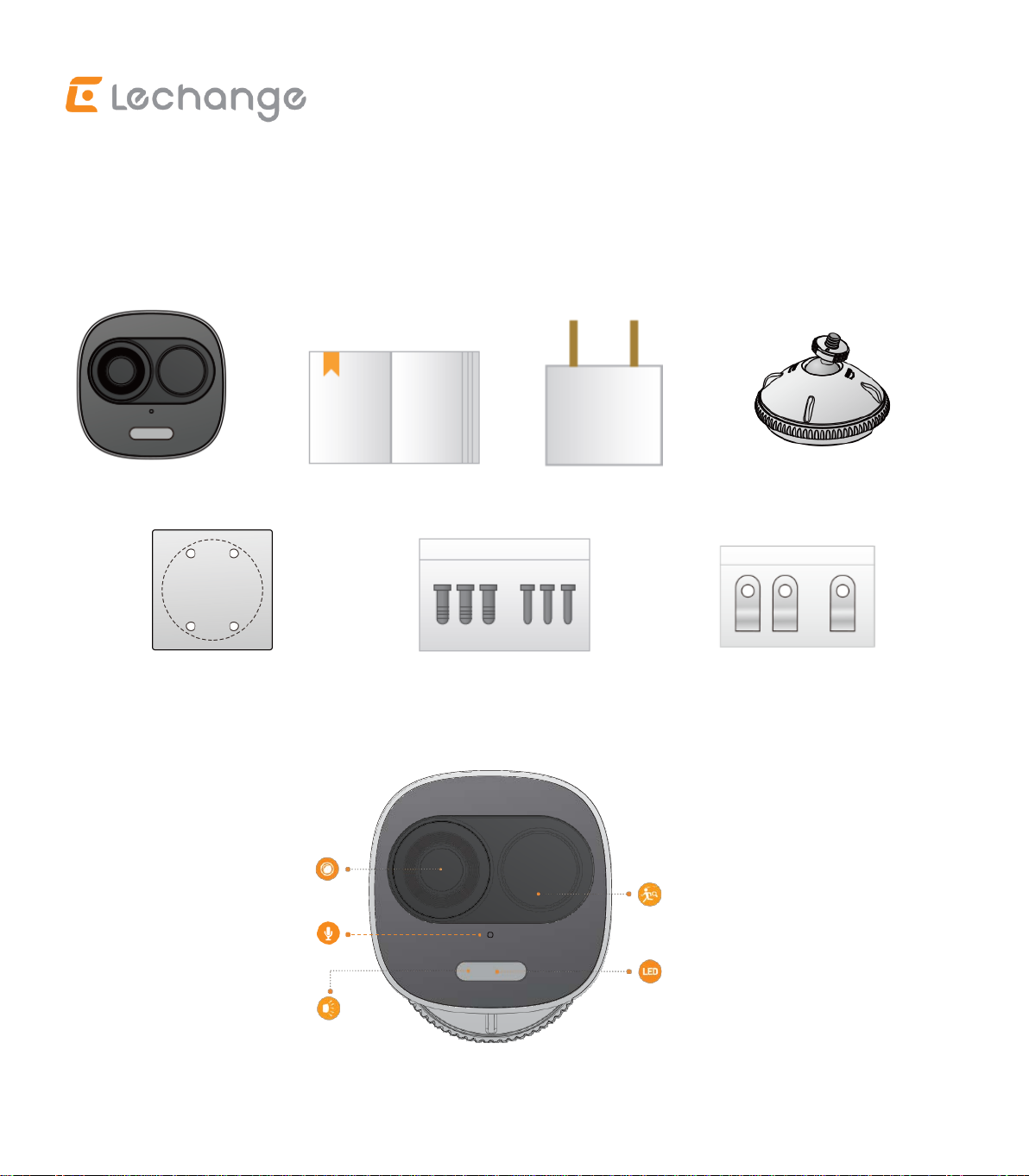
Packing List1
Device ×1QSG ×1Power Adapter ×1Bracket×1
Installation Position Map ×1 Screw Package*5 Cable Clip Package ×1
Product Introduction2
Figure 2-1
Microphone
Lens
PIR Detetor
LED Indicator
Spotlight

2
Figure 2-2
Note: Press the Reset/WPS Button to enable WPS.
Press the Reset/WPS Button for 10 seconds to reset the device.
Please refer to Table 2-1 for more details about status of LED indicator.
LED Indicator Status Device status
Red light on
Booting
Device malfunction
Green light flashing Waiting for Wi-Fi configuration
green light on Operating properly
Red light flashing Network connection failed
Red light rapid flashing Micro SD card malfunction
Light off Powered off/LED turned off
Rebooting after reset
Green and Red light flashing
alternately
Firmware updating
Table 2-1
Bulit-in Speaker
Micro SD Card Slot
Reset/WPS Button

3
Operation with Lechange App3
Step 1 Connect the device to power source with the power adapter.
Step 2 Connect your smartphone to your Wi-Fi network and scan the“Lechange”
QR code on the packing box. Then download and install the Lechange App.
Step 3 Run Lechange App, and register an account for first use.
Step 4 Follow the steps below to add device (Figure 3-1).
Figure 3-1
Note
- If you have more than one device, follow step 4 to add them one by one.
- If the Wi-Fi network changed, reset the device and follow step 4 to add it again.
Installing Device4
Note
Make sure the mounting surface is
strong enough to hold at least
three times of the device weight.
Step 1 Drill screw holes on the
mounting surface as the
installation position map

4
shows and put in the expansion bolts.
Step 2 Open the bracket and pull the power cable through the cable tray on the
bottom.
Step 3 Align the screw holes on the bracket to those on the mounting surface, then
put in and fasten the self-tapping screws.
Step 4 Attach the other half of the bracket to the device, then adjust the position of
the power cable and fix the bracket.
Disclaimer
- This quick start guide is for reference only. Minor difference might be found in
user interface.
- All the designs and software here are subject to change without prior written
notice.
- All trademarks and registered trademarks mentioned are the properties of their
respective owners.
- Please visit our website or contact your local service engineer for more
information.
- If there is any uncertainty or controversy, please refer to our final explanation.

5
Kurzanleitung
Lieferumfang1
Gerät × 1
Kurzanleitung × 1
Netzteil × 1
Halterung × 1
Montageschablone × 1
Schrauben × 5
Kabelschellen × 1
Produktvorstellung2
Abbildung 2-1
Mikrofon
Objektiv
PIR-Bewegungsmelder
LED-Anzeige
Scheinwerfer

6
Abbildung 2-2
Hinweis: Drücken Sie die Rücksetz-/WPS-Taste, um WPS zu aktivieren.
Halten Sie die Rücksetz-/WPS-Taste für 10 Sekunden gedrückt, um das Gerät auf
Werkseinstellungen zurückzusetzen.
Weitere Informationen zum Status der LED-Anzeige finden Sie in Tabelle 2-1.
LED-Anzeigestatus
Gerätestatus
Rote LED leuchtet
Gerät fährt hoch
Gerätestörung
Grüne LED blinkt
Warten auf WLAN-Konfiguration
Grüne LED leuchtet
Ordnungsgemäßer Betrieb
Rote LED blinkt
Netzwerkverbindung fehlgeschlagen
Rote LED blinkt schnell
Fehlfunktion microSD-Karte
LEDs aus
Gerät/LED ausgeschaltet
Gerät fährt nach Rücksetzung hoch
Grüne und rote LED blinken
abwechselnd
Firmware-Update
Tabelle 2-1
Integrierter
Lautsprecher
microSD-Kartensteckplatz
Reset/WPS-Taste

7
Bedienung über die Lechange-App3
Schritt 1 Schließen Sie das Gerät über das Netzteil an der Steckdose an.
Schritt 2 Verbinden Sie Ihr Smartphone mit Ihrem WLAN-Netzwerk und scannen
Sie den “Lechange”-QR-Code auf der Verpackung. Laden Sie dann die
Lechange-App herunter und installieren Sie sie.
Schritt 3 Führen Sie Lechange-App aus und registrieren Sie ein Konto für die erste
Verwendung.
Schritt 4 Führen Sie die folgenden Schritte aus, um ein Gerät hinzuzufügen.
Abbildung 3-1
Hinweis
- Wenn Sie mehr als ein Gerät haben, führen Sie Schritt 4 aus, um die Geräte
einzeln hinzuzufügen.
- Wenn sich das WLAN-Netzwerk
geändert hat, setzen Sie das
Gerät zurück und führen Sie
Schritt 4 aus, um es erneut
hinzuzufügen.
Halterung
Dübel
Montagefläche
Stromkabel
Selbstschneidende Schraube
Table des matières
Langues :
Autres manuels Lechange Caméra de sécurité


