
LD CDMP1 Manuel utilisateur

LD CDMP1
CD / USB / SD / MP3 PLAYER
2345
0
9
8
7
6
1
CDMP1
REMOTE
SENSOR
DIRECT ACCESS
ON
OFF
USB
SD
CD/CDR/CDRW/MP3/USB/SD
2345
0
9
8
7
6
1
CDMP1
REMOTE
SENSOR
DIRECT ACCESS
ON
OFF
USB
SD
CD/CDR/CDRW/MP3/USB/SD
USER´S MANUAL
BEDIENUNGSANLEITUNG
MANUEL D`UTILISATION
MANUAL DE USUARIO
INSTRUKCJA OBSŁUGI
MANUALE D‘ USO

ENGLISHDEUTSCHFRANCAIS
FRANCAISFRANCAIS FRANCAISFRANCAIS ESPAÑOLPOLSKIITALIANO
Thank you for choosing LD-Systems!
We have designed this product to give you reliable operation over many years. Therefore LD-Systems underwrites
high quality products with its name and many years of experience as a producer.
Please, take a few moments to read these instructions carefully, as we want you to enjoy your new LD-Systems
products quickly and to the fullest.
Further information about LD-Systems check our website WWW.LD-SYSTEMS.COM
2

ITALIANO
POLSKI
ESPAÑOL
FRANCAIS
FRANCAIS FRANCAIS
FRANCAIS FRANCAIS
DEUTSCH
ENGLISH
LD CDMP1
CD / USB / SD / MP3 PLAYER
2345
0
9
8
7
6
1
CDMP1
REMOTE
SENSOR
DIRECT ACCESS
ON
OFF
USB
SD
CD/CDR/CDRW/MP3/USB/SD
2345
0
9
8
7
6
1
CDMP1
REMOTE
SENSOR
DIRECT ACCESS
ON
OFF
USB
SD
CD/CDR/CDRW/MP3/USB/SD
3

ENGLISHDEUTSCHFRANCAIS
FRANCAISFRANCAIS FRANCAISFRANCAIS ESPAÑOLPOLSKIITALIANO
PREVENTIVE MEASURES:
1. Please read the attached safety instructions as well as the following instructions carefully.
2. Please keep all the instructions.
3. Please use the device only as intended.
4. Please respect the valid waste management rules. Please deliver the packaging divided into plastic and
paper/ cardboard to the recycling management.
5. Please refer all servicing to qualified personel only if the device is damaged, exposed to liquid/rain or if it does
not operate normally.
6. Please, do not expose to any kind of heat such as ovens, radiators, or any other devices (incl. amplifiers).
Please check for enough distance between amplifiers and walls, racks, etc. to prevent overheating.
7. After connection please check the wiring to prevent any kind of accident or damage.
Please never use any kind of damaged cable and wiring.
8. Only use authorized and stable stands, brackets, shelfs, tables etc.. for installations. Please check for
adequate stability against collapse.
9. Appearance of interferences when using wireless systems.
The simultaneous use of wireless microphones and of mobile phones (if both devices are not very distant from
each other) can lead to the appearance of interferences in the microphone signal which can be heard in the
PA system.
CAUTION:
To reduce the risk of electric shock, do not remove cover (or back). No user serviceable parts inside. Refer
servicing to qualified personnel.
The lightning flash with arrowhead symbol within an equilateral triangle is intended to alert the
user to the presence of uninsulated “dangerous voltage” within the product´s enclosure that may be
of sufficient magnitude to constitute a risk to persons.
The exclamation mark within an equilateral triangle is intended to alert the user to the presence of
important operating and maintenance (servicing) instructions in the literature accompanying the
appliance.
CAUTION! HIGH VOLUME!
You will operate this transmission system for professional use. Therefore the commercial use of this equipment
is liable to the rules and regulations of the Accident Prevention & Insurance Association of your industry sector.
Adam Hall as a manufacturer is bound to inform you formally about the existence of eventual sanitary risks.
This system is able to induce an acoustic pressure of 80 db. 85 db is by law the maximum audio pressure level
which your ear can be exposed to during a work day. It was set according to the technical expertise of the
occupational medicine as a basis for the noise rating level. Higher sound levels or longer exposition times could
damage your ear. The time of exposition by higher sound pressure levels should be shortened in order to prevent
from ear damages. Here are a few reliable warning signals which show that you have exposed yourself for a too
long period to excessive sound pressure levels:
- You hear bell- or whistling sounds!
- You have the impression that you can’t hear high tones anymore!
CAUTION
RISK OF ELECTRIC SHOCK
DO NOT OPEN
4

PREVENTIVE MEASURES & INTRO:
CAUTIONS ABOUT LASER RADIATION
There is no hazardous invisible laser radiation during operation because invisible laser radiation emitted inside
of this product is completely confined in the protective housings. Invisible laser radiation may occur when open
and interlock failed or defeated. Avoid direct exposure to beam. Use of controls or adjustments other than those
specified herein may result in hazardous radiation exposure.
INTRODUCTION
The CD / MP3 player is suitable for versatile PA applications (e.g. in theatres, pubs or waiting rooms) and offers
special features, e.g. continuous repeat, random replay, MP3 replay of USB storage media and SD memory cards.
It is able to play audio CDs, audio CDs you have burnt yourself (audio CD-R) and CDs with titles in MP3 format.
FEATURES
-CD / USB / SD / MP3 player
-IR remote control
-Title direct access
-Program function
-Various repeat modes
-Balanced XLR output
-Anti shock buffer memory 40 sec.
-19 inch housing
ITALIANO
POLSKI
ESPAÑOL
FRANCAIS
FRANCAIS FRANCAIS
FRANCAIS FRANCAIS
DEUTSCH
ENGLISH
5
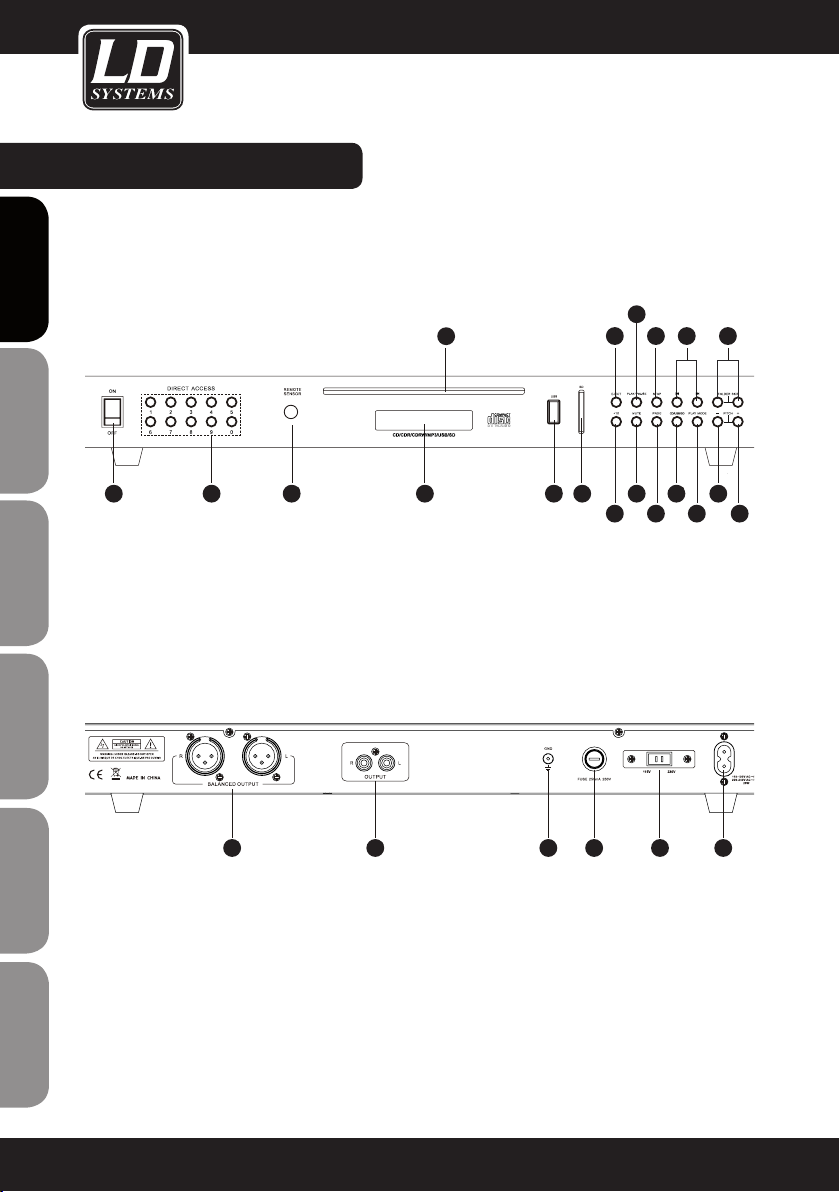
CONTROL ELEMENTS:
FRONT PANEL:
BACK PANEL:
ENGLISHDEUTSCHFRANCAIS
FRANCAISFRANCAIS FRANCAISFRANCAIS ESPAÑOLPOLSKIITALIANO
1
2
3 4
5
6789
10
11
12 131420
19
16
17
15
18
2221252324
6

CONTROL ELEMENTS:
1ON / OFF
On/off switch complete unit.
2AC CORD CONNECTION
Connect the main power cable here.
3TRACK SELECT
Pressing 0-9 Buttons allows you to directly select tracks from a CD, USB stick or SD card.
4PITCH "-"
The pitch is adjustable from 0% to -16% in 8 steps.
5PITCH "+"
The pitch is adjustable from 0% to +16% in 8 steps.
6CD SLOT
Insert your AUDIO CD here.
7FOLDER SKIP
Press the left button once to go to the first file of the previous folder, or the right button to go to the first file
of the next folder.
8<< AND >>
<< Button: Use this button to restart the track or to select the previous track. Press the button more than
1sec and the double-quick backwards function will start.
>> Button: Use this button to select the next track. Press the button more than 1 sec and the double-quick
forward function will start.
9STOP
Press to stop playing.
10 PLAY / PAUSE
Press to switch between play and pause.
11 EJECT
Ejects your CD
12 USB PORT
Insert a USB Memory Stick
13 SD CARD PORT
Insert SD Card with contacts facing right.
14 DISPLAY
Backlight LCD Display
ITALIANO
POLSKI
ESPAÑOL
FRANCAIS
FRANCAIS FRANCAIS
FRANCAIS FRANCAIS
DEUTSCH
ENGLISH
7

15 MUTE
Mute and demute.
16 CD / USB / SD
Choose between CD, USB or SD function.
17 +10
Press to progress 10 songs and continue play.
18 PROG
Press to enter programming mode.
19 PLAY MODE
Press to switch between play modes:
(PLAY ALL) All (programmed) tracks will play in sequence.
(REPEAT TRACK) (programmed) track will repeat.
(REPEAT ALL) All tracks will play in sequence and then repeat.
(RANDOM REPEAT) All tracks will repeat in random order.
20 SENSOR
Infrared sensor for remote control signals.
21 FUSE
Under normal operation the fuse should not blow. A blown fuse usually indicated an overload or fault condi-
tion. To change the fuse disconnect the power cord and replace the blown fuse. Refer to the specifiactions
for the fuse current ratings.
22 CHANGING VOLTAGE
To change the voltage, slide voltage selector to desired voltage setting. The setting must match your local
line voltage rating.
23 UNBALANCED RCA OUTPUT
24 BALANCED XLR OUTPUT
25 GROUNDING
CONTROL ELEMENTS:
ENGLISHDEUTSCHFRANCAIS
FRANCAISFRANCAIS FRANCAISFRANCAIS ESPAÑOLPOLSKIITALIANO
8

1EJECT
Ejects your CD.
2STOP
Press to stop playing.
3PREVIOUS TRACK
Press to select pevious track.
4NEXT TRACK
Press to select next track.
5PLAY / PAUSE
Press to switch between play and pause.
REMOTE:
ITALIANO
POLSKI
ESPAÑOL
FRANCAIS
FRANCAIS FRANCAIS
FRANCAIS FRANCAIS
DEUTSCH
ENGLISH
10
1
5
8
9
11
12
13
14
15
16
17
7
4
2
6
3
9

6REWIND
Press to fast rewind.
7FAST FORWARD
Press to fast forward.
8TRACK SELECT
Pressing 0-9 Buttons allows you to directly select tracks from a CD, USB stick or SD card.
9+10
Press to progress 10 songs and continue play.
10 FOLDER SKIP
Press the left button once to go to the first file of the previous folder, or the right button to go to the first file
of the next folder.
11 PITCH+
The pitch is adjustable from 0% to -16% in 8 steps.
12 PITCH-
The pitch is adjustable from 0% to +16% in 8 steps.
13 PLAY MODE
Press to switch between play modes:
(PLAY ALL) All (programmed) tracks will play in sequence.
(REPEAT TRACK) (programmed) track will repeat.
(REPEAT ALL) All tracks will play in sequence and then repeat.
(RANDOM REPEAT) All tracks will repeat in random order.
14 TIME
Switches between elapsed and remaining track time.
15 SELECT
Choose between CD, USB or SD function.
16 MUTE
Mute and demute.
17 PROG
Press to enter programming mode.
REMOTE:
ENGLISHDEUTSCHFRANCAIS
FRANCAISFRANCAIS FRANCAISFRANCAIS ESPAÑOLPOLSKIITALIANO
10
Autres manuels pour CDMP1
1
Table des matières
Langues :
Autres manuels LD Lecteur multimédia


