
LCS LCS ASC2 Manuel utilisateur

78-1639-250
7/14
Lionel
Accessory Switch
Controller 2 (ASC2)
Owner's Manual
LCS PDI CABLES
use either connector
AC PowerPROGRAM
A U A U
SWITCH
ACCESSORY
SWITCH
ACCESSORY
COMM
COMM
4 O
8
4 T
7
3 O
6
3 T
5
2 O
4
2 T
3
1 O
2
1 T
1

2
Congratulations!
Your layout has always been more than the sum of its parts. But until now, combining
those parts into a complete system could be a challenge. Lionel’s new Layout Control
System or “LCS,” fulfills the LEGACY promise of integrated locomotive and layout control.
Table of Contents
What is Lionel’s Layout Control System?
How it works! 4
LCS ASC2 Module 5
Installing Your First LCS Device
Installing Your First LCS Device 6
The LCS DB-9 Cable with Power Supply 6
Installing a new LCS system with a Legacy Base 7
Installing a new LCS system with a Base-1L 8
Installing LCS with Legacy AND TrainMaster Command Bases 9-10
Installing a new LCS system with NO Command Base 11
Installing additional LCS devices
Installing additional LCS devices 12
Configuring Your ASC2
Configuring your ASC2 13
Connect accessory transformer to relay power terminals 14
Understanding ASC2 software configuration 15
Switch vs. Accessory mode 16
Momentary vs. Latching/Constant power operation 16
Accessory addressing: eight ID vs. single ID sub-mode 16
Configuring your ASC for Accessory operation 17
Configuring your ASC for Switch operation 18
Accessory Examples
Accessory examples 19
Wiring a single basic accessory 20
Wiring and operating the Floodlight Tower 21
Wiring multiple motors or lights on the same accessory 22
Wiring and operating the Sawmill 23
Wiring and operating the diesel fueling station 24
Wiring and operating uncoupling tracks (ASC2 single-address mode) 25

3
Connecting Switches to the ASC2
Connecting switches to the ASC2 26
Connecting Lionel FasTrack remote switches 27
Connecting Lionel Tubular remote switches 28
Modifying Lionel O-27 switches for fixed voltage operation 29
Connecting Atlas switches 30
Connecting Circuitron Tortoise switch machines 31
Connecting Z-Stuff DZ-1000 switch machines 32
Controlling switches wired to the ASC2
Controlling switches wired to the ASC2 33
Routes and the ASC2 34
Appendix
Operation of LEDs 36
Specifications of the LCS ASC2 36
Accessory configuration examples 37
Switch configuration examples 38
Lionel Limited Warranty Policy & Service 39
The following Lionel marks are used throughout this Owner’s Manual and are protected under
law. All rights reserved.
Lionel®, LionChief™, LionChief Plus™, LEGACY™, FasTrack®,TrainMaster®, Odyssey®, RailSounds®,
CrewTalk™, TowerCom™, DynaChuff™, StationSounds™, Pullmor®, ElectroCoupler™, Magne-
Traction®, CAB-1®Remote Controller, American Flyer®, Lionel ZW®, ZW®, MagniVision®, TMCC®,
Lionelville®, Wireless Tether™, Powerhouse™, LionMaster®, Conventional Classics™, Postwar
Celebration Series™, TruRail™, PH-1 Powerhouse®, Powermaster®, Powerstation-Powerhouse®,
Accessory Motor Controller™, AMC™, Accessory Switch Controller™, ASC™, Action Recorder
Controller™, ARC™, Track Power Controller 300™, TPC 300™, Track Power Controller 400™, TPC
400™, Block Power Controller™, BPC™, Operating Track Controller™, OTC™, FatBoy™, Lionel
Lines®, Joshua Lionel Cowen Series™, Lockon®, TrainSounds™, MultiHorn™, MultiWhistle™,
Choo-Choo™, SensorTrack™
Atlas, Z-Stuff and Circuitron Tortoise are traemarks of their respective owners.

4
What is Lionel’s Layout Control System?
LCS doesn’t replace your existing Lionel Legacy Control system. It adds to it! You can control your
layout from Lionel Cab Remote controllers or from smart devices like an Apple iPad and run
locomotives, operate track switches, accessories and lighting. Create automatic events to control
passing locomotives and other layout accessories or switches.
LCS is a modular system, with each product offering unique features. No single LCS product
will do everything and not every layout will require every type of LCS device. But a fully realized LCS
system will likely include the following:
• A Lionel Command Base (Legacy or Base-1L) for locomotive control
• LCS WiFi so you can control your layout from smart devices like an iPad®
• LCS ASC2, to operate switches, lighting and accessories
• LCS BPC2 for block power control
• LCS SensorTrack (one or more) which adds a new level of interactivity with compatible Lionel
Legacy and Vision locomotives
• LCS SER2 for computer control and use of existing Lionel serial devices like the TPC-300 and
TPC-400
How it works!
As you know, your Lionel Cab Remote sends commands to your Command Base. In turn,
the base controls your locomotives via a one-way communication link. LCS works in
parallel with your existing command base, adding a wired network of control modules. Spread
across your layout, these LCS modules operate switches, lighting, accessories and track power
blocks. LCS is bidirectional, meaning modules can send and receive commands.
And here’s where it all comes together: Since LCS can also send commands back through
the command base, LCS devices can operate your locomotives as well as your layout! For
example, a module like SensorTrack™ can make a loco blow a grade-crossing signal as it
passes. And the LCS WiFi module connects devices like an Apple iPad®to your layout so you
and your friends can easily operate switches, locos and more.
LCS WiFi
LCS SensorTrack
LCS SER2
LCS PDI cables connect modules
for bi-directional communication.
Command base controls locomotives,
one-way communication only
Figure 1. LCS doesn't replace your Lionel Command Base—it adds to it!

5
LCS ASC2 Module
The ASC2 module is designed to be connected to track switches and accessories on your
model railroad layout. Then you can control these connected switches and accessories
from a Lionel hand-held remote or a smart device such as an Apple iPad® and an LCS
WiFi module.
• When configured in switch mode, an ASC2 operates up to four remotely operated switches
from Lionel and other manufacturers.
• The ASC2 has eight Normally Open relays, with four banks of two complementary outputs.
One pair of relays will activate the “THRU” position with one set of contacts, and the other
set of contacts will activate the “OUT” position.
• Each relay is rated at 20 amps.
• When configured in accessory mode, up to eight lights, uncoupling tracks or basic on/off
accessories can be controlled.
• Accessory mode is configured as 8 normally open relays, split into two banks of four. Each
of these two banks has a common terminal feed.
Figure 2. LCS ASC2 Module
What is Lionel’s Layout Control System?
LCS PDI CABLES
use either connector
AC PowerPROGRAM
A U A U
SWITCH
ACCESSORY
SWITCH
ACCESSORY
COMM
COMM
4 O
8
4 T
7
3 O
6
3 T
5
2 O
4
2 T
3
1 O
2
1 T
1

6
Installing Your First LCS Device
The following section describes installation of a new LCS system. If you already have installed
your first LCS component, please skip ahead to the next section titled “Installing additional
LCS devices.”
When installing a new LCS system, the process you will follow depends on which (if any) Lionel
Command Base is to be connected to your LCS system. Following sections describe starting a new LCS
installation with a Legacy Base, a Base-1L or without any command base.
The LCS DB-9 Cable with Power Supply
Every LCS system requires exactly one 6-81499 LCS DB-9 Cable with Power Supply. This special
cable has three connectors: (A) a DB-9, with a “pig-tail” cable-mount power supply connector
(C) and also a 10-foot cable with an “LCS PDI” connector at its end (B). See below:
The cable receives power from the included DC wall-pack (12VDC at 1A). Power for each LCS
device is supplied through the single LCS data cable. The LCS DB-9 Cable with Power Supply wall-
pack is capable of powering dozens and dozens of LCS devices, depending on type. An additional
power booster/cable extender is available for extremely large LCS installations.
Figure 3. The LCS DB-9 Cable with Power Supply (sold separately)

7
Installing a new LCS system with a Legacy Base
To install a new LCS system on a layout with a Legacy Command Base:
1. Turn off power to your layout and Legacy Base
2. Connect the DC wall-pack to the female cable-mount connector of the LCS DB-9 Cable.
3. Connect the DB-9 connector of the LCS DB-9 Cable to your Legacy Command Base.
4. Connect the LCS PDI cable end of the LCS DB-9 Cable to either connector on your LCS device,
such as an LCS WiFi or LCS SensorTrack or any other Layout Control System product.
5. Restore power to your layout and Legacy Base.
6. Plug in the LCS wall-pack power supply.
If using a Legacy command base, it must have software rev 1.52 or
higher installed.
Your system should resemble the figure below.
Once connected and powered-up, the yellow LED on the Legacy Base will blink once every second.
With this setup, you can control Lionel locomotives and Layout Control System products using
a Legacy Remote(s) and optionally CAB-1L remote(s).
If you have additional LCS devices to install, see “Installing additional LCS devices.” If not, skip
ahead to the next section of this manual, “Configuring your LCS Device.”
Figure 4. Installing a new LCS system with a LEGACY Base
Note!
Installing Your First LCS Device
8
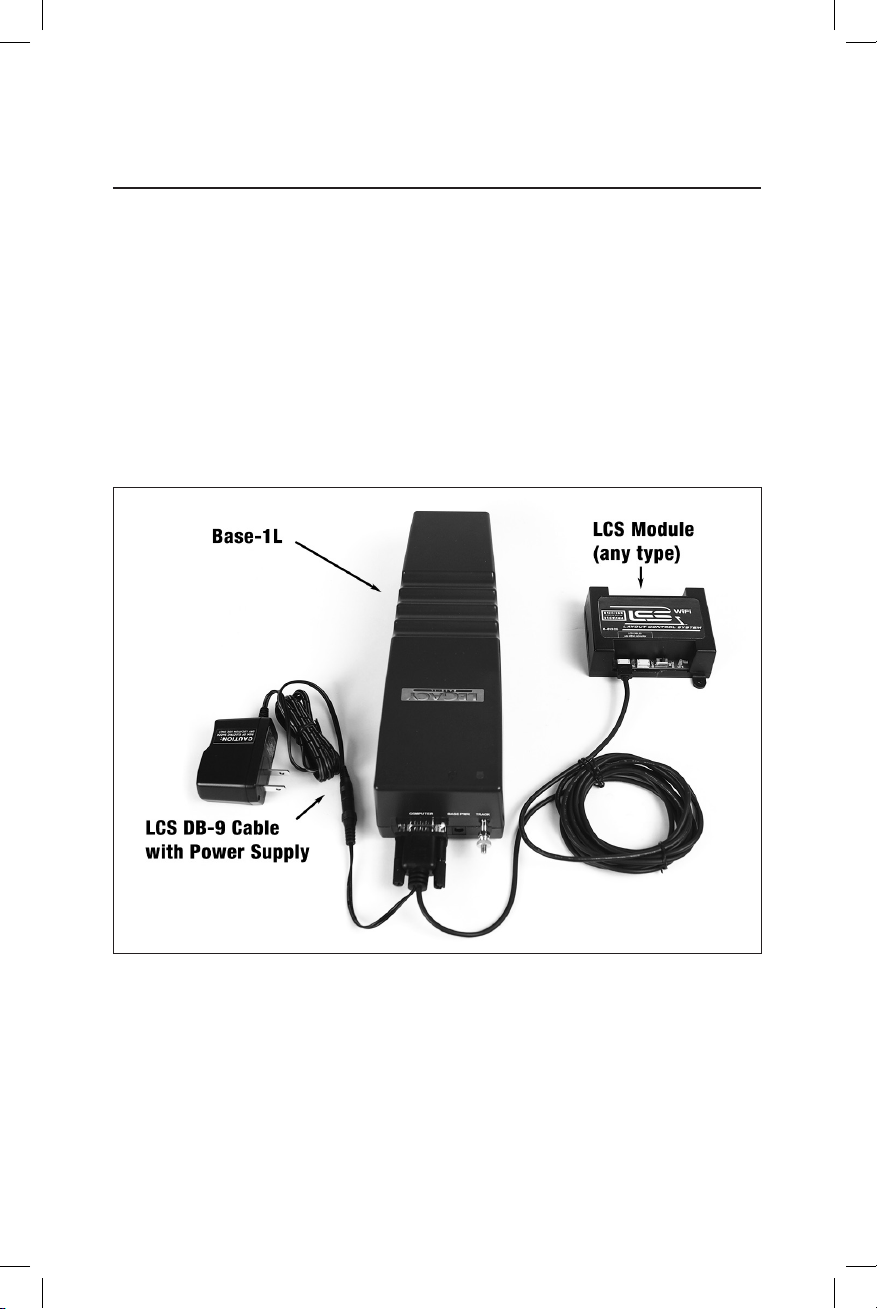
Installing a new LCS system with a Base-1L
To install a new LCS system on a layout with a Base-1L Command Base:
1. Turn off power to your layout and Base-1L
2. Connect the DC wall-pack to the female cable-mount connector of the LCS DB-9 Cable.
3. Connect the DB-9 connector of the LCS DB-9 Cable to your Base-1L.
4. Connect the LCS PDI cable end of the LCS DB-9 Cable to either connector on your LCS device,
such as an LCS WiFi or LCS SensorTrack or any other Layout Control System product.
5. Restore power to your layout and Base-1L.
6. Plug in the LCS wall-pack power supply.
Your system should resemble the figure below.
Once connected and powered-up, the red LED on the Base-1L will blink once every second.
With this setup, you can control Lionel locomotives and Layout Control System products using
a CAB-1L remote(s).
If you have additional LCS devices to install, see “Installing additional LCS devices.” If not,
skip ahead to the next section of this manual, “Configuring your LCS Device.”
Figure 5. Installing a new LCS system with a Base-1L
Installing Your First LCS Device

9
Installing LCS with Legacy AND TrainMaster Command Bases
The following instructions apply ONLY if you are using one or more original CAB-1 remotes with
a Legacy command base. It is not necessary to follow these instructions to use the CAB-1L remote
with a Legacy command base.
In order to complete this installation, you will need a CAB-1 remote, an original TMCC
Trainmaster command base, a Legacy Command Base with Legacy CAB-2 remote and the Legacy
serial Y cable (included with the Legacy command base).
This is the ONLY supported application for the Legacy Y cable. The “Command base” end
of the Legacy Serial Y cable cannot be directly connected to any accessory other than the
original TMCC TrainMaster command base.
To install a new LCS system on a layout with a Legacy Command Base, an original TMCC
Command Base and a Legacy Serial Y Cable:
1. Turn off power to your layout, Legacy Base and TMCC TrainMaster command base.
2. Connect the DC wall-pack to the female cable-mount connector of the LCS DB-9 Cable.
3. Connect the DB-9 connector of the Legacy Serial Y cable to your Legacy Command Base.
4. Connect the “Command Base” end of the Legacy Y cable to the DB-9 connector of your TMCC
Trainmaster Command Base.
5. Connect the DB-9 end of the LCS DB-9 Cable to the “Serial Comm” connector of the Legacy
Y cable.
6. Connect the LCS PDI cable end of the LCS DB-9 Cable to either connector on your LCS device,
such as an LCS WiFi or LCS SensorTrack or any other Layout Control System product.
7. Restore power to your layout, Legacy Base and TMCC TrainMaster command base.
8. Plug in the LCS wall-pack power supply.
Note!
Note! If using a Legacy command base, it must have software rev 1.52 or higher installed.
Installing Your First LCS Device

10
Installing LCS with Legacy AND TrainMaster Command Bases
(continued)
Your system should resemble the figure below.
Once connected and powered-up, the yellow LED on the Legacy Base will blink once every second.
With this setup, you can control Lionel locomotives and Layout Control System products using any
combination of LEGACY Remotes, CAB-1L remotes and original CAB-1 remotes.
If you have additional LCS devices to install, see “Installing additional LCS devices”. If not, skip
ahead to the next section of this manual, “Configuring your LCS Device.”
Figure 6. Installing LCS with Legacy AND TrainMaster Command Bases
Installing Your First LCS Device
Ce manuel convient aux modèles suivants
1
Table des matières


