LAZER BLU-BD2000 Manuel utilisateur

BLU-BD2000

IMPORTANT SAFETY INSTRUCTIONS AND PRECAUTIONS ............1
MEDIA COMPATIBILITY..............................................3
INCOMPATIBLE MEDIA..............................................4
Panel Description...................................................8
Remote Control Description......................................... 9
Device Connection Description...................................... 10
Setup – customizing setting in the main menu........................ 12
System.............................................................................12
Language............................................................................13
Play back.............................................................................13
Security..............................................................................15
TV...................................................................................16
Video processing......................................................................18
Audio output..........................................................................18
Speaker setup........................................................................20
Post processing.......................................................................20
Software version......................................................................20
Playing – Advanced Playing Operation............................... 21
Using screen control menu.............................................................21
Using OSD menu..................................................................... 22
Media Player – Special operation of data discs and USB playing........23
Troubleshooting A.................................................. 25
Technical Specifications............................................ 29
INEDX
PLAYER & DISC CARE..............................................
Using Remote & Battery.............................................
6
7
CONTACT INFORMATION............................................31
Troubleshooting B.................................................. 27

1
IMPORTANT SAFETY INSTRUCTIONS AND PRECAUTIONS
•Please read the instructions carefully before using this product
•Observe all warnings and cautions when using this product.
•Retain all manuals and documentation for future referral.
•Only use this product in the manner described in this manual.
•Do not use this device in extremely hot, cold, humid, dusty or sandy environments.
•Do not use this device in electrical storms or other conditions if the likely hood of lightning is possible.
•Do not attempt to clean this product using liquid cleaners or aerosol cleaners. Use only a damp soft cloth
to clean the surface of this device.
•This device may become hot during use. Do not cover vent holes and place in a well ventilated area.
•This device is not waterproof. Do not use this device in the open if there is a high level of moisture in the
air.
•Only place the device on a stable surface and ensure that cables attached to the device can not cause
the device to fall.
•There are no serviceable parts in this device. Attempts to open this device by unauthorised personnel
may cause further damage and void the warranty.
•Images of the product and accessories are indicative only and may vary slightly from actual the product.
•We reserve the right to make changes to this document and the product without notification.
The lightning flash with arrowhead symbol, within an
equilateral triangle, is intended to alert the user to the
presence of uninsulated “dangerous voltage” within
the product's enclosure that may be of sufficient
magnitude to constitute a risk of electric shock to
persons
The exclamation point within an equilateral triangle is
intended to alert the user to the presence of important
operation and maintenance (servicing) instruction in
the literature accompanying the appliance
THIS PRODUCT UTILIZES A LASER. USE OF
CONTROLS OR ADJUSTMENTS OR
PERFORMANCE OF PROCEDURES OTHER THAN
THOSE SPECIFIED HEREIN MAY RESULT IN
HAZARDOUS RADIATION EXPOSURE.
DO NOT OPEN COVERS AND DO NOT REPAIR
YOURSELF.
REFER SERVICING TO QUALIFIED PERSONNEL.
TRADEMARKS
•DVD Logo is a trademark of DVD Format/Logo Licensing Corp., registered in the U.S., Japan and other
countries.
•“AVCHD” and the “AVCHD” logo are trademarks of Panasonic Corporation and Sony Corporation.
•Designed for Windows Media, Microsoft, HDCD, and the HDCD logo are trademarks or registered
trademarks of Microsoft Corporation in the United States and/or other countries.
•DTS is a registered trademark and the DTS logos, Symbol, DTS-HD and DTS-HD Master Audio
| Essential are trademarks of DTS, Inc. © 1996-2008 DTS, Inc. All Rights Reserved.

2
IMPORTANT SAFETY INSTRUCTIONS AND PRECAUTIONS
•Manufactured under license from Dolby Laboratories. “Dolby” and the double-D symbol are trademarks
of Dolby Laboratories.
•HDMI, the HDMI logo and High-Definition Multimedia Interface are trademarks or registered trademarks
of HDMI Licensing LLC.
•All other trademarks are the properties of their respective owners.

3
MEDIA COMPATIBILITY
Media Type Compatibility Limitations
Blu-Ray Disk Supports high bit rate audio (Dolby Digital Plus,
Dolby TrueHD, DTS-HD High Resolution Audio
and DTS-HD Master Audio) adopted in BD-Video.
DVD
MediaType Compatibility Limitations
DVDDVD-ROM, DVD+R
(SL/DL), DVD-R
(SL/DL), DVD-RW
(SL/DL).
DVD Video or files compatible with the
BLU-BD2000 only.
Recordable DVD media must be finalised by a
recorder before playback on the BLU-BD2000.
CD
MediaType Compatibility Limitations
CD CD-Audio, CD-R.
CD-RW
Recordable CD media must be finalised by a
recorder before playback on the BLU-BD2000.
USB
MediaType Compatibility Limitations
USB Flash DrivesFormatted in FAT or FAT32 only up to 16GB
USB hard drives connect to the BLU-DB1000 should be powered by another source as well as the USB
port. A secondary power source may be required for some Notebook style USB hard drives.
Blu-ray
BD-ROM (SL/DL)
MEDIA COMPATIBILITY
Since the Blu-ray Disc specifications are new and evolving, some discs may not play properly depending
on the disc type, version and encoding. It is possible that a Blu-ray disc manufactured after the player was
manufactured uses certain new features of the Blu-ray Disc specifications. To ensure the best possible
viewing experience, the player may need a firmware or software update from time to time.

4
INCOMPATIBLE MEDIA
INCOMPATIBLE MEDIA
The following media may not be playable or produce erratic or substandard playback.
•DVD-RAM
•Super Audio CD
•Photo CD
•DVD- Audio
•WMA discs
•DivX discs
•BDs With cartridge
•DVDs with cartridge
•HD DVD
•Data files on CD-Extra discs
•CD Audio with DRM
•Non-finalised media
•BD-Video discs recorded at a rate of 50 fields (frames) per second.
NOTE: It may not be possible to play the above media in some cases due to the type of media, the
condition of the recording, the recording method and how the files were created.
The producers of the disc can control how discs are played, so you may not always be able to control
play as described in this Owner’s Manual. Read the disc’s instructions carefully.
REGION INFORMATION
Blu-ray
This player is designed and manufactured to respond to the region
management information.
If the region number of a BD-Video or DVD disc does not correspond
to the current region number of this player, the player cannot play the
disc.
The BLU-BD2000 is preset to play discs meant for region B
WHATS IN THE BOX
•BLU-BD1000 Blu-ray disc player
•Remote control
•2 x AAA Batteries
•Composite (RCA) Video/Audio cable
•User Manual (This Document)
Region Code Region Country
North America, Central America, South America, Korea, Japan, Taiwan, Hong Kong, South
East Asia
Europe, Greenland, French territories, Middle East, Africa, Australia, and New Zealand
India, China, Russia, Central Asia, and South Asia

5
INCOMPATIBLE MEDIA
DVD
This player is designed to play DVDs from all regions.
Note: Please refer to the GETTING THE BEST FROM THE PLAYER section later in this manual
for information on changing BD & DVD Region Codes.

6
PLAYER & DISC CARE
PLAYER & DISC CARE
Cleaning the BLU-BD2000 Player
Always turn the player off and unplug the power cord before cleaning.
Never use alcohol, paint thinner or benzene to clean this unit.
Before using chemically treated cloth, carefully read the instructions that came with the cloth.
Please use a damp soft cloth. Wring out any excess liquid and gently wipe the external case of the player.
Let the player dry before using again.
Lens Cleaning
Use a commercially available CD/DVD/BD lens cleaner (not supplied) to periodically clean the lens in this
player. Please read the instructions supplied with the lens cleaner carefully before use.
Handling Discs
•Handle discs by the edges to avoid inadvertent scratches or fingerprints on the
disc.
•Do not attach labels or stickers to discs.
•Do not use record cleaning sprays, benzene, thinner, static electricity prevention
liquids or any other solvent.
•Do not use the following discs
•Discs with exposed adhesive from removed stickers or
•Labels (rented discs etc) that are lifting or torn.
•Discs that are warped or cracked.
•Irregularly shaped discs, such as heart shapes.
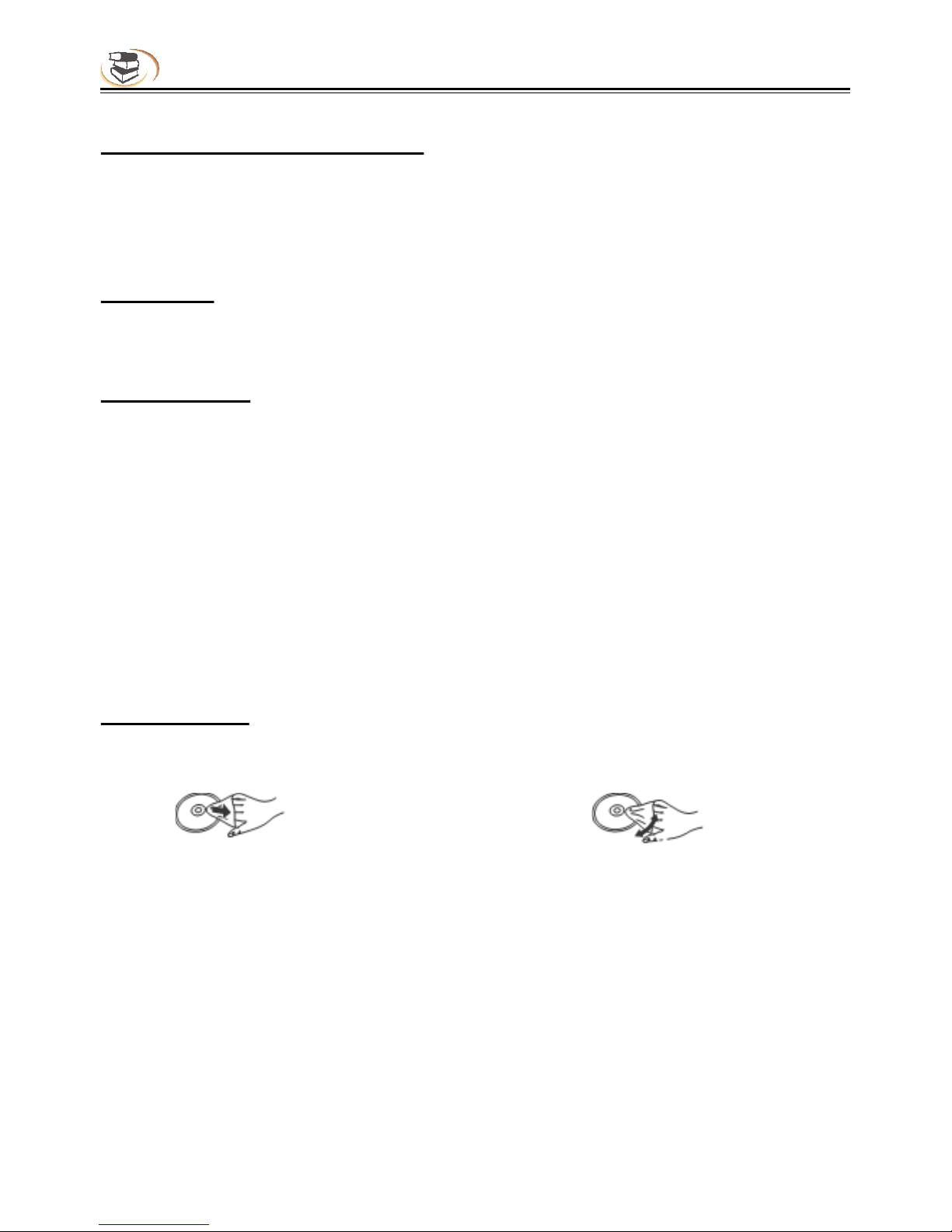
Cleaning Discs
Wipe discs with a soft damp cloth and allow to dry before placing disc in the players tray.
Never use alcohol, paint thinner or benzene to clean discs.
DO Don’t

7
Using Remote & Battery
Installing the battery
1.Open the battery cover.
2.Insert the battery (R03, AAA).
Align the +/- polarity of the battery to the
sign in the slot.
3.Put on the battery cover.
OPEN
CLOSE
Using remote control
Aim the remote control at the receiver on the panel
and then operate.
About 7m

8
Panel Description
5.Play/Pause
6.Stop
7.ON/Standby
Turn on the player or set to standby mode.
1 2 3
4 5 6 7
1.Disc tray
2.Eject/Insert
3.USB interface
Connect USB device to this interface.
4.Remote receiver
1 2
3 4 5
Parts and operation guide
Front panel
Rear panel
1.Composite video output
2.Audio output (L)
3.HDMI output
4.Digital audio output (coaxial)
5.Audio output (R)
Table des matières
Manuels Lecteur Blu-ray populaires d'autres marques

Samsung
Samsung BD-F5900 Manuel utilisateur

Philips
Philips BDP3380K Manuel utilisateur

Samsung
Samsung BD-P4600 Manuel utilisateur

Sharp
Sharp BD-HP17U - AQUOS 1080p Blu-ray DiscTM Player Manuel utilisateur

Pioneer
Pioneer BDP-140 Manuel d'installation et d'exploitation

Samsung
Samsung BD-D8200A Manuel utilisateur