Kystar LS4 Manuel utilisateur

LS4
Four lan ports 2 in 1 video controller
Version: v2.3
Release Date:November 2021
Manual

Version record
version
number
Change details
release time
V1.0
first release
2018.12.12
V2.0
Modify device interface information
2019.11.28
V2.1
Modify the format of the text
2020.12.09
V2.2
change cover
2021.10.25
V2.3
Correct size data, modify function description
2021.11.18

Safety precautions
Danger
●There is high voltage in the equipment. Non-professional maintenance
personnel should not open the back cover to avoid danger.
Warning
● This equipment is not waterproof equipment, please do waterproof treatment in wet
environment;
● This device is not allowed to get close to fire or high temperature environment;
● If the device emits strange noise, smoke or strange smells, unplug the power plug
immediately and contact the dealer.
●It is strictly forbidden to plug and unplug the VGA, DVI, and HDMI signal
cables under power.
Attention
1 Please read this manual carefully before use ,and keep it for future;
2 this equipment is not suitable for non-professionals to operate and debug,please use under
the guidance of professionals;
3 this equipment is not suitable for non-professionals to operate and debug, please use under
the guidance of professionals;
4 Do not insert anything into the vent hole of the device to avoid damage or accidents to the
device;
5 It is not appropriate to place the device on a heat sink or other high-temperature place;
6 It is not suitable to place this equipment in near water or other damp places;
7 Please properly organize and place the power cord to prevent damage;
8 If the following conditions exist,the power plug of the device should be unplugged and
commissioned for maintenance;
●When liquid splashes into the device
●When the device is dropped or the chassis is damaged
●When the device has obvious abnormality or performance is significantly
deteriorated

catalog
I、Product discussion............................................................................................................................ 1
Ⅱ、
Product characteristics..................................................................................................................... 2
III
、
Technical indicators......................................................................................................................... 3
IV、Working sketch
............................................................................................................................4
V、Panel Structure
..............................................................................................................................5
Front panel............................................................................................................................................................. 5
Back panel.............................................................................................................................................................. 6
VI、Wiring and installation
............................................................................................................. 7
Wiring diagram......................................................................................................................................................7
VII、Equipment commissioning
.................................................................................................... 8
Navigation mode................................................................................................................................................... 8
VIII
、Control menu
........................................................................................................................... 14
(1)、Language.................................................................................................................................................17
(2)、Factory.................................................................................................................................................... 17
(3)、Support................................................................................................................................................... 17
(4)、Schedule.................................................................................................................................................. 17
(5)、Effect....................................................................................................................................................... 17
(6)、VGA adjust.......................................................................................................................................... 17
(7)、Contrast................................................................................................................................................17
(8)、Freeze.................................................................................................................................................... 18
(9)、Brightness............................................................................................................................................18
(10)、Master................................................................................................................................................ 18
X
、
Method of Importing Box Files....................................................................................................... 21

LS4 manual www.kystar.com.cn
1
I、Product discussion
With the rapid development and application demand of LED display industry, various control
requirements for large screen control system emerge as the times require. However, due to the
limitations of the large screen control system in image processing, picture control and signal
format conversion, there are some weak links in the large screen control system of LED, which
can not meet the needs of users. The main problems are as follows:
1.The signal source access format of large LED screen control system is limited. At present,
only digital DVI signal is commonly used. Many signal sources (such as VGA) can not be
displayed directly on the large LED screen through the control system.
2.The image processing effect of traditional signal acquisition card is poor, which causes
great loss to the clarity of the picture while converting the signal format.
3.The large LED screen control system can only capture the corresponding points of the
large LED screen for display, while in some customer sites, it is necessary to display any size or
complete computer desktop screen at will.
4.The large LED screen control system can only capture the corresponding points of the
large LED screen for display, while in some customer sites, it is necessary to display any size or
complete computer desktop screen at will.
In view of the above problems, our company independently developed a number of video
processing products. The product adopts advanced control and image processing technology,
which can not only realize switching between signals quickly and steadily, but also process
multi-level pictures. In addition, the product can be controlled by keyboard and PC computer on
the device, which makes the operation simple and convenient.

LS4 manual www.kystar.com.cn
2
Ⅱ、Product characteristics
Professional Video Processor:
HD Multi Format Signal input
Transient or fading transitions between arbitrary signals
Arbitrary free Zoom Display
Integrated LED sending card:
4 pcs network port output, the output max width 3840, the max high 1080
Loading 2.36 million pixels
Support without computer direct operation,3 Step configuration screen
high-performance offline Player:
Support USB playback, perfect support for various video and picture formats
Offline scheduled tasks that automatically play or switch signals at a user-set time
One-click configuration :
Support readback configuration and resend configuration implementation, easily realize one-key repair

LS4 manual www.kystar.com.cn
3
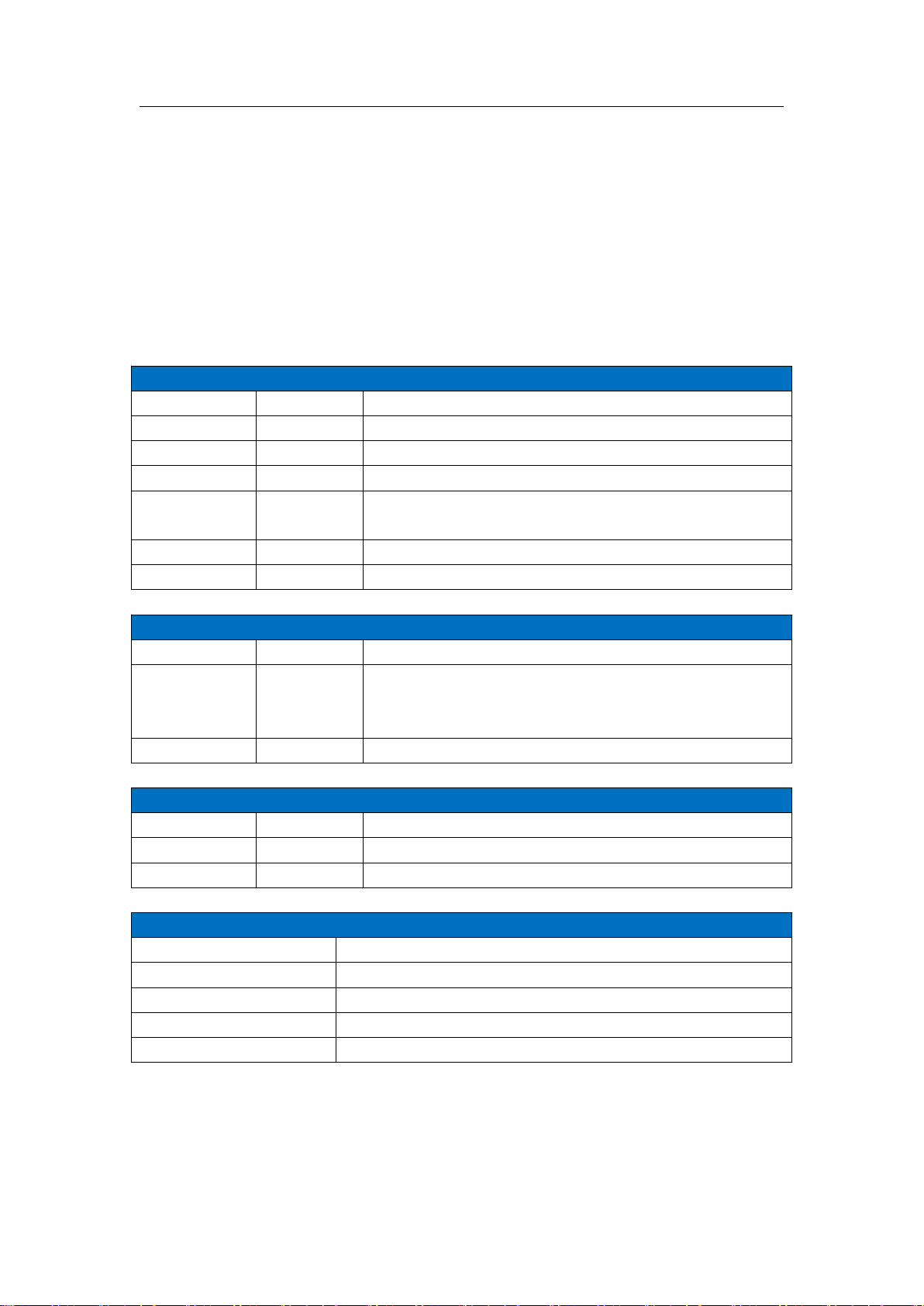
III、Technical indicators
The video processor adopts the latest patented video processing technology, and has the
video conversion capability of any format input and corresponding format output. Video signals
including CVBS (composite video), HDMI, VGA (RGB) and DVI-D can be processed and
enhanced to meet customer application needs. The detailed specifications are as follows:
Input port
Type
Number
Specifications
CVBS(BNC)
2
NTSC/PAL Adaptive, support 3D comb filter
VGA
1
VESA Standard, maximum support 1920x1080@60hz
DVI
1
1.3 Standard, maximum support 1920x1080@60hz
USB
1
USB input, NTFS system supports up to 2T, FAT32 system supports up
to 192G, and single file up to 4G
HDMI
1
1.3A Standard, maximum support 1920x1080@60Hz
1/8" TRS audio
2
3.5mm stereo interface, 2.0Vp-p / 10 KΩ
Output port
Type
Number
Specifications
LAN
4
LAN port, used to transmit data to the receiving card, the output widest
can reach 3840, the highest can reach 1080, the maximum load is 2.3 6
million pixels
1/4" TRS audio
1
6.3mm stereo interface, 2.0Vp-p / 10 KΩ
Control port
Type
Number
Specifications
USB(Type-B)
1
USB-CFG interface, used to connect to PC upper computer control
UART(RJ-45)
1
6.3mm stereo interface, 2.0Vp-p / 10 KΩ
Control port
Input power
100-240VAC 50/60Hz 0.6A
Working temperature
0-45℃
Dimensions
483×270.5×73mm(L×W×H)
Net weight
5KG
Whole machine power
36W

LS4 manual www.kystar.com.cn
4
IV、Working sketch
LED screen
Video processor
Desktop computer laptop camera DVD

LS4 manual www.kystar.com.cn
5
V、Panel Structure
Front panel
⑴ ⑵ ⑶ ⑷ ⑸ ⑹ ⑺ ⑻ ⑼ ⑽
⑾⑿⒀ ⒁⒂ ⒃⒄
⑴POWER-----------------------------Device switch, OFF - power off, ON - power on
⑵LCD----------------------------------Text display, displaying menus, parameters, etc.
⑶DVI-------------------------------------------------------------Digital signal channel key
⑷HDMI----------------------------------------------------HD multimedia channel button
⑸VGA-----------------------------------------------------------Analog signal channel key
⑹BRI-----------------------------------------------------------------------Brightness setting
⑺MODE-------------------------------------------------------------------User mode call
⑻MENU----------------------------------------------------------------------------Menu
⑼OK--------Confirm button, click to enter the next interface when navigating mode
⑽ADJUST--------------------Knob increase the decrease button, press the OK button
⑾/⑿CV1~2---------------------------------------------Composite signal channel button
⒀USB-----------------------------------------------------------USB signal channel button
⒁OUT---------------------------Switch between output black screen and normal; Note:
Blue screen is switched with knob
⒂PART-----------------------------------------------------Do partial panorama switching
⒃Navigation key--------------User navigation mode, as a step value switch when
adjusting the data size
⒄Arrow sign----------------------------------------------------------------------back key

LS4 manual www.kystar.com.cn
6
Back panel
⑴ ⑵ ⑶ ⑷ ⑸ ⑹⑺ ⑻ ⑼⑽ ⑾ ⑿
⑴UART -------------------------------------Connect the host computer software through
the 9-pin serial port to the RJ45 network port
⑵USB-CFG ---------------Connect the host computer software through the USB port
⑶USB --------------------------------Program upgrade port, USB source input interface
⑷HDMI------------------------------------------Laptop, etc. HDMI signal input interface
⑸DVI ------------------------------DVI signal input interface such as desktop computer
⑹VGA----------------------------------------laptop and other VGA signal input interface
⑺CV-1/2--------------------------------Composite signal input interface such as camera
⑻AUDIO1/2-----------------------------------------------------------Audio input interface
⑼AUDIO -OUT------------------------------------------------------Audio output interface
⑽SAT1/2/3/4----------------------------------------Network port 1/2/3/4 signal indicator
⑾LAN1/2/3/4------------------------------------------------------------Network port output
⑿Power port-----------------------------------------------------------------------220V power
Table des matières
Autres manuels Kystar Contrôleurs