
Kyocera W63K Guide d'installation

Contents/
GettingReady
PhoneCall
TextInput
AddressBook/
PairFunction
Mail
Keitai!Kenkouroku
EZNavi
Camera
EZweb
OtherFunctions
EZNewsFlash
Index
Troubleshooting/
RemoteCtrlLock
Basic
Manual
表1-PDF書き出し_33 08.5.20 10:11 AM ページ 1

ThankyouforpurchasingtheW63K.Beforeusingitforthefirsttime,be
suretoreadtheW63KBasicManual(thisPDFmanual)soastoknowhow
touseitcorrectly.Afteryoufinishreadingthismanual,storeitandthe
printedmaterialsthatcomewiththephoneinasafeplaceforfuture
reference.
Introduction
●
Thetypefaces/design/colorsofitemsinthescreensandillustrations
providedforexplanatorypurposesinthismanualmaydifferfromtheactual
screensandkeysonthephone.Also,certainscreenportionssuchasicons
atthescreentopmaybeomitted.
Note
TheW63KcomeswithaBasicManualandanInstructionManual.
PrintedManualsfortheW63K(Japanese)
Thefollowingmanualisalsoavailableontheauwebsite.
・TodownloadtheBasicManual/InstructionManual(http://www.au.kddi.com/torisetsu/index.html)
・Toaccessakeywordsearchableauonlinemanual(http://www.au.kddi.com/manual/index.html)
YoucanalsoaccesstheauonlinemanualusingEZweb.
<EZwebAccess> auoneTop⇒auお客さまサポート(auCustomerSupport)⇒
調べる(Information)⇒オンラインマニュアル(OnlineManual)
Readthisbarcode(QRcode)to
accesstotheauonlinemanual
目次/準備
通話
文字入力
アドレス帳/
ペア機能
メール
ケータイ!健康録
EZナビ
カメラ
EZweb
その他機能
EZ ニュースフラッシュ
索引
English(英語)/
中文(中国語)
困ったときは
遠隔ロック
ご使用になる前に
auICカード
基本機能
カメラ
音/画面
ケータイ!健康録
EZweb
メール
プライバシー機能
EZナビ
目次
auのネットワーク
サービス
EZニュースフラッシュ
auoneMyPage
EZアプリ
データフォルダ
microSDカード
付録/索引
クイックガイド
便利な機能
かんたんモード
W63KBasicManual
EquivalenttothisEnglishPDF
manual.
Englishversionnotavailable.
W63KInstructionManual
+D61_kantan_cover2-3_33 08.5.20 10:09 AM ページ 1

1
CellphoneEtiquette
Somelocationsdonotallowtheuseofcellphones
● Usingacellphonewhiledrivingisdangerous
andprohibitedbyTrafficControlLaw.
● Usingacellphoneinanaircraftisprohibited
bylaw.Besuretoturnoffyourcellphone.
Watchoutwhereyouuseyourcellphone,andkeepyourvoicedown
● Donotmakecallsatcinemas,theaters,
museums,libraries,orothersimilarlocations.
TurnoffthecellphoneoruseMannerModeto
ensurethattheringtonedoesnotdisturb
others.
● Wheninpublic,movetoalocationwhereyou
willnotbeblockingtraffic.
● OntheShinkansen,inahotellobby,orin
othersimilarlocations,movetoalocation
whereyouwillnotdisturbothers.
● Takecaretoavoidtalkingonthephoneina
loudvoice.
● Beforetakingapictureofothers,besureto
obtainpermissionfirst.
Cellphoneradiowavesmayinterferewithelectricalmedicalequipment
● Onatrainorinothercrowdedlocations,there
isalwaysthepossibilitythatsomeonenearby
maybewearingapacemaker.Turnoffyour
cellphonewhenyouareinacrowdedarea.
● Followtherulesofhospitalsandother
medicalfacilitiesprohibitingtheuseor
possessionofcellphones.
MindYourManners!
Acellphonealwaysemitsweakradiowaveswhileitisturnedon,even
whenyouarenottalkingwithit.Enjoyusingyourcellphonewithout
forgettingtobeconsiderateofthosearoundyou.
1
+W63K_01基本_33 08.5.27 9:45 AM ページ 1

2
CellphoneBasics
WhatYouCanDowithW63K
Page46,61,69
Page66
Page55 Page71
Page57
Beprepared...
●Mail:
SendE-mailtoothercellphonesandPCs.
●EZweb:
DownloadChaku-Uta®,wallpaper,and
otherdata.
●EZNewsFlash:
Thisservicedeliversthelatestnewsand
weathertoyourstandbyscreenfreeof
bothinformationandcallcharges.
EZNaviWalk,PassengerSeat
Navi,EvacuateNavi,andSecurity
Naviallowyoutogetvarious
kindsoflocationinformation.
Theyareallbuilt-infunctions.
Shootphotosandsendthemby
E-mail.
CameraEZNavi
Mail EZweb EZNewsFlash
Recordsyourweightandhelps
withdiagnostichealthchecks.
Keitai!Kenkouroku
Emittheextremevolumesound
byusingtheSafetyBuzzer
functiontoshowthatyouarein
emergencies.
SafetyBuzzer
● Yourphonealsohasmanyotherfunctions.Referto"OtherFunctions"
(→Page71).
Note
+W63K_01基本_33 08.6.9 10:09 AM ページ 2

3
SimpleMode
YourW63KhasNormalModeandSimpleMode.SimpleModeletsyou
displayinthemenuonlyfrequentlyusedfunctionssuchasphoneand
mail,inaneasy-to-usemanner.ThephoneisinNormalModeatthetime
ofpurchase.ThismanualdescribesoperationforNormalMode.
● FollowthestepsbelowtosetSimpleMode.
WhenthestandbyscreenisdisplayedinNormalMode,c+→!8→
!1"YES"
● FollowthestepsbelowtosetNormalMode.
WhenthestandbyscreenisdisplayedinSimpleMode,c+→select"Set
Functions",c+[Select]→select"CancelSimpleMode",c+[Select]→
!1"YES"
Note
Simple!
SimpleMode
mainmenu
WhenCarryingW63KHandset
Lockthehandsetkeystopreventthe
activationforaccidentaloperations.
Keypad
Lockkey
● Somefunctionscanbeoperatedin
keypadlock.
Note
+W63K_01基本_33 08.5.22 5:58 PM ページ 3
4
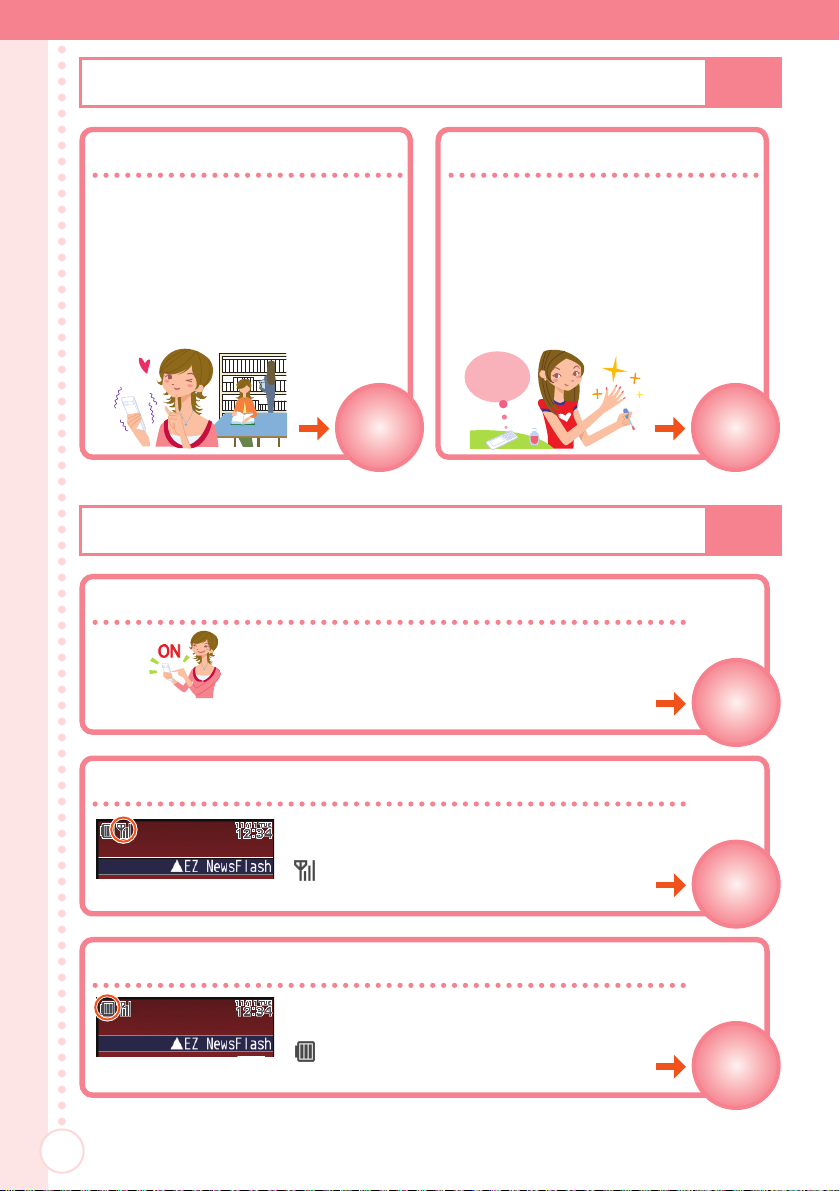
Youcannottalkonthephoneifitisunabletoreceiveasignal
Page13-14
Normallyleavethephoneturnedon
Page13
Keepaneyeonthebatterylevel
Page13-14
Page32
MannerMode AnswerMemo
Page32
MannerModeandAnswerMemo
CheckingPower,SignalStrength,andBatteryLevel
UseMannerModetoturnoffthe
ringtonesoasnottobother
othersaroundyou.
Whenthestandbyscreenis
displayed,holddown*for
atleastonesecond.
Ifyoucannotansweracall,
AnswerMemoplaysan
answeringmessageandrecords
thecaller'smessage.
Whenthestandbyscreenis
displayed,holddown$for
atleastonesecond.
I'llanswer
foryou!
Thephoneneedstobeturnedontomake
andreceivecalls.
Holddown&foratleastone
second.
Thephonemaynotfunctionproperlyif
batterypowerislow.
" "indicatesthecurrentbattery
level.
Signalstrengthislowinsomeareas,even
iftheyarewithintheservicearea.
" "indicatesthecurrentsignal
strength.
+W63K_01基本_33 08.6.9 10:09 AM ページ 4

5
UsingYourCellphoneWhileDrivingisProhibited
Donotuseyourphonewhileridingabicycleoramotorbike,orwhile
drivingacar.Doingsomaycauseanaccident.Usingacellphonewhile
drivingacarorridingamotorcycleisprohibitedbyJapaneselaw.You
mayalsobepenalizedforusingacellphonewhileridingabicycle.
× Readingmailor
lookingatthe
display
× Holdinga
cellphonein
yourhandto
talk
DriveMode
InDriveMode,thephonewillplaythemessage"ただ今、車を運転していま
す。…"(Iamdrivingrightnow...),andaskthecallertoleaveamessage
usingAnswerMemo.
Whenthestandbyscreenisdisplayed,
+→select"MannerMode",
+[Select]→select"DriveMode",
+[OK]
Turnoffyourcellphoneoruse
DriveModewhiledriving
Iamdriving
rightnow...
(Japanese)
+W63K_01基本_33 08.6.9 10:09 AM ページ 5

6
BewareofSpamandOne-ringCalls!
Ifyoureceivespam... →Page52
YoucansetupmailfilterstoblockspecificmailorspoofE-mail.
Yourcellphonemainlyhasthefollowingfunctionstoblockspam.
・Blocksmailidentifiedas"未承諾広告※"(Unsolicitedadvertisement)
・Blocksspecificmail
・BlocksspoofE-mail
Ifyoureceiveacallfromanunknownnumber...
A"one-ringcall"(wan-giriinJapanese)ringsyourphoneonlyonce,inan
attempttomakeyoucallbacktoaservicethatautomaticallybillsyouvery
highcharges.Bewareofone-ringcalls.
An" "iconattheheadof
anincomingrecordindicates
thatthecallrangforonly
lessthanthreeseconds.
Thismailagain...
Huh,Iwonderwho...
+W63K_01基本_33 08.6.9 10:09 AM ページ 6

7
DisasterMessageBoardService
DisasterMessageBoard
TheDisasterMessageBoardletsyouuseEZwebtoregisterinformation
aboutyoursafetyincaseofamajordisaster.Theinformationyouregister
canbeaccessedfromanywhereinJapanoverEZwebortheInternet.
Registering
safety
information
◆ Whenamajordisasterstrikes,youcanuseyourau
cellphonetoaccessthe"災害用伝言板"(DisasterMessage
Board)onEZwebandregisteryourcurrentcondition,
comments,andotherinformationaboutyoursafety.
◆ Afteryouregisterinformation,itcanbesentbymailto
family,friends,andotherindividualsyouhaveregistered
asarecipientofyourDisasterMessageBoard
information.
Checking
safety
information
◆ DisasterMessageBoardinformationcanbeaccessed
byinputtingthephonenumberofanindividualover
EZwebortheInternet.
※ DisasterMessageBoardinformationcanbeaccessed
fromotherbrandcellphone,PHS,orPCat
http://dengon.ezweb.ne.jp/.
Howtoaccess
B→EZweb→auoneTop→災害
用伝言板(DisasterMessage
Board)
http://dengon.ezweb.ne.jp/
災害用伝言板
伝言板トップ
〜サービス提供中〜
安否情報の登録・確認が
できます。
登録(登録可能地域は下
記のご利用地域情報を
参照ください)
確認
削除
安否お知らせメール設定
-------------------
サービス概要
ご利用地域情報
お問合せ
災害対策への取り組み
災害関連情報
English
※ Registeredcontentsareretainedforupto72hours.
※ Youcanregisterupto10entriesperphonenumber.
Registeringanewentrywhentherearealready10will
automaticallyoverwritetheoldest.
※ YoucanviewaDisasterMessageBoarddemonstration
at:B→EZweb→auoneTop→auお客さまサポート(au
CustomerSupport)→災害用伝言板(デモ版)(Disaster
MessageBoard(Demo))
※ ToviewtheDisasterMessageBoardinEnglish,select
the"English"optionontheDisasterMessageBoardtop
screen.
+W63K_01基本_33 08.6.10 9:29 AM ページ 7

CellphoneEtiquette …………………………………………………………1
MindYourManners! …………………………………………………………………1
CellphoneBasics………………………………………………………………2
WhatYouCanDowithW63K ………………………………………………………2
WhenCarryingW63KHandset ……………………………………………………3
SimpleMode ……………………………………………………………………………3
MannerModeandAnswerMemo …………………………………………………4
CheckingPower,SignalStrength,andBatteryLevel …………………………4
UsingYourCellphoneWhileDrivingisProhibited ……………………………5
BewareofSpamandOne-ringCalls! ……………………………………………6
DisasterMessageBoardService …………………………………………………7
Contents…………………………………………………………………………8
GettingReady ………………………………………………………………10
CheckingtheContentsofthePackage …………………………………………10
NamesofParts ………………………………………………………………………11
ChargingtheBattery ………………………………………………………………12
TurningPowerOn/Off………………………………………………………………13
DisplayIndicators ……………………………………………………………………14
InitializingYourPhone………………………………………………………………15
SwitchingtheDisplayLanguagetoEnglish ……………………………………16
BasicOperations ……………………………………………………………………18
InitializingE-mailandEZweb ……………………………………………………22
CheckingYourCurrentPhoneNumberandE-mailAddress ………………23
ChangingYourE-mailAddress……………………………………………………23
PhoneCall ……………………………………………………………………26
MakingaCall …………………………………………………………………………26
MakinganInternationalCall ………………………………………………………27
AnsweringaCall ……………………………………………………………………28
Redialing(OutgoingRecords/IncomingRecords) ……………………………29
AdjustingtheEarpieceVolume ……………………………………………………29
AdjustingtheRingToneVolumeandMelody …………………………………30
TurningOnMannerMode …………………………………………………………32
TurningOnAnswerMemo …………………………………………………………32
PlayinganAnswerMemo …………………………………………………………33
TextInput ……………………………………………………………………34
BasicKeyOperation …………………………………………………………………34
SwitchingtheInputMode …………………………………………………………35
CharacterKeyAssignments ………………………………………………………36
InputtingText …………………………………………………………………………37
AddressBook…………………………………………………………………39
RegisteringtotheAddressBook …………………………………………………39
DialingfromtheAddressBook……………………………………………………41
EditinganAddressBookRecord …………………………………………………41
AddingOutgoingorIncomingRecordDatatotheAddressBook ………43
Contents/Getting Ready
8
+W63K_02目次/準備_33 08.6.9 10:54 AM ページ 8
Table des matières
Autres manuels Kyocera Téléphone mobile


