
Kroy K4710P Manuel utilisateur
kroy
www.kroyeurope.com
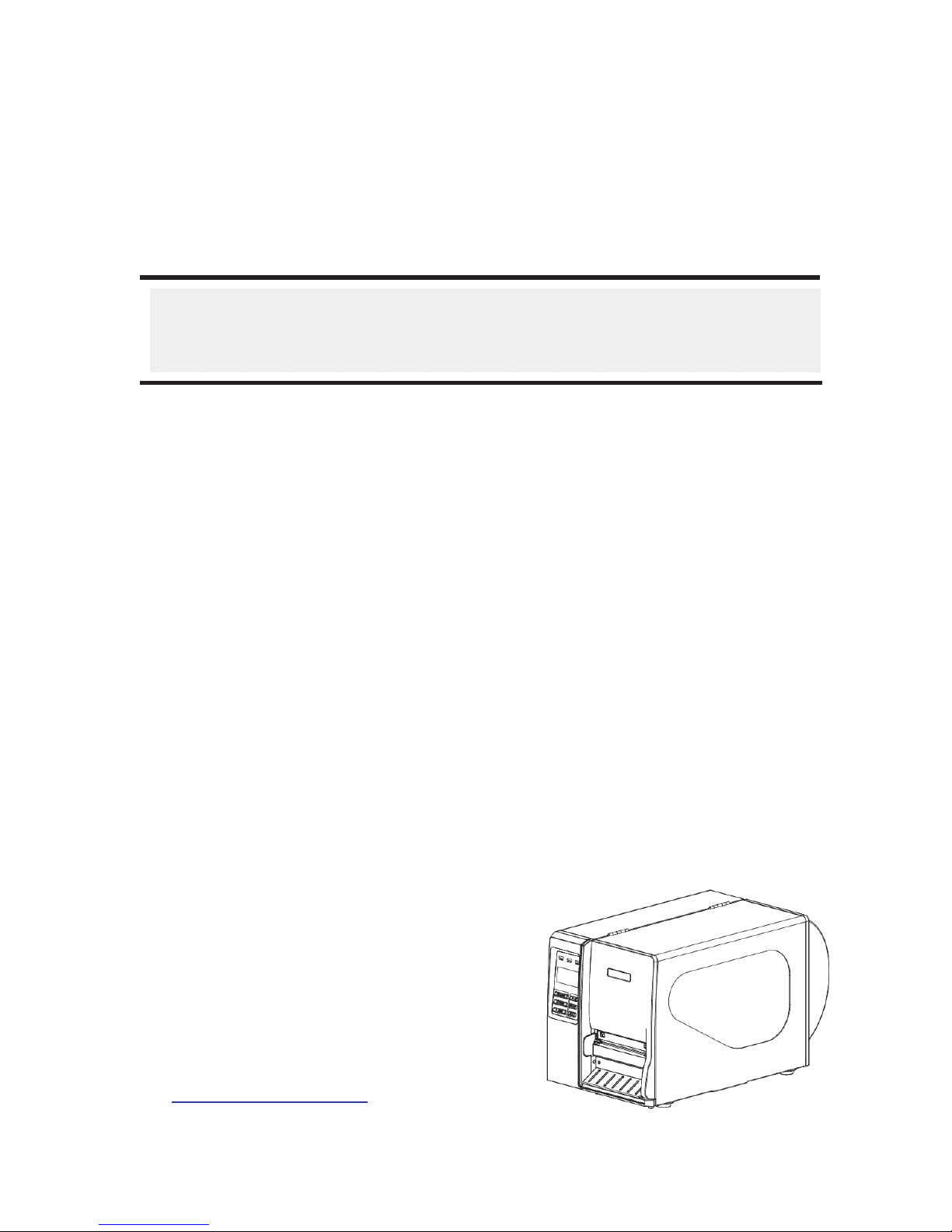
USER’S
MANUAL
K4710P, K4730P, K4760P
K4652P, K4653P
Kroy Professional Series - Barcode, Label
and Heat Shrink Tubing Printers
K4710 – 200dpi
K4730 – 300dpi
K4760 – 600dpi
K4652 – 200dpi
K4653 – 300dpi

1
Copyright Information
©2011 Kroy Europe Ltd / TSC Auto ID Technology Co., Ltd,
The copyright in this manual, the software and firmware in the printer
described therein are owned by Kroy / TSCAuto ID Technology Co., Ltd,
All rights reserved.
CG Triumvirate is a trademark of Agfa Corporation. CG Triumvirate Bold
Condensed font is under license from the Monotype Corporation. Windows
is a registered trademark of Microsoft Corporation. KROY is a trademark of
Kroy LLC / Kroy Europe Ltd
All other trademarks are the property of their respective owners.
Information in this document is subject to change without notice and does
not represent a commitment on the part of Kroy or TSC Auto ID
Technology Co.
No part of this manual may be reproduced or transmitted in any form or by
any means, for any purpose other than the purchaser’s personal use,
without the expressed written permission of Kroy or TSCAuto ID
Technology Co.

2
Agency Compliance and Approvals
CE CLASS A
EN 55022:2006 +A1:2007
EN 55024:1998+A1:2001+A2:2003
EN 61000-4 SERIES REQULATIONS
FCC CFR Title 47 Part 15 Subpart B:2010-Section 15.107
and 15.109
ICES-003 Issue 4:2004 Class A
AS/NZS CISPR 22:2009
CLASS A
GB-4953-2001
GB9254-2008 (CLASS A)
GB17625.1-2003
此为 A级产品,在生活环境中,该产品可能会造成无线电干扰,
在这种情况下,可能需要用户对干扰采取切实可行的措施。
UL 60950-1(2nd Edition)
CSA C22.2 No. 60950-1-07(2nd Edition)
EN 60950-1/A1:2010
IEC 60950-1/A1:2009
IEC 60950-1:2005(2nd Edition)

i
Contents
1. Introduction ............................................1
1.1 Product Introduction ...............................................................................1
1.2 Product Features .....................................................................................2
1.2.1 Printer standard features..............................................................2
1.2.2 Printer optional features ...............................................................3
1.3 General Specification..............................................................................5
1.4 Print Specifications .................................................................................5
1.5 Ribbon Specifications.............................................................................6
1.6 Media Specifications ...............................................................................7
2. Operations Overview .....................................9
2.1 Unpacking and Inspection ......................................................................9
2.2 Printer Overview ....................................................................................10
2.2.1 Front View ....................................................................................10
2.2.2 Interior view..................................................................................11
2.2.3 Rear View......................................................................................12
2.3 Operator Controls..................................................................................14
2.3.1 Front Panel Display .....................................................................14
2.3.2 LED Indicators .............................................................................14
2.3.3 Front Panel Keys .........................................................................15
2.4 Setting up the Printer ............................................................................15
2.5 Loading Ribbon......................................................................................16
2.5.1 Loading Ribbon ...........................................................................16
2.5.2 Remove Used Ribbon..................................................................19
2.6 Loading the Media .................................................................................20
2.6.1 Loading the Media .......................................................................20
2.6.2 Loading Fan-fold Labels .............................................................24
2.6.3 Loading Media in Peel-off Mode (Option)..................................26
2.6.4 Remove Liner from Internal Rewind (Option)............................28
2.6.5 Loading Media in Rewind Liner with Label Mode (Option) ......29
2.6.6 Remove Labels from Internal Rewind (Option).........................31
2.7 Adjustment Knob...................................................................................32
2.7.1 Print head Pressure Adjustment Knob ......................................32
2.7.2 Print Head Burn Line Adjustment Knob.....................................32
2.8 Using the Keyboard with PS/2 Interface (Optional for K4652P &
K4653P models)...........................................................................................34

ii
3. Menu Function .........................................35
3.1 Setup Menu Overview............................................................................36
3.1.1-1 Printer Setup (TSPL2)...............................................................37
3.1.1-2 Printer Setup (ZPL2).................................................................44
3.1.2 Sensor...........................................................................................51
3.1.3 Serial Comm.................................................................................59
3.1.4 Ethernet........................................................................................62
3.2 File Manager...........................................................................................65
3.2.1 File List.........................................................................................65
3.2.2 Avail. Memory...............................................................................65
3.2.3 Del. All Files..................................................................................66
3.3 Diagnostics ............................................................................................67
3.3.1 Print Config. .................................................................................67
3.3.2 Dump Mode..................................................................................70
3.3.3 Rotate Cutter................................................................................71
3.4 Language................................................................................................71
3.5 Service....................................................................................................72
3.5.1 Initialization..................................................................................72
3.5.2 Mileage Info..................................................................................73
4. Diagnostic Tool.........................................74
4.1 Start the Diagnostic Tool.......................................................................74
4.2 Printer Function (Calibrate sensor, Ethernet setup, RTC setup………)
.......................................................................................................................75
5 Setting Ethernet by Diagnostic Utility (Optional for K4652P and K4653P
Pro Series models) ..................................76
5.1 Using USB interface to setup Ethernet interface................................76
5.2 Using RS-232 interface to setup Ethernet interface............................77
5.3 Using Ethernet interface to setup Ethernet interface.........................78
6. Troubleshooting ........................................80
6.1 Common Problems................................................................................80
6.2 Mechanism Fine Adjustment to Avoid Ribbon Wrinkles ....................84
7. Maintenance ...........................................86
Revise History ...........................................88

1. Introduction
1.1 Product Introduction
Thank you very much for purchasing KROY Professional series printer.
This printer is designed with die-casting aluminum chassis and print mechanism, metal
cover with large clear media view window, which ensuring to work for the extreme and
heavy duty industrial environment and applications.
With backlit graphic LCD display, printer status can be managed easier and operated
more user friendly. The moveable sensor design can accept wide range of label media.
All of the most frequently used bar code formats are included. Fonts and bar codes can
be printed in any one of the four directions.
This printer is built-in the high quality, high performance MONOTYPE IMAGING® True
Type font engine and one CG Triumvirate Bold Condensed smooth font. With flexible
firmware design, user can also download the True Type Font from PC into printer
memory for printing labels. Besides the scalable font, it also provides a choice of five
different sizes of alphanumeric bitmap font, OCR-Aand OCR-B fonts. By integrating rich
features, it is the most cost-effective and high performance printer in its class!
xApplications
oIndustrial-duty printing
oHealthcare patient safety
oCompliance labelling
oManufacturing /process lines
oOrder fulfillment
oDistribution
oShipping/ receiving
oTicketing
oElectronics & jewelry labeling
oHeat Shrink tubing (with optional guides)
oSelf laminating wire and cable markers
oTags
Your printer will print on to a wide variety of label materials. Kroy advise testing materials
and ribbons to ensure compatibility between the ribbon, label material and printer.
2
1.2 Product Features
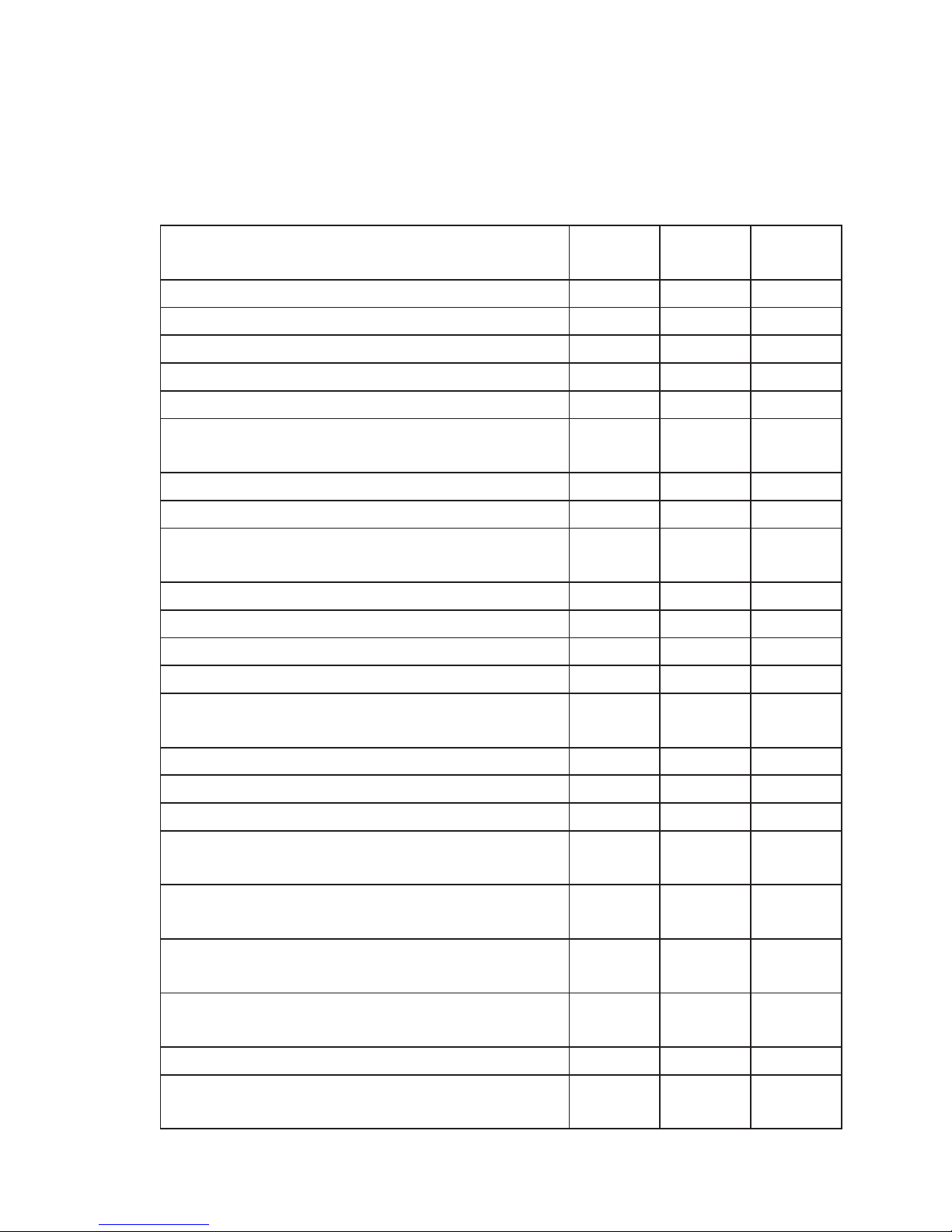
1.2.1 Printer standard features
The printer offers the following standard features.
Product standard feature 203 dpi
models 300 dpi
models 600 dpi
models
Thermal transfer printing ○ ○ ○
Direct thermal printing ○ ○ ○
High quality die-cast aluminum design ○ ○ ○
Metal cover with large clear media view window ○ ○ ○
Moveable gap sensor (position full web adjustable) ○ ○ ○
Moveable black mark sensor (position full web
adjustable) ○ ○ ○
Ribbon end sensor ○ ○ ○
Head open sensor ○ ○ ○
LCD display (graphic type, 128x64 pixel) with back
light ○ ○ ○
Control panel with 6 operation buttons ○ ○ ○
Control panel security (TCF) ○ ○ ○
LED indicators ○ ○ ○
Real time clock ○ ○ ○
Internal Ethernet print server (10/100 Mbps)
interface ○ ○ ○
USB 2.0 (full speed) interface ○ ○ ○
Serial RS-232C (2400-115200 bps) interface ○ ○ ○
Centronics (SPP mode) interface ○ ○ ○
PS/2 keyboard interface for stand-alone or data
entry at print site ○ ○ ○
32 MB SDRAM memory for *industrial model
(8 MB SDRAM memory for *economic model) ○ ○ ○
8 MB FLASH memory for *industrial model
(4 MB FLASH memory for *economic model) ○ ○ ○
SD FLASH card memory expands storage to 4 GB
for *industrial model ○ ○ ○
Powerful 32 bit 200 MHz RISC processor ○ ○ ○
Standard industry emulations right out of the box
including Eltron®and Zebra®language support ○ ○ ○

3
Internal 8 alpha-numeric bitmap fonts ○ ○ ○
Fonts and bar codes can be printed in any one of
the four directions (0, 90,180, 270 degree) ○ ○ ○
Internal Monotype Imaging®true type font engine
with one CG Triumvirate Bold Condensed scalable
font ○ ○ ○
Downloadable fonts from PC to printer memory ○ ○ ○
Text, bar code, graphics/image printing (Please
refer to the TSPL/TSPL2 programming manual for
supporting code page)
Support Bar Code Support image
1D bar code 2D bar code
BITMAP,
BMP,
PCX
Code 39,
Code 93,
Code128UCC,
Code128 subsets A.B.C,
Codabar,
Interleave 2 of 5, EAN-8,
EAN-13,
EAN-128,
UPC-A,
UPC-E,
EAN and UPC 2(5) digits
add-on,
MSI,
PLESSEY,
POSTNET,
China POST,
RSS-14,
Code 11
PDF-417,
Maxicode,
DataMatrix,
QR code,
Aztec ○ ○ ○
* Industrial models: K4710P, K4730P, K4760P
* Economy models: K4652P, K4653P
1.2.2 Printer optional features
1.2.2-1 Industrial model
The printer offers the following optional features.
Product option feature User
options Dealer
options Factory
options
Applicator I/O interface --
○
USB Host - - ○
Peel-off kit - ○ -
(Include liner rewind spindle and peel off
sensor)

4
Internalrewindkit
(Include label rewind spindle and label
redirect kit) - ○ -
Regular guillotine cutter
(Paperthickness:0.06~0.19mm,500,000cuts;
0.20~0.25mm,200,000cuts)
○ - -
Heavy duty cutter module
○ - -
(Paperthickness:Max0.25mm/Max.paper
weight<200g/m2,1,000,000cuts;<300g/m2,
500,000cuts)
Care label cutter
(Paperthickness:Max.0.15mm,400,000cuts)○ - -
KP-200 Plus keyboard display unit ○ - -
KU-007 Plus programmable smart keyboard
display unit ○ - -
HCS-200 long rang CCD scanner ○ - -
Note:exceptforthelinerlesscutter,notallregular/heavyduty/carelabelcutterscut
onmediawithglue.
1.2.2-2 Economy model
The printer offers the following optional features.
Product option feature User
options Dealer
options Factory
options
USB Host - ○ -
Peel-off kit - ○ -
(include liner rewind spindle and peel off
sensor)
Internalrewindkit
(include label rewind spindle and label
redirect kit) - ○ -
Applicator I/O interface -○ -
Internal Ethernet print server -○ -
PS/2 keyboard interface -○ -
SD FLASH memory card slot -○ -
Regular guillotine cutter
(Paperthickness:0.06~0.19mm,500,000cuts;
0.20~0.25mm,200,000cuts) ○ - -
Heavy duty cutter module ○ - -

5
(Paperthickness:Max0.25mm/Max.paper
weight<200g/m2,1,000,000cuts;<300g/m2,
500,000cuts)
Care label cutter
(Paperthickness:Max.0.15mm,400,000cuts)○ - -
KP-200 Plus keyboard display unit ○ - -
KU-007 Plus programmable smart keyboard
display unit ○ - -
HCS-200 long rang CCD scanner ○ - -
Note:ExceptforthelinerͲlesscutter,allregular/heavyduty/carelabelcuttersDO
NOTcutonmediawithglue.
1.3 General Specification
General Specifications
Physical dimensions 270 mm (W) x 308 mm (H) x 505 mm (D)
Weight 15 kg (33.1 lb)
Electrical Internal switching power supply
For *industrial model:
Input: AC 100-240V, 2A, 50-60Hz
Output: DC 24V, 5A, 120W
For *economic model
Input: AC 100-240V, 3A, 50-60Hz
Output: DC 24V, 3.3A, 80W
Environmental condition Operation: 5 ~ 40˚C (41 ~ 104˚F), 25~85% non-condensing
Storage: -40 ~ 60 °C (-40 ~ 140°F), 5~90% non-condensing
* Industrial models: K4710P, K4730P, K4760P
* Economy models: K4652P, K4653P
1.4 Print Specifications
1.4-1 Industrial model
Print
Specifications 203 dpi models 300 dpi models 600 dpi models
Print head resolution 203 dots/inch 300 dots/inch 600 dots/inch
Ce manuel convient aux modèles suivants
4
Table des matières
Autres manuels Kroy Lecteur de codes-barres


Manuels Lecteur de codes-barres populaires d'autres marques

POSMicro
POSMicro Datalogic PowerScan D7100 Manuel utilisateur

Marson
Marson MT780 Guide de configuration rapide

NCR
NCR RealPOS Manuel utilisateur

Motorola
Motorola SE3300 Guide de configuration rapide

Element
Element P130BT Manuel utilisateur

Motorola
Motorola Symbol LS3008 Manuel d'installation et d'exploitation


