Korg Nu:Tekt HA-S Manuel utilisateur

- 1 -
EJ 2
2019
HA-S
NUTUBE HEADPHONE AMPLIFIER KIT
Table of Contents
Main features.......................................................................2
Cautions Before Assembly.................................................5
Tools to prepare................................................................................... 5
Checking the parts.............................................................................. 5
Assembly .............................................................................6
Preparing the main circuit board and Nutube circuit board..... 6
Install the main circuit board into the case .................................. 8
Part Names and Functions ............................................... 11
How to Use the Nu:Tekt HA-S........................................... 11
Adjusting the main circuit board ..................................... 11
Troubleshooting................................................................. 12
Replacing the operational amplifier................................ 12
Specifications.................................................................... 12
Mounting Diagram............................................................. 13
List of mounted parts....................................................... 14
CIRCUIT DIAGRAM........................................................... 16

- 2 -
Thank you for purchasing the Nu:Tekt HA-S.
To help you get the most out of your new headphone amp, please read this
manual carefully.
Main features
• The HA-S is a kit to assemble a hi-fi headphone amp that utilizes a Korg
Nutube vacuum tube.
• Although this headphone amp is powered with only two batteries, it can
drive the Nutube with a line voltage of 26 V for an authentic vacuum
tube sound.
• The filament is powered by a DC to DC converter, which consumes less
electric current.
• An NFB (negative feedback) switch is used, which lets you switch the NFB
circuit on and off as you like.
• The headphone amp output uses an IC socket, which allows the
operational amplifier to be replaced. Two types of operational amplifiers
are included.
• The Nutube anode load resistance value can be adjusted, letting you
enjoy different sounds by changing the steepness of the load curve for
the vacuum tube.
• This unit is shaped like a mint can case, which is familiar to fans of these
kinds of cases. —The unit also includes a protector for the power switch.
• An acrylic cover is provided that features the Nu:Tekt design, letting you
see the light from the Nutube through the cover.
About Nutube
Nutube is a new vacuum tube developed by KORG INC. and Noritake Itron
Corporation and that utilizes technology from vacuum fluorescent displays.
As with conventional vacuum tubes, the Nutube is constructed with an
anode, grid and filament, and operates as a complete triode tube.
Furthermore, it generates the response and same rich harmonic character-
istics of conventional vacuum tubes.
If a strong impact is applied to this unit, high-frequency noise may be
output. This is due to the structure of the Nutube; it is not a
malfunction.

- 3 -
Precautions
Location
Using the unit in the following locations can result in a malfunction.
• In direct sunlight
• Locations of extreme temperature or humidity
• Excessively dusty or dirty locations
• Locations of excessive vibration
• Close to magnetic fields
Power supply
Be sure to turn the power switch to OFF when the unit is not in use. Remove
the battery in order to prevent it from leaking when the unit is not in use for
extended periods.
Handling
To avoid breakage, do not apply excessive force to the switches or controls.
Care
If the exterior becomes dirty, wipe it with a clean, dry cloth. Do not use
liquid cleaners such as benzene, alcohol or thinner, or cleaning compounds
or flammable polishes.
Keep this manual
After reading this manual, please keep it for later reference.
Keeping foreign matter out of your equipment
Never set any container with liquid in it near this equipment. If liquid gets
into the equipment, it could cause a breakdown, fire, or electrical shock. Be
careful not to let metal objects get into the equipment.
Notice regarding disposal (EU only)
If this symbol is shown on the product, manual, battery, or package,
you must dispose of it in the correct manner to avoid harm to human
health or damage to the environment. Contact your local administra-
tive body for details on the correct disposal method. If the battery
contains heavy metals in excess of the regulated amount, a chemical
symbol is displayed below the symbol on the battery or battery package.
IMPORTANT NOTICE TO CONSUMERS
This product has been manufactured according to strict specifications and
voltage requirements that are applicable in the country in which it is intend-
ed that this product should be used. If you have purchased this product via
the internet, through mail order, and/or via a telephone sale, you must
verify that this product is intended to be used in the country in which you
reside.
WARNING: Use of this product in any country other than that for which it
is intended could be dangerous and could invalidate the manufacturer’s or
distributor’s warranty. Please also retain your receipt as proof of purchase
otherwise your product may be disqualified from the manufacturer’s or
distributor’s warranty. Company names, product names, and names of
formats etc. are the trademarks or registered trademarks of their respective
owners.
* All product names and company names are the trademarks or registered
trademarks of their respective owners.

- 4 -

- 5 -
Cautions Before Assembly
Be careful of injury when handling parts
Use caution not to injure yourself due to the protruding parts when
handling the circuit board. Use cotton work gloves to protect your hands
when working. Also, be sure to wash your hands thoroughly after working.
Tighten screws and nuts at a perpendicular angle
Tightening screws and nuts that are inserted diagonally may damage the
threads, making it impossible to tighten them again. Be sure to tighten
screws so that they are inserted perpendicular to the surface.
Use caution, as applying too much torque and tightening the screws too
tightly may damage the parts.
Do not injure yourself or scratch the surface with the
tools.
When using tools to tighten screws and nuts, make sure not to injure
yourself, such as by getting your fingers pinched. Work carefully to avoid
scratching the case or circuit board with the tools.
Provide a sufficiently large work space to complete the assembly procedure,
and prepare work mats so parts will not be scratched.
Avoid losing the screws and nuts
Handle the screws and nuts with caution, to avoid losing them. Do not use
other screws or nuts aside from the ones included with this kit, and do not
use the screws and nuts included with this kit for any other purpose.
Tools to prepare
You will need the following tools in order to assemble this kit.
Note: You will also need the AA alkaline batteries and so on. These items are
not included, so please obtain them separately.
• Precision screwdriver (Phillips head No. 0, No. 1, flathead 2.4 mm)
Use a screwdriver that matches the size of the screw. Using the wrong
size of screwdriver may damage the screw or make it impossible to
tighten.
• Wrench (two-sided, 10 mm wide)
Checking the parts
Before assembly, make sure that all parts are on hand. (Page 6, Page 8)
Contact us at www.nutekt.org if any parts are missing or damaged.
TIP If you are concerned about whether you can assemble this kit or
whether you might make a mistake, refer to the video explanations
available on the Web (www.nutekt.org), or use our assembly service
support (chargeable).

- 6 -
Assembly
Preparing the main circuit board and Nutube circuit board
Parts List
1Circuit board cushion PORON 7t, 8x19 1
2Cushion N1 Sponge 1t, 5x40 2
3Cushion N2 Sponge 1t, 5x15 1
4Harness -- 4
5Hex spacers M2, L=3mm 2
6Hex spacers M2, L=16mm 4
7Internal tooth lock washers M2 4
8Screws M2, L=5mm, Black 2
Building the Nutube circuit board unit
1. Peel off the release paper from one side of the circuit board
cushion (1), and attach it to the back side of the Nutube circuit
board.
Nutube circuit board
Circuit board cushion (1)
2. Attach the cushion onto the Nutube circuit board unit.
Attach cushion N1 (2) onto the edge of the Nutube circuit board. Attach
cushion N2 (3) onto both upper edges of the Nutube.
CushionN2 (3)
CushionN1 (2)
CushionN2 (3)
CushionN1 (2)
Do not cover
the connector
Attaching the Nutube circuit board unit
1. Connect the Nutube circuit board unit and the main circuit board
with the harness (4).
Do not use excessive force, as the wire can easily break. Also, do not
repeatedly connect and disconnect the harness.
2. Remove the release paper on the circuit board cushion (1) that you
attached to the Nutube circuit board, and attach the circuit board
unit to the main circuit board.
Make sure that the Nutube does not touch the adjacent parts or the
case.
(4)

- 7 -
Attaching the hex spacers
1. Mount the hex spacers (5, 6) onto the circuit board.
Use the screws (8) to affix the two hex spacers (6) and the internal
tooth lock washers (7) for the volume and jack side. In the same way,
tighten the hex spacers (6) on the Nutube circuit board side and the
internal tooth lock washers (7) by tightening the screws for the lower
hex spacers (5).
(6)
(7) (7)
(6)
(8)
(5)
Since the screws (8) cannot be retightened from the outside of the
case, use a precision screwdriver (Phillips #1) to firmly tighten the
screws.

- 8 -
Install the main circuit board into the case
Parts List
1
5
10
11
6
78 9
213 12
3
4
12
1Case Mint-tin size case 1
2Pan head screws M2, No.0, L=2mm, Silver 2
3Cover Resin treatment 1
4Knurled screw M2, L=6mm
4
5Main circuit board Parts for assembly on pages 6 and 7 1
6Insulation sheet PET 1
7Volume nut Included with Volume 1
8Volume washer Included with Volume 1
9Volume knob -- 1
10 Battery AA alkaline batteries (sold separately) 2
11 Battery cushion 1t, 30 x 10 1
12 Rubber feet --
4
13 Rating label -- 1
Make sure not to lose any of the small screws.

- 9 -
Fix the main circuit board in place on the case
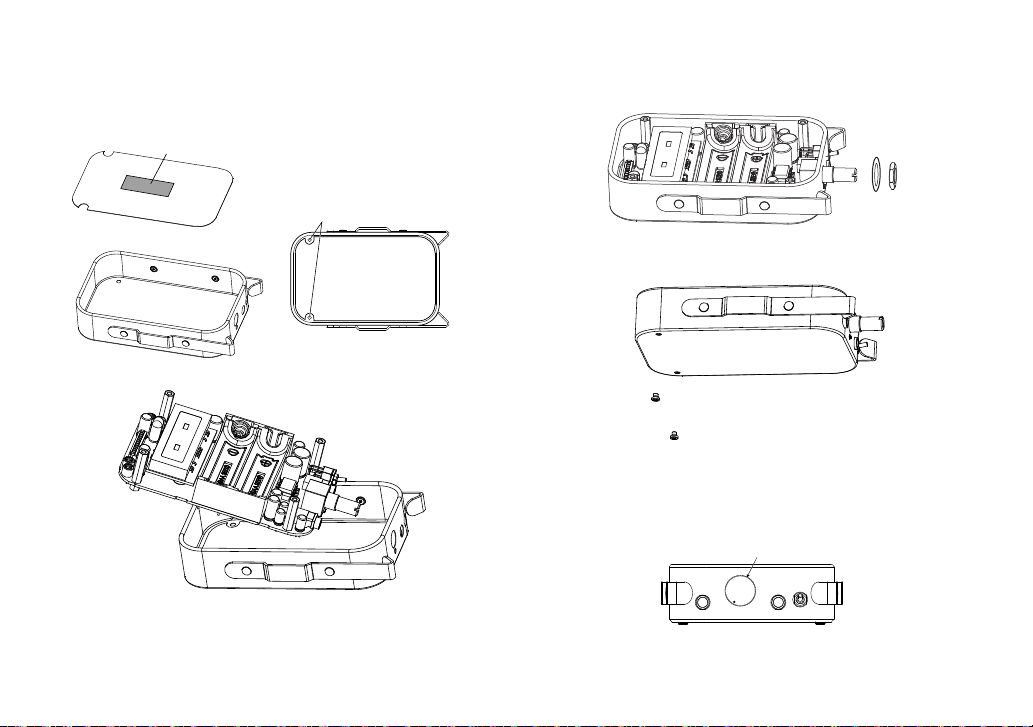
1. Put the insulation sheet [6] into the case [1].
Peel off the release paper on the double-sided tape attached to the
insulation sheet [6], and attach it to the case [1].
[6]
[1]
Double-sided tape (bottom side)
Be careful not to cover the screw holes.
2. Slide the main circuit board (assembled) into the case [1] to mount.
TIP If the volume control is attached to the circuit board using a washer
and nut, remove the washer and nut and then mount the main circuit
board onto the case.
3. Attach the washer [8] to the volume, and then use the volume nut
[7] to temporarily tighten the volume onto the case.
Make sure that the stereo mini jack protrudes from the hole in the
case.
[8]
[7]
4. Fix the main circuit board in place by screwing the pan head screws
[2] into the two holes at the bottom of the case.
TIP Use a precision screwdriver (Phillips #0) to tighten the screws.
5. Retighten the volume nut [7] to be fixed in place.
6. Attach the knob [9] onto the volume.
Mount the volume knob onto this spindle.
Tighten the fastener screw with a hex wrench.

- 10 -
Put the batteries and close the case
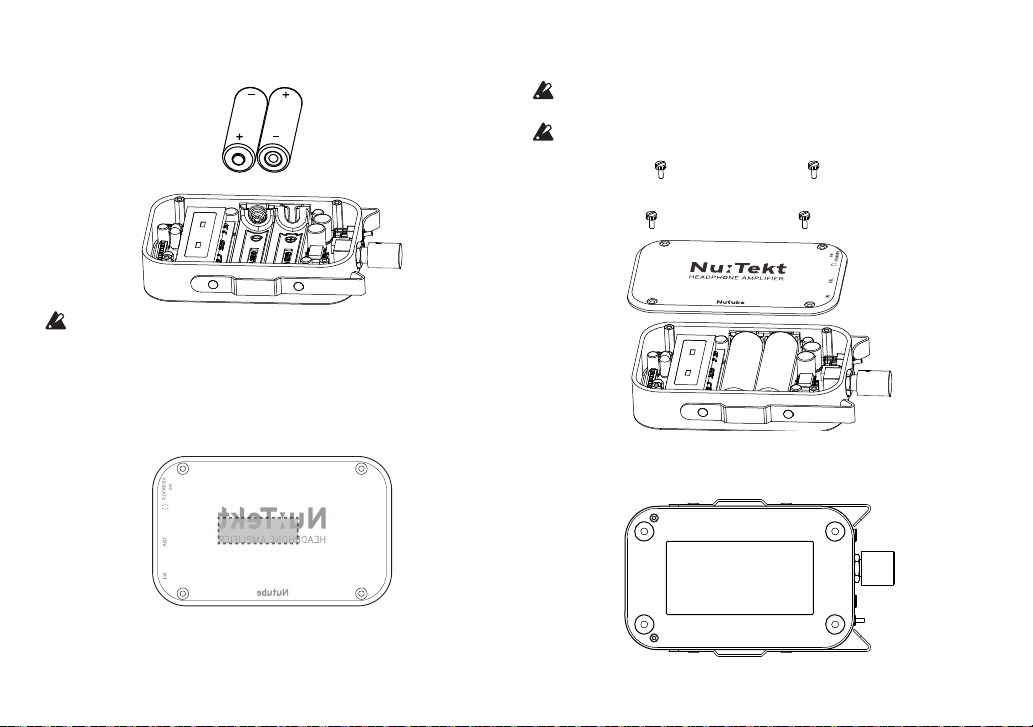
1. Put the batteries [10] in.
Batteries are not included. You will need to purchase a commercially
available AA alkaline batteries.
2. Peel off the protective sheet on the cover [3], and attach the
battery cushion [11].
A protective sheet is attached to both sides of the cover. After peeling
off the protective sheet on the back side, attach the battery cushion in
the position shown in the diagram below.
3. With the printed jack names facing the jack side, put the cover [3]
on, and fasten the knurled screws [4] in four places.
Take care not to pinch the harness or other parts when closing the
cover.
Tighten the knurled screws by hand. Overtightening the screws using
a screwdriver or other tool may damage the screws or the main unit.
[4]
[4]
[3]
4. Attach the rubber feet [4] onto the case.
Attach the rubber feet [12] and rating label [13] so that they do not
overlap, as shown in the diagram.
Table des matières
Autres manuels Korg Amplificateur