
Konig CMP-BLUEHS11 Manuel utilisateur

CMP-BLUEHS11
MANUAL (p. 2)
Stereo Bluetooth Sports Headset
MODE D’EMPLOI (p. 10)
Casque Stéréo Bluetooth®Sports
MANUALE (p. 19)
Cuffia stereo Bluetooth®
BRUKSANVISNING (s. 35)
Stereo Bluetooth®Sportheadset
MANUAL DE UTILIZARE (p. 43)
Headset sport stereo cu Bluetooth®
BRUGERVEJLEDNING (p. 51)
Stereo Bluetooth®Sports Headset
HASZNÁLATI ÚTMUTATÓ (o. 27.)
Sztereo Bluetooth®sport headset
KÄYTTÖOHJE (s. 31)
Urheilullisesti muotoillut Bluetooth®-
stereokuulokkeet
ANLEITUNG (S. 6)
Stereo Bluetooth®Sportkopfhörer
GEBRUIKSAANWIJZING (p. 15)
Stereo Bluetooth®Sporthoofdtelefoon
MANUAL DE USO (p. 23)
Auriculares deportivos estéreo Bluetooth®
NÁVOD K POUŽITÍ (s. 39)
Sportovní Bluetooth®stereo sluchátka s
mikrofonem
ΕΓΧΕΙΡΙΔΙΟ XPHΣHΣ (σελ. 47)
Σπορ Στερεοφωνικά Ακουστικά Bluetooth®
VEILEDNING (p. 55)
Stereo Bluetooth®sport-hodesett

2
ENGLISH
Charging the headset
Before using for the rsttime, please charge the battery for a minimum of 4 hours.
If during succeeding uses you hear 3 “beep” warning tone every 20 seconds and the red LED blinks twice, it
means the battery power is low and the battery needs to be charged.
The steps for charging the battery are as follows:
Step 1: Pull up the rubber cover of the charging port .
Step 2: Plug the USB cable into a USB port of the PC
Step 3: Connect the USB cable to the charging port of the headset.
When the red LED is on, the headset is charging
When the red LED is off, the headset is fully charged
Step 4: It will take about 3 hours to charge the headset, when charging is done, pull out the charger.
Functions of the CMP-BLUEHS11
1. Switch one
¯: Next song
]
I
: Pause/Mute microphone
˘: Last song
2. Switch two
–: Volume down
O: Multi-function key (switch on/off, answer/end/reject a call, voice dial/voice transfer/redial
3. LED indicator
4. Charging port (plugged with a rubber cover)
5. Built-in microphone
6. Loudspeaker

3
Usage of the CMP-BLUEHS11
1. Switching the headset on/off
Function Operation LED indicator Indication tone
Switch on the headset Press O the for 3-5 seconds,
and release until the blue LED
blinks
The blue LED blinks quickly in
every 4 seconds4s a time
One long tone
Switch off the headset Press O the for 3-5 seconds,
and release until the red LED
blinks
The red LED blinks quickly in
every 4 seconds4s a time
One long tone
Remarks:
* The headset will switch off automatically if no device is connected after 5 minutes in order to save power.
2. Pairing the headset with Bluetooth devices
2.1. How to enter the pairing mode
Function Operation LED indicator Indication tone
Enter into pairing
mode
First, make sure the headset
is off. Press O for 5-9 seconds
and release until the red and
blue LEDs blink alternately
The red and blue LEDs blink
alternately
Two tones
Note:
* The pairing mode will last 2 minutes. If the headset still cannot pair with any Bluetooth devices, it will
automatically switch into standby mode.
2.2. Pairing the headset with a Bluetooth mobile phone
Please make sure your mobile phone has a Bluetooth function.
Specic pairing procedures may vary with different mobile phones. Please refer to your mobile phones’
manual for further information. The steps are as follows:
a. Please keep the headset and mobile phone within 1 metre of each other when pairing
b. Make the headset enter the pairing mode (please refer to 2.1)
c. Switch on the Bluetooth function of the mobile phone and search for Bluetooth devices. When the search
is completed, select the headset in the Bluetooth device list.
d. When prompted, enter PIN No: “0000” as the password and press “Yes” or “Confirm”.
e. After pairing the devices successfully, select the headset in the Bluetooth device list and press “Connect”.
f. If the connection is successful, the blue LED of the headset blinks twice every 4 seconds.
Note:
* If the pairing is not successful, please switch off headset rst then try to pair them again according to the
steps mentioned above.
* After pairing, the devices will remember each other.
* The headset can remember 8 paired devices, when the number of paired devices exceeds 8, the rst
one will be replaced. If you want to pair the headset with other devices, please pair it with the new device
according to the steps above.
3. Pairing the headset with a Bluetooth transmitter
You can enjoy music wirelessly by connecting the headset with a stereo Bluetooth transmitter. See the
manual of your transmitter for more details.
4. Making a call with the headset
Function Status of the headset Operation
Voice dial Standby mode Press ˘ for 2 seconds and release until a tone is heard
Redial last number Standby mode Short press O twice
Conversation mode Move switch two to + and then release (or hold) it
Volume down Conversation mode Move switch one to – and then release (or hold) it

4
Function Status of the headset Operation
Answer call Ringing Short press O
Reject call Ringing Press O for 2 seconds and release until a tone is heard
End call Conversation mode Short press O
Voice transfer Conversation mode Press O for 2 seconds and release until a tone is heard
Mute microphone Conversation mode Short press O twice, the headset will emits 2 tones
every 10 seconds
Cancel mute Conversation mode
(mute) Short press O twice
Remarks:
* Not all mobile phones support all the functions listed above. Please refer to your mobile phone’s user manual.
* When the volume is adjusted to maximum or minimum, you will hear an indicator tone of “Ding-Dong”.
* For some mobile phones, when you press the button to answer the phone, the conversation will be sent to
the phone. If this happens, you can switch the call to the headset by using the conversation switch button or
trough operating on the mobile phone. Please refer to your mobile phone’s user manual for further information.
It means you can check your phone setting and transfer the conversation back to the Bluetooth headphone.
5. Wearing the headset
Hook the headset over both ears by using both hands (see picture).
6. Playing music
When the headset connects with the mobile phone or Bluetooth transmitter, you can enjoy music wirelessly
through the headset.
Function Status of headset Operation
Volume up Playing music Move switch two to + and then release (or hold) it
Volume down Playing music Move switch two to – and then release (or hold) it
Pause Pausing music Short press ]
I
Play Playing music
Revert Pause Short press ]
I
Last song Playing music Move switch one to ˘ and then release it
Next song Playing music Move switch one to ¯ and then release it
Remarks:
* For some mobile phones, when you play music, the music will be transmitted to the speaker of the phone.
In this case you should choose “transmit the sound through Bluetooth” in the phone settings. Please refer
to the manual of the phone.
* When the volume of the headset is adjusted to maximum or minimum you will hear a tone of “Ding-Dong”.
* To remotely control the functions of last song / next song / pause / revert, your mobile phone needs a Bluetooth
transmitter which supports AVRCP. Please refer to the manual of the mobile phone for further information.
7. LED indicator
Pairing the Bluetooth device
LED indicator Status of the headset
Red and blue LEDs blink alternately Pairing mode
Blue LED blinks twice every 2 seconds Standby mode (not connected with the Bluetooth device)

5
LED indicator Status of the headset
Blue LED blinks twice every 5 seconds Standby mode (connected with the Bluetooth device)
Blue LED blinks 3 times every second Ringing
Blue LED blinks every 2 seconds Conversation mode
Safety precautions:
To reduce risk of electric shock, this product should ONLY be opened by an
authorized technician when service is required. Disconnect the product from
mains and other equipment if a problem should occur. Do not expose the product
to water or moisture.
Maintenance:
Clean only with a dry cloth. Do not use cleaning solvents or abrasives.
Warranty:
No guarantee or liability can be accepted for any changes and modications of the product or damage
caused due to incorrect use of this product.
General:
Designs and specications are subject to change without notice.
All logos brands and product names are trademarks or registered trademarks of their respective holders and
are hereby recognized as such.
Keep this manual and packaging for future reference.
Attention:
This product is marked with this symbol. It means that used electrical and electronic products
should not be mixed with general household waste. There is a separate collections system for these
products.
RISK OF ELECTRIC SHOCK
DO NOT OPEN
CAUTION

6
DEUTSCH
Auaden des Kopfhörers
Bitte laden Sie die Akkus für mindestens 4 Stunden vor dem Erstgebrauch.
Wenn Sie beim Fortfahren drei kurze Warntöne in 20-sekündigem Abstand hören und die rote LED zweimal
blinkt, bedeutet das, dass der Batteriestand niedrig ist und die Batterie aufgeladen werden muss.
Bitte laden Sie die Akkus in diesem Falle wie unten beschrieben:
Schritt 1: Lösen Sie die Gummiabdeckung des Aufladeanschlusses .
Schritt 2: Verbinden Sie das USB-Kabel mit dem USB-Anschluss Ihres PCs.
Schritt 3: Verbinden Sie das USB-Kabel mit dem Ladeanschluss Ihres Kopfhörers.
Wenn die LED leuchtet, bendet sich der Kopfhörer im Ladevorgang
Erlischt die LED, so ist der Auadevorgang des Kopfhörers abgeschlossen
Schritt 4: Der vollständige Ladevorgang des Kopfhörers nimmt 3 Stunden in Anspruch. Nach Beendigung,
trennen Sie den Kopfhörer bitte wieder vom Ladegerät.
Funktionen des CMP-BLUEHS11
1. Schalter 1
¯: Nächster Titel
]
I
: Pause/Mikrofon stummschalten
˘: Letzter Titel
2. Schalter 2
–: Lautstärke verringern
O: Multifunktionstaste (Ein-/Ausschalter, Antworten/Auflegen/Anruf abweisen, Nummernwahl per
Stimmerkennung/Anrufumschaltung per Stimmerkennung/Wahlwiederholung
3. LED Anzeige
4. Ladeanschluss (Verdeckt durch Gummiabdichtung)
5. Internes Mikrofon
6. Lautsprecher

7
Benutzung des CMP-BLUEHS11
1. Ein-/Ausschalten des Kopfhörers
Funktion Vorgang LED Anzeige Signalton
Einschalten des
Kopfhörers Drücken Sie die O Taste für
3 – 5 Sekunden, bis die blaue
LED-Leuchte blinkt
Die blaue LED blinkt 4 mal
schnell pro Intervall
Ein langer Ton
Ausschalten des
Kopfhörers Drücken Sie die O Taste für
3 – 5 Sekunden, bis die rote
LED blinkt
Die rote LED blinkt 4 mal
schnell pro Intervall
Ein langer Ton
Anmerkungen:
* Ohne Kopplung zu einem Gerät schaltet sich der Kopfhörer nach 5 Minuten, zwecks Energieeinsparung,
selbständig ab.
2. Kopplung des Kopfhörers mit Bluetooth®Geräten
2.1. Aktivierung des Kopplungsmodus
Funktion Vorgang LED Anzeige Signalton
Kopplungsmodus
aktivieren
Stellen Sie erst sicher, dass
der Kopfhörer ausgeschaltet
ist.
Drücken und halten Sie die
Taste für 5 – 9 Sekunden, bis
die LEDs abwechselnd rot und
blau aueuchten
Die rote und blaue LED blinkt
abwechselnd
Zwei Signaltöne
Bemerkung:
* Der Kopplungssmodus hat eine Dauer von 2 Minuten. Sollte in dieser Zeit keine Verbindung mit einem
Bluetooth® Gerät hergestellt werden, schaltet sich das Gerät automatisch in den Standby-Modus.
2.2. Die Kopplung des Kopfhörers mit einem Bluetooth®Handy
Bitte stellen Sie sicher, dass Ihr Handy über Bluetooth® Funktionalität verfügt.
Die spezischen Kopplungsprozeduren können sich von Modell zu Modell des Handys unterscheiden. Bitte
ziehen Sie für weitere Informationen die Bedienungsanleitung Ihres Handys zu Rate. Die weiteren Schritte
lauten wie folgt:
a. Bitte halten Sie den Kopfhörer und das Handy während des Kopplungsvorganges innerhalb eines
Abstandes von einem Meter
b. Schalten Sie den Kopfhörer in den Kopplungsmodus (Siehe 2.1)
c. Schalten Sie die Bluetooth® Funktion Ihres Handys ein und suchen Sie nach Bluetooth® Geräten. Wählen
Sie bitte den Kopfhörer nach Beendigung des Suchvorganges aus der Liste der gefundenen Geräte aus
d. Wenn aufgefordert, geben Sie die PIN-Nummer: “0000” als Passwort ein und bestätigen selbiges mit “Ja”
oder “Ok”
e. Wählen Sie bitte den Kopfhörer aus der Liste der Bluetooth® Geräte nach erfolgreicher Kopplung der
Geräte, und bestätigen mit “Connect”.
f. Nach erfolgreicher Kopplung, blinkt die blaue LED des Kopfhörers alle 4 Sekunden, zweimal auf.
Bemerkung:
* Für den Fall, dass die Kopplung fehlschlägt, schalten Sie den Kopfhörer bitte aus, dann wieder ein und
wiederholen die oben genannten Schritte.
* Nach erfolgreicher Kopplung werden sich die Geräte in Zukunft automatisch erkennen.
* Das Headset kann sich an 8 gekoppelte Geräte erinnern, wenn die Zahl der gekoppelten Geräte 8
übersteigt, wird das erste ersetzt. Wenn Sie das Headset mit anderen Geräten koppeln möchten, koppeln
Sie es mit dem neuen Gerät bitte entsprechend der oben genannten Schritte.
3. Kopplung des Kopfhörers mit einem Bluetooth®Sender
Sie können Ihre Musik auch kabellos genießen, indem Sie den Kopfhörer mit einem Stereo Bluetooth®
Sender verbinden. Für weitere Details hierzu, ziehen Sie bitte die Bedienungsanleitung Ihres Senders zu
Rate.
8
4. Ausführen eines Anrufs mit dem Kopfhörer
Funktion Status des Kopfhörers Vorgang
Anruf per Sprachbefehl Standby Modus Drücken Sie die ˘ Taste für 2 Sekunden, bis ein
Signalton hörbar ist
Wahlwiederholung der
letzten Nummer
Standby Modus Drücken Sie die O Taste zweimal kurz
Lautstärke erhöhen Gesprächsmodus Bewegen Sie den Schalter in Richtung + und lassen
Sie selbigen wieder los, wenn die gewünschte
Lautstärke erreicht wurde
Lautstärke herabsetzen Gesprächsmodus Bewegen Sie den Schalter in Richtung – und lassen
Sie selbigen wieder los, wenn die gewünschte
Lautstärke erreicht wurde
Anruf annehmen Klingelton Drücken Sie kurz die O Taste
Anruf abweisen Klingelton Drücken Sie die O Taste für 2 Sekunden, bis ein
Signalton hörbar ist
Anruf beenden Gesprächsmodus Drücken Sie kurz die O Taste
Sprachübertragung Gesprächsmodus Drücken Sie die O Taste für 2 Sekunden, bis ein
Signalton hörbar ist
Mikrofon stummschalten Gesprächsmodus Drücken Sie zweimal kurz O, das Headset gibt zwei
Töne in 10-sekündigem Abstand aus
Stummschaltung
aufheben
Gesprächsmodus
(Stummgeschaltet) Drücken Sie zweimal kurz O
Anmerkungen:
* Nicht alle Handys unterstützen die oben gelisteten Funktionen. Bitte ziehen Sie diesbezüglich die
Bedienungsanleitung Ihres Handys zu Rate.
* Für den Fall, dass die Lautstärke auf das Maximum oder Minimum gesetzt wurde, wird das Gerät einen
Signalton (“Ding-Dong”) abspielen.
* Bei einigen Handys ist es möglich, dass mit dem Drücken der Anrufannahmetaste, das Gespräch
direkt auf dem Telefon angenommen wird. Wenn dies geschieht, können Sie das Gespräch mit Hilfe
der Anrufwechseltaste Ihres Handys auf den Kopfhörer umlegen. Bitte ziehen Sie diesbezüglich die
Bedienungsanleitung Ihres Handys zu Rate.
5. Tragen des Kopfhörers
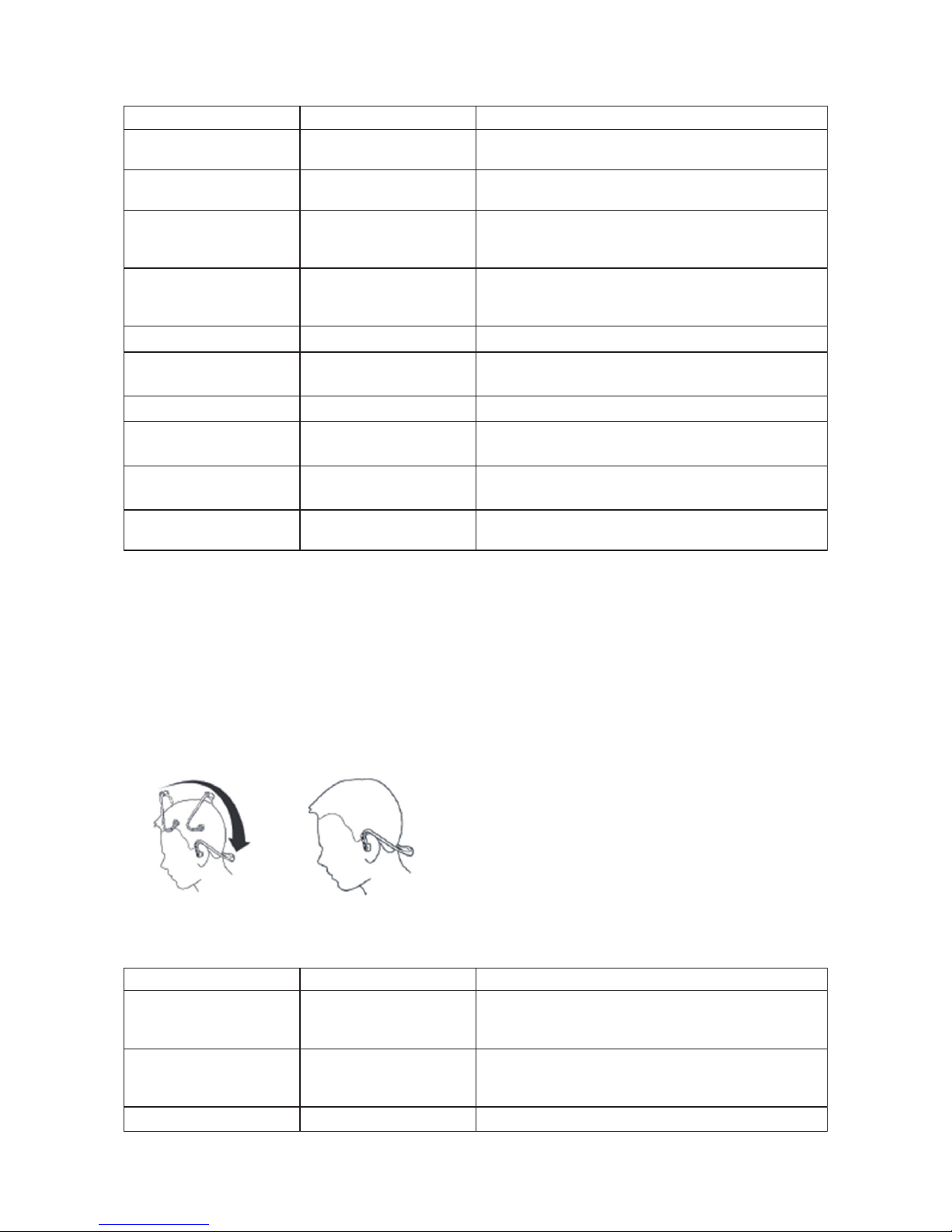
Legen Sie den Kopfhörer unter Benutzung beider Hände über beiden Ohren an (Siehe Abbildung).
6. Abspielen von Musik
Der Genuss Ihrer Musik ist kabellos möglich, wenn der Kopfhörer mit dem Handy oder einem Bluetooth®
Sender verbunden ist.
Funktion Status des Kopfhörers Vorgang
Lautstärke erhöhen Wiedergabe von Musik Bewegen Sie den Schalter 2 in Richtung + und
lassen Sie selbigen wieder los, wenn die gewünschte
Lautstärke erreicht wurde
Lautstärke herabsetzen Wiedergabe von Musik Bewegen Sie den Schalter 2 in Richtung – und
lassen Sie selbigen wieder los, wenn die gewünschte
Lautstärke erreicht wurde
Pause Musik anhalten Drücken Sie kurz die ]
I
Taste

9
Funktion Status des Kopfhörers Vorgang
Wiedergabe Musik wiedergeben
Zurücksetzen Pause Drücken Sie kurz die ]
I
Taste
Letzter Titel Wiedergabe von Musik Bewegen Sie den Schalter 1 in Richtung ˘und
lassen Sie selbigen wieder los
Nächster Titel Wiedergabe von Musik Bewegen Sie den Schalter 1 in Richtung ¯und
lassen Sie selbigen wieder los
Anmerkungen:
* Bei einigen Handys ist es möglich, dass beim Abspielen von Musik, diese automatisch auf den
Lautsprecher des Telefons gelegt wird. In diesem Falle wählen Sie bitte die “Übertragung durch ein
Bluetooth Gerät” Option in den Einstellungen Ihres Handys. Bitte ziehen Sie die Bedienungsanleitung Ihres
Telefons zu Rate.
* Für den Fall, dass die Lautstärke auf Maximum oder Minimum gesetzt wurde, wird das Gerät einen
Signalton (“Ding-Dong”) abspielen.
* Um Funktionen wie “Letzter Titel/Erster Titel/Pause/Zurücksetzen” fernzusteuern, muss Ihr Handy
über einen Bluetooth Sender mit AVRCP Unterstützung verfügen. Bitte ziehen Sie diesbezüglich die
Bedienungsanleitung Ihres Handys zu Rate.
7. LED Anzeige
Kopplung mit einem Bluetooth Gerät
LED Anzeige Status des Kopfhörers
Die rote und blaue LED blinkt abwechselnd Kopplungsmodus
Die blaue LED blinkt zweimal im Intervall von
2 Sekunden
Standby Modus (nicht mit dem Bluetooth Gerät
verbunden)
Die blaue LED blinkt zweimal im Intervall von
5 Sekunden
Standby Modus (mit dem Bluetooth Gerät verbunden)
Die blaue LED blinkt 3 Mal pro Sekunde Klingelton
Die blaue LED blinkt alle 2 Sekunden Gesprächsmodus
Sicherheitsvorkehrungen:
STROMSCHLAGGEFAHR
NICHT ÖFFNEN
VORSICHT
Um das Risiko eines elektrischen Schlags zu verringern, sollte dieses Produkt
AUSSCHLIESSLICH von einem autorisierten Techniker geöffnet werden. Bei
Problemen trennen Sie das Gerät bitte von der Spannungsversorgung und von
anderen Geräten ab. Stellen Sie sicher, dass das Gerät nicht mit Wasser oder Feuchtigkeit in Berührung
kommt.
Wartung:
Nur mit einem trockenen Tuch säubern. Keine Reinigungs- oder Scheuermittel verwenden.
Garantie:
Es kann keine Garantie oder Haftung für irgendwelche Änderungen oder Modikationen des Produkts oder
für Schäden übernommen werden, die aufgrund einer nicht ordnungsgemäßen Anwendung des Produkts
entstanden sind.
Allgemeines:
Design und technische Daten können ohne vorherige Ankündigung geändert werden.
Alle Logos, Marken und Produktnamen sind Marken oder eingetragene Marken ihrer jeweiligen Eigentümer
und werden hiermit als solche anerkannt.
Bitte bewahren Sie Bedienungsanleitung und Verpackung für spätere Verwendung auf.
Achtung:
Dieses Produkt ist mit diesem Symbol gekennzeichnet. Es bedeutet, dass die ausgedienten
elektrischen und elektronischen Produkte nicht mit dem allgemeinen Haushaltsmüll entsorgt werden
dürfen. Für diese Produkte stehen gesonderte Sammelsysteme zur Verfügung.

10
FRANÇAIS
Charge du casque
Avant la première utilisation, veuillez charger la batterie pendant 4 heures au minimum.
Si, au cours d'utilisation normale vous entendez 3 “bip” d'avertissement toutes les 20 secondes et le voyant
rouge clignote deux fois, cela signie que la batterie est faible et elle doit être rechargée.
Chargez votre batterie comme indiqué ci-après:
Etape 1 : Soulevez la patte en caoutchouc sur le port de charge .
Etape 2 : Branchez le câble USB sur un port USB de votre PC.
Etape 3 : Raccordez le câble USB au port de charge du casque.
Lorsque le voyant LED rouge est allumé, le casque est en charge
Lorsque le voyant LED rouge est éteint, le casque est complètement chargé
Etape 4 : Cela prendra environ 3 heures pour charger complètement le casque, lorsque la charge est
terminée, retirer le chargeur.
Fonctions du CMP-BLUEHS11
1. Bouton poussoir un
¯
: Morceau suivant
]
I
: Microphone en mode Pause/Muet
˘
: Morceau précédent
2. Bouton poussoir deux
– : Diminuer le volume
O : Touche multifonctions (bouton marche/arrêt, répondre à/mettre fin à/rejeter un appel, composition
vocale/transfert vocal/recomposer)
3. Voyant LED
4. Port de charge (fermé par une patte en caoutchouc)
5. Microphone intégré
6. Haut-parleur
Table des matières
Langues :
Autres manuels Konig casque


