
komamura Falcon Eye KC-1100 Manuel utilisateur
Instruction Manual
Falcon Eye KC-1100
Komamura Corporation
2
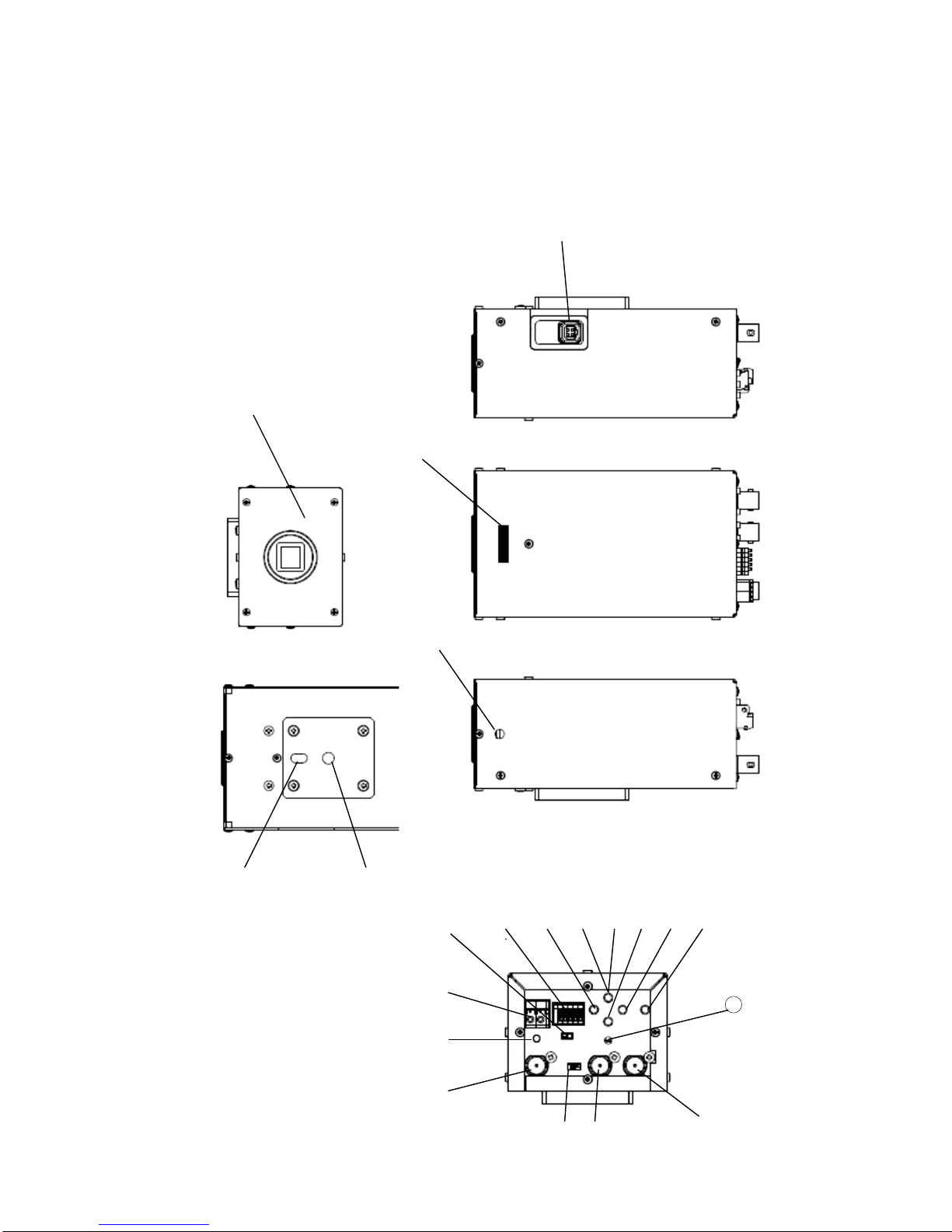
1.Names of Parts
⑨
⑧
⑦
④
③
①
②
⑥
⑤
⑬
字
⑫
⑪
⑩
⑲
⑱
⑰
⑯
⑮
⑭
⑳
21
3
Names of parts
No.
Name
①
CS Lens Mount
②
Flange Back Adjuster
③
Locking Screw for Flange Back Adjuster
④
Auto Iris Connector
⑤
Tripod Socket
⑥
Guide Pin Socket
⑦~
⑪
Set up switch (Ref: 2. Operation)
⑫
Focus EZ Switch (Ref: 2-5 Special Menu)
⑬
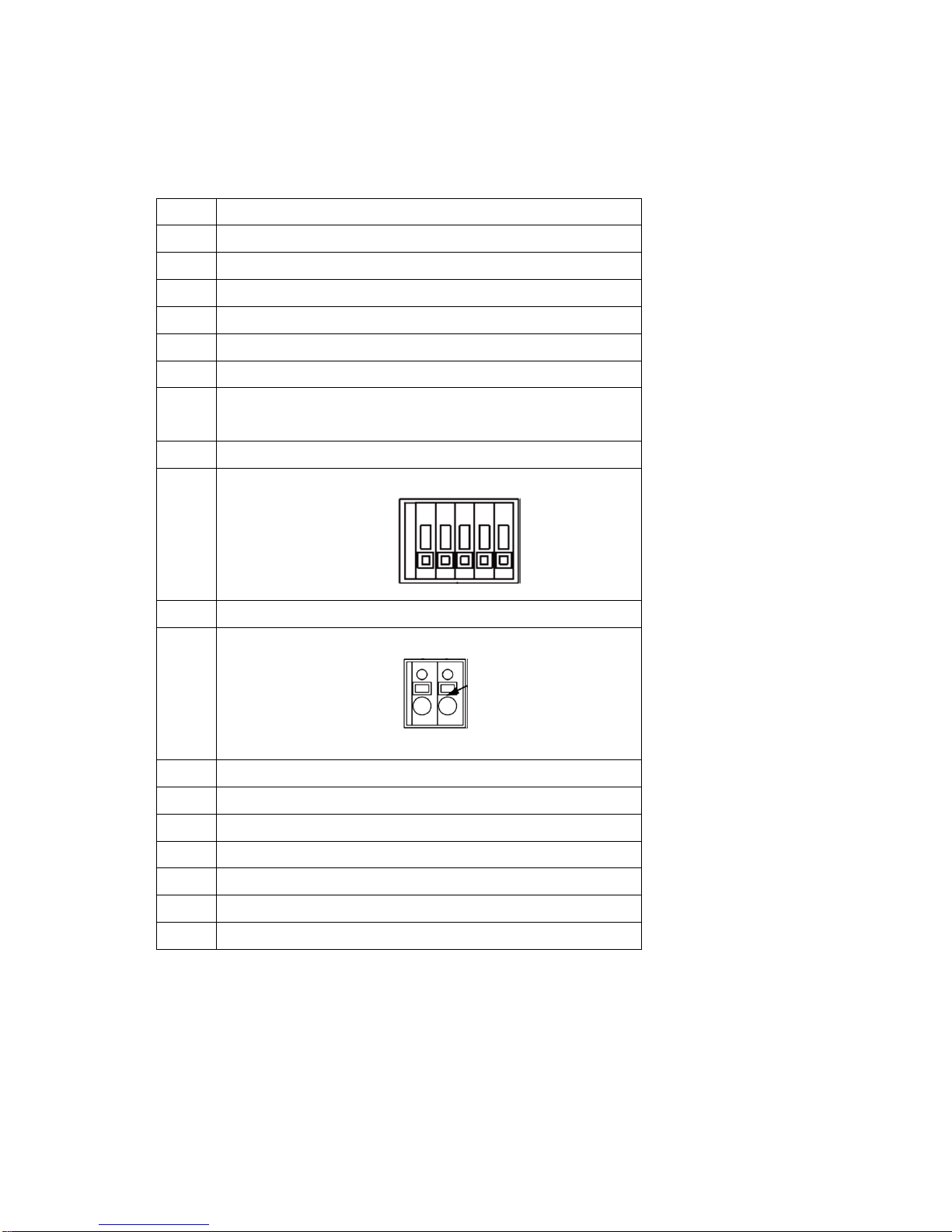
RS-485 (for remote controlling day/night switch)
⑭
RS-485 Terminal Switch
⑮
DC12V Input Be aware of each polarity
-+
⑯
Power Indicator
⑰
HD-SDI Output
⑱
SD Output
⑲
Genlock IN For external sync, input VBS, BBS or VS
⑳
Genlock IN Termination Switch Usually set at HIGH.
○
21
RESET Button
12
-
+ GND
4
2.Operation
2-1 Set up menu
Set up can be made on OSD.
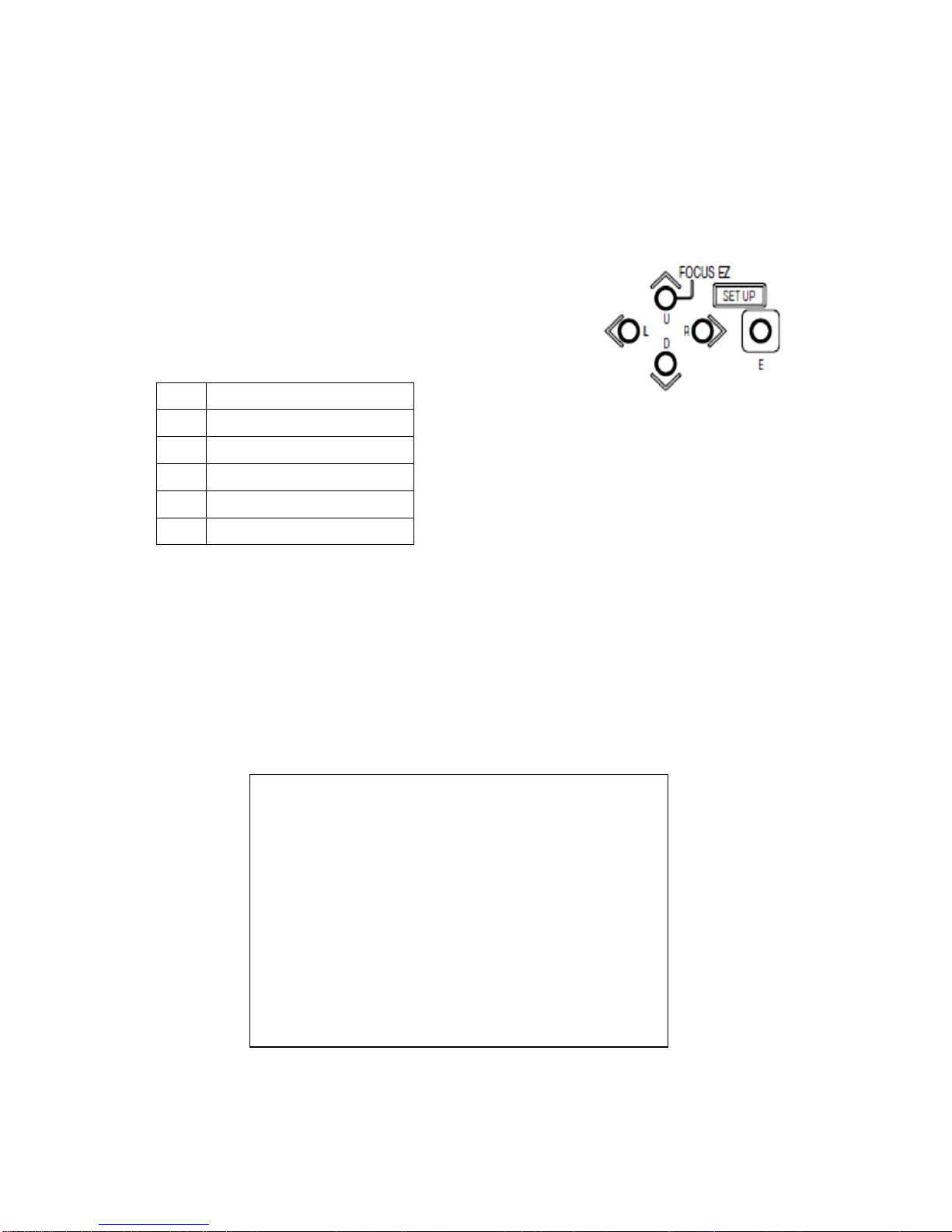
2-2 Set up buttons
Push switches are located on the camera back.
Name
U
Up Switch
D
Down Switch
L
Left Switch
R
Right Switch
E
Enter Switch
2-3 Set up mode
Set up menu is consisted Main Menu (ref. page 5) and special Menu
(ref. page 1)
2-4 Main Menu
Main Menu will appear after pushing Ebutton for more than 2 seconds. Pushing
R button will lead to the next page and L button to return.
MAIN MENU (PAGE 1/5)
SENSE UP MOVE ↓
SHUTTER x64 x1
BLC MODE OFF
ALC LEVEL L****I****H
GAIN HYP-AGC
WHITE BAL ATW1
DNR HIGH
MENU LOCK OFF ↓
EXIT CANCEL RESET

5
2-4-1、SENSE (Sensitivity) UP
(1)Setting it up something else rather than OFF or MANUAL, GAIN will be set
automatically on AGC. It can also be switchable to HYP-AGC.
①OFF
②S/N
Signal Noise priority mode
For slow motion shooting.
Max GAIN: +21dB on +15dB、HYP-AGC
③STD
Standard Value
Max. GAIN: +42dB on +36dB、HYP-AGC
④MOVE
MOVE priority mode
Max. GAIN: +78dB on +54dB、HYP-AGC
⑤MANUAL
Manual GAIN
For the required magnification, see SHUTTER on MAIN MENU
(2)Set ups of 4 patters of ALC and DAY/NIGHT can be made by pushing the E button
after the above modes are selected.
(3)ALC Set Up
A combination of BASED SHUTTER (OFF/Set up value) and HS-SHT
LIMIT (OFF/Set Up value) makes it possible to set up 4 patters.
①BASED SHUTTER : OFF, HS-SHT LIMIT : OFF normal
mode
②BASED SHUTTER : Set up Value, HS-SHT LIMIT : OFF
The shutter speed becomes slower according to a reduction of
incoming light volume. When it comes to the BASED SHUTTER
set up value, it stays at a full opening of iris while the shutter
speed comes to 1/30 sec at a full opening. While the shutter speed
stays at 1/3 sec, Auto Gain starts working and increases the
sensitivity up to maximum 16 times with an accumulation mode.

6
③BASED SHUTTER : OFF, HS-SHT LIMIT : Set Up value
The shutter speed becomes slower according to a reduction of
incoming light volume and once it comes to the set up value of
HS-SHT LIMIT, it stays afterward. A maximum increase of
auto gain makes iris full opening after accumulation.
④BASED SHUTTER: Set Up Value, HS-SHT LIMIT : Set Up Value
The shutter speed becomes slower according to a reduction of
incoming light volume. When it comes to the BASED SHUTTER
set up value, it stays at a full opening of iris while the shutter
speed comes to the HS-SHT LIMIT Value. Once the shutter
speed comes to the set up value, it stays there. Then Auto Gain
comes to a maximum increase.
(4)Setting up DAY / NIGHT
①COLOR
②B/W
③AUTO
LEVEL setting Switchable to either one of the following level
DARK
MID
BRIGHT
MANUAL
MANUAL setting
COLOR⇒B/W
B/W⇒COLOR
④REMOTE
Switchable to DAY/NIGHT mode through the optional remote control switch.
Function: ⑬RS485 /DAY/NIGHT switching terminal. Short circuit on
1-2 or open on B/W COLOR.

7
IR TRIG. POL setting on MAIN MENU (PAGE 4/5)
RS485/DAY/NIGHT switch terminal 1-2
Short Circuit
Open Circuit
IR TRIG POL..
BRAKE
COLOR
B/W
MAKE
B/W
COLOR
(5)FLICKER LESS
①OFF
②ON Select SHUTTER to 1/100
2-4-2、SHUTTER
(1)In case SENSE (Sensitivity)UP is set OFF, the following shutter speed can be
manually selected.
OFF(1/30 or 1/25)、 1/50, 1/60, 1/100、1/125、1/250、1/500、1/1,000、1/2,000、
1/4,000、1/10,000、
(2)In case SENSE (Sensitivity)UP is set at S/N、STD、MOVE or MANUAL, the
following sensitivity increase ratio can be selected.
x1、x2、x4、x8、x16、
2-4-3、BLC MODE
For Back Light Control
(1)OFF
(2)ON
(3)SPOT
By moving the cursor by using U、D、L and R buttons、push E button on
the required position.
2-4-4、ALC LEVEL
Auto Level Control
2-4-5、GAIN
The Gain value can be selected with L and R Button
When the SENSE UP is set either at S/N, STD or MOVE, or the
DAY/NIGHT is set at AUTO, The GAIN can select (2) AGC or
(3)HYP-AGC only.

8
*When the SENSE UP is selected either at OFF or MANUAL and DAY/NIGHT is set
anything else but AUTO, (1) MANUAL can be selected.
(1) MANUAL
AUTO GAIN can be changed into MANUAL mode. By pushing E button,
GAIN works manually between 0 ~ 72dB at 0.3dB step.
(2)AGC
Auto Gain Control
(3)HYP-AGC
Hyper Auto Gain Control
Compared with AGC, it increases the sensitivity by +6dB on S/N、
+6dB on STD and+18dB on MOVE.
*In case of SENSE Up on either S/N、STD or MOVE and DAY/NIGHT on
AUTO、the GAIN can be selected only on AGC or HYP AGC.
2-4-6、WHITE BAL
(1)ATW1
Auto Tracking White Balance (Standard mode)
(2)ATW2
Auto Tracking White Balance (for wider color temperature setting)
(3)AWC
For one push Auto White Balance Control
(4)MANUAL
For manual white balance setting by adjusting R and B GAIN
2-4-7、DNR
Digital Noise Reduction
(1)OFF
(2)LOW
(3)HIGH

9
2-4-8、MENU LOCK
(1)Locking MENU LOCK
Push E button on ON
(2)Unlocking MENU LOCK
Push the button in order of U→L→D→R→U→D→E
Start over again when mistake was made.
2-4-9、EXIT、CANCEL、RESET
(1)EXIT
(2)CANCEL
(3)RESET
2-4-10、DETAIL
2-4-12、CHROMA
2-4-13、BLACK LEVEL
2-4-14、WDR MODE
Wide Dynamic Range
(1)OFF
(2)WDR
(3)AUTO KNEE
High Light Zone Adjustment
MAIN MENU (PAGE 2/5)
DETAIL L****I****H
CHROMA L****I****H
BLACK LEVEL L****I****H
WDR MODE OFF
FOG OFF
GAMMA 0.45
COLOR MATRIX SETUP ↓
EXIT CANCEL RESET

10
(4)AUTO B STR (Auto Black Stretch)
Shadow zone adjustment
2-4-15、FOG
FOG Mode features fog elimination as long as the scene behind the fog
can be recognized. This mode cuts through mist-boosts contrast to
enhance clarity.
(1) OFF :
(2) LOW:
(3) MID
(4) HIGH
2-4-16、GAMMA
Gamma setting
(0.45 / 0.75 / 1 )
2-4-17、COLOR MATRIX
The adjustment of HUE and SATURATION can be made on R、G、B、Ye、
Cy and Mg.
2-4-18、FLIP/MIRROR
(1)NORMAL
MAIN MENU (PAGE 3/5)
FLIP/MIRROR NORMAL
ZOOM x1
CAMERA ID OFF
RS485 ID 1
P.MASK OFF
RS485 BAUD 9600
VIDEO TEST LIVE
EXIT CANCEL RESET
Autres manuels pour Falcon Eye KC-1100
1
Table des matières


