Kolver K-DUCER Manuel utilisateur

KDU1 / KDU1A
Torque range: 0.1 - 70 Nm
OPERATOR
MANUAL

Vers. 062721 2
IDENTIFICATION DATA OF THE MANUFACTURER
KOLVER S.r.l.
VIA M. CORNER, 19/21
36016 THIENE (VI) ITALIA
IDENTIFICATION DATA OF THE PRODUCT
MODEL:
KDU-1
KDU-1A
CODE:
035001
035001/A
TECHNICAL DATA OF THE PRODUCT
FUSE: 3,15 A
DIMENSIONS: 190 x 205 x h120 mm WEIGHT: 2,5 Kg
POWER SUPPLY: 90÷260 V AC 50÷60 Hz
TENSION: 40V DC
POWER: 600W
DECLARATION OF CONFORMITY
KOLVER S.r.l. declares that the new tool here described: control units model KDU-1, KDU-
1A are in conformity with the following standards and other normative documents:
2006/42/CE, LVD 2014/35/UE, EMCD 2014/30/UE, EN 62841-2-2:2014, EN 62841-1: 2015, EN
60204-1, EN 61000-6-2, EN 61000-6-4.
It is also in conformity with III normative (2011/65/UE and following 2015/863).
Name: Giovanni Colasante
Position: General Manager
Person authorized to compile the technical file in Kolver
Thiene, January 1st 2021 Giovanni Colasante

Vers. 062721 3
Table of Contents
INTRODUCTION ...............................................................................................................................5
MODELS...............................................................................................................................................5
INSTALLATION .................................................................................................................................7
Installation of KDU unit.................................................................................................................7
Connectors .......................................................................................................................................8
Installation of KDS screwdriver....................................................................................................9
Installation of reaction arm......................................................................................................10
QUICK START...................................................................................................................................13
TERMINOLOGY ...............................................................................................................................16
OPERATING THE KDS SCREWDRIVER .....................................................................................18
OPERATING THE K-DUCER CONTROL UNIT.........................................................................20
Main Screen – Program Mode.....................................................................................................20
Main Screen – Program Mode – navigation tree ......................................................................22
Main Screen – Sequence Mode....................................................................................................23
Main Screen – Sequence Mode – navigation tree .....................................................................25
Retrieving and storing the screwdriving results......................................................................26
Connecting a barcode scanner ....................................................................................................28
Connecting Kolver accessories SWBX88, CBS880 ....................................................................28
CONFIGURING THE K-DUCER ...................................................................................................30
MAIN MENU ................................................................................................................................30
PROGRAMS menu .......................................................................................................................31
PROGRAMS menu tree............................................................................................................32
TORQUE & ANGLE menu ......................................................................................................35
RAMP & TIME menu ...............................................................................................................37
REV & PRE-REV menu ............................................................................................................39
OTHER menu ............................................................................................................................40
SEQUENCE SETTINGS menu ....................................................................................................43
SEQUENCE SETTINGS menu tree.........................................................................................44
CURRENT SEQ. menu .............................................................................................................45
GENERAL SETTINGS menu.......................................................................................................47
USB menu.......................................................................................................................................51
USB menu tree...........................................................................................................................53

Vers. 062721 4
K-EXPAND software ....................................................................................................................54
Interface Selection .....................................................................................................................54
Screwdriver................................................................................................................................55
Settings .......................................................................................................................................55
General Settings.........................................................................................................................56
Sequence Settings......................................................................................................................57
Programs ....................................................................................................................................58
Actions........................................................................................................................................60
REMOTE CONTROL INTERFACES..............................................................................................64
24V I/O............................................................................................................................................64
Introduction ...............................................................................................................................64
Pinout (CN3)..............................................................................................................................65
Wiring diagrams........................................................................................................................69
Binary tables for sequence and program selection ..............................................................71
MODBUS TCP ...............................................................................................................................73
Introduction ...............................................................................................................................73
Usage...........................................................................................................................................73
K-DUCER MODBUS map........................................................................................................74
MODBUS TCP code examples and literature .......................................................................75
OPEN PROTOCOL.......................................................................................................................76
Introduction ...............................................................................................................................76
Terminology...............................................................................................................................76
Supported MIDs........................................................................................................................76
MAINTENANCE AND CARE........................................................................................................78
INTRODUCTION .........................................................................................................................78
CALIBRATION..............................................................................................................................78
MAINTENANCE..........................................................................................................................79
EXPLODED VIEWS AND SPARE PARTS.....................................................................................80
GUARANTEE....................................................................................................................................82

Vers. 062721 5
INTRODUCTION
K-DUCER is the new class A intelligent transducerized assembly system from Kolver.
Thanks to a sophisticated control system, the electronic circuit communicates with KDS
series screwdriver equipped with integrated torque/angle transducer and allows to stop the
screwdriver instantly when reaching the preset torque or angle.
The AC 90÷260V - 50÷60Hz power supply is converted into 40VDC required by the KDS
series screwdrivers through a switching board.
IMPORTANT: K-DUCER is a highly accurate unit but it is critically important to select the
appropriate settings to ensure that the desired and proper torque is being applied and that
the screwdriver motor works efficiently. Read the menu description carefully and if unsure
please contact Kolver for support.
MODELS
K-DUCER power supply and control units are available in two versions:
Code
Model
Features
035001
KDU-1
035001/A
KDU-1A
as KDU-1 + RJ45 connector, provoding
Modbus TCP (server) communication
protocol and Open Protocol v1.6rev3
K-DUCER units are compatible with any of the KDS electric screwdrivers with transducer,
available in straight, pistol and fixture configuration.
Code
Model
Torque
(Nm)
Speed (rpm)
Min
Max
175015
KDS-MT1.5
0,1-1,5
50
850
175015/ESD
KDS-MT1.5/ESD
0,1-1,5
50
850
175016/ESD
KDS-MT1.5P
0,1-1,5
50
850
175016/U/ESD
KDS-MT1.5P/U
0,1-1,5
50
850
175115
KDS-MT1.5CA
0,1-1,5
50
850
175115/FN
KDS-MT1.5CA/FN
0,1-1,5
50
850
175015/A
KDS-MT1.5ANG
0,1-1,5
50
850
135006
KDS-PL6
0,5-6
50
850
135006/ESD
KDS-PL6
0,5-6
50
850

Vers. 062721 6
135007/ESD
KDS-PL6P
0,5-6
50
850
135007/U/ESD
KDS-PL6P/U
0,5-6
50
850
135106
KDS-PL6CA
0,5-6
50
850
135106/FN
KDS-PL6CA/FN
0,5-6
50
850
135006/A/ESD
KDS-PL6ANG
0,5-5,5
50
850
135010
KDS-PL10
0,8-10
50
600
135010/ESD
KDS-PL10
0,8-10
50
600
135011/ESD
KDS-PL10P
0,8-10
50
600
135011/U/ESD
KDS-PL10P/U
0,8-10
50
600
135110
KDS-PL10CA
0,8-10
50
600
135110/FN
KDS-PL10CA/FN
0,8-10
50
600
135010/A/ESD
KDS-PL10ANG
0,8-9
50
600
135015
KDS-PL15
0,5-15
50
320
135015/ESD
KDS-PL15
0,5-15
50
320
135016/ESD
KDS-PL15P
0,5-15
50
320
135016/U/ESD
KDS-PL15P/U
0,5-15
50
320
135115
KDS-PL15CA
0,5-15
50
320
135115/FN
KDS-PL15CA/FN
0,5-15
50
320
135015/A/ESD
KDS-PL15ANG
0,5-12
50
320
135020
KDS-PL20
2-20
10
210
135120
KDS-PL20CA
2-20
10
210
135120/FN
KDS-PL20CA/FN
2-20
10
210
135030/ANG
KDS-PL30ANG
3-30
10
140
135035
KDS-PL35
3-35
10
140
135135
KDS-PL35CA
3-35
10
140
135135/FN
KDS-PL35CA/FN
3-35
10
140
135045/ANG
KDS-PL45ANG
4-45
10
90
135050
KDS-PL50
5-50
10
90
135150
KDS-PL50CA
5-50
10
90
135150/FN
KDS-PL50CA/FN
5-50
10
90
135070/ANG
KDS-PL70ANG
7-70
10
50

Vers. 062721 7
INSTALLATION
Installation of KDU unit
The K-DUCER is supplied with the following mounting bracket (all dimensions reported in
mm):

Vers. 062721 8
The bracket should be fixed to the four provided 8mm depth female threads on the back
panel using the provided M4x8 screws.
Also available separately:
•table stand (part number 010400)
•vertically and horizontally adjustable bracket (part number 010401).
Connectors

Vers. 062721 9
TOOL connector
To connect a KDS series screwdriver. Take care to respect the alignment tabs on the
connector. See “Installation of KDS screwdriver” section for instructions on connecting the
screwdriver.
CN1 connector
Reserved for servicing the unit and upgrading the firmware.
CN2 male serial connector
To connect with a compatible barcode scanner, such as Kolver Barcode P/N 020050, serial
printers such as Kolver PRNTR1, or serial terminals (PC/PLCs).
CN4 female serial connector
To connect with Kolver accessories SWBX88/CBX880, serial printers such as Kolver
PRNTR1, or serial terminals (PC/PLCs).
CN3 I/O connector
To connect with 24V I/O functionality such as PLCs, pedals/buttons, LEDS, etc. Refer to
REMOTE CONTROL INTERFACES chapter.
CN5 ethernet connector RJ45
To connect using MODBUS TCP, Open Protocol, or K-Expand on any compatible device or
software (PLCs, PCs, etc). Refer to REMOTE CONTROL INTERFACES chapter.
USB mini B
To connect using K-Expand software. Refer to K-EXPAND software chapter.
USB A
Plug in a FAT32 formatted flash drive to automatically save screwdriving results and backup
all settings. Refer to the “Retrieving and storing the screwdriving results” and “USB menu”
sections.
Installation of KDS screwdriver
Cable connection and part numbers
The KDS screwdriver series require one of the following cables:
-2.5m male/female cable (code 250064)
-2.5m male/female cable with strain relief (code 250064/H)
-5.0m male/female cable (code 250564)
-5.0m male/female cable with strain relief (code 250564/H)

Vers. 062721 10
To connect the screwdriver to the unit:
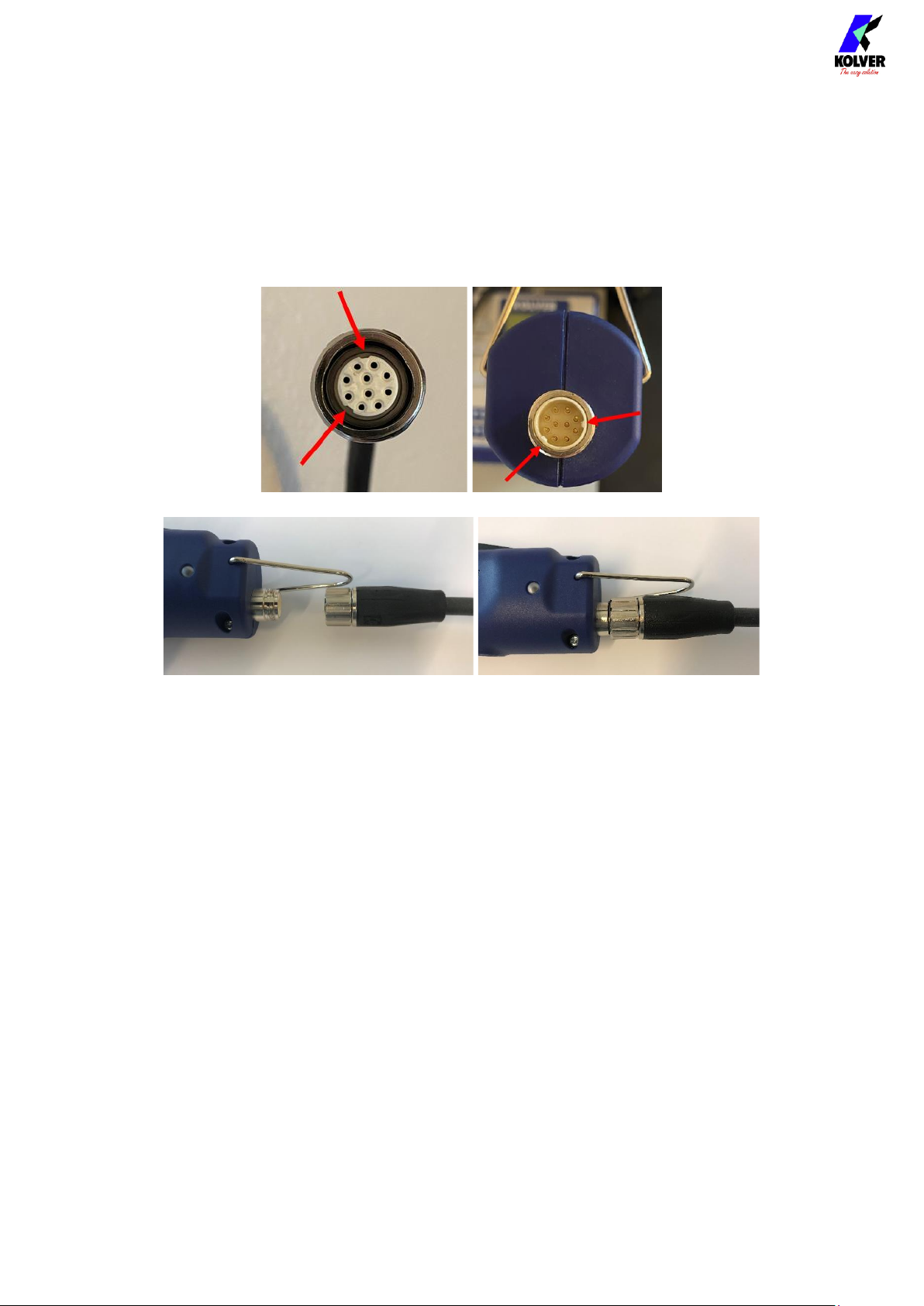
1. insert the male connector into the appropriate TOOL connector on the bottom of the
unit, taking care to respect the alignment tabs. Push the connector into its position
and turn the OPEN/CLOSE nut clockwise until it clicks*
2. insert the female connector into the appropriate connector at the top of the
screwdriver, taking care to respect the alignment tabs. Push the connector into its
position and turn the OPEN/CLOSE nut clockwise until it clicks*
To disconnect the cable:
1. push the connector in lightly towards the screwdriver or the unit
2. turn the OPEN/CLOSE nut counterclockwise*
3. pull the connector out
*note: some models use a threaded nut instead of an OPEN/CLOSE nut. In this case, tighten
the nut all the way until it stops, without overtightening with excessive force.
Installation of reaction arm
Note: a reaction arm is ALWAYS required for KDS screwdrivers size 20Nm and above.
Kolver recommends always using a reaction arm for operator comfort, especially for
applications with torques above 5 Nm.
Fix the reaction arm to the indicated areas only.
KDS series screwdrivers sizes 15Nm and below have two positions designed for connecting
to the reaction arm:
1. The naked metal cylinder near the head of the screwdriver
2. The reinforced plastic section at the very top of the screwdriver (not present on the
pistol-shaped version)
Ce manuel convient aux modèles suivants
2
Table des matières
Autres manuels Kolver Équipement de laboratoire
Manuels Équipement de laboratoire populaires d'autres marques

Agilent Technologies
Agilent Technologies 5800 ICP-OES Manuel utilisateur

Endress+Hauser
Endress+Hauser Cleanfit CPA875 Manuel utilisateur

NI
NI PXI-5422 Manuel

Collomix
Collomix Aqix Manuel utilisateur

SPEX SamplePrep
SPEX SamplePrep 6875 Freezer/Mill Series Manuel utilisateur

Ocean Insight
Ocean Insight FLAME-NIR+ Manuel utilisateur