
Kolibri Domino Manuel utilisateur



Table of Contents:
1. INTRODUCTION
1.1 About the Kolibri Domino_______________________________________________________ 1
1.2 Important Safety Notes ________________________________________________________ 1
1.3 Box Contents __________________________________________________________________ 2
1.4 Specications _________________________________________________________________ 2
1.5 Views of the Kolibri Domino ____________________________________________________ 3
1.6 Control Panel __________________________________________________________________ 4
1.7 Home Screen __________________________________________________________________ 5
2. GETTING STARTED
2.1 Powering Up ___________________________________________________________________ 6
2.2 Loading the Hopper ____________________________________________________________ 6
3. OPERATING MODES
3.1 Mix Mode______________________________________________________________________ 8
3.2 Sort Mode _____________________________________________________________________ 8
3.3 VSort Mode____________________________________________________________________ 9
3.4 Count Mode ___________________________________________________________________ 9
4. FUNCTIONS
4.1 Auto and Manual Function_____________________________________________________ 10
4.2 Add Function _________________________________________________________________ 10
4.3 Batch Function________________________________________________________________ 10
4.4 Add+Batch Function __________________________________________________________ 11
5. AFTER-COUNT FUNCTIONS
5.1 Report ________________________________________________________________________ 11
5.2 Serial Report__________________________________________________________________ 11
5.3 Print__________________________________________________________________________ 12
5.4 Menu _________________________________________________________________________ 12
6. MAINTENANCE AND TROUBLESHOOTING
6.1 Maintenance__________________________________________________________________ 13
6.2 Adjusting the Feed Gap _______________________________________________________ 15
6.3 Calibration Procedure _________________________________________________________ 17
6.4 Troubleshooting ______________________________________________________________ 18
6.5 Warranty______________________________________________________________________ 21
6.6 Contact Information___________________________________________________________ 22

1.1 About the Kolibri Domino
Thank you for choosing the Kolibri Domino one-pocket currency discriminator.
The Kolibri Domino is a professional, powerful, value counter and sorter.
Kolibri Domino has a convenient user-friendly interface, intuitive control panel, and a
variety of counting modes. All of these features come with strong built-in counterfeit
detection technology and high level performance.
1.2 Important Safety Notes
When using this product, basic safety precautions should always be followed, including
the following:
• Do not use this product in areas where it may be exposed to water or any other
liquids.
• Unplug this product from the wall outlet before cleaning. Use a damp cloth or
air duster to clean the unit.
• To avoid the risk of electrical shock, do not disassemble this unit. Disassembling
will expose you to dangerous voltages and other safety risks. Incorrect
reassembly may cause electrical shock when the unit is subsequently used.
• Only use this product with the power cord supplied with the it. Plug the power
cord into a properly grounded wall outlet. Do not remove the grounding pin
from the power cord. Failure to properly ground the unit can result in severe
injuryorre.
•Makesurethedeviceisplacedonaatsurface.Donotoperatetheunitin
areas with high temperature, humidity or smoke as these conditions may
impede performance.
• This product is designed for indoor use in a well-ventilated environment. Keep
theunitawayfromdirectsunlightandstrongmagneticeldswhichmay
interfere with the counterfeit detection sensors.
• When not using the unit for an extended period of time, disconnect the power
cord from the wall outlet.
INTRODUCTION
1.
1

1.3 Box Contents
- Kolibri Domino Currency Discriminator
- Adapter Cable (for Printer*)
- Power Cord
- User Manual
- Cleaning Brush
- Calibration Card (White Paper Card)
*Printer sold separately
1.4 Specications
Counting speed: Adjustable 800, 1000 and 1200 bills/min
Hopper capacity: 500 bills
Stacker capacity: 200 bills
Weight: 12.8 lbs (5.8 kg)
Dimensions: 11.3’’ x 8.9’’ x 9.25’’ (287mm x 270mm x 235mm)
Powersource:AC100-240V,50/60Hz,≤70W
2

1
2
3
TOP VIEW
1. Feed Gap Adjustment Knob
2. Bill Guides
3. Hopper
4. Control Panel
5. TFT Screen
6. microSD Card Port
7. Stacker
8. Carrying Handle
9. Back Door
10. Back Door Handle
11. RJ11 Port (Printing)
12. USB Port
13. Power Switch
14. AC Power
15. Fuse
1.5 Views of the Kolibri Domino
2
5
6
FRONT VIEW
1 1
910
12
13
14
15
BACK VIEW
3
4
7
8
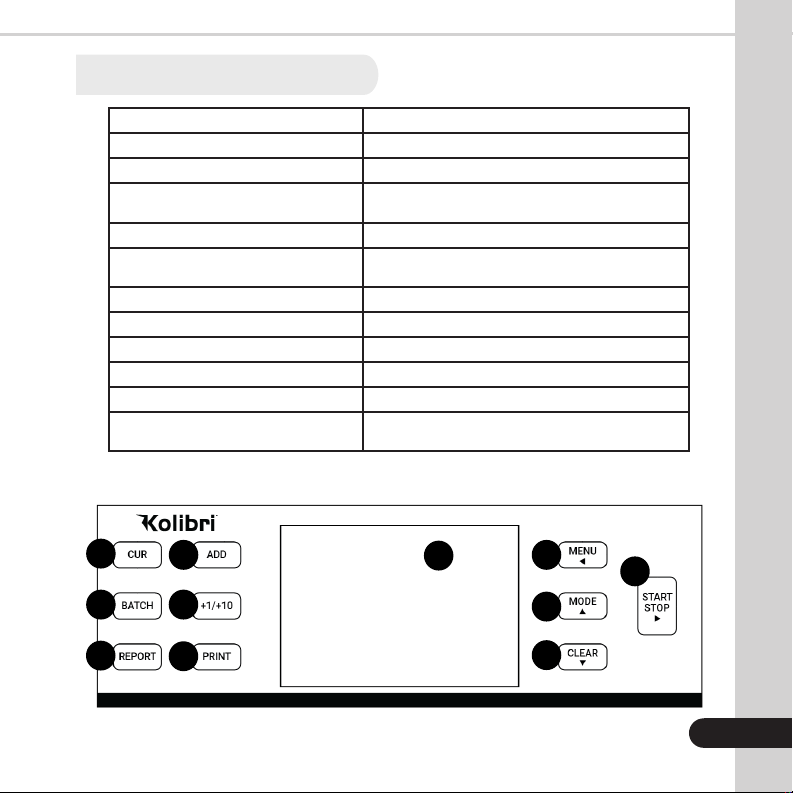
1.6 Control Panel
Key Function
1. CUR Button Changes currency type (USD, CAD, MXN)
2. BATCH Button Activates/Deactivates Batch function
3. REPORT Button Shows the detailed Report Screen
(for Serial Report press REPORT button twice)
4. ADD Button Activates/Deactivates Add function
5. +1/+10 Button Customizes batch in incriments of 1 or 10
(Press for +1, Hold for +10)
6. PRINT Button Prints the displayed report if a printer is connected
7. Display Shows total count and all settings (or shows all data)
8. MENU Button Shows settings and works as a “back button” in Menu
9. MODE Button Changes mode and moves cursor up in Menu
10. CLEAR Button Resets the count and moves cursor down in Menu
11. START/STOP Button Starts or Stops the count (when not in auto-start func-
tion)orvalidate/conrmsettings
1
2
3
4
5
6
8
7
9
10
4
1 1
Domino

1.7 Home Screen
1. Currency Selected
2. Mode Selected
3. ADD Function (Activated)
4. Selected Batch Number (Activated)
5. Number of Bills Counted
6. Total Value Counted
7. Auto/Manual Start Function
8. Counterfeit Detection (ON)
9. Time
10. Date
11. Serial Number of Last Bill Scanned
12. Number of Rejected Bills
1 2 3 4
5
6
87
911 10
12
5

6
GETTING STARTED
2.
2.1 Powering Up
Ensure the hopper and stacker are empty. Then, attach the provided power cable to
the power inlet on the back of the machine. Make sure to plug the power cable into a
three-prong outlet and turn on the power switch located on the back of the machine .
The unit will load and conduct a self-checking. When the home screen is displayed the
machine is ready to operate.
2.2 Loading the Hopper
In order to avoid jams and ensure proper operating speed of the machine, it is important
to correctly load the hopper. Bills should be placed in a neat stack prior to being placed
into the hopper.
Avoid counting bills that are wet, excessively dirty, spoiled, folded, curled or with
foreign material like clips, bands, etc. Bills such as these can cause the machine to
malfunction.
Adjust the hopper bill guides to a size slightly wider (0.10’’ on each side) than the width
of the bills in the stack (all US dollar denomination are the same size). This will help to
correctly place the bills in the hopper, and will ensue smooth bill feeding.
WARNING: Hazardous moving parts!
Do not place fingers, hair, clothes, etc. near the moving parts.
7

7
TIPS: To Reduce Rejects
1. MAKE A STACK
Correct or remove bills that are
severly wrinkled, damaged or
folded. Square the bill stack.
3. FEED THE BILLS
2. LOAD THE STACK
Autres manuels pour Domino
1
Table des matières
Autres manuels Kolibri Caisse enregistreuse


Manuels Caisse enregistreuse populaires d'autres marques


Cashmaster
Cashmaster Sigma 105 Manuel utilisateur

Agilent Technologies
Agilent Technologies 53151A Manuel utilisateur

Cashmaster
Cashmaster Sigma 105 Manuel utilisateur

Tellermate
Tellermate TY Manuel d'utilisation et d'entretien

HYOSUNG
HYOSUNG MX-4000W Manuel utilisateur

Cashmaster
Cashmaster Sigma 105 Manuel utilisateur


