
Kofax 350 Manuel utilisateur

Kofax Communication Server
Model 350 GSM Box Installation Guide
Version: 10.3.0
Date: 2019-12-13

© 2019 Kofax. All rights reserved.
Kofax is a trademark of Kofax, Inc., registered in the U.S. and/or other countries. All other trademarks
are the property of their respective owners. No part of this publication may be reproduced, stored, or
transmitted in any form without the prior written permission of Kofax.

Table of Contents
Chapter 1: Product Description.................................................................................................................4
Chapter 2: Specifications........................................................................................................................... 5
Chapter 3: Installation Instructions...........................................................................................................6
Prerequisites....................................................................................................................................... 6
Installation of DeviceInstaller..............................................................................................................7
Select Device to Configure................................................................................................................ 7
Assign IP Address..............................................................................................................................7
Telnet Setup........................................................................................................................................9
Test Connection to Model350.......................................................................................................... 11
Recovery from LAN-Deadlock via arp Command............................................................................11
LEDs................................................................................................................................................. 14
Chapter 4: Specific Registry Keys.......................................................................................................... 16
Chapter 5: Further Documents................................................................................................................17
Chapter 6: Approvals................................................................................................................................18
Chapter 7: Restrictions.............................................................................................................................19
3

Chapter 1
Product Description
Model350 (GSM box) is a standalone device to send and receive SMS messages via Kofax
Communication Server (KCS). Model350 may be connected to the KCS via a local network or as a Branch
Box via WAN.
4

Chapter 2
Specifications
GSM frequency bands 900/1800/1900MHz with MC55 module (default)
850/1800/1900MHz with optional MC56 module
Interface 10Base-T and 100Base-TX (auto sensing)
Operating voltage 100-230V/60-50Hz
Operating current 0,15-0,22A max.
Mechanical size 145mm x 125mm x 75mm (without antenna)
Weight app. 500g
Operating Temperature 0-40°C
5

Chapter 3
Installation Instructions
This section describes the installation of Model350.
Prerequisites
• DeviceInstaller program is necessary. It can be downloaded from the Lantronix website (http://
ltxfaq.custhelp.com/app/answers/detail/a_id/644).
(
Most recently tested version: 4.3.0.1 on Windows Server 2008 R2 64-bit)
• Laptop/PC with Windows 2003 or later with network access
• Valid SIM card
• Free IP address and net mask from network administrator
• Power cord and network cable.
• Mobile phone to find the location with best GSM-reception of the chosen provider.
• MAC address of the device to install (optional)
Note Do not update firmware of the GSM box with the DeviceInstaller.
Model350 is supported from TC/LINK-MD/WM V2.10.08 on.
1. Remove Model350 rear panel (where no connectors are) and insert a SIM card.
2. Place Model350/GSM antenna in a location with LAN access and good GSM reception (check with
a mobile phone of the same provider). An external antenna may be connected via a 50 Ohm (e.g.
RG174) cable of max. 3m length with FME connector if preferred.
3. Connect antenna to Model350.
4. Connect Model350 to LAN.
5. If you have not installed DeviceInstaller on your PC yet continue with Installation of DeviceInstaller.
6. Start DeviceInstaller.exe on a Computer in the same subnet as the device to configure.
7. Start Device – Search.
8. Remember other devices which are eventually found on the network.
9. Connect Model350 to power.
10. Wait 1 minute, then start Device – Search again.
11. Identify the new device.
12. Select the new device and then click 'Assign IP'.
13. Continue with Assign IP Address.
6

Kofax Communication Server Model 350 GSM Box Installation Guide
Installation of DeviceInstaller
Start DeviceInstaller setup file. This software requires .NET Framework; a required version is installed
automatically along with the product.
Select Device to Configure
Start DeviceInstaller. The program will automatically start searching for devices in your network.
The 'Hardware Address' (=MAC address) is marked internally on the LAN-connector (= COM server).
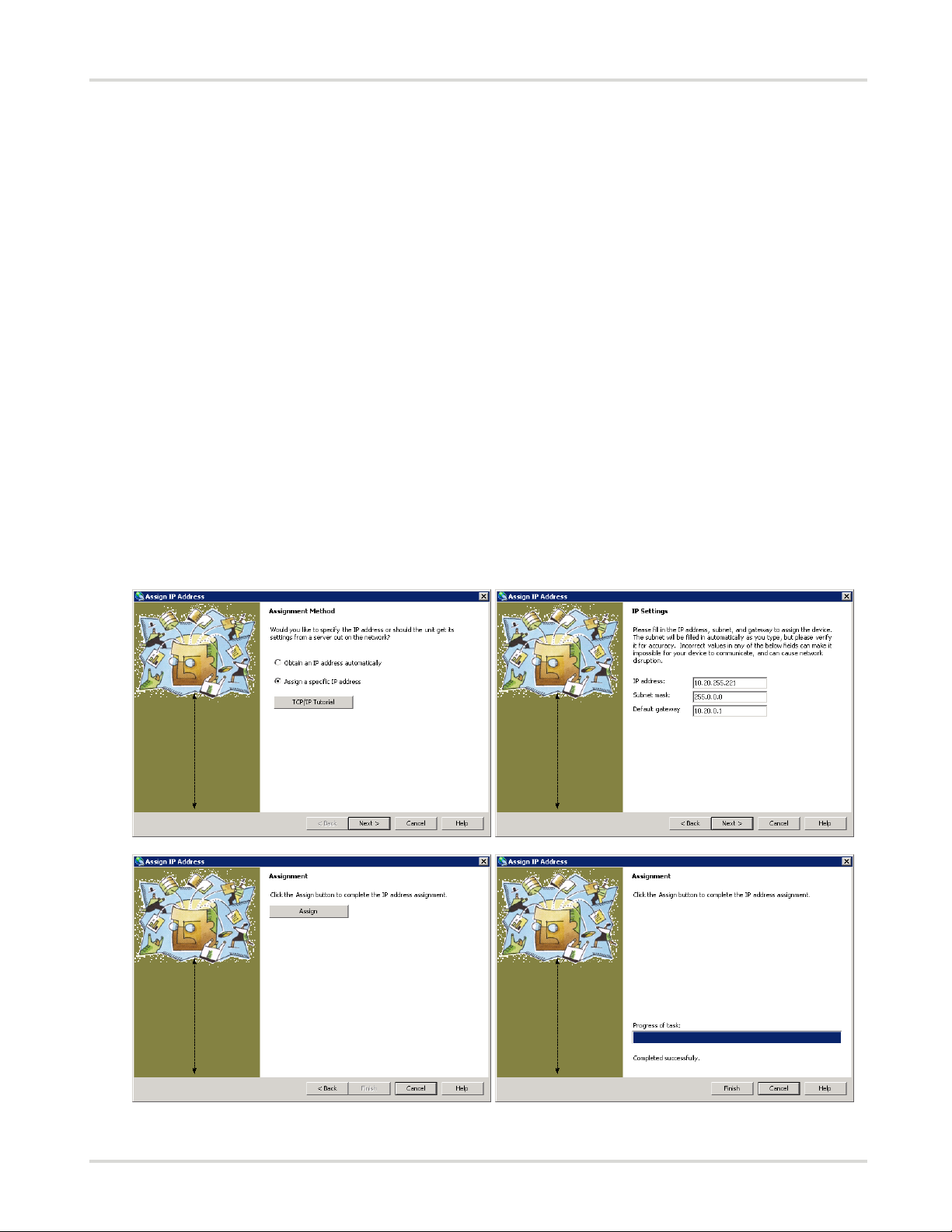
Assign IP Address
Assign IP address, Subnet mask and Default Gateway for your network or enable DHCP/Auto-IP. The
DeviceInstaller gives you a warning if you try to configure Subnet masks different from the Workstation
where DeviceInstaller is running. It will display such a device as ‘Unreachable’ for further configuration.
7
Kofax Communication Server Model 350 GSM Box Installation Guide
Via Telnet there is no config-check and therefore you can set a different Subnet mask. It even is possible
to configure a mask which will make it impossible to reach the device from that workstation again via
Telnet without a change of network configuration of the workstation. Keep this in mind when planning an
installation.
There are 3 possible scenarios for assigning an IP address:
1. Configuration is performed in the target network: Workstation with DeviceInstaller is in the same
subnet as Model350 -> all features of DeviceInstaller are available, configuration of IP’s within the same
subnet are possible.
2. Configuration is performed outside the target network: DeviceInstaller’s Search finds the Model350
but is NOT running in the same subnet as Model350 -> only the ‘assign IP’-option of DeviceInstaller is
available (find the MAC address of Model350 on the COM-server inside Model350 if the device is not
found with the ‘Search’ feature). Note the IP-address of the device in question and connect via Telnet
(Port 9999) – continue at 3.12. ‘Alternatively use Telnet setup’.
3. IP-address of Model350 was set to an invalid value with Telnet: e.g. 000.xxx.xxx.xxx -> Model350
will be unreachable via network, return to factory.
There are multiple ways how to assign the IP address via DeviceInstaller. This chapter describes the
Assign IP Address wizard (select a device, click Assign IP). Alternatively, you can modify it via web
configuration (double-click a device, select the Web Configuration tab).
8

Kofax Communication Server Model 350 GSM Box Installation Guide
Telnet Setup
Note Be careful when configuring the COM-Server by Telnet, wrong configuration e.g. of the Subnet
mask may lead to a LAN-deadlock of the device – see Recovery from LAN-Deadlock via arp Command!
Select device to configure by a double-click. Go to the Telnet Configuration tab and click Connect.
Type the password. Press Enter again to start setup mode.
Alternatively, you can start telnet via Start > Run, and the command “telnet [IP address] 9999”. 9999 is the
unit's fixed network configuration port number. Follow the instructions.
9

Kofax Communication Server Model 350 GSM Box Installation Guide
Change the following settings:
*** Server configuration
IP Address: (xxx) .(xxx) .(xxx) .(xxx)
10
Table des matières
Autres manuels Kofax Serveur


