
Klinsmann K185 Manuel utilisateur

ROBOT VACUUM CLEANER
K185 USER MANUAL
Thanks for your purchasing
Please read this manual carefully before using

Contents
1. Important Safety Instructions ..............................................................................................3-5
2. Package Contents /Structure introduction ......................................................................6-8
3.Technical Specifications ...........................................................................................................9
4. Instruction for Use ...................................................................................................................10-21
5. Routine Maintenance ..............................................................................................................22-26
6. Troubleshooting .........................................................................................................................27-28
2

1.Important Safety Instructions
When using an electrical Appliance, basic
precautions should always be followed,
including the following:
READ ALL INSTRUCTIONS BEFORE
USING THIS APPLIANCE
SAVE THESE INSTRUCTIONS
1. This Appliance can be used by children
aged from 8 years and above and persons
with reduced physical, sensory or mental
capabilities or lack of experience and
knowledge if they have been given
supervision or instruction concerning use
of the Appliance in a safe way and
understand the hazards involved.Children
shall not play with the Appliance.Cleaning
and user maintenance shall not be made by
children without supervision.
2. Clear the area to be cleaned. Remove power
cords and small objects from the floor that
could entangle the Appliance. Tuck rug
fringe under the rug base, and lift items such
as curtains and tablecloths off the floor.
3. If there is a drop off in the cleaning area
due to a step or stairs, you should operate
the Appliance to ensure that it can detect
the step without falling over the edge. It
may become necessary to place a physical
barrier at the edge to keep the unit from
falling. Make sure the physical barrier is not
a trip hazard.
4. Only use as described in this manual. Only
use attachments recommended or sold by
the manufacturer.
5. Please make sure your power supply source
voltage matches the power voltage marked
on the Docking Station.
6. For INDOOR household use ONLY. Do not
use the Appliance in outdoor, commercial or
industrial environments.
7. Use only the original rechargeable battery and
Docking Station provided with the Appliance
from the manufacturer. Non-rechargeable
batteries are prohibited. For battery information,
please refer to Specifications section.
3

1.Important Safety Instructions
8. Do not use without dust bin and/or filters in
place.
9. Do not operate the Appliance in an area
where there are lit candles or fragile objects.
10. Do not use in extremely hot or cold
environments (below -5˚C/23˚F or above
40˚C/104˚F).
11. Keep hair, loose clothing, fingers, and all
parts of body away from any openings and
moving parts.
12. Do not operate the Appliance in a room
where an infant or child is sleeping.
13. Do not use Appliance on wet surfaces or
surfaces with standing water.
14. Do not allow the Appliance to pick up large
objects like stones, large pieces of paper or
any item that may clog the Appliance.
15. Do not use Appliance to pick up flammable
or combustible materials such as gasoline,
printer or copier toner, or use in areas where
they may be present.
16. Do not use Appliance to pick up anything that is
burning or smoking, such as cigarettes, matches,
hot ashes, or anything that could cause a fire.
17. Do not put objects into the suction intake.
Do not use if the suction intake is blocked.
Keep the intake clear of dust, lint, hair, or
anything that may reduce air flow.
18. Take care not to damage the power cord.
Do not pull on or carry the Appliance or
Docking Station by the power cord, use the
power cord as a handle, close a door on the
power cord, or pull power cord around sharp
edges or corners. Do not run Appliance over
the power cord. Keep power cord away from
hot surfaces.
19. If the power cord is damaged, it must be
replaced by the manufacturer or its service
agent in order to avoid a hazard.
20. Do not use the Docking Station if it is
damaged. The power supply is not to be
repaired and not to be used any longer if it
is damaged or defective.
4

1.Important Safety Instructions
21. Do not use with a damaged power cord or
receptacle. Do not use the Appliance or
Docking Station if it is not working properly,
has been dropped, damaged, left outdoors,
or come in contact with water. It must be
repaired by the manufacturer or its service
agent in order to avoid a hazard.
22. Turn OFF the power switch before cleaning
or maintaining the Appliance.
23. The plug must be removed from the
receptacle before cleaning or maintaining
the Docking Station.
24. Remove the Appliance from the Docking
Station, and turn OFF the power switch to
the Appliance before removing the battery
for disposal of the Appliance.
25. The battery must be removed and discarded
according to local laws and regulations
before disposal of the Appliance.
26. Please dispose of used batteries according
to local laws and regulations.
27. Do not incinerate the Appliance even if it is
severely damaged. The batteries can explode
in a fire.
28. When not using the Docking Station for a
long period of time, please unplug it.
29. The Appliance must be used in accordance
with the directions in this Instruction Manual.
ROBOTICS cannot be held liable or responsible
for any damages or injuries caused by improper
use.
30. The robot contains batteries that are only
replaceable by skilled persons. To replace
the robot’s battery, please contact Customer
Service.
31. If the robot will not be used for a long time,
power OFF the robot for storage and unplug
the Docking Station.
32. WARNING: For the purposes of recharging
the battery, only use the detachable supply
unit CH1630A provided with the appliance.
5

ROBOT VACUUM CLEANER
K185 USER MANUAL
Thanks for your purchasing
Please read this manual carefully before using
Robot
Adapter
Docking Station
Instruction Manual
Side Brushes Remote Control Mop
Cleaning Brush
6
2.Package Contents /Structure introduction
2.1 Package Contents
Note: Figures and illustrations are for reference only and may differ from actual
product appearance

WiFi indicator
button
dust box power
switch
charging
socket
Glass Pannel
main brush
sensor
sensor
cliff
brush brush
window
7
2.Package Contents /Structure introduction
2.2 Structure introduction
water tank
signal
bumper universal
wheel
cliff sensor
charging contact
charging contact
cliff
cleaning cloth
battery shell
left wheel
right wheel
left side
right side
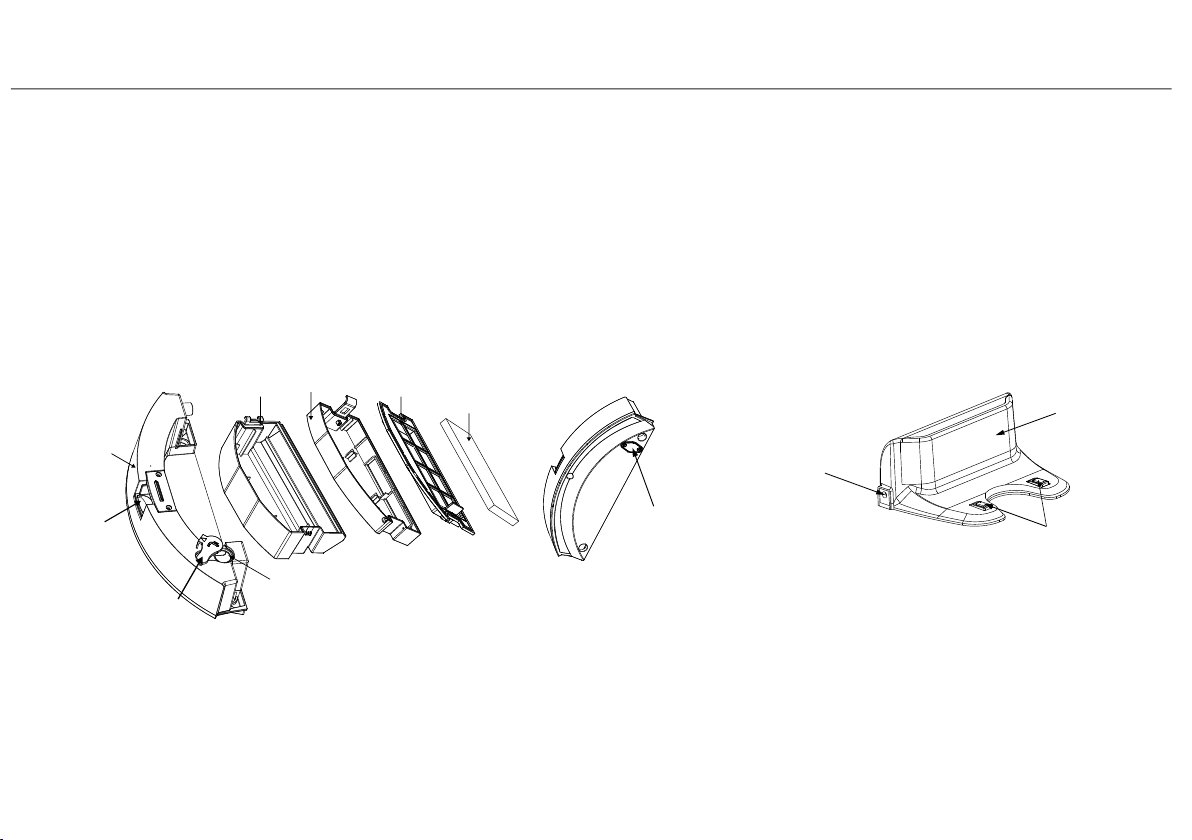
water tank filter
HEPA
HEPA
cover
dust box
water hole
water tank
water
water tank
lock
tank
socket
window
supporterfilter
plug
8
2.Package Contents /Structure introduction
2.2 Structure introduction
Docking Station
Dust Box & Water Tank
adapter
charging contact
signal

9
3.Technical Specifications
Model K185
3.1 Specifiaction
Working Voltage
Docking Station
Model
Input Output 19V DC,
0.6A
Battery 2600mAh Li-ion
14.8V
19V DC,
0.6A
KCH217
Rated Power 20W
Note:Technical and design specifications may be changed for continuous
product improvement

10
4.Instruction for Use
4.1 Notes Before Cleaning
1.Arrange the furniture neatly
Please arrange chair table and
other objects neatly to leave
the biggest space before cleaning
2.Remove unfriendly obstacles
Remove the weight scale ,fan
base and other low objects that
may affect the robot clean
It may be necessary to place
a physical barrier at the edge
of a drop to stop the unit from
falling over the edge.
3.Prevent robot from falling
Before using the
product on a rug
with tasseled edges,
please fold the
rug edges under.
Please do not use
mop function on
the rug.
Table des matières
Autres manuels Klinsmann Aspirateur


