
Keysight APS-M1010 Manuel utilisateur

202310131234-07:00
APS-M1010/APS-ONE-100 Platform for IxLoad
Release 9.45
Installation Guide

Notices
Copyright Notice
© Keysight Technologies 2023
No part of this document may be repro-
duced in any form or by any means (includ-
ing electronic storage and retrieval or
translation into a foreign language) without
prior agreement and written consent from
Keysight Technologies, Inc. as governed by
United States and international copyright
laws.
Warranty
The material contained in this document is
provided “as is,” and is subject to being
changed, without notice, in future editions.
Further, to the maximum extent permitted
by applicable law, Keysight disclaims all war-
ranties, either express or implied, with
regard to this manual and any information
contained herein, including but not limited
to the implied warranties of merchantability
and fitness for a particular purpose.
Keysight shall not be liable for errors or for
incidental or consequential damages in con-
nection with the furnishing, use, or per-
formance of this document or of any
information contained herein. Should
Keysight and the user have a separate writ-
ten agreement with warranty terms cov-
ering the material in this document that
conflict with these terms, the warranty
terms in the separate agreement shall con-
trol.
Technology Licenses
The hardware and/or software described in
this document are furnished under a license
and may be used or copied only in accord-
ance with the terms of such license.
U.S. Government Rights
The Software is "commercial computer soft-
ware," as defined by Federal Acquisition
Regulation ("FAR") 2.101. Pursuant to FAR
12.212 and 27.405-3 and Department of
Defense FAR Supplement ("DFARS")
227.7202, the U.S. government acquires
commercial computer software under the
same terms by which the software is cus-
tomarily provided to the public. Accordingly,
Keysight provides the Software to U.S. gov-
ernment customers under its standard com-
mercial license, which is embodied in its End
User License Agreement (EULA), a copy of
which can be found at http://www.key-
sight.com/find/sweula. The license set forth
in the EULA represents the exclusive author-
ity by which the U.S. government may use,
modify, distribute, or disclose the Software.
The EULA and the license set forth therein,
does not require or permit, among other
things, that Keysight: (1) Furnish technical
information related to commercial com-
puter software or commercial computer
software documentation that is not cus-
tomarily provided to the public; or (2) Relin-
quish to, or otherwise provide, the
government rights in excess of these rights
customarily provided to the public to use,
modify, reproduce, release, perform, dis-
play, or disclose commercial computer soft-
ware or commercial computer software
documentation. No additional government
requirements beyond those set forth in the
EULA shall apply, except to the extent that
those terms, rights, or licenses are explicitly
required from all providers of commercial
computer software pursuant to the FAR and
the DFARS and are set forth specifically in
writing elsewhere in the EULA. Keysight
shall be under no obligation to update,
revise or otherwise modify the Software.
With respect to any technical data as
defined by FAR 2.101, pursuant to FAR
12.211 and 27.404.2 and DFARS 227.7102,
the U.S. government acquires no greater
than Limited Rights as defined in FAR
27.401 or DFAR 227.7103-5 (c), as applic-
able in any technical data. 52.227-14 (June
1987) or DFAR 252.227-7015 (b)(2) (Novem-
ber 1995), as applicable in any technical
data.
Safety Information
Do not proceed beyond a hazard notice
until the indicated conditions are fully
understood and met.
ACAUTION notice denotes a hazardous
situation that, if not avoided, could res-
ult in minor or moderate injury.
AWARNING notice denotes a haz-
ardous situation that, if not avoided,
could result in death or serious injury.
– 2 –


Table of Contents
Contacting Us 3
Chapter 1 Product overview 6
Chapter 2 Functionality overview 7
Rack mounting 9
Aggregation modes 13
Chapter 3 Port aggregation 15
Mode 1 - Aggregated mode (default mode) 15
Mode 2 – Non-Aggregated mode 16
How to configure the Aggregation mode 17
Chapter 4 Related documentation 18
Chapter 5 Unpacking and inspection 19
Chapter 6 Front panel indicators 20
Chapter 7 Management Node and Compute Node ports and connectivity 22
Chapter 8 Connect power to the Management Node and Compute Nodes 24
Chapter 9 Connect DUTs for testing 25
Chapter 10 Install software packages 26
Chapter 11 Add IxLoad-ATI licenses 28
Chapter 12 Accessing the IxLoad user interface 29
IP Configuration using the KCOS CLI 30
Chapter 13 Assigning ports to an IxLoad test 32
Appendix A Regulatory Compliance information 34
Regulatory specifications 35
Regulatory marks 36
Appendix B Troubleshooting 38
Basic debugging and troubleshooting 38
Check Compute Node connectivity 39
– 4 –
APS-M1010/APS-ONE-100 Platform for IxLoad


CHAPTER 1
Product overview
Welcome to the Keysight APS-M1010/APS-ONE-100 Platform documentation for IxLoad.
The APS-M1010/APS-ONE-100 Platform provides next-generation ultra-high-performance Layer 4 -
Layer 7 application and security testing, TLS support and 100G Interfaces. Industry-proven IxLoad
is the user interface application.
The platform consists of one management node (MN) or controller, that can manage up to ten
compute nodes (CN) and the Keysight Cluster Operating System (KCOS).
Both components of the APS-M1010/APS-ONE-100 Platform are required.
Standalone APS-ONE-100 functionality is NOT supported for IxLoad
lThe management node is used to manage the entire cluster of compute nodes and expose
administrative and test configuration functionalities to the user.
lThe compute nodes are used for generating custom traffic. They have QSFP28 interfaces for
connecting devices under test (DUTs). Compute nodes must have a functional management
node to operate.
lKeysight Cluster Operating System (KCOS) is the base operating system. It provides a
command line interface (CLI) and a command shell to enable user control of the various
services. It is a purpose-built platform that provides essential services, including host
management, user access control, software upgrades and cluster orchestration.
– 6 –
APS-M1010/APS-ONE-100 Platform for IxLoad
CHAPTER 2
Functionality overview
This chapter provides a functional overview of the APS-M1010/APS-ONE-100 Platform for IxLoad.
The entire system runs on the Keysight Cluster Operating System (KCOS). To perform any system-
level operation, you will need to use KCOS CLI commands (see the APS-100/400GE Series Plaform,
KCOS Command Line Interface (CLI), For IxLoad Release 9.45, CLI Reference Guide).
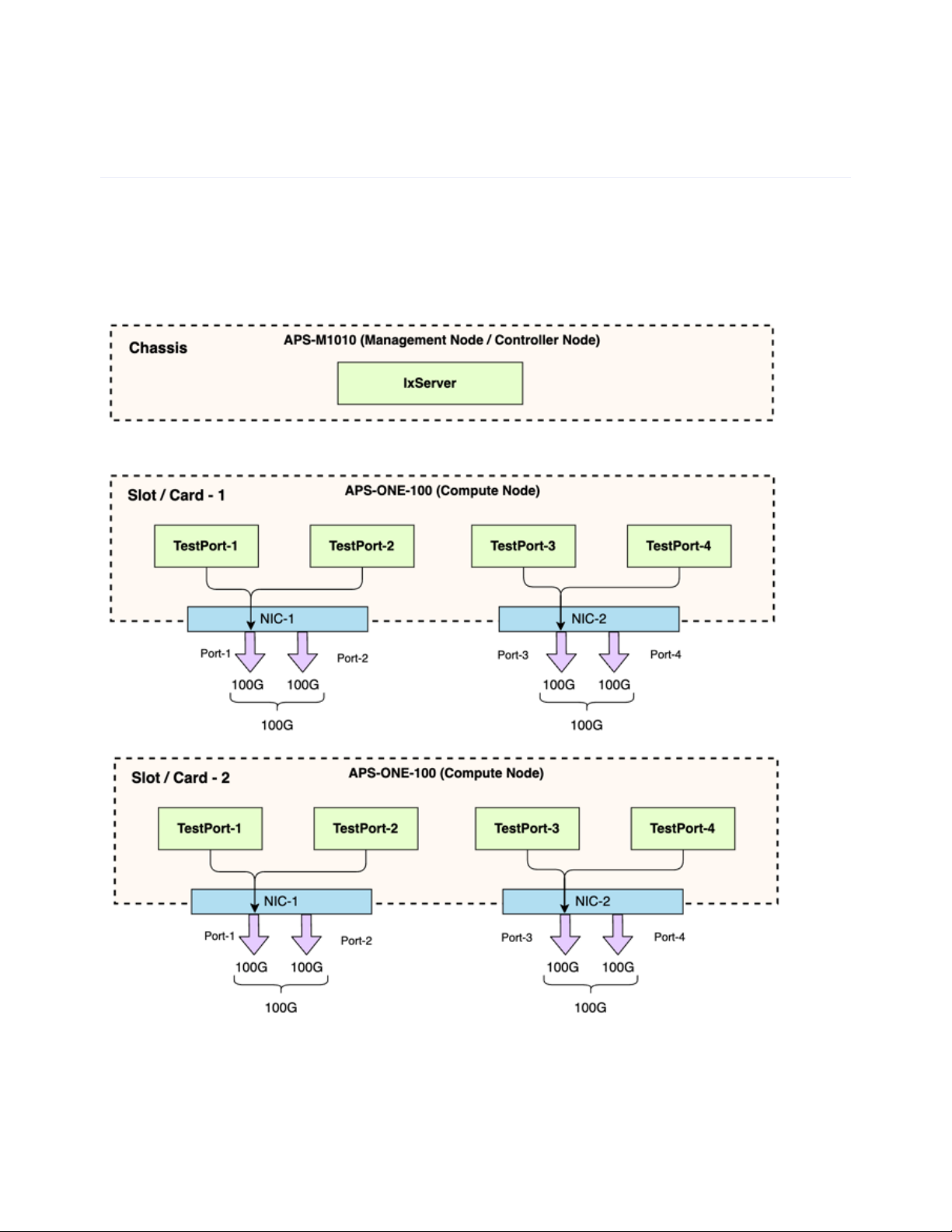
The following diagram provides a high-level system overview.
Management Node: The first block in the diagram represents the APS-M1010 Management Node
(MN). The MN is used to manage all of the compute nodes and provide administrative and test
configuration options to the user.
Chapter 2 Functionality overview
– 7 –

Compute Nodes: The second and third blocks in the diagram represent Compute Nodes. The
Compute Nodes are used for generating custom traffic. They have interfaces for connecting devices
under test (DUTs).
The "TestPorts" shown in the preceding diagram are displayed as Ports in the
IxLoad GUI.
Compute Nodes must have a functional Management Node to operate.
The bandwidth of each physical NIC shown in the diagram (consisting of 2 x
100G interfaces) is limited to 100G.
Chapter 2 Functionality overview
– 8 –

Rack mounting
The following guidelines are provided to optimize the device performance.
lMake sure cabling is away from sources of electrical noise. Radios, power lines, and fluorescent
lighting fixtures can interfere with the device performance.
lMake sure the cabling is positioned away from equipment that can damage the cables.
lOperating environment is within the ranges listed in the data sheet and installation guide.
lMake sure airflow around the APS-M1010/APS-ONE-100 and respective vents is unrestricted.
To rack mount the APS-M1010/APS-ONE-100 chassis:
1. Pull the inner rail out of the slide rail until it clicks.
2. Detach the inner rail completely from the slide rail by pulling the white tab forward.
3. After the inner rail is dislodged, adjust the middle rail back to its original position by pushing the
tab on the middle rail.
4. Install the inner rail onto the system barebone. Lock the keyholes and secure the screws on
sides of the system.
Chapter 2 Functionality overview
– 9 –

5. Continue installing the outer rail bracket to the mounting frame. Attach the outer rail
assembling to the frame and press the bracket to form a rack on both ends. Repeat to fully
mount the bracket assembly on the other side.
Chapter 2 Functionality overview
– 10 –
Ce manuel convient aux modèles suivants
1
Table des matières
Autres manuels Keysight Serveur


