
KD interactive Kurio 7 Manuel utilisateur

The Ultimate Android™ Tablet for Families™
INSTRUCTION MANUAL

1) FEATURES
CONTENT
Included in the box.......................................................................................................................................................................
Overview.........................................................................................................................................................................................
Charging..........................................................................................................................................................................................
Automatic lock..............................................................................................................................................................................
Home screen..................................................................................................................................................................................
Portrait / Landscape orientation............................................................................................................................................
Multi-touchscreen.......................................................................................................................................................................
Camera ...........................................................................................................................................................................................
Connect Kurio to PC/Mac®........................................................................................................................................................
External storage.........................................................................................................................................................................
Transfer le....................................................................................................................................................................................
Android interface .........................................................................................................................................................................
Connect Kurio to TV screen......................................................................................................................................................
1-1
1-2
1-3
1-4
1-5
1-6
1-7
1-8
1-9
1-10
1-11
1-12
1-13
1
2
3
3
4
5
6
8
9
10
11
11
13

2) STARTING WITH KURIO 7
Setup Kurio............................................................................................................................................................................
Choose your language.......................................................................................................................................................
Set-Up date and time..........................................................................................................................................................
Select and connecting to Wi-Fi.......................................................................................................................................
Serial number.........................................................................................................................................................................
Create Parental account...................................................................................................................................................
Create User account...........................................................................................................................................................
Internet security level........................................................................................................................................................
Content filtering parameters...........................................................................................................................................
Time management................................................................................................................................................................
App management..................................................................................................................................................................
Initial setup completed.......................................................................................................................................................
Step 1
Step 2
Step 3
Step 4
Step 5
Step 6
Step 7
Step 8
Step 9
Step 10
Step 11
3) PARENTAL AREA
How to get access to the Parental area?..........................................................................................................................
Profile...........................................................................................................................................................................................
Tablet setup.................................................................................................................................................................................
Kurio Store ...................................................................................................................................................................................
Main account...............................................................................................................................................................................
Android ..........................................................................................................................................................................................
3-1
3-2
3-3
3-4
3-5
3-6
14
14
15
17
18
19
21
23
25
26
28
31
32
34
35
35
37
37

4) SUPPORT AND IMPORTANT INFORMATION
4-1
4-2
4-3
4-4
4-5
4-6
4-7
4-8
4-9
38
39
40
40
40
41
41
42
43
Update Kurio system................................................................................................................................................................
Warning........................................................................................................................................................................................
Tech support and warranty information...........................................................................................................................
Restricted use of electronic devices.................................................................................................................................
FAQ/Troubleshooting..............................................................................................................................................................
Exposure to radio frequency energy.................................................................................................................................
Recycling ....................................................................................................................................................................................
Declaration of conformity.......................................................................................................................................................
Copyrights .................................................................................................................................................................................

1
The following accessories are included in the box:
Included in the box1-1
1- FEATURES
Kurio tablet
7inch
Anti-shock
cover
USB Cable
USB to
Mini-USB
adapter
Power Adapter
(DC 5V–2A)

2
Overview1-2
Power ON/OFF/STANDBY
Volume -
Volume +Exit the
prole
Wi-Fi settings Help
Screen
Back
Front
camera
Microphone
Rear camera
Headphone
3.5mm jack
Mini-HDMI
Mini-USB
DC Input
Micro SD Card Slot
Speaker
Home
Options

3
Charging1-3
You can charge your Kurio by either using the supplied power adapter or USB cable. Your Kurio will charge
more quickly by using the power adapter.
Automatic lock1-4
After a time of inactivity, Kurio will lock automatically. This time can be modified in Display settings of the Parental
Area. (See section ″Tablet Setup″ – Page 35)
Press simultaneously the 2 circles for 2 seconds to unlock.
4
Home screen1-5
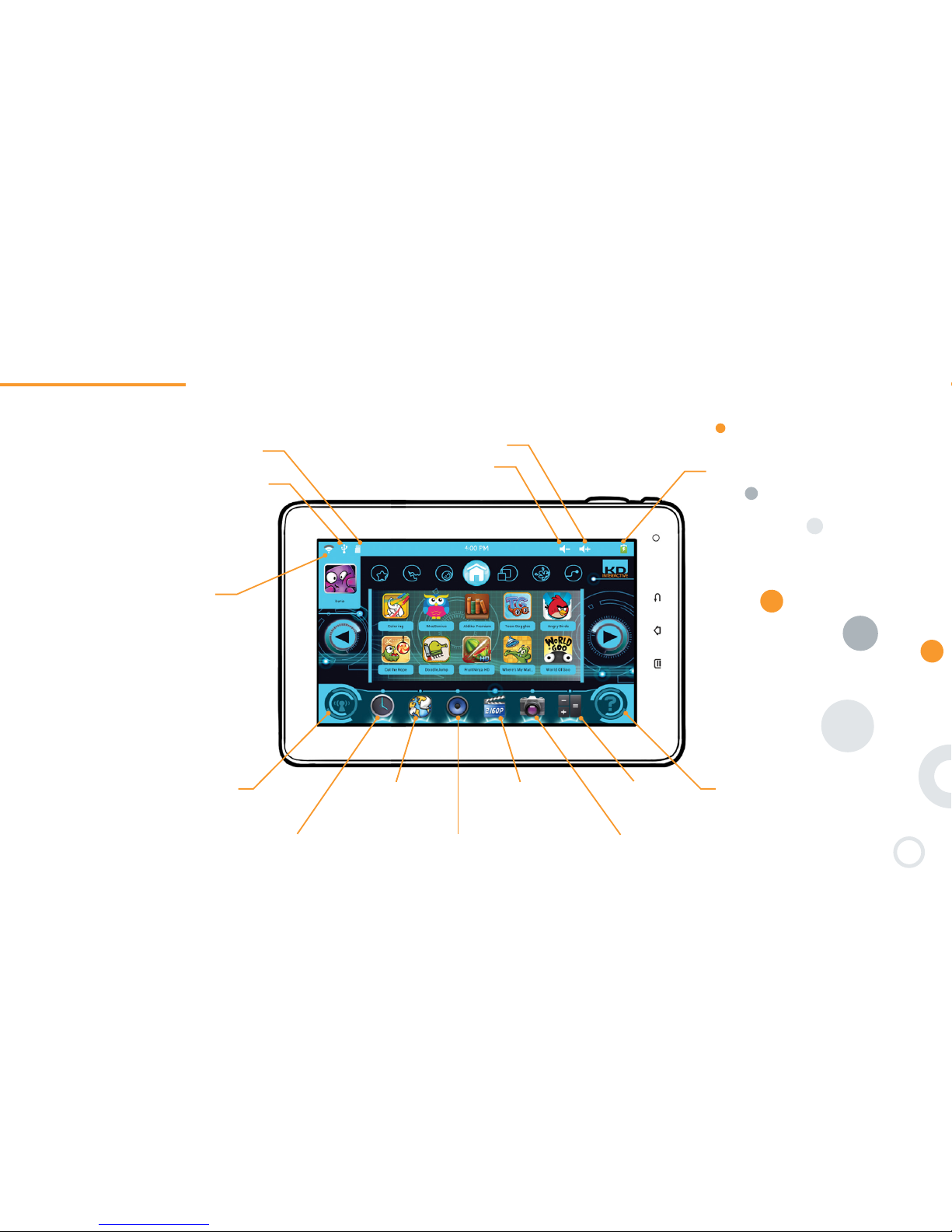
Here are the icons you can see on the Home screen of Kurio tablet:
Wi-Fi access On-screen help
Web browser Gallery: Edit /
Organise / watch
your photos and
videos
Calculator
Time & Date
Set alarm
Music: listen
to your music
Camera: Take photos
and record videos
Battery level indicator
Power of Wi-Fi signal
(if activated)
Micro SD card inserted
USB peripheral connected
Volume +
Volume -

5
Portrait / landscape orientation
Depending on the application you are using, you might prefer having the tablet in Portrait or Landscape orientation.
Kurio tablet has a built-in accelerometer (gravity sensor) which allows you to switch between the two modes simply
by rotating the tablet in the orientation you like.
The main screen and Parental area are only available in
Landscape orientation.
1-6

6
1-7Multi-touch screen
Kurio has a multi-touch capacitive screen. Just use your fingers to control Kurio.
Touch the screen to open files.
Press and hold on the main screen to add an application. press and hold the app icon to remove it.
Note: The reactivity of the touch screen can vary from one person to another, this is linked to the nature of the capacitive screen.
Note 2: Applications can only be added if this function is authorised in the Parental Area. Please check Step 10: App management –
Page 28 for more information.
Autres manuels pour Kurio 7
1
Table des matières
Autres manuels KD interactive Comprimé


