
kbice FDFM1JA01 Manuel utilisateur

1
w w w . k b g o o d i c e . c o m
U S E R I N S T R U C T I O N S
P o r t a b l e N u g g e t I c e D i s p e n s e r
F D F M 1 J A 0 1
Safety Instructions ----------------------------------------------------------------------------------2
Features & Specifications ---------------------------------------------------------------------------4
Dispenser Use ---------------------------------------------------------------------------------------6
Dispenser Care -------------------------------------------------------------------------------------10
Installations ----------------------------------------------------------------------------------------14
Troubleshootings -----------------------------------------------------------------------------------15
Service & Warranty --------------------------------------------------------------------------------16
G E N E R A L O P E R A T I N G I N S T R U C T I O N
Read these instructions before use and save them for future reference.
Let the unit rest and remain unplugged for 24 hours before use.
Remove all external and internal packaging materials. Be sure that all parts
have been included before discarding any packaging materials. You may
want to keep the packaging materials for use at a later date.
Contact customer service at 800-433-9938 or i[email protected].

2
2
i n f o @ k b g o o d i c e.c o m
SAFETY INSTRUCTIONS
Electrical Safety
DANGER
Improper use of the power cord plug can result in the risk of
electrical shock, property damage and personal injury or death.
Unplug the unit or disconnect power before performing any
maintenance.
Upon receipt and inspection of the unit the power cord must be
replaced if it is damaged.
This appliance is equipped with a 3-prong
grounding-type plug and shall be plugged into a
properly connected grounding-type outlet.
It is required to use a 3–prong grounding-type
electrical outlet properly grounded in accordance
with the National Electrical Code and local codes
and ordinances.
A separate adequately fused and grounded circuit
shall be used for this appliance. The voltage rating
must match the rating label on the unit.
Do not use an adapter or an extension cord.
Do not under any circumstances cut or remove the third ground prong from
the power cord.
Never unplug the appliance by pulling the power cord. To disconnect the
unit always grip the plug firmly and pull straight out from the wall outlet.
Do not operate the appliance if the appliance housing is removed or
damaged.
Do not attempt to repair or replace any part of your appliance unless it is
specifically recommended in this manual. All other servicing shall be
referred to a qualified technician.
To protect against electric shock do not immerse appliance plug or cord into
water or other liquids.
Child Safety
Exercise caution and use reasonable supervision when appliance is used
near children. Never allow children to operate the unit. Keep packing
materials away from children.
Keep fingers out of dispense point area.
Cleaning Safety
DANGER
To reduce the risk of injury when cleaning your appliance, follow
these basic precautions.
Unplug the appliance or disconnect power before performing any

3
24412 Main St. Suite 105, Carson, CA 90745
maintenance.
Do not clean appliance with flammable fluids. Do not store or use gasoline
or other flammable vapors or liquids in the vicinity of this or any other unit.
The fumes can create a fire hazard or explosion.
Do not use solvent-based cleaning agents or abrasives on the interior or
exterior of the appliance. These cleaners may damage or discolor the
appliance.
Do not operate the appliance with wet hands, while standing on a wet
surface, or while standing in water.
Disposing Safety
CAUTION
When disposing of refrigeration appliances, special handling is
often required. It is the consumer’s responsibility to comply with
federal and local regulations when disposing of this product.

4
4
i n f o @ k b g o o d i c e.c o m
FEATURES & SPECIFICATIONS
Overview
This self-dispensing portable ice dispenser allows you to enjoy chewable ice
with the touch of a button. Water fill through push-to-open port or removable
door makes it portable and easy to use. It is perfect for the nugget ice
enthusiasts and great for use in the home, at the pool or behind a bar.
Features and Parts
1. Display Panel
2. Ice Dispense Point
3. Water Fill Port
4. Air Vent
5. Water Drip Tray
6. Power Cord
7. Drain Tube Plugs/Holder
8. Funnel
This self-dispensing portable ice dispenser allows you to enjoy chewable ice
with the touch of a button.
The built-in ice engine can quickly make nugget ice within only 15 minutes
and produce up to 24 lbs of ice per day.
Self-cleaning and self-descaling programs can keep the unit in a good
sanitary and operational condition all the time.
Push-to-open port or removable reservoir door provides you with the
convenience to fill water.
Detachable drain tubes are easy to use and no plumbing is required.
Stainless steel front face and gloss black body give a sleek and modern appearance.
Less than 17.5 inches in height allows for installations on any counters and
tables.

5
24412 Main St. Suite 105, Carson, CA 90745
Specifications
Product
Portable Nugget Ice Dispenser
Model No
FDFM1JA01
Ice Type
Chewable Nugget Ice
Ice Production Capacity (75°F Air)
24 lb / 24 h
Ice Storage Capacity
2 lb
Ice Dispensing
Touch Button
Drip Tray
Magnetically Detachable
Drain Plumbing
Not Required
Water Supply
Manual Fill
Water Fill
Push to Open Port or Removable Door
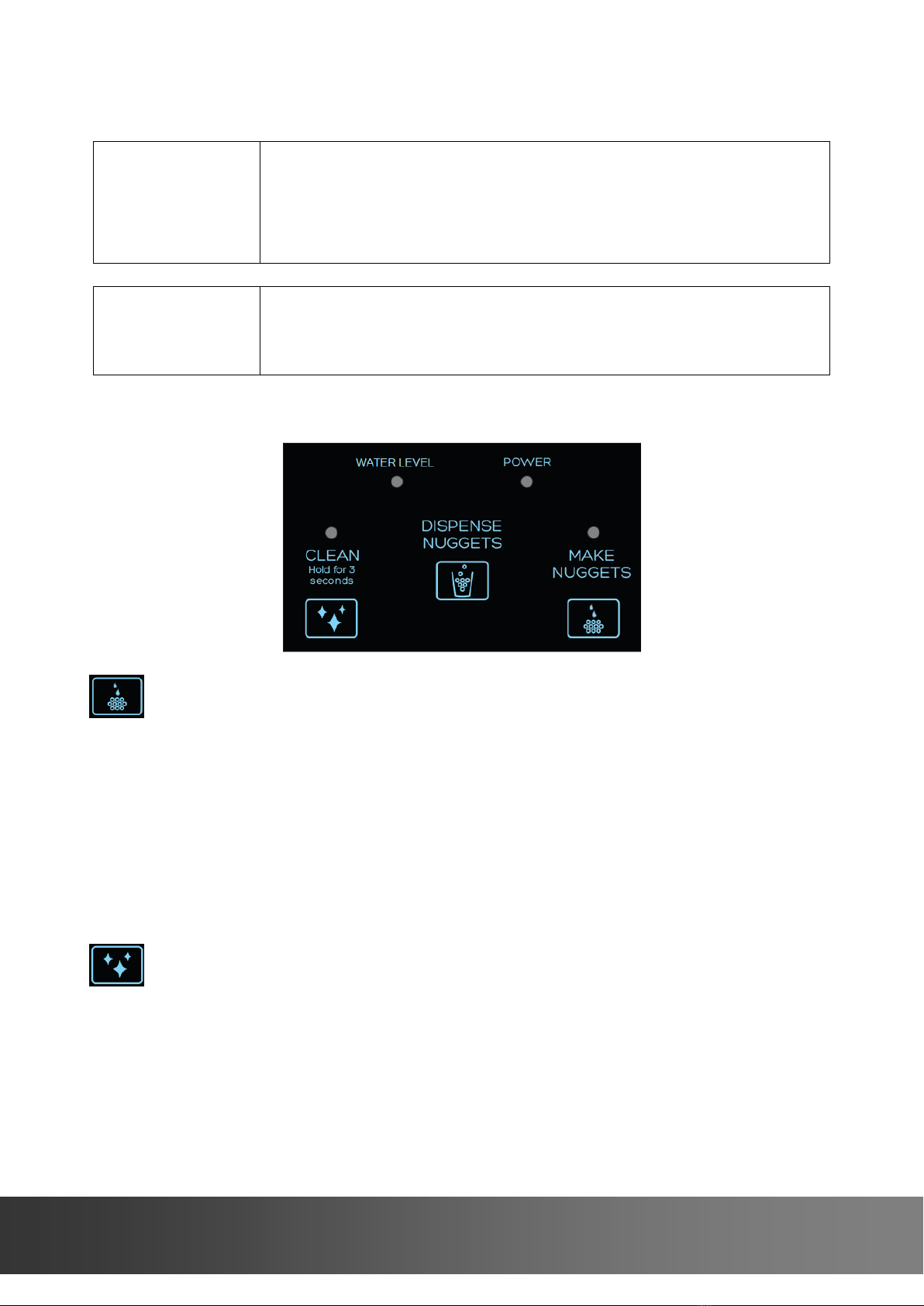
Touch Buttons
Make Ice, Clean, Dispense Ice
LED Notifications
Make Ice, Clean, Water Level, Power
Operating Temperature
50~90 °F
Electrical Rating
115V/60Hz/2.5A
Refrigerant
R600a
Installation
Countertop
Unit Dimensions
12”W x 16” D x 17-1/2”H
Net Weight
40 lb
6
6
i n f o @ k b g o o d i c e.c o m
DISPENSER USE
NOTE
Flush the unit with clean potable water once a week to prevent high
water TDS and hardness.
Descale the unit with citric acid once a month to prevent sediment
buildup.
Sanitize the unit with chlorine bleach twice a month to prevent
bacteria growth.
NOTE
Use potable water only.
Use purified or distilled water to improve ice making performance.
Water TDS level must be 5~100 mg/L (PPM).
Water Hardness must be no greater than 50 mg/L (3 grains/gal).
Display
Make Nuggets Button& LED
It will be disabled when the unit is in the cleaning mode.
Blue LED flashes slowly while the unit is currently making ice.
Blue LED illuminates once the ice bin is full.
Press once to start making ice, the Make Nuggets LED flashes slowly.
Press and hold for 3 seconds to stop making ice, the Make Nuggets LED
goes off.
Clean Button& LED
It will be disabled when the unit is in the ice making mode.
It can be used for defrosting, flushing, descaling or sanitizing process.
Blue LED flashes quickly once cleaning cycle is needed.
Blue LED flashes slowly while the unit is currently in the cleaning cycle.

7
24412 Main St. Suite 105, Carson, CA 90745
Press and hold for 3 seconds to start the cleaning cycle, the Clean LED
flashes slowly.
Press and hold for 3 seconds again to stop the cleaning cycle, the Clean
LED goes off.
Green LED illuminates when the unit is plugged into power.
Red LED flashes quickly when more water is needed.
Green LED illuminates once water is full.
Dispensing Ice
NOTE
The unit does not dispense ice while the Clean LED flashes.
Dispense Nuggets button
The unit will stop dispensing automatically after 60 seconds elapse.
Place a cup under the ice dispense point.
Press and hold to dispense ice, release to stop.
Combination Buttons
It can be used when the unit can’t dispense ice because ice is jammed.
While you hold the Dispense Nuggets button, press and hold the Clean
button to reverse the ice auger.
First time use
NOTE
For the first time use flush the unit following instructions below.
For the first time use dispense several cups of ice and then discard
them.
1. Filling the water reservoir for the first time use
Remove the reservoir door by simultaneously pulling the left and right
sides outwards.
Add clean potable water to MAX WATER FILL.
Replace the magnetically attached door.

8
8
i n f o @ k b g o o d i c e.c o m
2. Flushing the unit for the first time use
Plug the unit into power. You will hear 5 beeps if the reservoir is full.
Press and hold the Clean button for 3 seconds to start the cleaning cycle
for flushing process, the Clean LED starts flashing slowly (it takes 30
minutes to complete and the Clean LED goes off).
Unplug the unit when the flushing process is complete.
Unhook the plugs/holders with drain tubes out of the unit back and lower
them to a bucket or sink.
Press and hold the release buttons on the connectors to disconnect the
plugs/holders and release water.
Reconnect and hook them back to the unit.
3. Making ice for the first time use
Add clean potable water to MAX WATER FILL following instructions above.
Plug the unit into power. You will hear 5 beeps if the reservoir is full.

9
24412 Main St. Suite 105, Carson, CA 90745
Press the Make Nuggets button once to start making ice, the Make
Nuggets LED flashes slowly.
Filling the water reservoir when the Water Level red LED flashes
quickly
NOTE
Do not add water until Water Level red LED flashes quickly.
Do not overfill the reservoir otherwise it may overflow when ice
melts completely.
Insert a funnel into the fill port.
Add clean potable water using the funnel (included) until the Water Level
green LED illuminates and you hear 5 beeps.
Remove the funnel to close the fill port.
Or
Remove the reservoir door to add clean potable water to MAX WATER
FILL until you hear 5 beeps.
If the Clean LED flashes quickly and the unit stops making ice
Go to the section 5 of DISPENSER CARE.
If the ice dispenser hasn’t been interacted in the past 4 hours
The unit will enter energy saving mode.
If the ice dispenser hasn’t been interacted in the past 72 hours
The unit will enter idle mode.
If you are away on holidays or vacations
Empty the ice bin and water reservoir.

1
0
10
i n f o @ k b g o o d i c e.c o m
DISPENSER CARE
CAUTION
Use food grade citric acid powder and chlorine bleach only.
Follow the product instructions carefully for First Aid.
Keep the unit out of reach of children.
Unplug the unit before you drain water.
1-How to drain water
Unplug the unit.
Unhook the plugs/holders with drain tubes out of the unit back and lower
them to a bucket or sink.
Press and hold the release buttons on the connectors to disconnect the
plugs/holders and release water.
Reconnect and hook them back to the unit.
2-How to empty the ice bin and water reservoir
Dispense ice until no more ice comes out of the ice dispense point.
Drain water following instructions in Section 1.
3-If the Water Level red LED flashes quickly and the unit stops making
ice
Fill the water reservoir with clean potable water to MAX WATER FILL.
4-If the Water Level red LED flashes quickly when water is filled to
MAX WATER FILL
Autres manuels pour FDFM1JA01
3
Table des matières
Autres manuels kbice Machine à glaçons


