
Kaito KA550 Manuel utilisateur

KA550 WORLD RECEIVER
THE KAITO KA550 - SOLAR & CRANK WEATHER ALERT MULTIBAND RADIO
WITH CELL PHONE & MP3/IPOD CHARGER

1
KA550 KAITO
Thank You:
Thank y u f r purchasing the KA550 multi-band radi receiver. Please read the
manual th r ughly bef re perating and keep this b k in a safe place f r future
reference. With pr per care, y u will receive many years f tr uble-free service fr m
y ur new radi .
Description:
The KA550 multi-band radi is perfect f r emergency situati ns and is als ideal f r
any ne wh d es n t have access t a reliable AC p wer s urce. The radi can be
p wered by s lar energy, batteries, AC adapter and hand-crank generat r (magnet ).
With c verage f the AM/FM br adcast bands, 7 NOAA weather bands, plus 2
sh rtwave bands, y u'll never run ut f things t listen t !

2
KA550 KAITO
LOCATION O CONTROLS (front)
3
KA550 KAITO
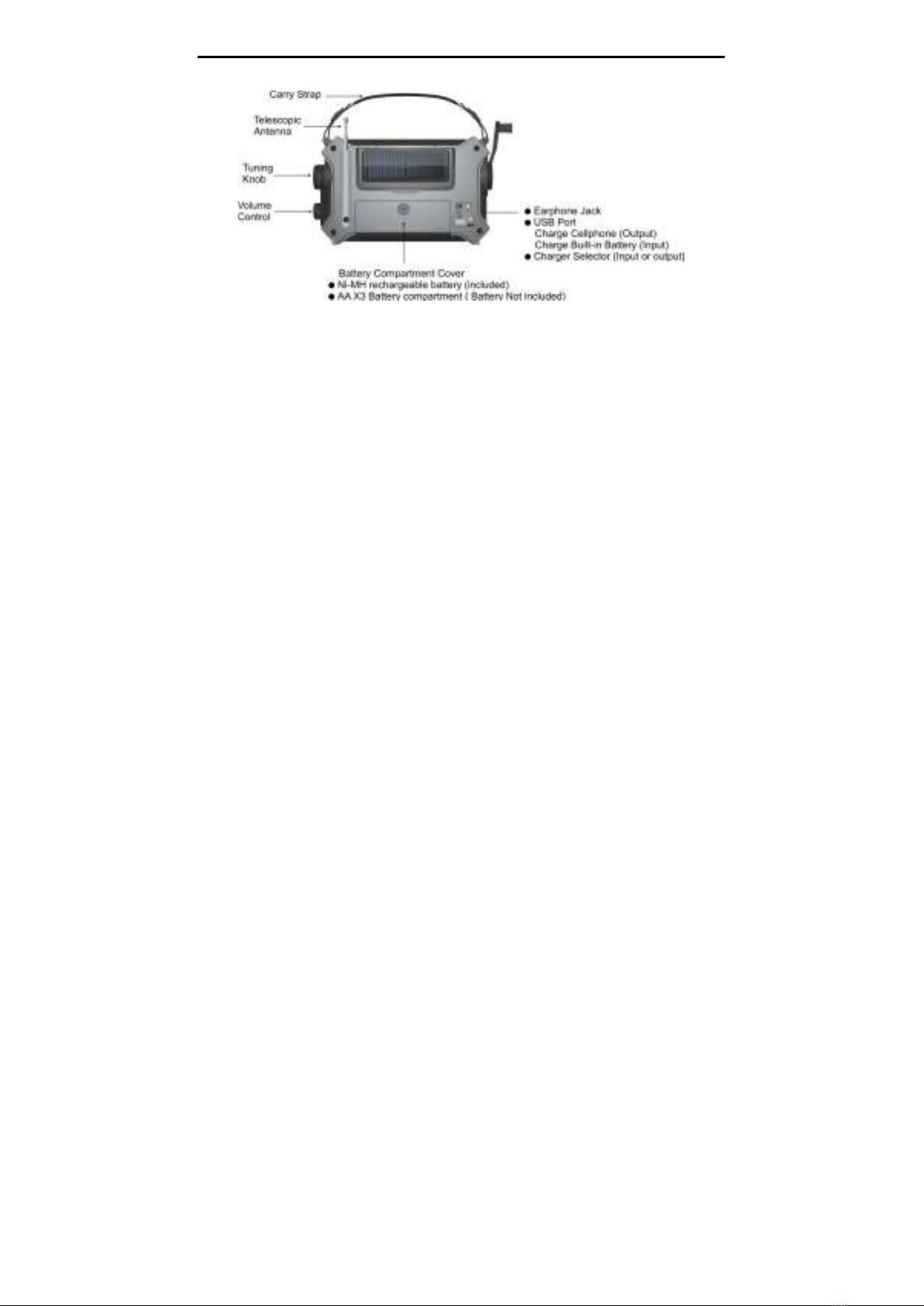
LOCATION O CONTROLS (rear)

4
KA550 KAITO
This radi is designed f r multiple p wer res urces.
A) ive Ways to Power the Kaito KA550
1) Crank Power (Rechargeable Batteries)
The rechargeable battery pack is already installed in the radi and will p wer all radi and flashlight functi ns.
T get started, pen the battery c mpartment and simply plug the small white plug attached t the
rechargeable batteries int the sl t t the left. All y u need t d is turn the crank handle f r ab ut ne minute
and it will generate ample p wer. On the fr nt f the unit, the b tt m right switch sh uld be set t the
SOLAR/CRANK.
2) AA Batteries
T use AA batteries, pen the battery c mpartment n the back f the unit and insert 3 AA batteries making
sure the p larity is c rrect. Set the P wer Select r t BATT/DC,
make sure the In-Out switch n the back f
the radi is in the "In" p siti n, therwise, the radi w uld n t be p wered n. T turn ff the radi , set the
p wer select r t OFF p siti n.

5
KA550 KAITO
3) Solar Power
S lar panel is designed t run the radi under sunlight; it can als charge the battery pack at
a very sl w rate. S the retically it will charge the battery, but it is better t crank it t charge
the battery. Put the radi under the str ng sunlight, and set the p wer at OFF, the sunlight will
charge the battery, but y u may n t n te it because it is a very sl w charge. The ind r light
may n t charge r run the radi at all. The s lar panel n the back f the unit r tates a full
180 degrees s y u can angle it f r ptimal charging.
4) AC Power
Y u can als p wer the radi by using an AC Adapter ( pti nal) and plugging it int any standard electric
utlet and then plug the adapter int the ‘DC IN’ jack n the back f the unit. (D n’t try any adapter with an
utput v ltage higher than 6V, it may permanently damage the radi , use Kait rec mmend adapt r.) Y u can
als charge the internal rechargeable batteries with this meth d. The DC charge v ltage is 6.0V DC, the
negative as sh wn. While listening t the radi , the b tt m right switch which is n the fr nt f the unit sh uld
be set t the BATT/DC. It is highly recommended to charge the battery 6 hours for the first time use.
Y u can rder an adapt r directly fr m the Kait website: http://www.kait usa.c m r call 1-866-524-8676,
(909) 628 6088

6
KA550 KAITO
5) Power via computer USB cable (not included)
The KA550 has a direct USB jack n the back f the unit under the rubber flap n the b tt m right. Y u can
c nnect the radi t y ur c mputers USB p rt with any standard USB cable set. Then set the Charging
Select r n the back f the unit t “IN”, and set the P wer Select r t SOLAR/CRANK, and the radi will
perate and charge the built-in battery f the USB p wer.
B) Power Indicators
When the rechargeable battery p wer is high, the HI green light n the fr nt f the KA550 is n.
When the battery p wer is l w, the LOW red light is n. When y u see this, it is rec mmended t charge the
rechargeable batteries.
1. Crank Power
When the battery level indicat r is RED, the rechargeable Ni-MH batteries are l w. Crank the handle f r 1-2
minutes until the HI LED turns Green.
N te: Set the p wer select r t OFF when crank charging the battery. This m de will charge the battery m st
efficiently.

7
KA550 KAITO
2. Charging via USB (USB cable not included)
There are tw functi ns that can be charged via USB:
a) Charge In: Select ‘IN’ switch n the back f the unit t charge the rechargeable
Ni-MH batteries fr m y ur c mputers USB p rt. (The max charging time is 6 H urs)
b) Charge Out: Select ‘OUT’ switch t charge y ur cell ph ne, iP d r MP3 Players
via the KA550’s built in USB p rt. USB devices such as iP d, MP3 r Blackberry
can plug directly int the units USB p rt. F r ther cell ph ne m dels, use ne f the
p wer tips that c me with the unit that charge m st p pular cell ph ne m dels. Once
y u have plugged y ur ph ne r ther digital device int the USB, simply turn the
crank handle f r a few minutes t charge it.
N te: F r Cell Ph nes and iP d/MP3’s, it is rec mmended that if y u want t crank charge them, y u d s
while there is still s me battery p wer. It is m re difficult t crank charge these units when the battery is
c mpletely dead.

8
KA550 KAITO
3. AC Adaptor Charging
Plug the AC adapt r int the utlet and c nnect the end t the radi ’s input jack (DC IN) n the back f the
unit. Y u can use any f the KA550’s functi ns while it is plugged in and charging.
N te: F r faster charging, set the P wer Select r t OFF. Unplug the adapt r fr m the radi when n t in use
t av id vercharging f the rechargeable batteries.
4. Solar Panel Charging
S lar panel is designed t run the radi under sunlight; it can als charge the
battery pack at a very sl w rate. S the retically it will charge the battery, but it is
better t crank it t charge the battery. Put the radi under the str ng sunlight, and
set the p wer at OFF, the sunlight will charge the battery, but y u may n t n te it
because it is a very sl w charge. The ind r light may n t charge r run the radi
at all.

9
KA550 KAITO
Charging Your Cellphone or Portable Digital Device
1. Charging the cellphone with the radio
Step 1: C nnecting y ur cell ph ne
Take the included cable and c nnect the USB end directly int the KA550’s USB P rt n the back. The ther
end f the cable will take ne f the included P wer Tips that fit y ur ph nes p wer jack. If y u have a USB
ph ne like a Blackberry, y u sh uld have y ur USB Cable that c mes with y ur ph ne. F r iP d/MP3, since
the standard charging meth d is USB, simply use the same cable that y u plug int y ur c mputer’s USB
p rt.
Step 2: Select P wer Out
Select the p wer select r t OUT p siti n n the back f the unit.
Step 3: Select fr m 2 ways t p wer y ur device
A. Cranking t charge.
B. Use the pti nal AC adapt r. Plug the AC adapter int the wall utlet and c nnect t the DC IN jack n the
back f the unit and y ur cell ph ne will start t charge immediately.
Table des matières
Autres manuels Kaito Récepteur


