
Kaito KA800 Manuel utilisateur

KA800
A radio with AM/FM/Weather Bands,
MP3 Player and Digital Recorder
Operation Manual

I DEX
LOCATION OF CONTROLS...............................................1
LCD DISPLAY.....................................................................3
BATTERY & ADAPTOR......................................................4
SUPPORT BL-5C LITHIUM BATTERY………….........4
SPECIAL ADAPTOR...................................................4
POWER SUPPLY........................…....................................5
REPLACING THE BATTERY.......................................5
BATTERY CONSUMPTION INDICATOR....................5
CHARGING THE BATTERY........................................5
POWER ON/OFF...............….............................................7
POWER ON/OFF.........................................................7
SLEEP TIMER SETTING.............................................7
AUTO TURN OFF in MP3 & Voice mode)..................8
AUTO TURN ON..........................................................8
LOCK SWITCH & USING THE BACKSTOP......................9
RADIO OPERATION.........................................................10
LISTENING TO THE RADIO............................…......10
Radio Mode Selection........................................10
Band Selection...................................................10
Adjust the Volume...............................................10
Using the Antenna..............................................10
TUNING IN STATIONS..............................................11
MANUALLY STORING STATIONS............................13
RECALLING THE STORED FREQUENCY..........…..13
DELETING PRESET STATIONS...............................14
DIRECT FM/MW AM)/WB RECORDING.........……...15
RECEIVING THE LOCAL WEATHER FORECAST
FROM NATIONAL WEATHER SERVICE NOAA)….17

I DEX
DATE,TIME & CLOCK MODE SETTING................….......18
SET THE MW AM) STEP & ALARM TIME..........….........20
DOWNLOADING THE MUSIC FILES FROM YOUR PC..21
PLAYING YOUR MUSIC..............…....................…..........22
TO PLAY THE MUSIC…………………………………22
SELECT THE PLAY MODE.......................................22
A-B REPEAT..............................................................22
SELECT THE FOLDER.............................................23
DELETE THE MUSIC FILES.....................................23
RECORD FILES................….....................……................24
ONE TOUCH RECORD FUNCTION.........................24
AUTO RECORD FUNCTION....................................24
PLAY THE RECORDED FILES........................….…........25
DELETE THE RECORDED FILES.....................…....25
PLAY THE RECORDED FILES....................…..........25
NOTE MESSAGES...........................................................26
SPECIFICATIONS..........................................……...........27

1
LOCATIO OF CO TROLS
FRO T
1. Working Mode Switch Radio/MP3/Voice)
2. Radio: Delete Memory; MP3: Delete Music File;
Voice: Delete Record File;
Alarm: Turn On/Off the Alarm Function
3. Power On/Off
4. Radio: FM Band; MP3: Play Mode Selection
5. Radio: MW AM) Band; MP3/Voice: Stop Playing
6. Speaker
7. Radio: WB Band; MP3/Voice: Play & Pause
8. Radio: Frequency +/-; MP3/Voice: Music +/-, FF/RW
9. VOL Sound Volume +/-
10. Radio: Directly FM/MW AM)/WB Recording;
Voice: Environment Voice Recording;
MP3/Voice: A-B Repeat; Power Off: Alarm Setting
11. LCD Display

2
LOCATIO OF CO TROLS
12.
Radio: Tuning Knob; When Power Off: Alarm Time Setting
13. Radio: Manual Saving & ATS Auto Tuning Storage);
When Power Off: Time Setting;
When Power Off: 12H/24H Clock Mode Setting ?
14. Radio: Station +; MP3: Folder +; Power Off: Date Setting;
Power Off: MW AM) Step 9K/10K Setting
15. Radio: Station -; MP3: Folder -;
Power Off: Auto Turn On Setting
16. USB Jack / Charging Jack
17. Lock Switch 18. Back stand
19. Earphone Jack 20. Battery Compartment
21. Strap Hole 22. Telescopic Antenna
3
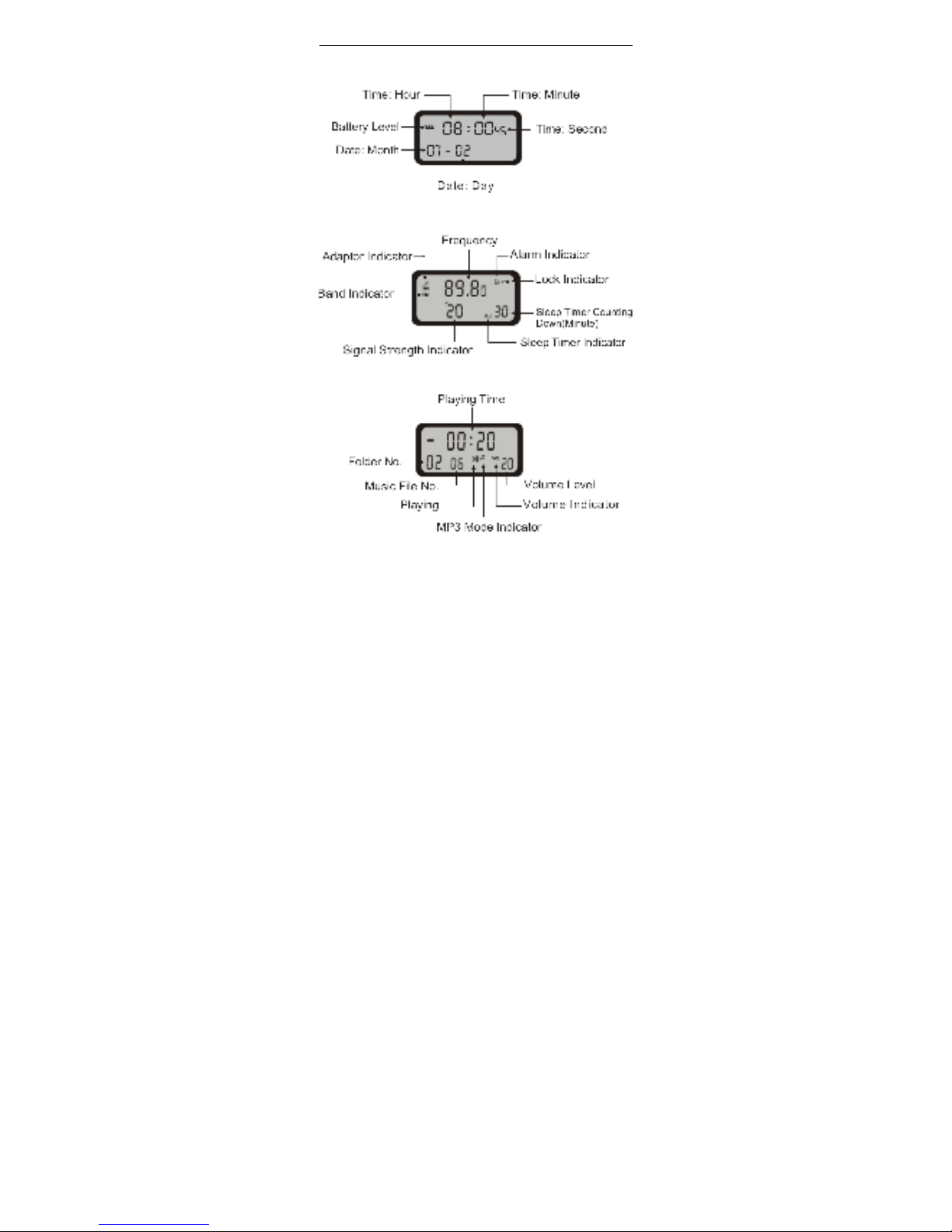
LCD DISPLAY
POWER OFF STATUS
WHILE LISTE I G TO FM STATIO S
WHILE PLAYI G THE MUSIC

4
BATTERY & ADAPTOR
SUPPORT BL-5C LITHIUM BATTERY
Please use the lithium battery which is ratified by our
company only. The supplied lithium battery model number is
BL-5C. You can buy it from our company or our agents, it is
also available in the market. Please visit our website
www.KAITOUSA.COM and select your desired products. Do
not use the lithium battery with other radio models that it is
not intended for.
POWER ADAPTOR
The supplied adaptor is designed to be used specifically with
this unit. Please only use this adaptor to charge the radio.
After the radio is fully charged, disconnect the radio and
adaptor first, and then unplug the adaptor from the wall
socket.

5
POWER SUPPLY
REPLACI G THE BATTERY
1. Before taking out the battery, please turn off the unit first.
Install a new battery in 20 seconds or less, otherwise you
will need to reset clock again once you have turned on the
unit.
2. Open the battery cover.
3. Install a new battery correctly according to the battery
polarity, as it appears in the diagram below.
4. Close the battery cover and then turn on the unit.
BATTERY LEVEL I DICATIO
1. Fully Charged 2. Medium
3. Low Battery, 4. Charge depleted,
please charge the unit will turn off automatically.
CHARGI G THE BATTERY
Charge by the Adaptor
Recommend: Please fully charge the battery and use it to a
complete empty for the first three times
in order to extend the
battery's life.

6
POWER SUPPLY
1. Install the lithium battery correctly.
2. Plug one port of the supplied USB cable into the USB jack
of the supplied adaptor, then plug the other port into the
USB jack of the unit.
3. Plug the supplied adaptor into the AC socket. The adaptor
indicator " " appears in the display. While charging,
the battery power icon " " flows.
4. When the battery power is full, icon" " stops flowing.
Please disconnect the adaptor and the radio first and then
disconnect the adaptor from the AC socket.
OTE:
1. Please don't listen to the radio while charging the radio via
adaptor to avoid interruption.
2. Please only use the supplied adaptor which comes with
the radio to charge the lithium battery.
Charge by the PC
1. Plug one port of the supplied USB cable into the USB jack
of the PC and the other port into the USB jack of the radio.
2. While charging, the battery power icon " " flows.
3. When the battery power is full, " " stops flowing.
Please disconnect the PC and the radio.

7
POWER O /OFF
POWER O /OFF
In radio OFF mode, press < > button quickly to turn it on;
In radio ON mode, press < > button quickly to turn it
off.
SLEEP TIMER SETTI G
1. In radio OFF mode, press <AUTO-> or <AUTO+> button
shortly to select the sleep timer 05 ~ 90 or " "
permanently ON).
2. Important: Only while both sleep timer Indicator " "
and the sleep timer are flashing in the display, press
< > button quickly to turn on the unit, in this case
only, the set sleep time will be activated as you set.
Otherwise, the sleep time will be the previously set one.
After it is confirmed, the sleep power off time and sleep
timer indicator will appear in the display.
3. The radio will turn off automatically when reaching your
preset sleep timer.
OTE: When you set the sleep time, there is " " in the
display, this icon means the sleep timer function is activated.
Autres manuels Kaito Lecteur MP3

Manuels Lecteur MP3 populaires d'autres marques

Blaupunkt
Blaupunkt Compact Drive MP3 Manuel utilisateur

Memorex
Memorex MMP9008 - 8GB USB 2.0 Manuel utilisateur

Meizu Electronic Technology
Meizu Electronic Technology E5 Manuel utilisateur

Naxa
Naxa NMV-173NX Manuel utilisateur

Philips
Philips PSA250 Manuel utilisateur

Zipy
Zipy go! Waving Manuel utilisateur


