
JRC JMR-611 Manuel utilisateur

INSTRUCTIONINSTRUCTION
MANUALMANUAL
JMRJMR-611611
RIVER RADAR EQUIPMENTRIVER RADAR EQUIPMENT
ISO 9001, ISO 14001 Certified
JAN. 2023 Edition 3CODE No.7ZPRD1016
Not use the asbestos
For further information,contact:
URL Head office : http://www.jrc.co.jp/eng/
Marine Service Department
1-7-32 Tatsumi, Koto-ku, Tokyo 135-0053, Japan
:
+81-50-3786-9201
e-mail
One-call


L
PREFACE
Thank you very much for purchasing the JRC river radar equipment, JMR-611.
This equipment is a river radar equipment designed to obtain safe operation of ships. This
equipment consists of a radar signal processing unit, a LCD display unit and a scanner unit as its
main units.
zBefore operating the equipment, be sure to read this instruction manual carefully for correct
operation.
zKeep this manual in a convenient place for future reference.
Make use of this manual when experiencing operation difficulties.
zThe LCD of this equipment uses thin film transistors (TFT). If some pixels on the screen are
not clear, the color is different, or the screen is brighter than usual, it is not because of defect,
instead it is because of inherent characteristic of the TFT display technology.
zThe information in this manual is subject to change without notice at any time.
Refer to this manual when any inconvenience or defect occurs.
=35'
ii
z
BEFORE OPERATION
z
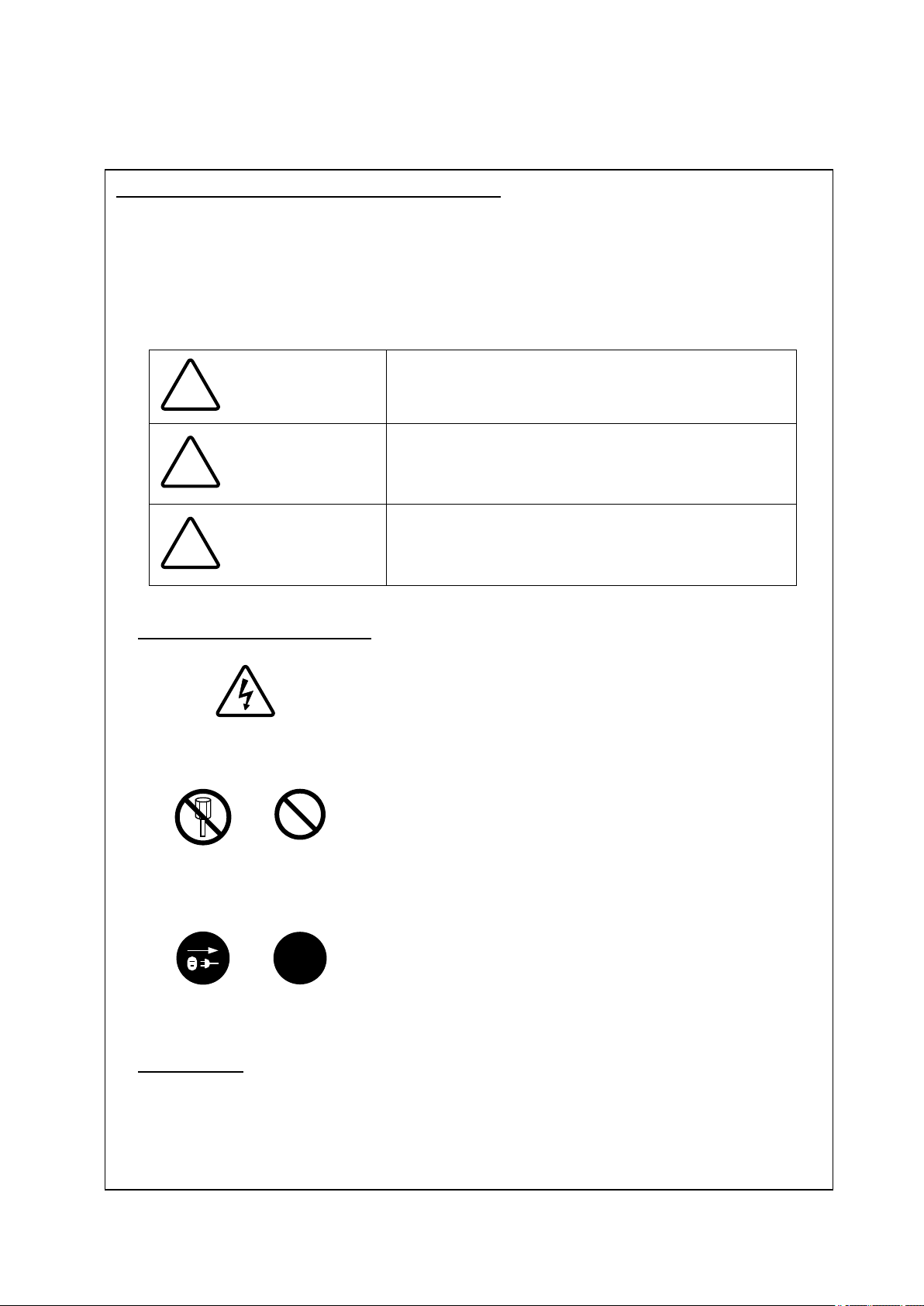
Meanings of Pictorial Indication
Various pictorial indications are included in this manual and are
shown on this equipment so that you can operate them safely
and correctly and prevent any danger to you and / or to other
persons and any damage to your property during operation.
Such indications and their meanings are as follows.
Please understand them before you read this manual:
!
DANGER This indication is shown where incorrect equipment
operation due to negligence may cause death or serious
injuries.
!
WARNING
This indication is shown where any person is supposed to
be in danger of being killed or seriously injured if this
indication is neglected and these equipment are not
operated correctly.
!
CAUTION This indication is shown where any person is supposed to
be injured or any property damage is supposed to occur if
this indication is neglected and these equipment are not
operated correctly.
Examples of Pictorial Indication
Electric Shock
The U mark represents CAUTION (including DANGER and
WARNING).
Detailed contents of CAUTION ("Electric Shock" in the example
on the left) is shown in the mark.
Disassembling
Prohibited
The ; mark represents prohibition.
Detailed contents of the prohibited action ("Disassembling
Prohibited" in the example on the left) is shown in the mark.
Disconnect the
power plug
!
The z mark represents instruction.
Detailed contents of the instruction ("Disconnect the power
plug" in the example on the left) is shown in the mark.
Warning Label
There is a warning label on the top cover of the equipment.
Do not try to remove, break or modify the label.
iii
ەPRECAUTIONSە
ە
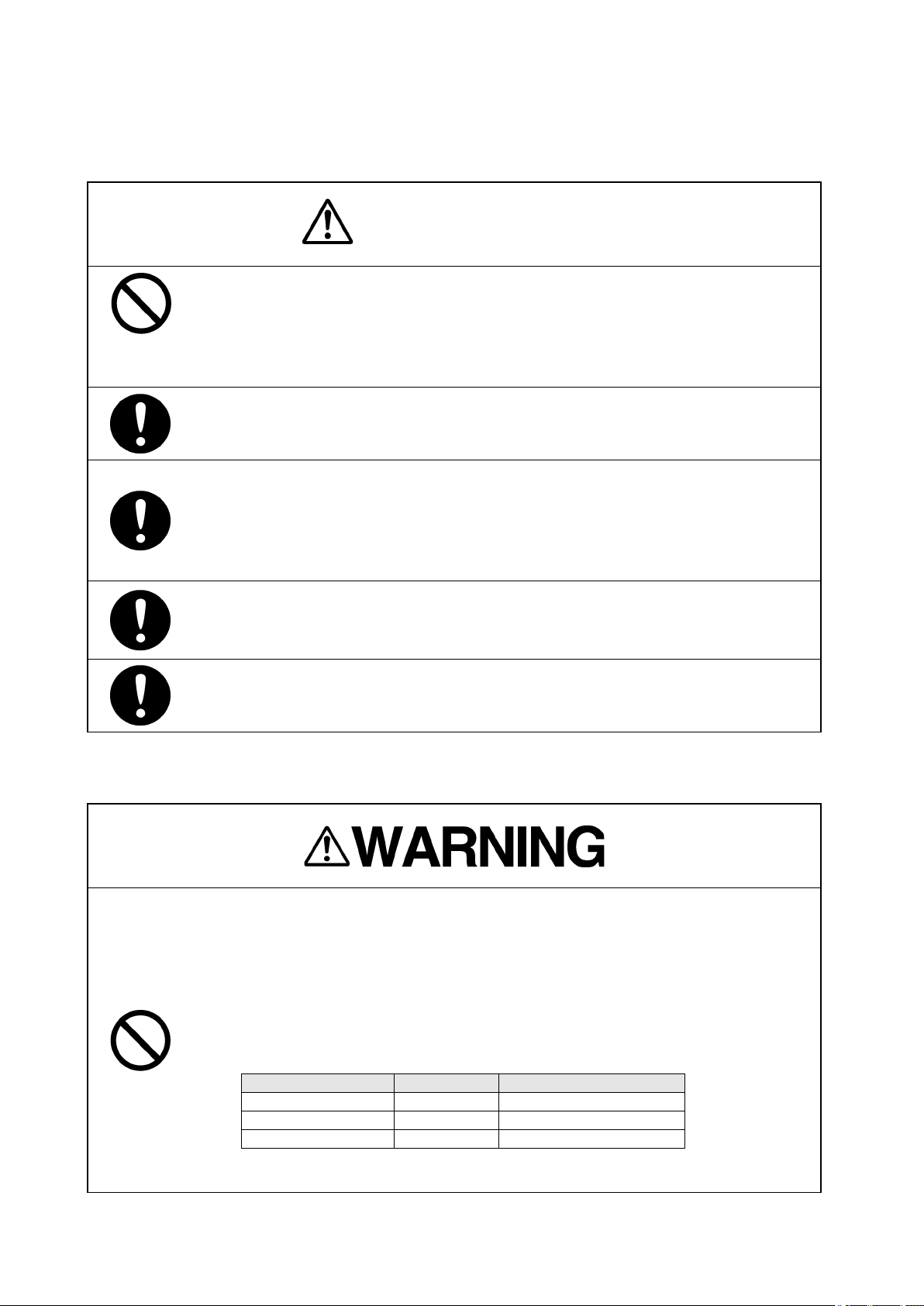
DANGER
Never conduct inspection or repair work of equipment components.
Inspection or repair work by uncertified personnel may result in fire hazard or
electrocution.
For inspection and repair work of equipment components, consult with our
branch office, branch shop, sales office, or our distributor in your district.
When conducting maintenance, make sure to turn the main power off.
Failure to comply may result in electrocution.
Turn off the main power before cleaning the equipment. Especially when a
rectifier is used, make sure to turn it off since voltage is still outputted from the
rectifier even after the indicator and the radar are turned off. Failure to comply
may result in equipment failure, or death or serious injury due to electric
shock.
When conducting maintenance work on the antenna, make sure to turn its main
power off.
Failure to comply may result in electrocution or injuries.
Make sure to turn off the antenna operation switch. Failure to comply may result
in injuries caused by physical contact with the rotating antenna.
FCC RF EXPOSURE STATEMENT
THIS UNIT COMPLIES WITH FCC RF EXPOSURE LIMITS FOR AN
UNCONTROLLED ENVIRONMENT. TO COMPLY WITH FCC RF EXPOSURE
LIMIT REQUIREMENTS, ANTENNAS MUST BE OPERATED MORE THAN AT A
MINIMUM DISTANCE. KEEP TO MORE THAN THE MINIMUM DISTANCE
WHICH IS BETWEEN THE RADIATOR AND ANY PERSON’S BODY. THE
MIMIMUM DISTANCE IS FOLLOWING.
RADIATOR TYPE LENGTH MIMIMUM DISTANCE
NAX-16R-6 6ft 308.4 cm
NAX-16R-7 7ft 322.9cm
NAX-16R-9 9ft 379.4cm

iv
When conducting maintenance work, make sure to turn off the power and unplug
the power line of the processor so that the power supply to the equipment is
completely cut off.
Some equipment components can carry electrical current even after the power
switch is turned off and conducting maintenance work without unplugging the
power connector may result in electrocution, equipment failure, or accidents.
Never carry out internal inspection or repair work of the equipment by users.
Inspection or repair work by unauthorized personnel may result in fire hazard or
electric shock.
Ask the nearest branch, business office or a dealer for inspection and repair.
Turn off the main power before maintenance work. Otherwise, an electric shock
may result.
Turn off the main power before cleaning the equipment. Especially, make sure to
turn off the indicator if a rectifier is used. Otherwise, equipment failure, or death
or serious injury due to electric shock may result, because voltage is outputted
from the rectifier even when the radar is not operating.
Turn off the main power source before starting maintenance.
Otherwise, an electric shock or injury may be caused.
Turn off the main power if you need to be near the scanner unit for maintenance
or inspection purposes. Direct exposure to electromagnetic waves at close range
in death or serious injury.
Set the safety switch for stopping the scanner unit to the OFF position.
Otherwise, an accidental contact with the rotating scanner unit may cause injury.
When cleaning the screen, do not wipe it too strongly with a dry cloth. Also, do
not use gasoline or thinner to clean the screen. Otherwise the screen surface
may be damaged.
Never carry out internal inspection or repair work of the equipment by users.
Inspection or repair work by unauthorized personnel may result in fire hazard or
electric shock. Ask the nearest branch, business office or a dealer for inspection
and repair.
Turn off the main power before maintenance work.
Otherwise, an electric shock may result.

v
Turn off the main power before cleaning the equipment. Especially, make sure to
turn off the indicator if a rectifier is used. Otherwise, equipment failure, or death or
serious injury due to electric shock may result, because voltage is outputted from
the rectifier even when the radar is not operating.
Turn off the main power source before starting maintenance.
Otherwise, an electric shock or injury may be caused.
Turn off the main power if you need to be near the scanner unit for maintenance
or inspection purposes. Direct exposure to electromagnetic waves at close range
in death or serious injury.
Set the safety switch for stopping the scanner unit to the OFF position.
Otherwise, an accidental contact with the rotating scanner unit may cause injury.
When disposing of used lithium batteries, be sure to insulate the batteries by
taping 䕿
+ and
䕿
- terminals.
Otherwise, heat generation, explosion or a fire may occur.

vi
A malfunction may occur if the power in the ship is instantaneously interrupted
during operation of the radar. In this case, the power should be turned on again.
Normally, use the automatic tune mode.
Use the manual tune mode only when best tuning is not possible in the automatic
tune mode due to deterioration of magnetron.
If the gain is too high, unnecessary signals including receiver noise and false
video increase resulting in reduction of visibility of targets.
On the contrary, if the gain is too low, targets including ships and dangerous
objects may not be clearly indicated.
When using the [SEA] function, never set the suppression level too high
canceling out all image noises from the sea surface at close range. Detection of
not only echoes from waves but also targets such as other ships or dangerous
objects will become inhibited.
When using the [SEA] function, make sure to choose the most appropriate image
noise suppression level.
When using the [RAIN] function, never set the suppression level too high
canceling out all image noises from the rain or snow at the close range.
Detection of not only echoes from the rain or snow but also targets such as other
ships or dangerous objects will become inhibited.
When using the [RAIN] function, make sure to choose the most appropriate
image noise suppression level.
The accuracy from the vectors are depending on the accuracy from the (D)GPS
sensors. With longer vectors, the accuracy will be lower. The vectors are
calculated with the situation at that time. When there will be some changed
influence from wind, water current etc., are not shown before the vessel is
influenced by this.
Do not turn the system off while the display shows “Copying” in a message area
on the bottom center of the screen in order not to make a flash memory card
damaged.
Do not put watches, clocks, or magnetic cards close to the modulator unit since
this unit holds magnetrons having strong magnetic force. Failure or data
destruction of the above devices may result.
Turn off the main power source before replacing parts.
Otherwise, an electric shock or trouble may be caused.
Before replacing the magnetron, turn off the main power source and wait for 5
minutes or more until the high voltage circuits are discharged.
Otherwise, an electric shock may be caused.

vii
Take off your wrist watch when bringing your hands close to the magnetron.
Otherwise, your watch may be damaged because the magnetron is a strong
magnet.
Two or more persons shall replace the liquid crystal monitor.
If only one person does this work, he may drop the LCD, resulting in injury.
Even after the main power source is turned off, some high voltages remain for a
while.
Do not contact the inverter circuit in the LCD with bare hands.
Otherwise, an electric shock may be caused.
Never changes or modifications the equipment by user with not expressly
approved method. Otherwise, the party responsible for compliance could void
the user’s authority to operate the equipment.
This equipment has been tested and found to comply with the limits for a Class
A digital device, pursuant to part 15 of the FCC Rules. These limits are
designed to provide reasonable protection against harmful interference when
the equipment is operated in a commercial environment. This equipment
generates, uses, and can radiate radio frequency energy and, if not installed
and used in accordance with the instruction manual, may cause harmful
interference to radio communications. Operation of this equipment in a
residential area is likely to cause harmful interference in which case the user will
be required to correct the interference at his own expense.
IC RSS-GEN, Sec 8.4 Warning Statement㻌–
㻌㻌㻌㻌㻌㻌㻌㻌㻌㻌㻌㻌㻌㻌㻌㻌㻌㻌㻌㻌㻌㻌(Required for license-exempt devices)
ENGLISH:㻌㻌㻌㻌㻌㻌㻌㻌㻌㻌㻌㻌㻌㻌㻌㻌㻌㻌㻌㻌㻌㻌㻌㻌㻌㻌㻌㻌㻌㻌㻌㻌㻌㻌㻌㻌㻌㻌㻌㻌㻌㻌㻌㻌
This device complies with Industry Canada license-exempt RSS standard(s).
Operation is subject to the following two conditions: (1) this device may not
cause interference, and (2) this device must accept any interference, including
interference that may cause undesired operation of the device.
FRENCH:㻌㻌㻌㻌㻌㻌㻌㻌㻌㻌㻌㻌㻌㻌㻌㻌㻌㻌㻌㻌㻌㻌㻌㻌㻌㻌㻌㻌㻌㻌㻌㻌㻌㻌㻌㻌㻌㻌㻌㻌㻌㻌㻌㻌㻌㻌㻌㻌
Le présent appareil est conforme aux CNR d'Industrie Canada applicables aux
appareils radio exempts de licence. L'exploitation est autorisée aux deux
conditions suivantes : (1) l'appareil ne doit pas produire de brouillage, et (2)
l'utilisateur de l'appareil doit accepter tout brouillage radioélectrique subi, même
si le brouillage est susceptible d'en compromettre le fonctionnement.

viii
z Safety Cautions z
Cautions for High Voltage
High voltages, ranging from several hundreds to tens of thousands volts, are used in
electronic apparatus, such as radio and radar instruments. These voltages are totally
harmless in most operations. However, touching a component inside the unit is very
dangerous. (Any person other than authorized service engineers should not maintain,
inspect, or adjust the unit.)
High voltages on the order of tens of thousands volts are most likely to cause instant
deaths from electrical shocks. At times, even voltages on the order of several hundred
volts could lead to electrocution. To defend against electrical shock hazards, don't put
your hand into the inside of apparatus. When you put in a hand unavoidably in case of
urgent, it is strongly suggested to turn off the power switch and allow the capacitors,
etc. to discharge with a wire having its one end positively grounded to remove residual
charges. Before you put your hand into the inside of apparatus, make sure that internal
parts are no longer charged. Extra protection is ensured by wearing dry cotton gloves
at this time. Another important precaution to observe is to keep one hand in your pocket
at a time, instead of using both hands at the same time.
It is also important to select a secure footing to work on, as the secondary effects of
electrical shock hazards can be more serious. In the event of electrical shocks, disinfect
the burnt site completely and obtain medical care immediately.
Precautions for Rescue of Victim
of Electric Shock
When a victim of electric shock is found, turn off the power source and ground the
circuit immediately. If this is impossible, move the victim away from the unit as quick as
possible without touching him or her with bare hands. He or she can safely be moved if
an insulating material such as dry wood plate or cloth is used.
Breathing may stop if current flows through the respiration center of brain due to
electric shock. If the electric shock is not large, breathing can be restored by artificial
respiration. A victim of electric shock looks pale and his or her pulse may become very
weak or stop, resulting in unconsciousness and rigidity at worst. It is necessary to
perform first aid immediately.
Table des matières
Autres manuels JRC Radar

JRC
JRC JMA-3300 Series Manuel utilisateur

JRC
JRC JMA-610 Series Manuel utilisateur

JRC
JRC JMA-933B Manuel utilisateur

JRC
JRC RADAR 1500 MKII Manuel utilisateur

JRC
JRC Radar 3000 Manuel utilisateur

JRC
JRC Handy Search NJJ-95B Manuel utilisateur

JRC
JRC JMA-610 Series Manuel utilisateur

JRC
JRC JMA-9132-SA Manuel utilisateur
Manuels Radar populaires d'autres marques

SAW D2L
SAW D2L Valentine One Gen2 Manuel utilisateur

Raymarine
Raymarine Raytheon R20X Manuel utilisateur

Simrad
Simrad CA34 Manuel utilisateur

Endress+Hauser
Endress+Hauser Micropilot FMR67B Caractéristiques techniques

Endress+Hauser
Endress+Hauser Levelflex M FMP45 Manuel utilisateur

ECHOMAX
ECHOMAX Active-X-Band Manuel utilisateur


