
Jitterbug flip2 Manuel utilisateur

Thank you for choosing the Jitterbug®Flip2
The Jitterbug Flip2 is the easiest Jitterbug®phone ever with a large screen, big
buttons, simple list-based menu, powerful speaker, voice calling and texting with
Amazon Alexa, and a dedicated Urgent Response button for help 24/7. With the
Jitterbug Flip2, you'll enjoy exclusive access to the Lively®Response Team, giving you
peace of mind, wherever you go.
For additional resources, including how-to cards and videos, visit
lively.com/fliplearn.

I
Table of Contents
Section 1: Getting Started �������������������������������������������������������������������� 1
Key Items in Your Box ............................................................................................................2
Your Jitterbug Flip2 ................................................................................................................3
Charging the Battery ............................................................................................................ 7
Turning Your Phone On (1st time).......................................................................................9
Outside Screen Overview .................................................................................................. 10
Inside Screen Overview....................................................................................................... 11
Main Menu.............................................................................................................................12
Status Bar.............................................................................................................................. 14
Title Bar.................................................................................................................................. 16
Navigation Buttons...............................................................................................................17
Section 2: Learning the Basics ����������������������������������������������������������19

II III
Dial Number..........................................................................................................................43
Speed Dial ............................................................................................................................45
Blocked Numbers ................................................................................................................47
Answering or Ignoring a Call ........................................................................................... 50
Speakerphone ...................................................................................................................... 51
Adjusting the Call Volume..................................................................................................52
Adjusting the Ringer Volume .............................................................................................53
Section 4: Text Messages������������������������������������������������������������������ 55
Text Messages Overview .................................................................................................. 56
Reading and Replying to Text Messages .......................................................................57
Sending New Text Messages............................................................................................ 59
Checking Emergency Alerts ............................................................................................. 60
Typing Text Messages with the Keypad.......................................................................... 61
Sending Photo Messages ................................................................................................. 65
Turning the Phone On/Off.................................................................................................20
Adding a Contact.................................................................................................................20
Making a Call .......................................................................................................................23
Sending a Text Message ....................................................................................................25
Taking a Photo......................................................................................................................27
Setting Up Your Voicemail Greeting.................................................................................29
Connecting to Wi-Fi ............................................................................................................30
Calling Urgent Response....................................................................................................33
Section 3: Phone Calls ����������������������������������������������������������������������� 35
Phone Overview...................................................................................................................36
Missed Calls..........................................................................................................................38
Voicemail ..............................................................................................................................39
Contacts................................................................................................................................ 40
Call History ...........................................................................................................................42

IV V
Section 7: Helpful Tools���������������������������������������������������������������������� 95
Flashlight .............................................................................................................................. 96
Magnifier...............................................................................................................................97
Clock...................................................................................................................................... 98
Calculator............................................................................................................................106
FM Radio .............................................................................................................................108
Reminders ............................................................................................................................110
Mobile Support ................................................................................................................... 115
Section 8: Changing Settings�����������������������������������������������������������117
Urgent Response Service ..................................................................................................118
Volumes & Sounds .............................................................................................................. 121
Notifications ........................................................................................................................ 130
Contacts Sort ...................................................................................................................... 132
Text Mode............................................................................................................................ 133
Deleting Text Messages .................................................................................................... 66
Section 5: Photos & Videos���������������������������������������������������������������� 67
Photos & Videos Overview ................................................................................................ 68
Taking a Photo..................................................................................................................... 69
Recording a Video ...............................................................................................................70
Viewing Your Photos and Videos ......................................................................................72
Deleting Your Photos and Videos .....................................................................................73
Sharing Your Photos............................................................................................................75
Saving Photos & Videos From Text Messages ...............................................................77
Section 6: Amazon Alexa������������������������������������������������������������������� 79
Setting up Alexa .................................................................................................................. 80
Setting up Lively Skill.......................................................................................................... 84
Using Alexa........................................................................................................................... 90
Disabling Alexa.................................................................................................................... 94

VI VII
Notification Pop-Ups.........................................................................................................160
Getting Information About Your Phone ........................................................................ 163
Additional Support ............................................................................................................164
Contacting Us .....................................................................................................................165
Legal����������������������������������������������������������������������������������������������������167
Index���������������������������������������������������������������������������������������������������� 181
Connecting to Wi-Fi .......................................................................................................... 136
Turning Wi-Fi On & Off ..................................................................................................... 138
Connecting with Bluetooth .............................................................................................. 139
Turning Bluetooth On & Off ..............................................................................................141
Accessibility......................................................................................................................... 142
Flip to Answer ..................................................................................................................... 147
Tips........................................................................................................................................148
Emergency Alerts...............................................................................................................149
Color Options...................................................................................................................... 152
Screen Timeout .................................................................................................................. 153
Screen Rotations................................................................................................................ 154
Turning Notifications On & Off........................................................................................ 155
Section 9: Additional Information���������������������������������������������������159
Brain Games....................................................................................................................... 162

1
Getting Started
Section 1: Getting Started
Topics
• Key Items in Your Box
• Your Jitterbug Flip2
• Charging the Battery
• Turning Your Phone On (1st time)
• Outside Screen Overview
• Inside Screen Overview
• Main Menu
• Status Bar
• Title Bar
• Navigation Buttons

2 3
Getting Started
Getting Started
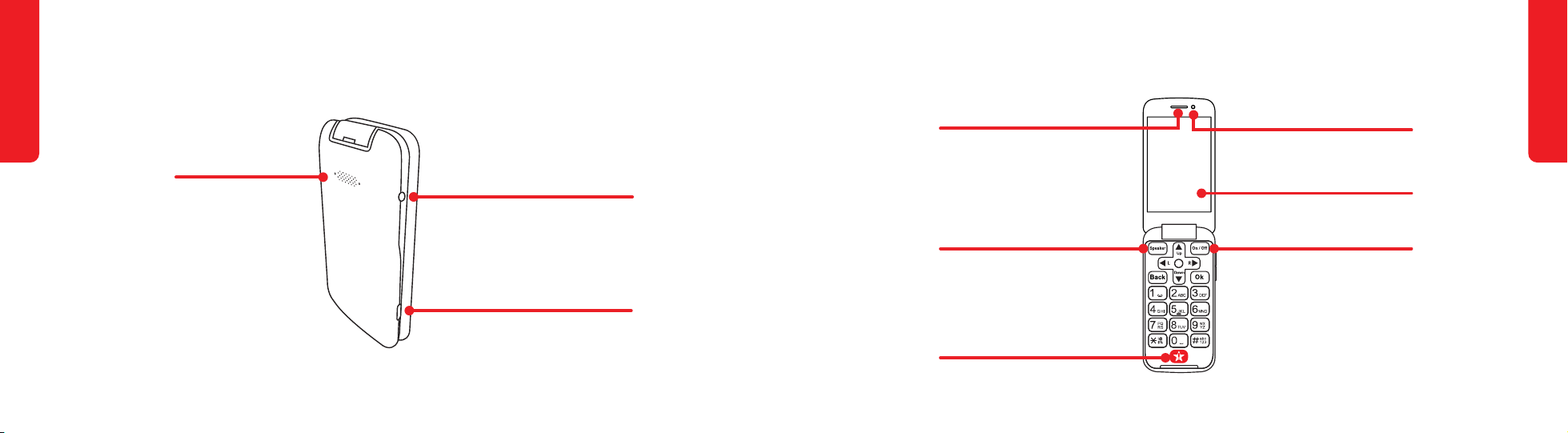
Your Jitterbug Flip2
Charging Dock Connectors
Volume Up Button
Rear Camera
LED Flash
Notification LED
Microphone
Outside Screen
Volume Down Button
Key Items in Your Box
Jitterbug Flip2
USB-C Cable Wall Charger
Charging Dock
4 5
Getting Started
Getting Started
Your Jitterbug Flip2 (continued)
Speakerphone Button
Urgent Response Button
Earpiece Speaker
Inside Screen
Front Camera (Selfie)
Power Button
Your Jitterbug Flip2 (continued)
3.5mm Audio Jack
Charging (USB-C) Port
Rear Speaker

6 7
Getting Started
Getting Started
Charging the Battery
The phone’s battery may be low when it is removed from its box. Charge the phone
before use and whenever the battery is low so that the phone is ready when you
need it.
With the USB Cable:
1. Plug the larger end of the USB Cable into the Wall Charger.
2. Plug the Wall Charger into a
wall outlet.
3. Plug the smaller end of the USB
Cable into the side of the phone.
Your Jitterbug Flip2 (continued)
Power Button
Directional Arrows
Ok Button
Speakerphone Button
Back Button
Number Pad
Urgent Response Button

8 9
Getting Started
Getting Started
Turning Your Phone On (1st time)
1. Press and hold on the keypad and wait while
the phone sets up.
2. Press to review the Terms & Conditions.
3. Press
Down
to read the Terms & Conditions and
to accept them. You must review four screens.
4. When you finish, the phone’s Main Menu is shown.
4
Phone
Contacts
Photos & Videos
Amazon Alexa
Text Messages 4
My #(888) 555-5555
Main Menu
100% 10:30 AM
Charging the Battery (continued)
With the Charging Dock:
1. Plug the larger end of the USB Cable into the
Wall Charger.
2. Plug the Wall Charger into a wall outlet.
3. Plug the smaller end of the USB Cable into the
back of the Charging Dock.
4. Place the phone on the Charging Dock.
STEP 2 STEP 4
Autres manuels pour flip2
1
Table des matières


