
Jinghao JH-W5 Manuel utilisateur

Instruction Manual Model: JH-W5
Please read this user manual thoroughly and
completely before using the product.
HEARING AID
VER: W5(A620)-20211213-V01
Life cycle of product is three years

-1- -2-
CONTENTS
03
07
08
09
15
14
11
11
09
17
23
25
28
30
30
31
32
33
21
17
I.IMPORTANT SAFETY INSTRUCTIONS
1.CONTRAINDICATION
2.WARNINGS
3.NOTICE
II.DO NOT USE IF ANY OF THE FOLLOWING APPLY TO YOU
III.MATTERS NEEDING ATTENTION, WARNINGS AND TIPS
IV.HOW TO USE YOUR DEVICE
1.HOW TO APPLY DOMES
2.LEFT & RIGHT HEARING AID MARKINGS
3.WEARING/REMOVE HEARING AID
4.TURN ON/TURN OFF
5.VOLUME ADJUSTMENT
6.HEARING AID CHARGING
7.HOW TO USE THE CHARGING CASE
V.MAINTENANCE AND CLEANING
VI.HEARING AID CARE
VII.TROUBLESHOOTING GUIDE
VIII.TIPS FOR BETTER COMMUNICATION
IX.TECHNICAL SPECIFICATION
X. ACCESSORIES LIST
XI.NORMALIZED SYMBOLS
XII.MAINTENANCE, STORAGE, AND DISPOSAL
XIII.WARRANTY

-3- -4-
I.IMPORTANT SAFETY INSTRUCTIONS
1. CONTRAINDICATION
The device should not be used in the following situations:
- Patients with chronic suppurative otitis media (CSOM),
congenital ear atresia, or any type of ear discharge
- Anyone under 36 months old
2. WARNINGS
- Keep small parts (hearing instrument, ear domes, battery or
other detachable parts) that can be swallowed out of children’s
reach. Dropping, immersing in liquid, exposure to strong
electromagnetic fields or excessive heat will damage the
hearing aids. Remove devices prior to any type of X-ray, MRI,
or CT scan. If parts become stuck in the ear canal, seek
medical assistance - do not attempt to remove by yourself.
3. Notice
- Do not use at high volume for extended periods of time - ear
injury can result.
- If you experience any pain or strong discomfort using the
devices, remove and consult a doctor.
- Routine maintenance to keep the device clean is required.
Ensure that ear domes are free of debris and moisture at all
times.
- Avoid shocks or dropping the product.
- Do not store or use the product in environments of high
humidity or temperature (such as sauna room), to avoid
damage.
- Batteries should be properly recycled and not disposed in the
trash.
- Keep the devices away from small children. Injury or damage
may result.
- Do not set volume levels too high. Listening with high-output
devices for extended periods at high volume levels can cause
further hearing damage.
- Do not share your hearing aids with others. Using a hearing
aid configured for someone else can result in hearing damage
or injury.
- Monitor for any unusual skin reaction. If you notice any
allergic reaction (itchiness, swelling, or rash), stop wearing the
hearing aids and consult a medical specialist.
- Do not touch the hearing aids to any type magnet or magne-
tized object. Your hearing aids are delicate electronic instru-
ments and may be damaged by contact with strong
Read all the information in this instruction manual and any
other literature included in the box before using the device.

-5-
magnetic fields.
- Do not attempt to open or repair the devices yourself.
Damage can result and will void the warranty.
- Do not store your devices in a hot/humid locations. You
should never leave your hearing aids near heating appliances
or in direct sunlight.
- Do not leave your hearing aids in the car as inside tempera-
tures can reach dangerous levels which could damage the
devices.
- Do not use the hearing aids together with a cell phone
earpiece directly - excessive noise and distortion may result.
Instead, use via Bluetooth pairing with your cell phone. Radio
wave emissions from mobile phones can cause noise in the
hearing aids or result in reduced volume.
- Please contact the MANUFACTURER:
• For assistance, if needed, in setting up, using or maintaining
your devices or to report any unexpected operation or events.
-6-
Specific warnings / statements
Keep small parts away from and out of children´s reach to
avoid accidental ingestion
Warning not to use in explosive or oxygen-enriched
atmospheres, as doing so may damage the device
Warning that it should only be used by intended person as
using hearing aids designed for someone else may result in
hearing damage

II. DO NOT USE IF ANY OF THE FOLLOWING APPLY
TO YOU:
1) Congenital atresia of external ear or deformity of any part of
the ear canal
2) Deafness is unstable, and the degree of hearing loss often
fluctuates
3) Persistent headaches, dizziness, earaches, tinnitus or other
symptoms that are not suitable for adaptation
4) Sudden onset of hearing loss within the past 3 months; rapid
progressive deafness; unilateral hearing loss or other acute
ear disease;
5) Effusion (secretions/discharge) in the ear and/or frequent
purulence (pus)
6) Central deafness (central nervous system) or non-organic
deafness
7) Patients with acute otitis externa and tympanitis
8) Patients with acute and chronic suppurative otitis media (in
the period of purulent infection)
9) Patients who are allergic to the materials of this product
1. Do not immerse the hearing aid in any liquid. Remove the
hearing aid before swimming or bathing. After swimming or
washing, wait for the ear canal to dry before wearing the
hearing aid.
2. After removing the hearing aid at night, it should be placed
in a case with a desiccant if possible, protected from light,
high temperature and high humidity environment.
3. The external surfaces of the hearing aid should be kept
clean, and earwax in the ear domes should be cleaned out
daily
4. Applicable objects: Suitable for people with air-conducting
hearing loss of about 30-50dB
5. When you do not use hearing aids, please charge the
product regularly to avoid battery damage; the recommend-
ed charging time interval of hearing aids is ≤28 days
-7- -8-
III. MATTERS NEEDING ATTENTION, WARNINGS AND TIPS

-9- -10-
IV.HOW TO USE YOUR DEVICE
1. Volume Control
2. Microphone
3. Ear Dome
4. In Ear Detection Sensor
5. Charging Contacts
1.【HOW TO APPLY DOMES】
Step 2: Push the ear dome rim membrane outward.
Step 3: Hold on to the end of the hearing aid and push firmly
to ensure that the dome is fastened securely.
1
2
3
4
5
12
L M S M S
Please follow these steps to mount domes, because Incorrect
dome replacement could result in the dome being left in the ear
when you remove the hearing aid.
Step 1: Choose a suitable size ear dome.
Warning:
Make sure the notch point of the ear dome is aligned with the
hearing aid.
Notes:
After the ear dome is installed, pull the ear dome gently to see if it
is firmly installed and ensure the ear dome does not fall off easily.
-12--11-
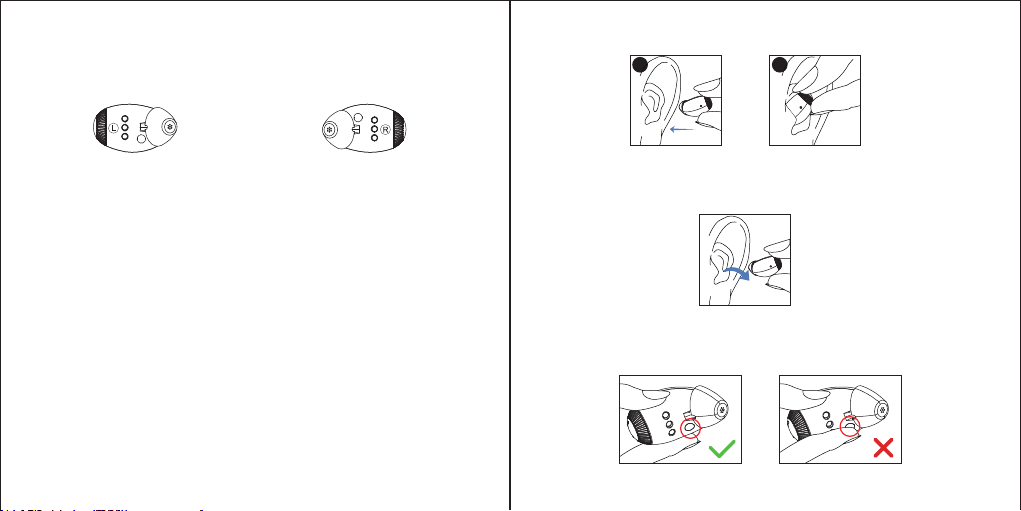
2.【LEFT & RIGHT HEARING AID MARKINGS】
3.【WEARING/REMOVE HEARING AID】
For comfort, your hearing aid always automatically standby
when you remove them.
The in ear detection sensor will carry out real-time intelligent
detection on the operation status of the hearing aid. When the
hearing aid is removed, it will automatically enter the standby
status. When you place the hearing aid in the ear, it will
automatically turn on.
There is a L or R marking on the hearing aid. This will tell you if it is
a left or a right hearing aid.
Notice:Don’t block the sensor by hands which will result in the
unexpected scream!
3.1 Wearing hearing aid
Step 1: Hold the hearing aid body (hard part), place in the ear
(Make sure it is in right direction like picture).
Step 2: Move the body slightly into auricle for holding.
3.2 Removing the hearing aid
Step 1: Grasp the protruding hearing aid and remove it.
L marking for left hearing aid. R marking for right hearing aid.
12

-13- -14-
4.【TURN ON/TURN OFF】
*Note:
1. It may be in few circumstances that the ear dome remain
attached to the auditory meatus after the hearing aid is taken
out. In that case, please ask a professional doctor to take the
Turn On: Take the hearing aid out of the charging case, the
hearing aid will enter the standby status. The hearing aid will
turn on automatically in 3 seconds when you wear the hearing
aid correctly in the ears.
Turn Off: The hearing aid will automatically enter the standby
status when you have remove it from your ear. Put the hearing
aid back into the correct slot of the charging case , they will
automatically turn off and start charging.
12
2
ear dome out.
2. Before the hearing aid is appropriately secured, it may give
out the creak sound, which is a normal phenomenon. The
creak sound can be used as a reference to determine whether
the hearing aid is secured. If the hearing aid gives out
squeaking, please check if it is taken on correctly; if so, but the
squeaking remains, please replace with the other set of ear
dome. When the hearing aid is not in use, please turn it off
without delay.
3. When the hearing aid is not functioning properly, please
check the “Troubleshooting Guide”. If none of the solutions
work, please contact our after-sales service team.

To increase the volume, turn the volume control towards the
"+" direction .
To decrease the volume, turn the volume control towards the
"-" direction .
-15- -16-
1. Lip
2. Hearing aid charging inserts with left/right indicators
3. Left-side hearing aid charging indicator
4. Charging case charging indicator
5. Right-side hearing aid charging indicator
6. Battery check button
7. Micro USB connection to external power supply
5.【VOLUME ADJUSTMENT】
Note: The hearing aid built in with ‘delay turn on’ function, after
placing correctly in the ear canal, automatically turn on after 3
seconds delay from the ‘beep’ tone.
67
1
2
3
4
5

6.【HEARING AID CHARGING】
7.【HOW TO USE THE CHARGING CASE】
-17- -18-
Put the hearing aid back into the correct slot of the charging
case, they will automatically turn off and start charging. Orange
light will indicate hearing aids are charging. After fully charged,
they will light in green and the light turn off in dicates charging
is complete.
(See details in table for Charging Indicator Changes of the
Charging Case)
*Note: hearing aid Low Power: You will hear the notification
sound when the hearing aid battery drops below 25%, and
when the battery below 10%, you will hear the notification
sound again.
7.1 Plug the small Micro-USB cable tip into the USB charging
port of the Case. Plug the large USB-A end into a USB-A power
source such as a wall charger or your computer.
7.2 The indicator light will show the charging status of the
battery until the hearing aid is fully charged. When the case is
charging, the indicator shows a orange solid light, and fully
charged the indicator light will shows a solid green light will be
constant.
7.3 With the hearing aids in the case, all charging will automati-
cally turn off when the case and hearing aids are fully charged.
The case will continue charging with or without the case lid
closed but it is recommended to close the lid when charging
overnight to keep out dust and moisture.
Table des matières
Autres manuels Jinghao Prothèse auditive

Jinghao
Jinghao JH-D58 Manuel utilisateur

Jinghao
Jinghao JH-D58 Manuel utilisateur

Jinghao
Jinghao JH-905 Manuel utilisateur

Jinghao
Jinghao JH-W3 Manuel utilisateur

Jinghao
Jinghao JH-W6 Manuel utilisateur

Jinghao
Jinghao JH-115 Manuel utilisateur

Jinghao
Jinghao JH-D30 Manuel utilisateur

Jinghao
Jinghao JH-A39 Manuel utilisateur
Manuels Prothèse auditive populaires d'autres marques


Advanced Bionics
Advanced Bionics Slim HP Standard Manuel utilisateur

Widex
Widex DREAM440 THE DREAM SERIES Manuel utilisateur

Phonak
Phonak myPilot Manuel utilisateur

NIKEN
NIKEN NK-401 Manuel utilisateur

ON Semiconductor
ON Semiconductor Ezairo 7111 Pre Suite Manuel utilisateur

Sonetik
Sonetik GOHEAR Manuel utilisateur