J.TOUR Vigor 5X Manuel utilisateur

JW910

Special anouncement
The document contains proprietary information of J.TOUR product and is not be disclosed or
used without the prior written permission of L.T.F communication Equipment and Technology Co.,
LTD and released authorization letter in offical website. The product appearance is supervised by
the company 30 Rui Tong.
L.T.F communication Equipment and Technology Co., LTD ownes the J.TOUR brand. Due to
update and improvment of J.TOUR products and technologies, information in this document is
subjected to change without notice. Login in J.TOUR’s official website: http://www.jtour.xin or call the
global operations center line: 400-900-8650 for more detailed instructions.

Due to the user habits and compatibility with associated application, this product attached GPS
global positioning system . GPS as a validate auxiliary for positioning results, provides the user with
a comparatively accurate measurement.by the way of one satellite calculation and the other
verification

Disclaimer
Due to the different circumstances and application methods, the user that wears the equipment must
pay special attention to the following instructions:
1、Since the product is the sophisticated wearable device, the factors such as the user wrong
operation, external interference and devise problem may lead to the unsafe consequences. The
user needs to master the the basic knowledge of wearing electronics and take the risk on your own.
2、This product is widely used in a variety of environments and activities. User needs to
consider the safety of the installation location and operation in movements, and take the safety
responsibility. Product manufacturers and operators does not undertake any responsibility for the
above operation..
3、The product is not suitable for precise Measurement.。
4、The product conforms to the FCC regulation in article 15 that describes the conditions of the
Class B digital device. That means there may be mild radio communication radiation when using.
User needs to adjust the position to avoid the interference by the other devices, that may lead to
signal receiving and operation inproperly. In addition, it is also important to notice whether the product
will affect the normal work of other communication devices. The above interference state is not within
the guarantee of this product.
5、The product does not refer to mapping standards in any country to set path. The results of map
scanning are based on accurate longitude and latitude by satellite positioning. Map is only as a
referrence and the distance can not be estimated according to the picture ratio.

Battery Warning
Without complying with the following
guidelines, the life of the lithium battery in the
equipment may be reduced and user may
take the risk of fire, chemical burn, electrolyte
leakage.
• Do not expose the equipment to a heat
source or at a high temperature location
• Do not bore or incinerate the equipment or
battery.
•Do not use in extreme enviorment
•Dispose your device battery according
to local applicable regulations and consulting
local waste disposal department.
Health Warning
•Before starting or change your exercise
program, please be sure to consult your
doctor. if you wear a heart preceptor or other
electronic devices inside your body, please
consult your doctor before the use of heart
rate monitor belt.
• The heart rate monitor belt and other
JTOUR accessories are used by consumers
rather than medical device and may be
interfered by external factors, so the heart
rate reading is only for reference. The
company will not take any responsibility for
the consequences of any error reading.

Security Precaution
ALLERGIC REACTIONS OR SKIN IRRITATIONS MAY OCCUR WHEN
PRODUCT IS IN CONTACT WITH SKIN, EVEN THOUGH OUR PRODUCTS COMPLY
WITH INDUSTRY STANDARDS. IN SUCH EVENT, STOP USE IMMEDIATELY AND
CONSULT A DOCTOR.
.
Limited Warranty
The products will be guaranteed for 2 years from the date of purchase. During this period, the
company will repair or replace the parts that have problems in normal use.

Button Function
LIGHT
UP
OK
BACK
DOWN
76%
LIGHT
short press to switch on/offthe back light;
Long press for 3 seconds to unlock
OK
Short press in home screen to enter the main menu; long press the
shortcut in user defined view to add or remove the view; short press in
the other view to enter or confirm
BACK
Long press to swith on/off the device; short press to return/exit; long
press for 10 seconds to thermally start the device
UP
Short press as up button; long press the shortcut to enter the sport view;
short press in stopwatch view to count;
DOWN
Short press as up button; long press the shortcut to enter the monitoring
view; short press in stopwatch view to count lap

Preparation
Start: Long press the BACK button for 3 seconds to swith on. If it doesn’t work, please connect the
matching charging device to check whether the wristwatch has no power. When charging, fasten the
charging plug properly according to the figure below, and tighten it at the position of the two fingers to
ensure that the charging head and watch are fastened. It takes about 2 hours from the air to the full
charge, and the specific situation is based on the power display in the watch.
Note: Dry the charging port before charging in order to avoidMetal contact smudge, short circuit or
other risks caused by flood.
The default language is chinese. If you need to change, please select menu - language setting to
adjust.

APP&Match
1. "JTOUR" APP is available for both IOS and Android operating system; scan the QR code to
download and install.
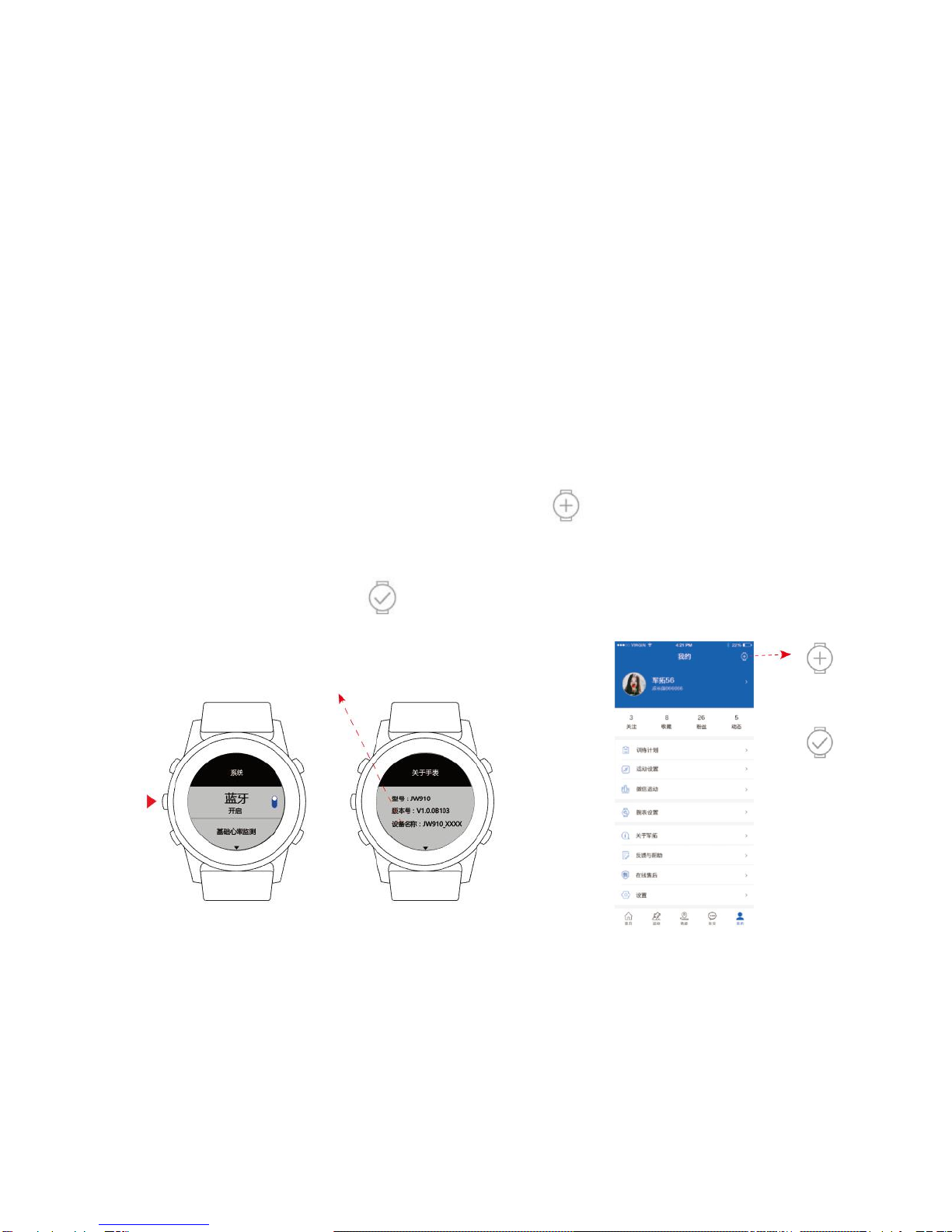
2. Press OK button in main screen to enter the main menu; switch on bluetooth in “system” setting
and record the device name “JW901_XXXX” in “About watch” settting
3. Start the APP, register and then switch on bluetooth; click “ ” on the top right corner of my page
and match the name of the watch in the search list; A connection is displayed after successful
matching.
My home page shows the status “ ” of the connected device.
device name “JW910_XXXX”

Message Notification
When the wristwatch and APP are connected successfully, the wristwatch can receive SMS, WeChat,
phone and QQ message alert, and you can view information details in the reminder view. The
reminder view disappears in 10 seconds, and can then be viewed in the custom shortcut view “ Notice”.
Note: Settings reminder needs to be setted in my - wristwatch Setting - message Settings on the APP
side.
Ce manuel convient aux modèles suivants
1
Table des matières
Autres manuels J.TOUR Montre