
IVIE MPS 2300 Manuel utilisateur

1605 NW State Street
Lehi, Utah 84043
(801) 766-7600
FAX: (801) 766-8282
Interenet: www.ivie.com
Operation and Owners Manual for the
Printed in U.S.A.

lvie Technologies
MPS 2300
MUSIC AND PAGING SYSTEM
Table of Contents
Section One...Introduction
1-1
Welcome
Warranty
1-2 Overview and Description
Section Two....Basic Instructions
2-1 Unpacking and Inspection
Important Installation Precautions
2-2 Front Panel Controls and Indicators
2-2 Power Switch
Master Volumes A
&
B
2-3 Master Treble and Bass Controls
Music Source Selector
Music Volume
2-4 Music Input Signal Presence and Assignment Indicators
Paging Volumes
Mic Input Signal Presence and Assignment Indicators
Mono/Stereo Linking Switch (located on bottom)
2-4 Rear Panel Controls and Features
2-4 Paging Section
Mic Gain Control
Mic AGC
Voice EQ
Mic Input Sensitivity Switch
Active Balanced Mic Input
Mic/Zone Keys
2-5 Music Section
Music Gain Control
Music Treble and Bass EQ Controls
Input Sensitivity Switches
Unbalanced Music Inputs
Active Balanced Inputs
Pre-Amp Out/Power Amp In
Muting Trims
2-6 AUX Inputs and Gain Controls
Remote Control Terminals
Power Amplifier Section
Clip Indicator
2-7 PowerLimit Control
Speaker Impedance Switch
Power Amp Output Terminals
Power Amp Active Balanced Inputs
2-8 Switched AC Outlet
Switched +/- 15V Power Supply Taps
2-9
Basic Set-up Instructions

2-10
2-11
2-12
2-14
2-17
AC Power
Chassis Ground
Speaker Connections
Paging Connections
Paging Inputs
Balanced Sources
Unbalanced Sources
Zone Keying
Paging Mic/Line Switch
Mic Gain Control (See Gain Staging)
Music Connections
Unbalanced Inputs
Balanced Inputs
Summing Stereo Pairs
Music Adjustments
AUX Inputs
Gain Staging
Control Range
Gain Staging Adjustments
Gain Staging the Paging Levels
2-13 Gain Staging the Music Levels
Gain Staging with Remote Control.
AUX Level
Music Muting Trims
PowerLimit Control
Limiting Overall Level
2-15
Protecting Speakers from Excess Power
2-l 6 Preventing Output Clipping
25 Volt Systems
Pre-Out/Amp In
Insertion of signal processing
2-17 Routing of signal to other amplifiers
Amplifier Active Balanced Inputs
Using Amplifier Active Balanced Inputs
Inserting Signal Processing
Mixing with Active Balanced Inputs
Switched AC Outlet
+/-15V Power Supply Taps
Section Three....Installation and Set-up
3-1 Shelf Mounting
Rack Mounting
Front Panel Set-up
Knob Lock-out Plug
Site Specific Labels
3-2
Music Source Selector Knob Rotation Limit
Remote Control
Hook-up
Set-up
3-3
Operation
Building Your Own Remote Control Panel
Stereo Operation

3-4 Set-up
Operation
Stereo Remote Hook-up
3-5 Stereo Remote Set-up
Quasi-balanced Lines
Section Four....Operational Trouble Shooting
4-1 No Sound
Very Faint Sound
4-2 Page but No Music
Music but No Page
Weak but Clear Sound
4-3 Weak and Distorted Sound
Sound Cuts In and Out
Sound has Bad Tone
Lacks Power
Unwanted Noise
Hum
Buzz
4-4 Hiss
Crackles
Radio Interference
Section Five....Maintenance and Service
5-1 Cleaning
Dust Removal
User Maintenance
Obtaining Service
Section Six...Schematics and Drawings
6-1
Specifications
Flow Chart
Schematics
Remote Schematic
Rear Panel Knob and Switch Setting Drawing/Log
Front Panel Knob Setting Drawing/Log

lvie Technologies
MPS 2300
Introduction
Thank you for selecting an Ivie product for your audio
system. Our goal is to be sure you remain happy with your
choice for many years to come. Please do not hesitate to
call the lvie customer service department if you have any
service problem or questions not answered in this manual.
Welcome.
Your lvie MPS 2300 can be readily operated by anyone.
However, we recommend that you use a qualified audio
professional to install and set-up the system. In this
manner, you will be assured of achieving optimum system
performance.
--
Please consult the Table of Contents for fast guidance to
the sections of interest. We recommend that all users read
Section Two, Front Panel Controls and Indicators. This will
provide operating information on the user front panel
controls. For individuals installing this product we urge you to
read the entire manual. Set-up instructions are contained
in Section Two, Basic Set-up Instructions. All users should
read Section Two, Unpacking and Inspection, and
important Precautions.
lvie Technologies warrantees all Series Two products to
be free from defective material and/or workmanship for a
period of three years from date of sale. lvie will replace
defective parts and repair malfunctioning products under
this warranty when the defect occurs under normal
installation and use, provided the unit is returned to our
factory via prepaid transportation. This warranty provides that
examination of the returned product must disclose, in our
judgement, a manufacturing defect. This warranty does not
extend to any product which has been subject to misuse,
neglect, accident, improper installation, or where the serial
number has been removed or defaced. Manufacturer shall
not be liable for consequential damages resulting from
defects in materials and/or workmanship.

Introduction
lvie Technologies
MPS 2300
Overview and
Description. The MPS 2300 Music + Paging System is an integrated 8-
channel, 2-zone or stereo 1 -zone mixer amplifier designed
specifically for music and paging applications. The
numerous features incorporated to improve performance,
ease installation and simplify use include:
l
Switch selectable music source selection
l
LED input signal and routing indicators
l
AGC on mic channels maintain consistent page
levels
l
Adjustable muting trims set the exact amount of
muting desired
l
PowerLimit
controls set maximum level, prevent
clipping and protect speakers
l
Remote control Source Select, Page and Music
volume
l
Switchable channel input sensitivity
l
Gain, Treble, and Bass controls on music channels
to match sources
l
Active balanced inputs on Mic channels and Music
channels 1 and 2
l
Pre-out/Amp-in patch points and separate Aux inputs
for each zone
l
Direct 8 ohm/70V outputs improve damping and
lower distortion
l
Mono/Stereo linking switch
l +/-
15V power supply taps to power outboard signal
processing
l
Switched AC accessory outlet
l
Delayed Turn-on/off and DC Fault speaker
protection
The mixer/[re=amp has 2-Mic, 4-Music and 2-Aux input
channels and two Zone outputs. Except for the Aux inputs,
any channel may be routed to either or both Zones. Mic
channels are keyed; grounding the appropriate terminal(s)
activates the mic, routes it to the correct zone(s) and
triggers the music muting circuit. Mic channels have AGC
and EQ tailored to provide high intelligibility. Music
channels are switched by front panel or remote selectors.
Music channels have Gain, Treble and Bass controls.
Separate AUX channels are provided for each Zone. Front
panel controls adjust Page, Music and Master levels for

Ivie
Technologies
MPS 2300
Introduction
each Zone. LEDs monitor input signals and routing to each
Zone while level meters monitor the output.
Zone A and Zone B each have a 150 watt power amplifier
to drive
25-35V,
4-8 ohm loads or 70V lines. The direct-
output circuit significantly improves damping while lowering
distortion and is protected from shorts, mis-matched loads,
and thermal over-temp.
Speakers
are protected from DC
fault and the PowerLimit circuit prevents clipping, protects
speakers from excess power, and/or limits overall level to a
preset maximum.
The MPS 2300 is designed to provide years of trouble free
performance. Quality components and contemporary high
performance circuits assure optimum performance and
long-term reliability. A three year limited parts and labor
warranty is among the longest in the industry.

lvie Technologies
MPS 2300
Basic
Instructions
l
Check for carton damage while unpacking.
Unpacking and
Inspection.
l
Check the product for loose or rattling parts.
l
Save the carton for return shipment, if required.
l
If shipping damage is evident, notify the transpor-
tation company immediately. File a claim with the carrier
for shipping damage. Be sure to save the carton for the
Shipper to inspect.
l
Keep power OFF when making any connections.
Important
Installation
Precautions.
l
Check the AC voltage before connecting the AC
plug. CONNECTION TO WRONG VOLTAGE WILL IM-
MEDIATELY DAMAGE THE PRODUCT, and voids the
warranty.
l
Start with the Master Volume controls all the
way off. Turn the controls up gradually until normal
operation is verified.
l
Never connect speaker barriers from different
channels together or the same speaker to more
than one channel.
l
Do not connect speaker barriers to chassis or
signal ground.
l
Keep speaker wiring separate from input wiring.
l
Always connect speakers with power off. Use
heavy gauge cable with no frayed strands or
damaged insulation.
l
Failure to observe precautions could lead to fire
or shock hazard. Never plug in a damaged amplifier
until the condition of the internal insulation is checked. If
the internal fuse blows the amplifier section is defective
and must be repaired or replaced.
l
Be sure to provide adequate support and
ventilation.
Basic
Instructions
lvie Technologies
MPS 2300
Safety Warning.
DANGEROUS VOLTAGE INSIDE. Do not remove
the cover or expose to rain or moisture. Refer all
servicing to qualified personnel. Warranty may be
void if the product is repaired or tampered with by
non-lvie repair personnel. Please call the factory
for service information and locations.
Front Panel Controls
and Indicators.
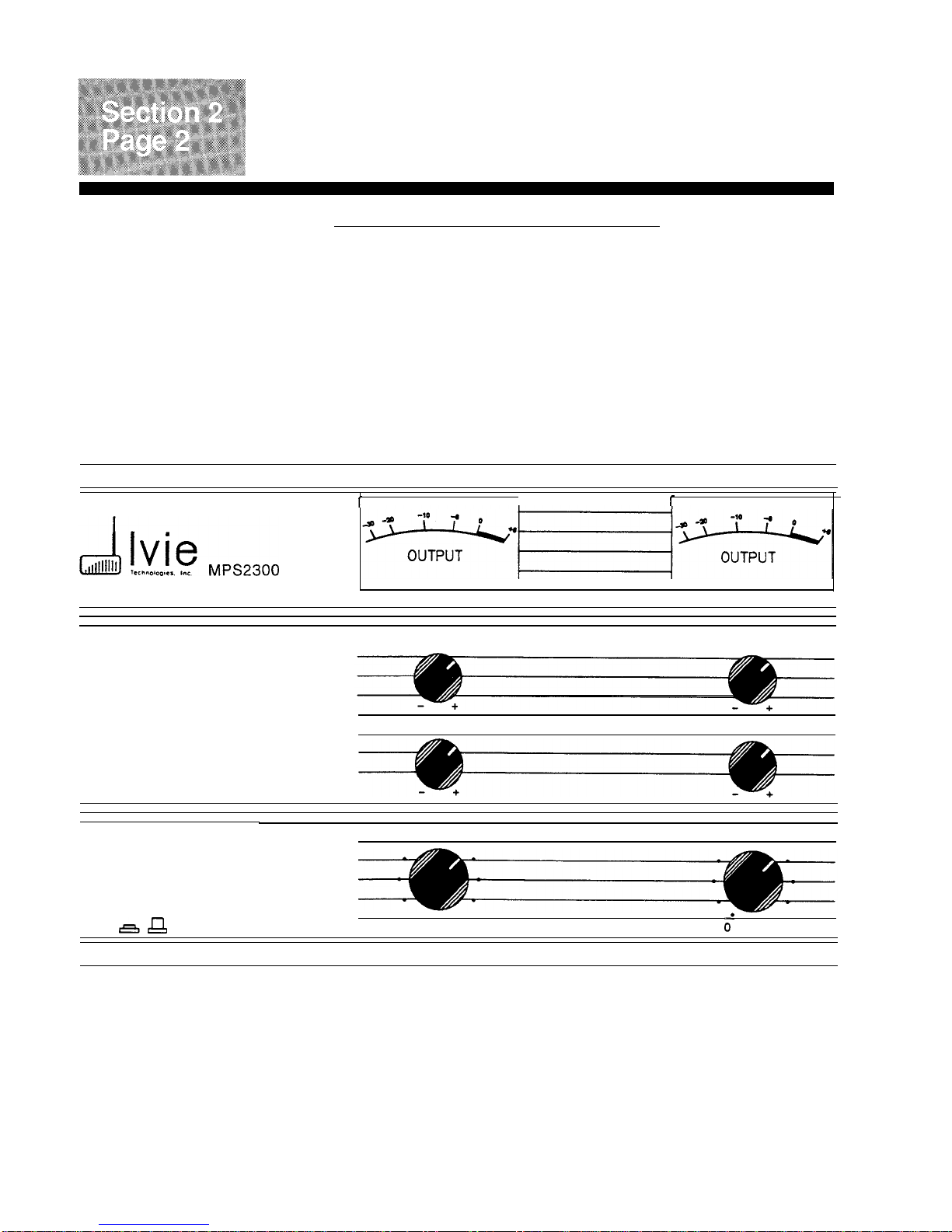
MUSIC + PAGING SYSTEM MASTER CONTROLS
r
1
r
I
TREBLE TREBLE
BASS BASS
POWER
0MASTER. VOLUME MASTER volume
. .
.
.
.
nA
0’
0.
.
10 10
ON/OFF ZONE AZONE B
Power Switch. Power Switch controls entire unit including outlet and
+/-
15V
power supply taps.
Master Volumes A
&
B Master Volumes A
&
B are the gain controls for each power
amp. The nominal position for full output is all the way up.
A center detent marks the -6 dB gain position.
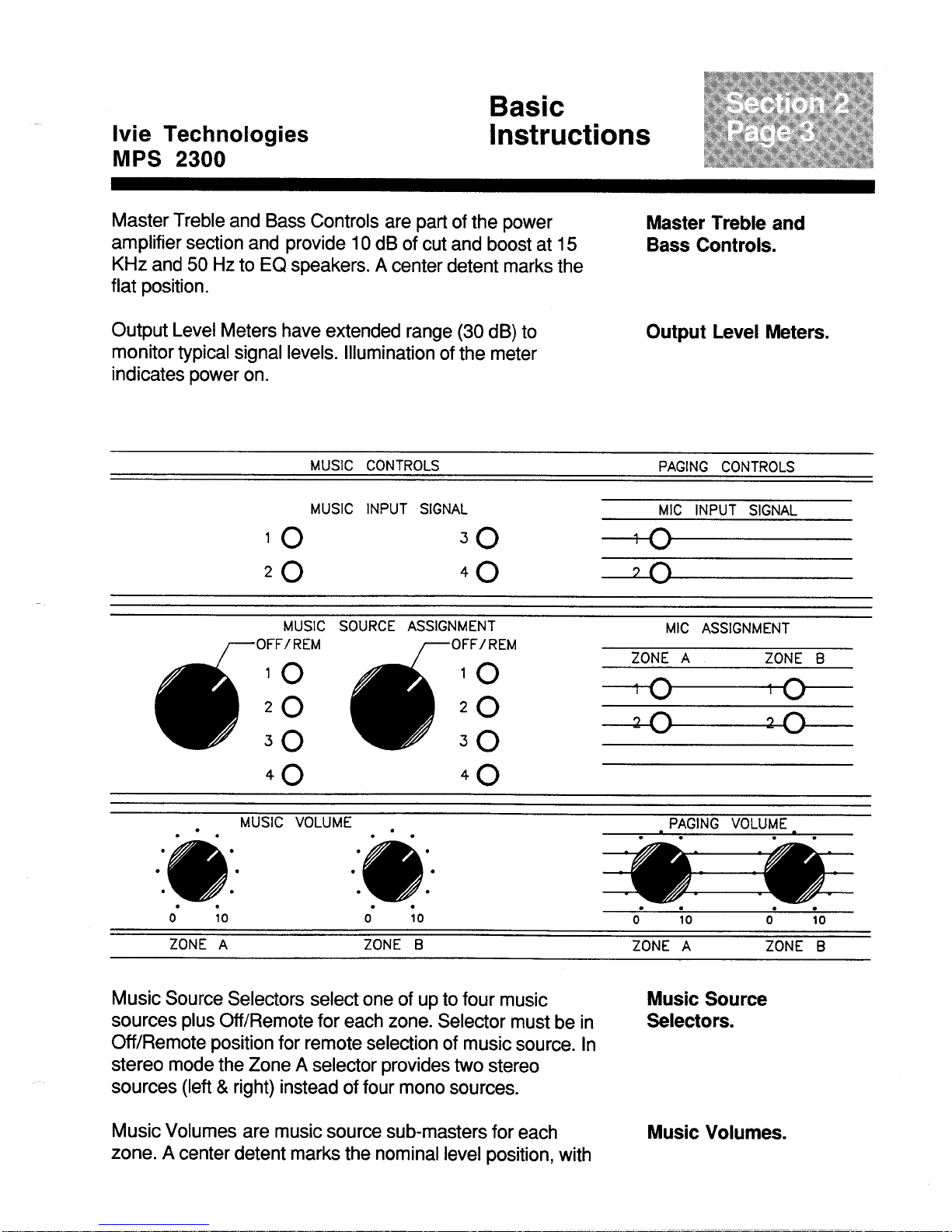
Table des matières
Autres manuels IVIE Amplificateur


