Itm FLUKE Professional Series Manuel utilisateur

Ti300 PRO, Ti400 PRO, Ti401 PRO,
Ti450 PRO, Ti480 PRO
Professional Series Thermal Imagers
Ti450 SF6
Gas Leak Detector
Users Manual
November 2017 Rev. 2, 4/19 (English)
© 2017-2019 Fluke Corporation. All rights reserved. Specifications are subject to change without notice.
All product names are trademarks of their respective companies.
www. .com information@itm.com1.800.561.8187

LIMITED WARRANTY AND LIMITATION OF LIABILITY
Each Fluke product is warranted to be free from defects in material and workmanship under normal use and
service. The warranty period is two years and begins on the date of shipment. Parts, product repairs, and services
are warranted for 90 days. This warranty extends only to the original buyer or end-user customer of a Fluke
authorized reseller, and does not apply to fuses, disposable batteries, or to any product which, in Fluke's opinion,
has been misused, altered, neglected, contaminated, or damaged by accident or abnormal conditions of operation
or handling. Fluke warrants that software will operate substantially in accordance with its functional specifications
for 90 days and that it has been properly recorded on non-defective media. Fluke does not warrant that software
will be error free or operate without interruption.
Fluke authorized resellers shall extend this warranty on new and unused products to end-user customers only but
have no authority to extend a greater or different warranty on behalf of Fluke. Warranty support is available only if
product is purchased through a Fluke authorized sales outlet or Buyer has paid the applicable international price.
Fluke reserves the right to invoice Buyer for importation costs of repair/replacement parts when product purchased
in one country is submitted for repair in another country.
Fluke's warranty obligation is limited, at Fluke's option, to refund of the purchase price, free of charge repair, or
replacement of a defective product which is returned to a Fluke authorized service center within the warranty
period.
To obtain warranty service, contact your nearest Fluke authorized service center to obtain return authorization
information, then send the product to that service center, with a description of the difficulty, postage and insurance
prepaid (FOB Destination). Fluke assumes no risk for damage in transit. Following warranty repair, the product will
be returned to Buyer, transportation prepaid (FOB Destination). If Fluke determines that failure was caused by
neglect, misuse, contamination, alteration, accident, or abnormal condition of operation or handling, including
overvoltage failures caused by use outside the product’s specified rating, or normal wear and tear of mechanical
components, Fluke will provide an estimate of repair costs and obtain authorization before commencing the work.
Following repair, the product will be returned to the Buyer transportation prepaid and the Buyer will be billed for the
repair and return transportation charges (FOB Shipping Point).
THIS WARRANTY IS BUYER'S SOLE AND EXCLUSIVE REMEDY AND IS IN LIEU OF ALL OTHER
WARRANTIES, EXPRESS OR IMPLIED, INCLUDING BUT NOT LIMITED TO ANY IMPLIED WARRANTY OF
MERCHANTABILITY OR FITNESS FOR A PARTICULAR PURPOSE. FLUKE SHALL NOT BE LIABLE FOR ANY
SPECIAL, INDIRECT, INCIDENTAL OR CONSEQUENTIAL DAMAGES OR LOSSES, INCLUDING LOSS OF
DATA, ARISING FROM ANY CAUSE OR THEORY.
Since some countries or states do not allow limitation of the term of an implied warranty, or exclusion or limitation
of incidental or consequential damages, the limitations and exclusions of this warranty may not apply to every
buyer. If any provision of this Warranty is held invalid or unenforceable by a court or other decision-maker of
competent jurisdiction, such holding will not affect the validity or enforceability of any other provision.
11/99
LIMITED WARRANTY AND LIMITATION OF LIABILITY
www. .com information@itm.com1.800.561.8187


i
Table of Contents
Title Page
Introduction ........................................................................................................... 1
Safety Information................................................................................................. 2
Product Familiarization ......................................................................................... 4
Features........................................................................................................... 4
Controls ........................................................................................................... 6
Touch Screen .................................................................................................. 8
Control Panel ................................................................................................... 9
Primary and Secondary Triggers ..................................................................... 9
Basic Operation .................................................................................................... 10
Turn On and Off the Imager............................................................................. 10
Focus ............................................................................................................... 10
Capture Image ................................................................................................. 10
Save Image...................................................................................................... 11
Menus ................................................................................................................... 11
Measurement Menu......................................................................................... 12
Level/Span.................................................................................................. 14
Emissivity Adjustment................................................................................. 15
Transmission .............................................................................................. 16
Spot Boxes ................................................................................................. 16
Spot Markers .............................................................................................. 17
Delta-T........................................................................................................ 17
Image Menu..................................................................................................... 18
Image Enhancement .................................................................................. 20
Distance...................................................................................................... 22
Camera Menu .................................................................................................. 23
LaserSharp Auto Focus System................................................................. 25
Video .......................................................................................................... 25
Wireless Connectivity ................................................................................. 26
Fluke Connect Wireless System...................................................................... 28
Fluke Connect App ..................................................................................... 28
Fluke Connect Tools................................................................................... 29
Memory Menu.................................................................................................. 30
Review Image............................................................................................. 30
Edit Image .................................................................................................. 30
Delete Image .............................................................................................. 32
Settings Menu.................................................................................................. 33
File Format ................................................................................................. 34
Date ............................................................................................................ 35
www. .com information@itm.com1.800.561.8187

Ti300 PRO, Ti400 PRO, Ti401 PRO Ti450 PRO, Ti450 SF6, Ti480 PRO
Users Manual
ii
Time ............................................................................................................ 35
SF6 Gas Detection Mode Menu....................................................................... 36
Gas Detection Conditions ........................................................................... 36
SmartView Software.............................................................................................. 38
Download SmartView Software........................................................................ 38
Download Firmware ......................................................................................... 38
Enable the Radio.............................................................................................. 39
Streaming Video (Remote Display) ....................................................................... 39
Stream Live to a PC ......................................................................................... 40
Stream Live with Fluke Connect Software ....................................................... 40
Stream Live to an HDMI Device ....................................................................... 40
Remote Control of Imager ..................................................................................... 41
Accessories ........................................................................................................... 41
Optional Lenses ............................................................................................... 42
Maintenance.......................................................................................................... 43
Clean the Case ................................................................................................ 43
Lens Care......................................................................................................... 43
Battery Care ..................................................................................................... 43
Charge Batteries .............................................................................................. 44
Two-Bay Battery Charger Base .................................................................. 44
AC Power Socket on Imager....................................................................... 44
Optional 12 V Vehicle Charger ................................................................... 45
Radio Frequency Data .......................................................................................... 45
General Specifications .......................................................................................... 45
Detailed Specifications .......................................................................................... 47
www. .com information@itm.com1.800.561.8187

1
Introduction
The Fluke Ti300 PRO, Ti400 PRO, Ti401 PRO, Ti450 PRO, Ti450 SF6, and Ti480 PRO Professional Thermal
Imagers (the Product or Imager) are handheld, infrared imaging cameras for use in many applications. These
applications include equipment troubleshooting, preventive and predictive maintenance, building diagnostics,
research and development, and gas leak detection.
The Imager displays thermal images on a high-visibility, industrial-quality LCD touch screen. The Imager can
save images to internal memory, to a removable memory card, or to a USB storage device. Saved images and
data stored in internal memory or on the memory card can be transferred to a PC through a direct USB
connection to the PC or by wireless transfer to a PC or mobile device.
The Imager includes SmartView software. SmartView is a high-performance, professional software suite for
quality analysis and reporting. The Imager works with the Fluke Connect app available on mobile devices.
A rugged, rechargeable lithium-ion smart battery provides power to the Imager. Direct ac power is accessible with
the included ac power adapter.
www. .com information@itm.com1.800.561.8187

Ti300 PRO, Ti400 PRO, Ti401 PRO Ti450 PRO, Ti450 SF6, Ti480 PRO
Users Manual
2
Safety Information
A Warning identifies hazardous conditions and procedures that are dangerous to the user. A Caution identifies
conditions and procedures that can cause damage to the Product or the equipment under test.
*W Warning
To prevent possible electrical shock, fire, or personal injury and for safe operation of the
Product:
• Read all safety information before you use the Product.
• Carefully read all instructions.
• Do not alter the Product and use only as specified, or the protection supplied by the Product
can be compromised.
• Replace the batteries when the low battery indicator shows to prevent incorrect
measurements.
• Do not use the Product if it operates incorrectly.
• Do not use the Product if it is altered or damaged.
• Disable the Product if it is damaged.
• See emissivity information for actual temperatures. Reflective objects result in lower than
actual temperature measurements. These objects can pose a burn hazard.
• Do not put battery cells and battery packs near heat or fire. Do not put in sunlight.
• Do not disassemble or crush battery cells and battery packs.
• Remove batteries to prevent battery leakage and damage to the Product if it is not used for an
extended period.
• Connect the battery charger to the mains power outlet before the charger.
• Use only Fluke approved power adapters to charge the battery.
• Keep cells and battery packs clean and dry. Clean dirty connectors with a dry, clean cloth.
• Batteries contain hazardous chemicals that can cause burns or explode. If exposure to
chemicals occurs, clean with water and get medical aid.
• Do not disassemble the battery.
• Repair the Product before use if the battery leaks.
• Use only the external mains power supply included with the Product.
• Do not put metal objects into connectors.
• Use only specified replacement parts.
• Have an approved technician repair the Product.
• Remove the batteries if the Product is not used for an extended period of time, or if stored in
temperatures above 50 °C. If the batteries are not removed, battery leakage can damage the
Product.
www. .com information@itm.com1.800.561.8187

Professional Series Thermal Imagers
Safety Information
3
• Disconnect the battery charger and move the Product or battery to a cool, non-flammable
location if the rechargeable battery becomes hot (>50 °C) during the charge period.
• Replace the rechargeable battery after 5 years of moderate use or 2 years of heavy use.
Moderate use is defined as recharged twice a week. Heavy use is defined as discharged to
cutoff and recharged daily.
• Do not short the battery terminals together.
• Do not keep cells or batteries in a container where the terminals can be shorted.
• Do not use the Product for medical reasons. The Product is intended for equipment evaluation
only and should never be used in diagnostics, treatment, or any other capacity where the
Product would come in contact with a patient.
W Caution
Storage and/or continual operation of the Imager in extreme ambient temperature conditions
can result in temporary interruption of operation. If this occurs, let the Imager stabilize (cool
down or warm up) before you resume operation.
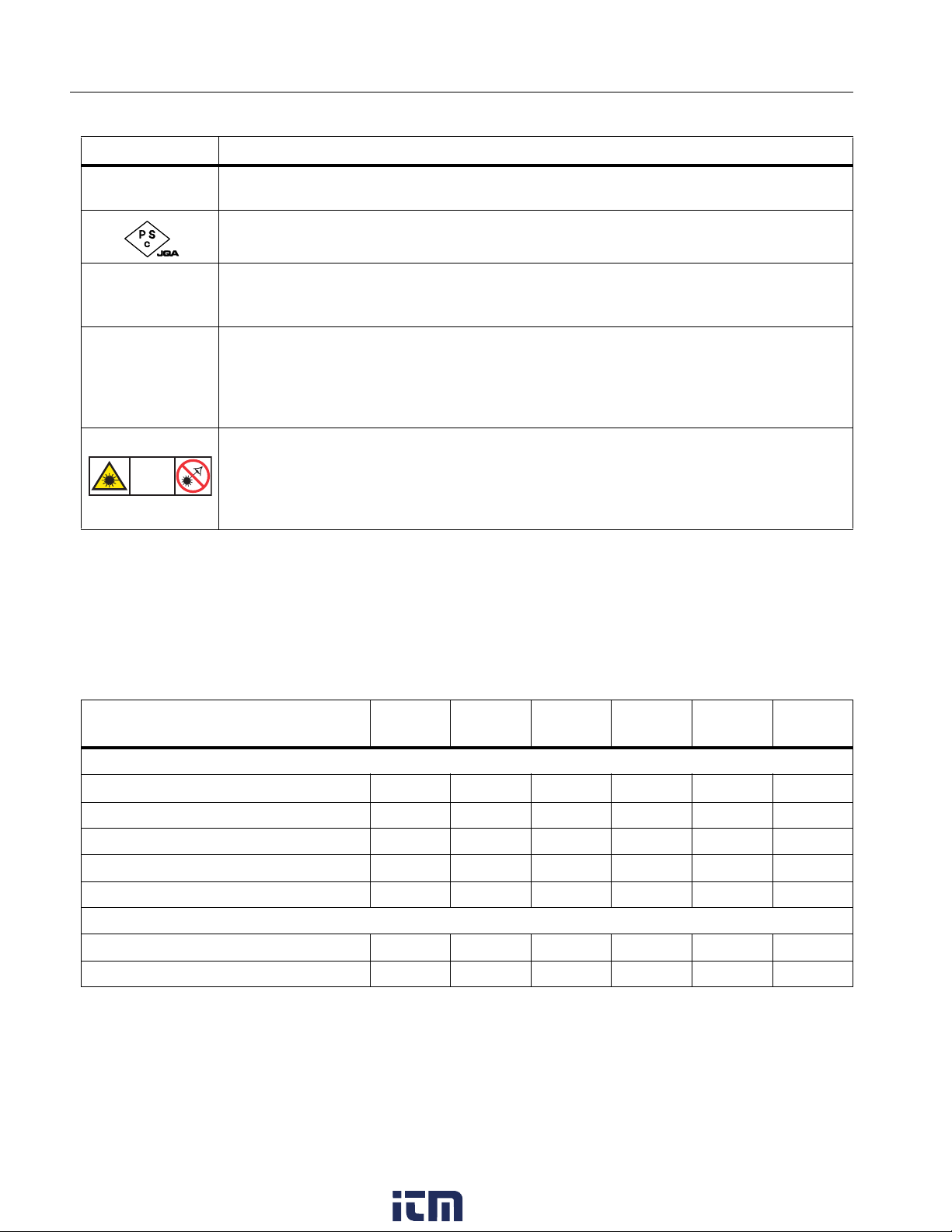
Table 1 is a list of symbols that can be used on the Imager or in this manual.
Table 1. Symbols
Symbol Description
Consult user documentation.
WWARNING. RISK OF DANGER.
*WARNING. LASER RADIATION. Risk of eye damage.
15V DC
"Center positive power port.
Connected to ac power. Battery removed.
Battery.
Battery status. Battery charging when animated.
On/Off
™Universal Serial Bus (USB) connection.
MEMORY Memory card slot.
HDMI High-Definition Multimedia Interface (HDMI) connection.
PConforms to European Union directives.
)Certified by CSA Group to North American safety standards.
Conforms to relevant Australian Safety and EMC standards.
Conforms to relevant South Korean EMC standards.
www. .com information@itm.com1.800.561.8187

Ti300 PRO, Ti400 PRO, Ti401 PRO Ti450 PRO, Ti450 SF6, Ti480 PRO
Users Manual
4
Product Familiarization
The manual explains features for multiple models. Because models have different features, not all of the
information in the manual may apply to your Imager. Use Table 2 to identify the features of your Imager.
Features
Table 2 lists the features of the Imager.
Conforms to the Appliance Efficiency Regulation (California Code of Regulations, Title 20,
Sections 1601 through 1608), for small battery charging systems.
Japan Quality Association
This Product contains a lithium-ion battery. Do not mix with the solid waste stream. Spent
batteries should be disposed of by a qualified recycler or hazardous materials handler per
local regulations. Contact your authorized Fluke Service Center for recycling information.
~
This product complies with the WEEE Directive marking requirements. The affixed label
indicates that you must not discard this electrical/electronic product in domestic household
waste. Product Category: With reference to the equipment types in the WEEE Directive
Annex I, this product is classed as category 9 "Monitoring and Control Instrumentation"
product. Do not dispose of this product as unsorted municipal waste.
Indicates a Class 2 laser. DO NOT STARE INTO BEAM The following text may appear
with the symbol on the product label: “IEC/EN 60825-1:2014. Complies with 21 CFR
1040.10 and 1040.11 except for deviations pursuant to Laser Notice 50, dated June 24,
2007.” In addition, the following pattern on the label will indicate wavelength and optical
power: λ = xxxnm, x.xxmW.
Table 2. Features
Feature Ti300
PRO
Ti400
PRO
Ti401
PRO
Ti450
PRO
Ti450
SF6
Ti480
PRO
Focus/Image Enhancement
Advanced manual focus
LaserSharp Auto Focus System
Filter mode
MultiSharp Focus
SuperResolution
Digital Zoom
2X
4X
Table 1. Symbols (cont.)
Symbol Description
LASER
2
www. .com information@itm.com1.800.561.8187
Professional Series Thermal Imagers
Product Familiarization
5
IR-Fusion Technology
Visible
Picture-in-Picture (PIP)
Full screen IR Autoblend (Preset
percentage selection)
Image annotations
IR-PhotoNotes
Audio (Voice)
Text
Video mode
Auto capture mode
Spot Markers
Wireless connectivity
WiFi
Bluetooth
Fluke Connect
HDMI connectivity
SmartView software
Stream video (remote display)
Remote operation of Imager
Gas Leak Detection
Relative Humidity and Temperature
Adjustment
Table 2. Features (cont.)
Feature Ti300
PRO
Ti400
PRO
Ti401
PRO
Ti450
PRO
Ti450
SF6
Ti480
PRO
www. .com information@itm.com1.800.561.8187

Ti300 PRO, Ti400 PRO, Ti401 PRO Ti450 PRO, Ti450 SF6, Ti480 PRO
Users Manual
6
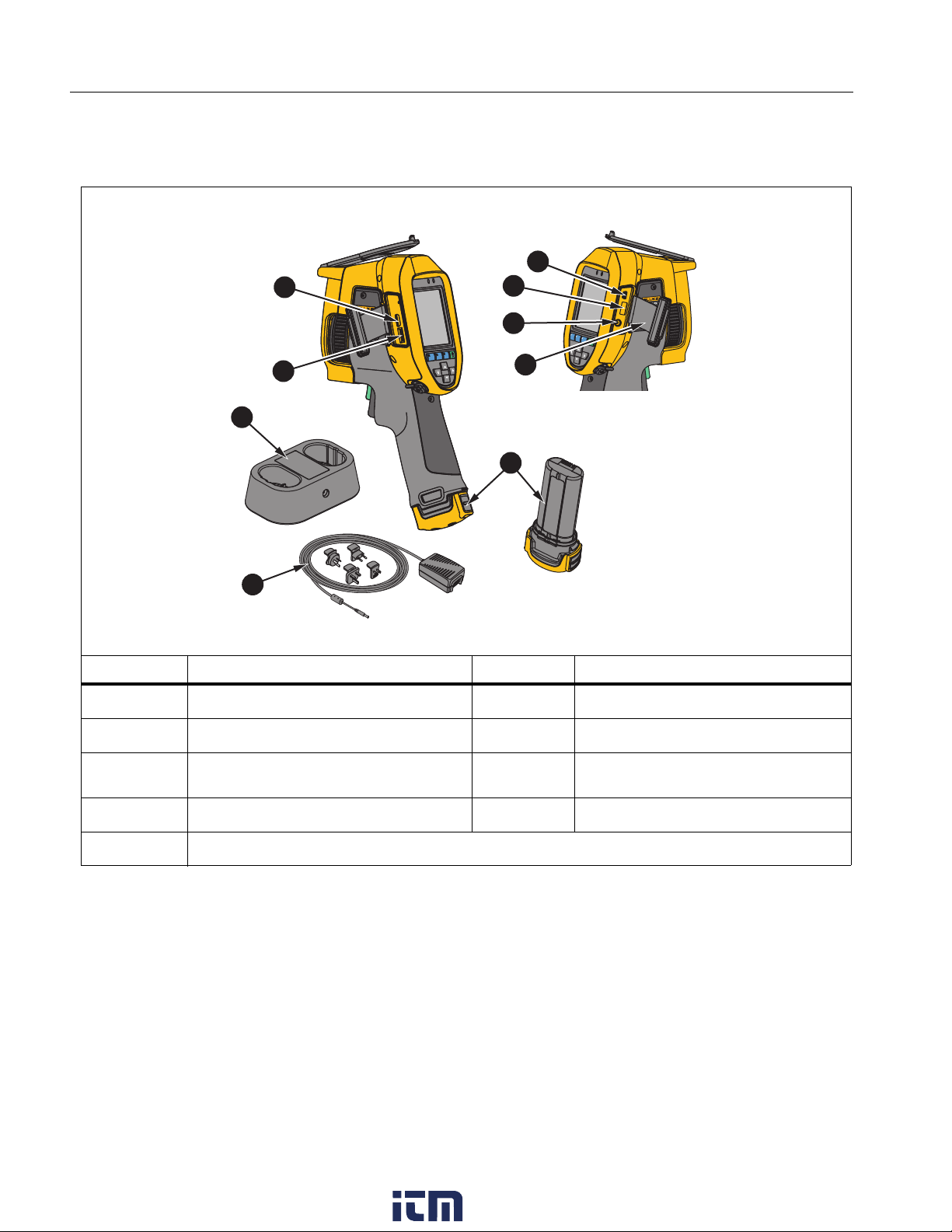
Controls
Table 3 shows the connections of the Imager.
Table 3. Connections
Item Description Item Description
Micro SD Memory Card Slot FConnector Cover
HDMI Connection GLithium-ion Smart Battery
USB Cable Connection HAC Power Supply with Universal
Adapters
DUSB Storage Device Connection I2-Bay Battery Charging Base
EAC Adapter/Charger Input Terminal
7
1
2
9
8
4
5
3
6
www. .com information@itm.com1.800.561.8187
Ce manuel convient aux modèles suivants
6
Table des matières


