
IT Concepts iTool Manuel utilisateur

1
Operation Manual
iTool
Digital Video Recorder
Zoom: 1.0x Flip: N Integr:Standard 11.9

2

3
Zoom: 1.0x Flip: N Integr:Standard 11.9

4
Content
Introduction.......................................... 5
Warning Notices and Precautions ....... 6
Scope of Delivery................................. 8
System Presentation
Overview iTool....................................................... 9
The 24 Watt Metal Halide Light Source................. 11
The Control Panel ................................................ 12
iTool Interfaces..................................................... 14
Preparing the iTool
Connecting to Power Supply................................ 16
Inserting the SD Card........................................... 17
Connecting a Headset ......................................... 17
Connecting an Output Device .............................. 17
Starting Inspection
Switching-on the iTool.......................................... 18
Menu Structure and Operating ............................. 18
Language Selection ............................................. 19
Resetting to Default Settings ................................ 20
Image Control ...................................................... 21
Format SD Card................................................... 22
Setting Time and Date ......................................... 23
Creating and saving Image Captures
Choosing a Standard Setting ............................... 24
Image Capture and Video Recording
in Mode „OFF“ ..................................................... 25
Image Capture and Video Recording
in Mode „ON“ ...................................................... 26
Comparative Measuring with the iTool .................. 28
Playback of saved Images and
Recordings ......................................... 29
Optimising Camera Settings
Camera Setting.................................................... 32
Camera Setting Standard..................................... 33
Camera Setting Short Integration ......................... 34
Camera Setting Long Integration.......................... 35
Camera Setting Manual........................................ 36
Maintenance
Replacement of the Metal Halide Lamp ................ 37
Cleaning the iTool................................................. 38
Spare Parts and Accessories ............................... 39
Service ................................................................ 41
Technical Specifications...................... 42
Declaration of Compliance with CE .... 43

5
We congratulate you on buying your iTool DVR Video Imaging Hub, in the following just named iTool.
The iTool constitutes the core of the iTool DVR System. It unites Light Source, TFT Display plus Image
Storage and Video Recording Device. The iTool mostly is delivered in conjunction with an iSeries Videoscope
and an iPack, iCase or iCaseplus.
The diversity of inspection objects, materials and lightning conditions often makes it difficult to get
high-quality images. It is easy to adjust the iTool to your application to receive optimal inspection images
even in extreme situations.
Always keep the Operation Manual with the iTool. It contains all information for safe and efficient operation.
However, should you have further questions, feel free to contact our Service Team.
Introduction
Online Store - store.itcworld.de

6
Read the Operation Manual carefully before suing the iTool.
The iTool is designed for a diversified field of applications in Industry, Building and Science.
Caution! The iTool has not to be used in specially designated or prohibited areas (e.g. Explosion
Prevention).
Caution! The iTool has to be employed by skilled and qualified personnel appropriate to the application.
Electric Shock! No unauthorised opening of the casing. There is high danger of electric shock due to
Parts being under voltage.
Caution! Never look directly into the light emitting part of the Videoscope or of the Light Source. There
is ultraviolet and infrared as well as highly intense visible light coming from the Light Source. These can
cause injuries of eyes and skin. Always switch off the Light Source or adjust brightness to a minimum
when changing or controlling the objective or the distal end of the Videoscope.
Warning Notices and Precautions
Online Store - store.itcworld.de

7
A Videoscope in use with the iTool should not come into contact with a current or voltage source.
Damage to the product or an electric shock for you may result.
Always switch off the iTool before connecting a Videoscope or a Video Camera.
Take care, that there always is enough free space for ventilation behind and in front of the iTool.
The iTool is not watertight. Operate the iTool in dry environment only. The iTool is not water-proof
and must not be immerged into water.
Only use the iTool as intended.
Warning Notices and Precautions
Online Store - store.itcworld.de
8
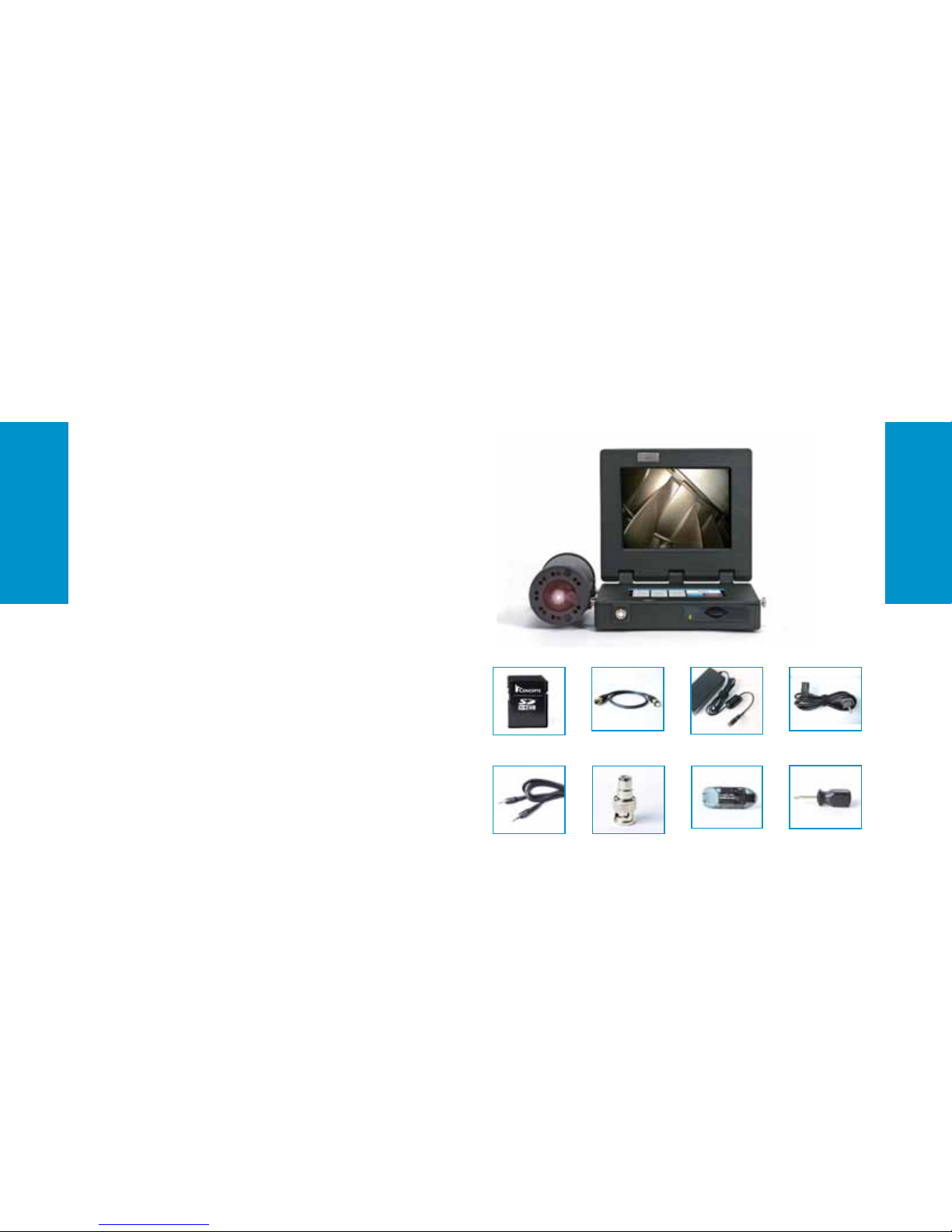
If the iTool is delivered as part of a Videoscope System
following components will be included in the Scope of
Delivery:
– iSeries Videoscope
– iSeries Interchangeable Objective
– iCase or iCaseplus
– Components (see figure on the right)
You will find additional Accessories in this Operation
Manual on Page 39, in our Accessories Catalogue or on
our Homepage under www.itcworld.de.
We are certainly pleased being at your disposal for personal
consulting as well.
Scope of Delivery
BNC/Cinch Adapter
5-pin Cable short AC Adapter
Screwdriver
Cinch Cable
Online Store - store.itcworld.de
Card Reader
Power Supply Cable
SD Card

9
The iTool DVR Video Imaging Hub is designed for the use with IT Concepts Videoscopes and CCD Cameras.
The 24W Metal Halide Light Source produces extremely bright light and therefore allows illumination of dark
cavities. Videos and images are shown on the TFT Display. Overlay texts can be attached to them. Video recordings
can also be saved with additional audio comments.
System Presentation
TFT-Display
Keypad
SD-Card Slot
Online Store - store.itcworld.de
Zoom: 1.0x Flip: N Integr:Standard 11.9
Status Indicator Line
24W Metal Halide Light Source
Light Guide Connector
Brightness Control
5-pin Connector for
Videoscope or Camera
Overview iTool

10
System Presentation
BNC Connector (IN) for
Videoscope or Camera
BNC Connector (OUT) for
Hard Disk, Monitor, etc.
Microphone Connector
12V DC Input
S-Video IN
Headphones Connector
Online Store - store.itcworld.de
Overview iTool
Table des matières
Autres manuels IT Concepts DVR


