
iRoom iTop Manuel utilisateur

MANUAL
iTop Light / iTop Pro / iTop Plus
EnglishDeutschFrançais
intelligence. on.


ENGLISH
Page 3
for iRoom‘s iTop
MANUAL
Package content
iRoom‘s iTop
1x Icon set
(iTop Pro & iTop Plus)
Introduction
Thank you for purchasing iRoom‘s iTop tabletop docking station.
This MANUAL is designed to guide you through the hardware installation and initial software configuration.
The warranty terms are also included in this MANUAL.
For details on configuring iRoom‘s iTop, to download the TCP-interface description, latest drivers, latest FAQ‘s or user manuals in other
languages, please visit: www.iRoomiO.com
1x PoE+Injector
1 x CAT6 flat
network cable 2m
1 x Power cable
Power
Active

Page 4
intelligence. on.
Quick Start Guide
Klick
1
3
4
2
LAN
PoE
+
AC
Klick
Audio
System
USB Port*
Installation:
How to Dock: Motion Sensor (iTop Pro & iTop Plus):
press
outwards
* iTop Pro & iTop Plus

ENGLISH
Page 5
for iRoom‘s iTop
MANUAL
!!
38 mm
115 mm 155 mm
M4
7 deep
mm
Icon change (iTop Pro & iTop Plus):
Securing to surface:
Caution Caution
Use this tapped
hole to secure your iTop.
1
2
1 2 3

Page 6
intelligence. on.
Basic Configuration
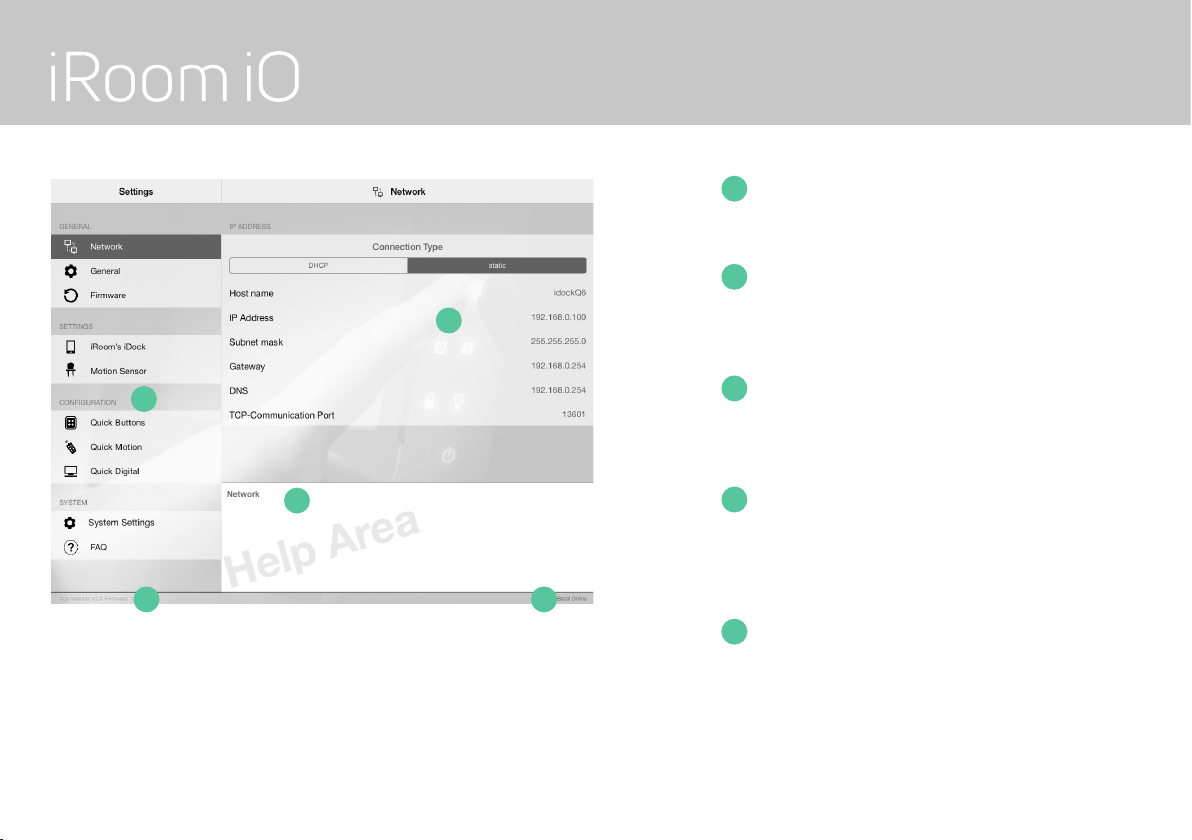
To configure iRoom‘s iTop Pro and iTop Plus access it via a docked iPad using the free iOS App „iRoom‘s iDock“.
Default IP: DHCP
Default Access-Code: iBezel
iOS App Store & App iRoom‘s iDock
• Open iOS App store and search for App „iRoom‘s iDock“
• Install App „iRoom‘s iDock“
• Open App „iRoom‘s iDock“
• Dock the iPad into iRoom‘s iTop
• Verify status „online“ (indicates successful docking procedure)
For additional details on the iRoom‘s iDock App, please refer to the „in App Help“ and the in App FAQ area.
As we perform frequent iOS-App-updates the visual appearance might change.
Default Unlock PIN
Press and hold any two Quick Keys until the green LED starts flashing. Enter PIN and confirm by pressing the Quick Key with the green LED.
Default PIN: 1234
Please change Access Code & TouchCode PIN during configuration to avoid unauthorized iPad removal.

ENGLISH
Page 7
for iRoom‘s iTop
MANUAL
Specifications iRoom’s iTop
Type iTop Light / iTop Pro / iTop Plus
Dimensions (WxHxD) 280mm x 160mm x 138mm / 11“ x 6.3“ x 5,3“
Power Supply PoE+(IEEE 802.3at) or 110-240VAC
LAN 10 Mbps
Communication TCP/IP, status & control
Function Description Store & charge iPad; 6 configurable Quick Keys.
Intelligent Glass Bezel (iTop Pro & iTop Plus) 6 touch buttons (with customizable icons) / 1 motion sensor
Anti-Theft Protection (iTop Plus) Code-protected removal of the iPad
Audio output 3,5 mm audio jack analog stereo / adjustable Line-Out
USB port (iTop Pro & iTop Plus) For USB-C accessories. 5V/1A max.
Operating Temperature 0 - 35°C or 32 - 95°F
Operating Humidity 20% - 90% RH non-condensing
Weight iTop 2,2 kg / 4.85 lbs
Cleaning
The product requires no special care, but only a regular cleaning of the glass. Do not use any abrasive/harsh cleaners and
unplug power supply before cleaning. For general cleaning of the surfaces please use a soft cloth with screen cleaner. If
possible frequently change the cloth so that no dust particles get stuck in the towel causing scratches.
!
Page 8
intelligence. on.
Restoring the Default Configuration and Password
Use the „restore to factory setting“ function of the iRoom‘s iDock iOS-App
• Access-Code is required
1
1
2
2
3
3
5
5
4
4
MAIN MENU
Main Function Selection Area
SUB MENU
Setting Adjustment and
Configuration section
in App HELP AREA
Selecting text in Sub-Menu
shows affiliated help
App & Firmware Version
Displays App Version number and
Firmware Version installed on your iTop
(if comm. status is online)
Communication Status
Displays iTop Communication status
(online/offline)

ENGLISH
Page 9
for iRoom‘s iTop
MANUAL
Lock
Pull the steel bar out, turn the lug forward and move the steel bar
back until the lug secures the iPad.
Unlock
Press and hold any two buttons on the iTop faceplate (Quick Keys)
at the same time until the green button starts blinking. Enter the
4-digit PIN (you’ve set before – see above) and confirm by pressing
the green button. The red button starts blinking. This indicates that
the lock is released now. After a defined time, it relocks itself auto-
matically. By pressing the red button, you can relock manually.
• In case you entered the wrong PIN, you will hear a double beep.
Start over and enter the correct PIN.
• In case you notice any mistyping while entering the code, you
can start over by pressing the red button.
1
1
2
2
3
3
TouchCode Functionality
For activating the iPad lock.
Changing TouchCode PIN
Enter desired 4-digit PIN and confirm by pressing the green
button.
Time delay for Automatic Lock
Once the lock is released, it automatically relocks after a set
time.

Page 10
intelligence. on.
Electrical Safety Information
1.) Compliance is required with respect to voltage, frequency, and current requirements indicated on the manufacturer’s label. Connection to a
different power source than those specified may result in improper operation, damage to the equipment or pose a fire hazard if the limita-
tions are not followed.
2.) There are no operator serviceable parts inside this equipment. Service should be provided only by an authorized
service technician.
Protection against Theft
iRoom’s iTop Plus provides a locking mechanism for the iPad. However, the locking mechanism does not provide any protection against theft. Unau-
thorized and/or forceful removal of a tablet cannot be prevented. iRoom GmbH does not accept any liability for the theft of an iPad!
IT-Security
In order to the open an unsecured communication protocol used by iRoom‘s iTop the user is responsible to ensure proper network security to
avoid unauthorized LAN Control of iRooms iTop.
Limited Warranty
iRoom GmbH warrants that the product(s) furnished hereunder shall be free from defects in material and workmanship for a period of two (2)
years from the date of purchase made by the original end-customer or for a period of 3 years from the date of shipment by iRoom GmbH under
normal use and operation.
iRoom‘s GmbH sole and exclusive obligation and liability under the foregoing warranty shall be for iRoom GmbH, at its discretion, to repair or
replace any product that fails to conform to the above warranty during the above warranty period. The expense of removal and reinstallation of
any product is not included in this warranty. The warranty period of any repaired or replaced product shall not extend beyond its original term.
Autres manuels pour iTop
1
Ce manuel convient aux modèles suivants
2
Table des matières
Langues :


