
IPN W99 Series Manuel utilisateur

Manual
Eco Low
Radiation
IPN W99x
2
1
4
3
2
9
1
8
7
1
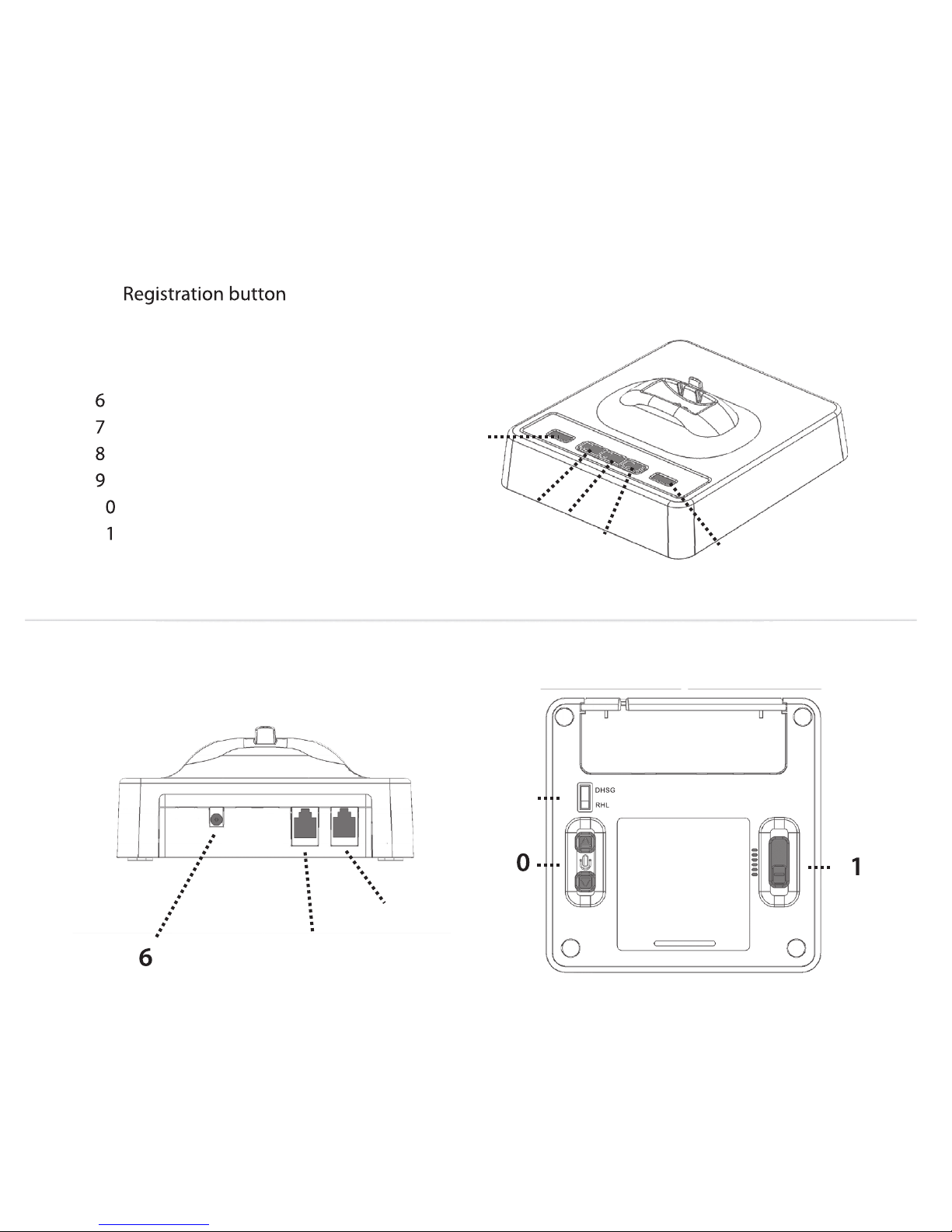
1. Battery Indicator
. Handset connector
4. Telephone (TEL) button
. EHS Selection switch
. Telephone connector (’Tel’ port)
2.
A. Telephone/Bluetooth base station
3. Bluetooth Button
5. Online indicator
1 . Microphone volume up/down
1 . Wiring switch
. Power socket
5
3
5
1
2
3
4
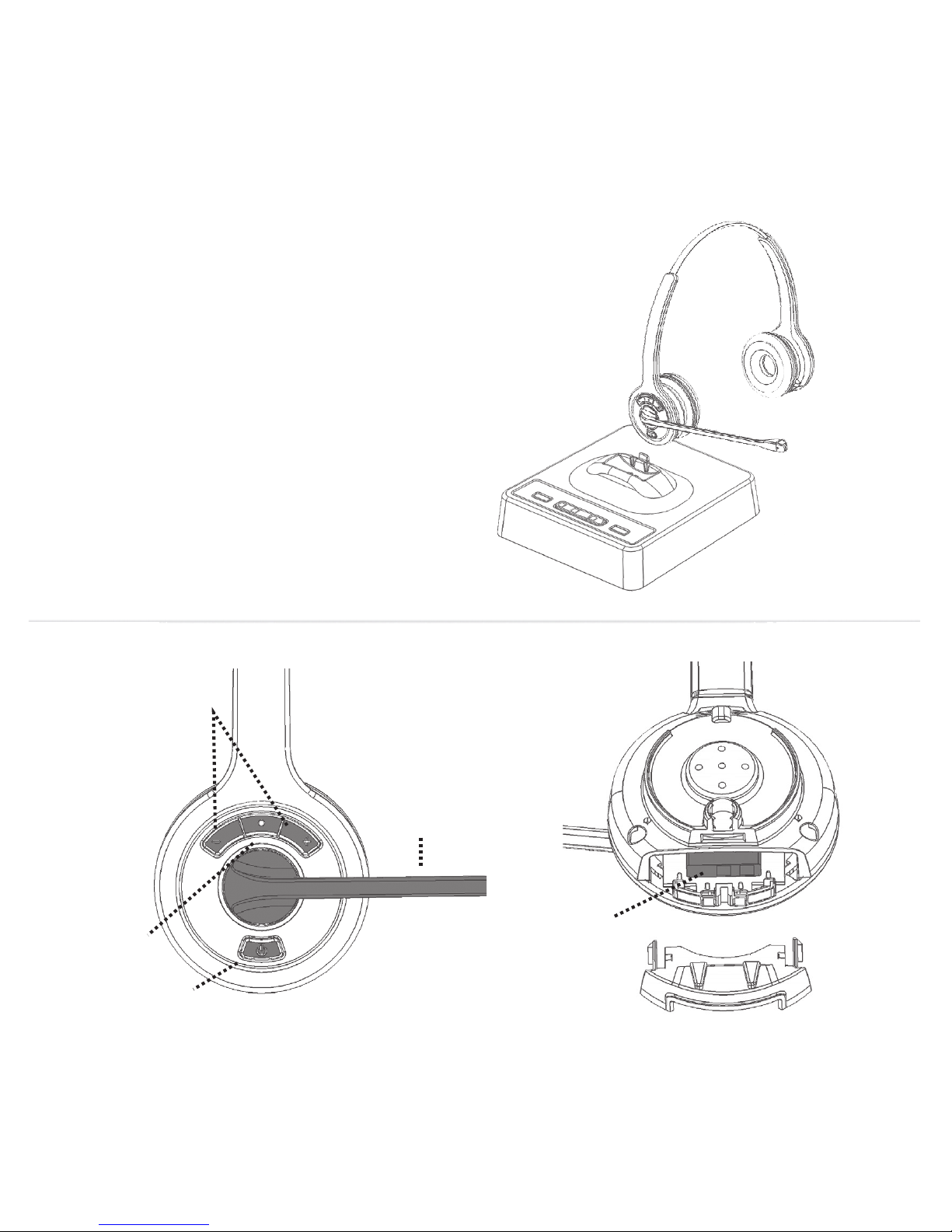
B. IPN Monaural / IPN Binaural
3. Headset ON/OFF
1. Receive volume up/down
2. Mute
4. Noise cancelling boom
5. Battery

4
Contents:
2. Connecting to a Bluetooth devic 7
2. Wearing style 7
3. Operation 8
2.2
2. Setup 6
1. Product description 5
2.1 Connecting to a telephone or terminal with a headset port 6
3.7 Battery level indication 10
3.9 Making a conference call 11
3.2 Adjusting the ring volume 9
3.4 Headset transmitting volume setting 9
3.3 Muting the headset microphone 9
3.11 Using multiple headsets 12
3.1
3.1 Overview of audi signals 13
4. Troubleshooting 14
3.6 Out of range and reconnection 10
3.8
3.1.1 Making an outgoing call in telephone mode 8
3.1.2 Receiving an incoming call in telephone mode 8
3.10 Registering headsets to the base 11
3.1. Making or receiving a bluetooth cal 9
3.5 Adjusting headset receive volume 10

5
1. Product description
•DECT wireless headset solution
The IPN W99x DECT is a fully wireless headset solution offering the user the ability to
work ‘handsfree’ with true wireless mobility.
•‘Out of range’ warning
Main features:
•Universal headset base
•Auxiliary port for connecting handset lifter or electronic hookswitch device
•Receive volume control on headset
•Secure high quality audio
•Mute button on headset
•Up to 9 hours talk time without recharging
•Talk button with LED on headset
•Magnetic charging unit
•Eco-Low Radiation Dect with dynamic power adjustment
•Noise cancelling microphone for reduced background noise
•Operating Range up to 400m/1300 ft (Over-the-ear headset up to 300m)
•DECT 6.0/GAP compatible
•DHSG protocol
•Bluetooth device connectivity
•Three way conferencing by connection of additional headset

6
•You may need to adjust the wiring switch that is located on the bottom of the
base with the 'handset' port on your telephone.
•Use the power adaptor supplied with the product to connect the headset base to a
•You may need to adjust the wiring switch that is located on the bottom of the
base with the headset port on your telephone.
•Using the headset cord supplied with the product, connect the 'Tel' port on headset
NOTE: The first time you use your headset, it is recommended that the headset is charged
for a minimum of 4 hours before use.
•The base power LED with light.
2. Setup
2.1 Connecting to a telephone or terminal with a headset port
•Using the headset cord supplied with the product, connect the 'Tel' port on headset
•Connect the power adaptor supplied with the product to the base unit.
•Use the power adaptor supplied with the product to connect the headset base to a
power socket.
•headset Base to find the correct wiring for your device.
2.2 Connecting to a telephone or terminal without a headset port
•Connect the telephone handset cord to the handset port on the headset base.
power socket.
•headset base to find the correct wiring for your device.

7
2. Wearing Style
•The IPN W99x series is available in two headset variants:
To replace the ear cushion of the IPN or binaural, put your thumb on
the top of the speaker and carefully pull the ear cushion at the bottom towards you.
•W995 IPN Over-the-head binaural
•W990 IPN Over-the-head monaural
•Hold down the Bluetooth button on the base for three (3) seconds until the LED flashes
Connecting to a Bluetooth device
•On the ® device, turn on the ® feature. The ® feature is usually
found in the settings menu
•Select ‘DECT Headset’ from the device list. Once paired, the LED will stop flashing.

8
3.1 Making and Receiving Calls
3.1.1 Making an outgoing call in Telephone mode
•Ensure that the 'TEL' button on top of the headset base is selected.
•Lift the headset from the base to start a call. If you are already wearing the headset,
press the headset’s ‘ON/OFF’ button. The base 'Online Indicator' LED will light. If a
3. Operation
handset Lifter or Electronic Hookswitch device is connected to the headset base, the
headset press the headset’s ‘ON/OFF’ button . The base 'online indicator' LED will light.
telephone terminal.
•Dial the telephone number on the telephone terminal
flash, also a ring tone will be heard on the headset.
•Lift the headset from the base to answer the call. If you are already wearing the
your telephone terminal.
•After finishing the call, replace the headset on the base or press the ON/OFF button
•If there is an incoming call from the telephone line and the headset base is connected
to disconnect. The 'Online indicator' LED will turn off.
to a handset lifter or Electronic Hook switch device, the 'TEL' LED and 'headset' LED will
If a handset Lifter or Electronic Hookswitch device is connected to the headset base,
the line will be seized. Otherwise, you will also need to activate the headset port via
line will be seized. Otherwise, you will also need to activate the Headset port via your
3.1.2 Receive an incoming call in Telephone mode.
•To end the call, replace the headset on the base or press the headset ON/OFF button.

9
When the headset is ringing to indicated an incoming call, you can adjust the ring volume
You can adjust the transmit volume of the headset by using the two buttons located on the
bottom of the headset base.
While the headset is in Mute mode, a short beep will be heard on the headset every 8 seconds.
Press the 'Mute' button again to release the mute.
using the volume control buttons located on the headset.
3.4 Headset transmitting volume setting
3.3 Muting The Headset Microphone
To mute the headset microphone when on a call, press the 'Mute' button on the headset.
•Ensure that the 'Bluetooth' button on top of the headset base is selected.
•Lift the headset from the base or press the headset's ON/OFF button if you are already
•Make or answer the call on your bluetooth device ensuring that the DECT Headset is
selected as your audio device
3.1. Making or receiving a Bluetooth call
•After finishing your call, press the ON/OFF button on the headset or end call button on the
bluetooth device to disconnect. The base ‘Online
3.2 Adjusting the Ringing Volume

10
< 20%
20%-40%
40%-60%
60%-80%
80%-100%
8 Switching Off Auto Pickup Mode
The
3.6 Out of range and Reconnection
You will hear a warning tone in the headset when you walk out of range of the base. The
headset will be disconnected from the base and the call will be automatically placed on hold.
If you move back inside the range of the base the headset will automatically reconnect.
3.7 Battery Level Indication
The four LED's (8) on the top of the headset base indicate the battery level of your headset.
Use the volume control buttons on the headset to adjust the receive volume on your headset.
You will hear a beep sound for each volume step Up or Down.
3.5 Adjusting Headset Receive Volume
Ce manuel convient aux modèles suivants
2
Table des matières
Autres manuels IPN casque


