
iPazzPort NC-812-16A Manuel utilisateur

Unisen Group 联力胜 Android Stick Player with feature of voice
www.ipazzport.com
www.unisengroup.com 1
USER MANUAL
Android Mini PC
MODEL:NC-812-16A
VER.: 01
“All trademarks here belong to their respective company's”

Unisen Group 联力胜 Android Stick Player with feature of voice
www.ipazzport.com
www.unisengroup.com 2
iPazzport Android 4.0 ICS voice Smart TV with customized Voice Driver which can
allow user select Audio output to iPazzPort voice mini wireless keyboard(voice remote)
for audio playback. With iPazzPort wireless audio keyboard mouse and touchpad
(voice remote), you can either use the speaker and microphone of the voice remote
like the phone for Skype or use the headset that plugged into the voice remote for
enjoy movie at night that not disturb families sleeping, also it is very well for voice
control, voice search, voice input and talk.Wanting to watch any movie, only to speak
toward the voice remote.
Of course, with the customized voice driver, it can allow user select selectable Audio
output between voice remote or TV audio out (TV HDMI) for audio playback.
iPazzport Android 4.0 ICS voice Smart TV connects to the HDMI interface of any
regular TV and converts it into a Smart TV. It's basically a fully functioning
micro-computer with the size of your thumb which runs at Android 4.0 ICS as today's
latest Smart TV or smart phones. The TV becomes a giant tablet and you can control
it through the USB wired/wireless/voice keyboard. You can download apps from the
Google Play Store to stream videos, play games, connect with your friends on
Facebook, catch up on news, do some work or simply surf the web. You can even
attach the iPazzPort voice wireless keyboard(Voice remote) and a video camera to do
Skype call. Yes, all that on your TV!
iPazzport Android 4.0 ICS voice Smart TV is so small that it can fits inside your pocket
and you can conveniently take it anywhere you go, even when you travel abroad. And
when you get to your destination, hotel room or office you can easily plug it into any
monitor or TV and you will get access to all your information, games, TV streaming
channels, work documents and your entire digital life. Imagine walking into a meeting
and doing a presentation without a laptop. All you need to do is plug it into the
projector and your presentation can be played from the cloud (like a Dropbox account)
or locally from the SD Card.
Of course, when friends and family can come together to share the collection HD
movies, stored in their own computers, mobile hard disk, connect iPazzport
Android 4.0 ICS voice Smart TV to HD TV, you can play now.

Unisen Group 联力胜 Android Stick Player with feature of voice
www.ipazzport.com
www.unisengroup.com 3
1.Features and specifications:
1.1.Features
z Ultra-mini, thumb Android Smart TV
z Supports voice mini wireless keyboard (remote) for Skype QQ, MSN, Google
Voice search, voice input and voice control.
z Play voice at remote as watching video alone, no effect family
z Supports video call
z Android 4.0 OS, rich preloaded applic ations software for home education,
entertainment, travel presentation, etc.
z WiFi inside
1.2. Specifications:
1.2.1 CPU: 1.0G, GPU inside
-HD video decoder(1080P@ 60FPS)
-HD video encoder(1080P@ 30FPS)
1.2.2. Memory:DDR3: 1G
1.2.3. Flash:8G
1.2.4. Network:WiFi 802/.11 b/g
1.2.5. Interface:
--HDMI1.4 1
--USB HOST 1
--Mini USB 1
--SDSlot 1
1.2.6. Operations system:Android4.0, support multi language
1.2.7. Power supply:MINI USB,DC:5V
1.2.8. Size:77.2*26*13.5mm
1.2.9. Weight:26g

Unisen Group 联力胜 Android Stick Player with feature of voice
www.ipazzport.com
www.unisengroup.com 4
2. Product overview
3. How to use:
3.1 Slide the HDMI switch, Rise the external antenna, and push out the HDMI
port.Don’t push theantenna
3.2 Power on Android Stick Player: plug USB cable into Mini USB port of your HD TV, and
another mini end to your Stick, (please note, if USB power output of HD TV is less than
5V/500mA, please buy one power adaptor to make it work.), then green Indicator will be on,
that means your device successfully started.
3.3Plug Android Stick Player into HDMI slot of your TV, power on your TV and set signal
source to “HDMI”(you also can connect them via HDMI extension cable)

Unisen Group 联力胜 Android Stick Player with feature of voice
www.ipazzport.com
www.unisengroup.com 5
After push(below chart)
3.3 input device: This device support standard USB keyboard and mouse, also support RF
2.4G Voice Wireless keyboard. Left mouse for click, right mouse for back.
3.3.1. iPazzPort Voice Wireless Keyboard and Mouse, please read its manual for install
instruction.
3.3.2. RF 2.4G wireless keyboard and mouse: plug USB receiver into USB port of Android
Stick Player
3.3.3 Standard wired USB keyboard or mouse: plug USB keyboard or mouse into USB port of
Android Stick Player.

Unisen Group 联力胜 Android Stick Player with feature of voice
www.ipazzport.com
www.unisengroup.com 6
3.3.4. Device does not support “double click to open”, just “click-to-open”
3.3.5. For more input device interfacing, Android Stick Player can plug with USB hub to
share the physical USB socket with more device. Although it can support hub for more
interface, it cannot be too much as the output power of the socket is limited.
3.4 Wi-fi connect:
3.4.1 Click “Settings” on the main interface.
3.4.2 Select “Wi-Fi” and turn it to on, then the available open SSID will shown. Select
the preferred SSID for connection and then follow through the normal WiFi setup for
connection
3.4.3 If the required SSID not shown on the list then requires searching the wireless
network again to make sure that the required SSID is found.
3.5 Application software management:
3.5.1 Voice Search is one of free apps, you can get it at APPCHINA. Please search it
in APPCHINA by typing “voice search” and install it.
3.5.2 after Voice Search is installed, an icon appear at the end of the input field,
press this icon and a pop up will show you that you require to speak. Voice out
what you want to input and corresponding voice search result will be displayed at the
input field. Repeat the procedure until the correct result is coming out. Although it is
not 100% accuracy, it already reduces much of the input effort.

Unisen Group 联力胜 Android Stick Player with feature of voice
www.ipazzport.com
www.unisengroup.com 7
3.5.3 Language setting for voice search: G oogle Voice Search support s most
language in the world, please do as following to set language:
Îback to main user inter face and find “setting” button and clic k it to enter setting
window
Îfind “
A
Language and input”
Î find “Speech”Î “Voice search”
Îclick “Voice Search” and select your language.
Unisen Group 联力胜 Android Stick Player with feature of voice
www.ipazzport.com
www.unisengroup.com 8
3.6 Local or internet video and audio: take Youtube as an example,
3.6.1 plug USB receiv er of iPazzPort Voice keyboard into USB port of Android S tick
Player, then power on Voice keyboard and activate keyboard voice function,
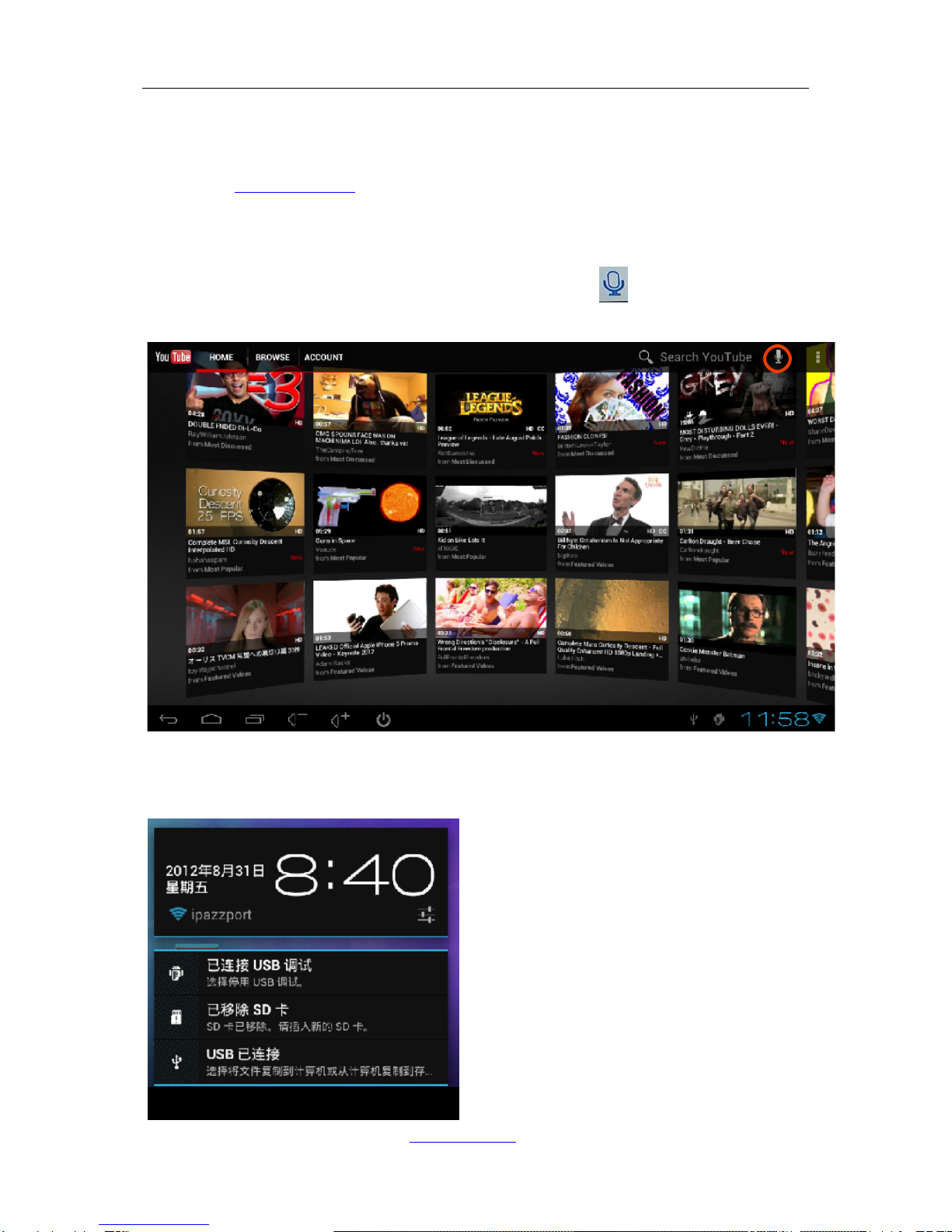
3.6.2 Go to m.youtube.com and search your favourite movies for watching, Other than
playing voice, the movie nam e searching after installin g of voice search, it can
input the movie name by speaking out the movie name and the voice search
engine will convert the voice to text input and inputted to the input field of the
YouTube searching input fi eld. So, after clicking to activate the voice
search
3.6.3 to avoid disturbing to your families, you can set the voice out through iPazzPort
Voice keyboard and enjoy the entertainment separately:
Î Tap ESC key to exit full-screen mode and click right-bottom of screen.

Unisen Group 联力胜 Android Stick Player with feature of voice
www.ipazzport.com
www.unisengroup.com 9
Î Go to “Setting” window, find “Sound”Î “Audio Output”
Î Click USB audio to set voice output through USB port and HDMI PCM to set voice output
through HDMI interface
3.7, Adjust your TV screen resolutions: if your TV screen is not full mapped when
device is powered on, please do as following:
SettingsÎ DisplayÎ output settingsÎ Auto detecting.

Unisen Group 联力胜 Android Stick Player with feature of voice
www.ipazzport.com
www.unisengroup.com 10
3.8 Menu description on the main interface:
: Back to upper menu
: Return to main interface
: Volume up
: Volume down
: Enter management of application software
3.9 File management:
3.9.1Click to enter application software management, find “ES File Browser”
and running it. This app can manage your file such as copy, cut, paste etc. All function
buttons locate at the top bar of the screen.
3.9.2 Data exchange with your PC: it is just a mobile hard disc when connect to your
PC with USB cable.
Connect device to your computer via USB cable, a message window will pop up
at the bottom-left of the screen, saying “USB debugging connected, select to disable
USB mass storage, then you will find new “NAND DISK” in your computer (your can
find it by double clicking “My Computer” on the desktop), now it can fully function as a
normal disc.
You also can fulfill the function by pressing button to extend the HDMI interface
out of the case, then press button as indicated below)
Table des matières


