ionnic 06-0001 Manuel utilisateur

RUGGEDISED
TABLET 7"
06-0001
User’s Manual

2
Declaration of Conformity
CE
The CE symbol on your product indicates that it is in compliance with the directives of the Union European (EU). A
Certificate of Compliance is available by contacting Technical Support.
This product has passed the CE test for environmental specifications when shielded cables are used for external
wiring. We recommend the use of shielded cables.
FCC Class B
This device complies with Part 15 of the FCC Rules. Any changes or modifications not expressly approved by the
guarantee of this device could void the user’s authority to operate the equipment.
RoHS
Certifies that all components in its products are in compliance and conform to the European Union’s Restriction of
Use of Hazardous Substances in Electrical and Electronic Equipment (RoHS) Directive 2002/95/EC.
!This symbol of “CAUTION” indicates that there is a danger of injury to the user or a risk of
damage to the product, should warning notices be disregarded
This symbol indicates electrical warning
Battery Recycle
About This Manual
This user’s manual provides the general information, wiring and installation instructions for the product. The manual is
meant for the experienced users and integrators with hardware knowledge of personal computers. If you are not sure
about any description in this manual, consult your vendor before further handling.
We recommend that you keep one copy of this manual for the quick reference for any necessary maintenance in the
future.
Safety Symbols

3
Important Safety Instructions
Read these safety instructions carefully:
• Read all cautions and warnings on the equipment.
• Place this equipment on a reliable surface when installing. Dropping it or letting it fall may cause damage.
• Make sure the correct voltage is connected to the equipment.
• For pluggable equipment, the socket outlet should be near the equipment and should be easily accessible.
• Keep this equipment away from humidity.
• Disconnect this equipment from the A/C outlet before cleaning it. Use a moist cloth. Do not use liquid or
sprayed detergent for cleaning.
• Do not scratch or rub the screen with a hard object.
• Never use any of the solvents, such as Thinner Spray-type cleaner, Wax, Benzene, Abrasive cleaner, Acid or
Alkaline solvent, on the display. Harsh chemicals may cause damage to the cabinet and the touch sensor.
• Remove dirt with a lightly moistened cloth and a mild solvent detergent. Then wipe the cabinet with a soft
dry cloth.
• If the equipment will not be used for a long time, disconnect it from the power source to avoid damage by
transient over-voltage.
• Never pour any liquid into openings. This may causes fire or electrical shock.
• If one of the following situations arises, get the equipment checked by service personnel:
• The power cord or plug is damaged.
• Liquid has penetrated into the equipment.
• The equipment has been exposed to moisture.
• The equipment does not work well, or you cannot get it to work according to the user’s manual.
• The equipment has been dropped or damaged.
• The equipment has obvious signs of breakage.
Rechargeable Battery Pack Safety
With very little care, you can optimize the battery life and maximize the lifespan of the battery. Most
importantly, use only the equipment in its ideal operating temperature (as described in specifications, page 10).
• Using the Equipment for the First Time
Be sure to fully charge (approx. 4 hours) the equipment when charging the equipment for the first time.
• Long-Term Storage & Maintenance
If you are putting away the battery for more than three months, it is recommended that the battery
should be stored separately and fully charged, and get recharged every three months. If you store an
uncharged battery, it could fall into a deep state of discharge which would render it incapable of holding
any charge. Be sure to store the equipment and battery at the proper temperature (as described in
specifications, page 10).

4
Manufacturer Limited Warranty and Limitation of Liability
Manufacturer warrants that on the date of purchase this product will conform to Manufacturer’s
specifications for this product (which are available from the Manufacturer upon request), and
Manufacturer further warrants that this product is free from defects in materials and workmanship. The
Limited Warranty extends for one (1) years from the date of purchase, this warranty does not cover the
battery or any damage to the LCD screen. Other warranties may apply, call the Manufacturer for details.
The Manufacturer will, at its discretion, repair or replace any product found by the Manufacturer to be
defective and subject to this Limited Warranty.
Damage to parts of product resulting from tampering, accident, abuse, misuse, negligence,
unapproved modifications, fire or other hazard; improper installation or operation; or not being
maintained in accordance with the maintenance procedures set forth in the manufacturer’s
installation and operating instructions voids this limited warranty.
Oral statements or representations about the product which may have been made by
salespeople, dealers, agents or other manufacturer’s representatives do not constitute
warranties. This limited warranty may not be amended, modified, or enlarged except by a written
agreement signed by an authorised official or manufacturer which expressly refers to this limited
warranty.
Exclusion of Other Warranties
The manufacturer makes no other warranties, express or implied. The implied warranties for
merchantability or fitness for a particular purpose are hereby excluded and shall not apply to the
product. Buyer’s sole and exclusive remedy in contract, tort, or under any other theory against
manufacturer regarding the product and its use shall be the replacement or repair of the product as
described above.
Limitation of Liability
In the event of liability for damages arising out of the limited warranty or any other claim related to
the manufacturer’s products, the manufacturer’s liability for damages shall be limited to the amount
paid for the product at the time of the original purchase. In no event shall the manufacturer be special,
consequential, or incidental damages based upon any claim for breach of contract, improper installation,
negligence, or other claim, even if the manufacturer or a manufacturer’s representative has been
advised of the possibility of such damages. The manufacturer shall have no further obligation or liability
with respect to the product or its sale, operation and use, and the manufacturer neither assumes nor
authorises the assumption of any other obligation or liability in connection with such product.
This Limited Warranty defines specific legal rights. You may have other legal rights which
vary from state to state. Some states do no allow the exclusion or limitation of incidental or
consequential damages.

5
Product Features
• Qualcomm Quad-Core, Cortex A7, 1.1GHz Processor.
• Android 7.1.2 Operation System.
• Comply with IP-66 rating.
• WIFI, Bluetooth, LTE, GNSS connectivity.
• 5000mAh rechargeable battery.
• 7” IPS Display with 1280x800 resolution, 800cd/m, Multi-touch.
• Docking station provides easy charging and connectivity.
• Fully Rugged for Transportation / Warehousing / Industrial Control
Parts of the Device
7
Chapter 1: Introduction
1.1 Product Highlights
● Qualcomm Quad-Core, Cortex A7, 1.1GHz Processor
● Android 7.1.2 Operation System
● comply with IP-66 rating
● WIFI, Bluetooth, LTE, GNSS and 5000mAh rechargeable battery supported
● 7” IPS Display, physical 1280x800 resolution, 800cd/m2, Touch Multi-touch
● Portable with Docking-Station
● Fully Rugged for Transportation/Warehousing/Industrial Control
1.2 Parts of the Device
Auto Backlights
Hand Strap
Mounting
Ram Mounting
Speaker
Home
Menu
Return
Power Indicator
SIM Card Slot
SD Card Slot
Headphone Jack
USB Type-C
Docking Station Docking Station
Protection Rubber
Power Button
Contact Pins
75mm VESA
Built-in Battery
Cooling Vent
Power Button
Camera Camera
Flashlight

6
Wiring Diagram
8
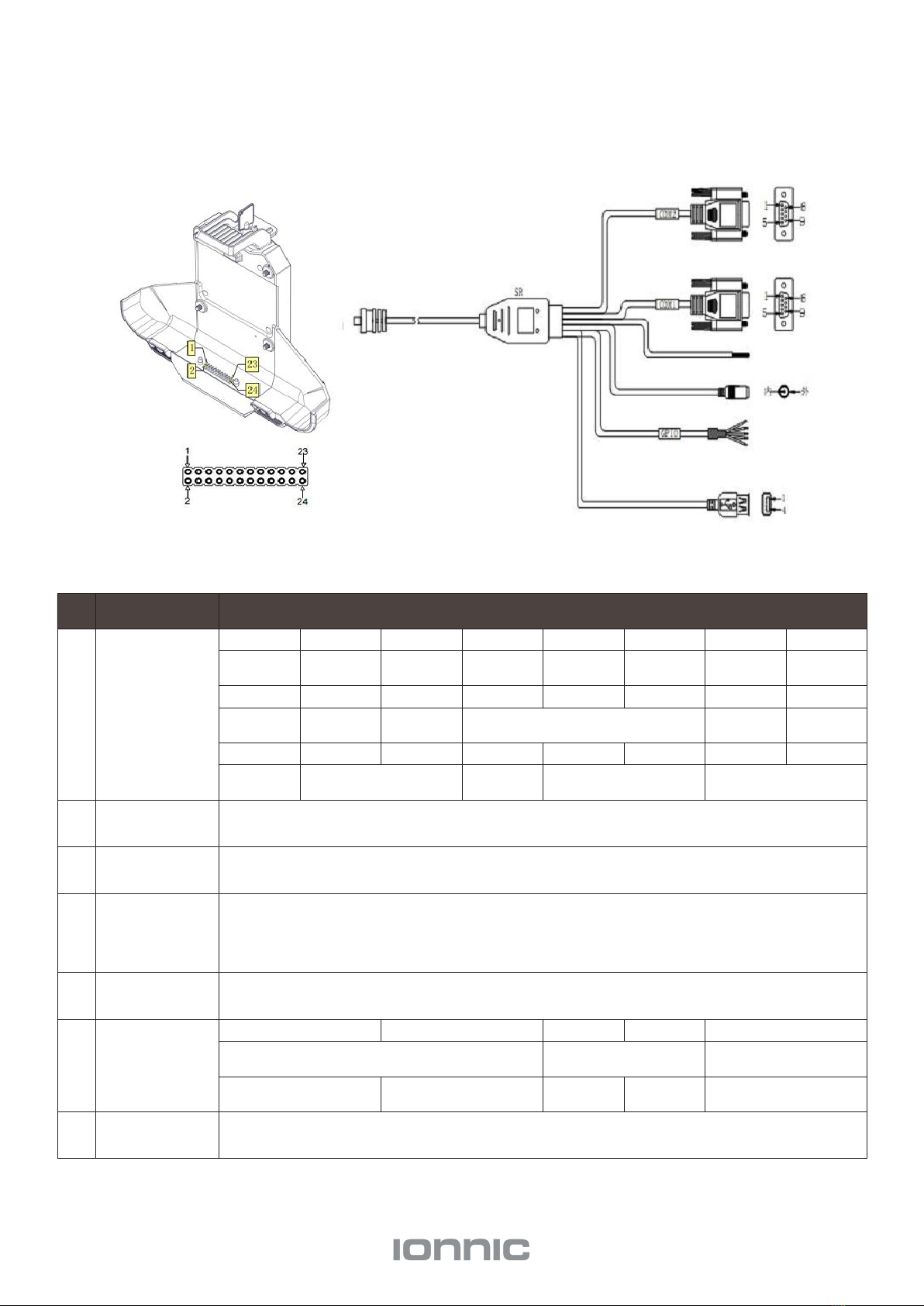
1.3 Extended Cable Definition
1.3.1 Standard version
NO.
Item
Definition
1
Pogo pin
1
2
3
4
5
6
7
8
GPIO69
GPIO1
GPIO
2
GPIO
3
GPIO4
ACC
GND
RXD0
9
10
11
12
13
14
15
16
TXD0
RXD1
TXD1
GND
ID
DP
17
18
19
20
21
22
23
24
DM
VUSB
EN
DC+
DC-
2
Com 2
RS232 /dev/ttyHSL1.
3
Com 1
RS232 /dev/ttyHSL0.
4
ACC Input
Connect with vehicle ACC power.
Voltage range: 0-30V.
Ps: With ACC function, the device is requested to connect the power source via
DC adaptor simultaneously to power on after ignition. please refer to 3-2 for the
DEMO and source code of ACC.
5
Power
DC input Voltage:DC8-36V(ISO 7637-2 compliant)
6
GPIO
Red
White
Green
Yellow
Black
Voltage range: 0-30V
Voltage range:
0-3.7V
Contact Pins
1
2
3
4
5
6
7
No. Connection Description
1 Contact Pins
12345678
GPIO69 GPIO1 GPIO2 GPIO3 GPIO4 ACC GND RXD0
9 10 11 12 13 14 15 16
TXD0 RXD1 TXD1 GND ID DP
17 18 19 20 21 22 23 24
DM VUSB EN DC+ DC-
2 COM 2 RS232 / dev / ttyHSL1.
3 COM 3 RS232 / dev / ttyHSL0.
4 ACC Input
Connect with vehicle ACC power.
Voltage: 0–30V.
With ACC function, the device is requested to connect the power source via DC adaptor simultaneously to power
on after ignition. See page 25 for the DEMO and source code of ACC.
5 Power DC input. Voltage: 8–36V (ISO 7637-2 compliant)
6 GPIO
RED White Green Yellow Black
Voltage: 0–30V Voltage: 0–3.7V —
Input 1 Input 2 Output 1 Output 2 GND
7 USB USB Type-A (Can not be used simultaneously with USB Type-C on the device)

7
Specifications
Protection
IP-66
1.5m drop resistance
Raised bezel for LCD impact protection
LCD 7" Digital IPS Panel
Resolution 1280x800
Brightness 800 cm/m
Touch Input Capacitive Multi-touch
CPU Qualcomm 4xARM Cortex A7, 1.1GHz Processor
OS Andriod v7.1.2
Memory LPDDR3 2GB
Storage 16GB
GPU Adreno 304
Audio
Integrated microphone
Integrated 2W speaker
1 x 3.5mm stereo headphone jack
Navigation
AGPS &
E-Compass
GPS 1575.42MHz±1.023MHz
GLONASS 1597.5MHz~1605.8MHz
BeiDou 1561.098MHz±2.046MHz
WWAN
US Version North
America
LTE FDD: B2/B4/B5/B7/B12/B13/B25/B26 WCDMA: B1/B2/B4/B5/B8
GSM: 850/1900MHz
EU Version
EMEA/Korea/Thailand
LTE FDD: B1/B3/B5/B7/B8/B20 LTE TDD: B38/B40/B41 WCDMA: B1/B5/B8
GSM: 850/900/1800/1900MHz
AU Version Australia/
Taiwan/Brazil
LTE FDD: B1/B3/B5/B7/B8/B28 LTE TDD: B40
WCDMA: B1/B2/B5/B8
GSM: 850/900/1800/1900MHz
CN Version
China/India
LTE FDD: B1/B3/B8
LTE TDD: B38/B39/B40/B41 TDSCDMA: B34/B39 EVDO/CDMA: BC0 WCDMA: B1/B8
GSM: 900/1800MHz
JPN Version
Japan
LTE FDD: B1/B3/B8/B18/B19/B26 LTE TDD: B41
WCDMA: B1/B6/B19

8
Specifications cont.
Data
Transmission
LTE
LTE-FDD
Max 150Mbps(DL)/Max 50Mbps(UL) LTE-FDD
Max 130Mbps(DL)/Max 35Mbps(UL)
DC-HSPA+ Max 42 Mbps(DL)/Max 5.76Mbps(UL)
WLAN
802.11a/b/g/n
2.4GHz & 5GHz
Wake-on-WLAN (WoWLAN)
Ad hoc mode
WAPI SMS4 hardware encryption
AP mode
Wi-Fi Direct
MCS 0-7 for HT20 and HT40
Bluetooth
2402MHz~2480MHz
Integrated Bluetooth 4.2 LE + EDR class 2, with HID, A2DP, AVRCP, BIP, BPP, FTP, HFP, HSP, OPP, SPP
Sensor
Gyroscope
Accelerometer (G-sensor)
NFC
(optional)
Read/ write Made: ISO/IEC 14443 A&B up to 848kbit/s, FeliCa at 212&424 kbit/s
MIFARE 1K, 4K, NFC Forum type 1, 2, 3, 4, 5 tags. ISO/IEC 15693 All peer-to-peer modes
Card Emulation Mode (from host): NFC Forum T4T( ISO/IEC 14443 A&B)at 106 kbit/s
Camera
(optional)
Front 2 megapixel camera
Rear 8 megapixel camera
Mounting
(Optional)
RAM Mount 1.912"RAM mount compatible (AMPS holes)
VESA Bracket Vesa 75mm Folder Bracket
I/O Interface
Serial Port 2 x RS232
USB Port 1 x USB Host,1x USB Device, High speed up to 480Mbps
SD Slot 1 x Micro SD card, 1.8v / 2.95v, up to 64G
SIM Socket 1 x Mini SIM Card slot, 1.8v / 2.95v
GPIO Gpio×2 Input, Gpio×2 Output (See "3. 4Extended Cable Definition" for details.)
ACC See page 6 "Wiring Diagram" for details.

9
Power Supply External AC Power Adapter
Battery Type Lithium-ion rechargeable battery
Battery Capacity 3.7V, 5000mAh battery, about 5hours
Power
Consumption
Normal mode: 5 Watt
Charging mode: 8 Watt
Adapter Input AC 100-240C, 50-60Hz
Adapter Output DC power output 12V/2A
Operating Temp. -10°C ~ 65°C (14°F ~ 149°F)
Storage Temp. -20°C ~ 70°C (-4°F ~ 158°F)
Operating
Humidity 95% (non-condensing)
Dimensions 207.4 x 137.4 x 30.1 cm
Weight
Tablet 785g
Docking Station 550g
Specifications cont.

10
Getting Started
Power On/Off and Sleep/Wake
Power On the Device
1. Long press the power button for more than 2 seconds until the Logo displayed. It needs around 40 seconds to
start the system. The indicator is on when tablet activate normally.
2. Power on by connecting ACC, see details on page 17 "Using ACC”.
3. Power consumption during activation: 5w Typical Value.
Power Off The Device
1. Long press the power button for more than 2 seconds until the shut down option box pop-up, then click the
“POWER OFF” option.
2. Power off by ACC, see details on page 17 "Using ACC”.
3. In order to reduce the standby power consumption, the red light is on in charging status when power on. And the
light will go off if full charged.
4. The consumption during power off (with docking station) – around 100mW.
Sleep and Wake Up The Device
1. Auto sleep, the sleep time can be set up in the settings.
2. Short press button to sleep.
3. Sleep by ACC, see details on page 17 "Using ACC”.
4. Short press to wake
5. Wake by ACC, see details on page 17 "Using ACC”.
6. The average of power consumption in sleep status – 1W
Indicator Colour
Device Status
Charging and Discharging Power On/Off
Green light on Uncharged or Fully charged Power On
Red light on Charging Power Off or Power On
Red or Green light
blinking
The device is abnormal, please cut off the external power supply immediately and
return it back to the supplier for repair.
Table des matières