
Intex Aqua Style Manuel utilisateur

1
Aqua Style
Android Smart Phone
User Guide

2
Directory
1Install .......................................................................................................................................9
1.1 Install the SIM card or USIM card and battery .............................................9
1.2 Battery charging..........................................................................................................10
1.3 Insert the storage card.........................................................................................12
1.4 Remove the storage card .....................................................................................13
1.5 Format the storage card ......................................................................................13
1.6 Use the storage card as U disk ..........................................................................14
1.7 Standby screen ........................................................................................................15
2Custom mobile phone ........................................................................................................16
2.1 Wireless and internet.............................................................................................16
2.2 Equipment.................................................................................................................17
2.3 Personal .....................................................................................................................18
2.4 System.......................................................................................................................19
2.5 Install and unload apps..........................................................................................20
2.6 Gesture Sensor ........................................................................................................20
3First Interface......................................................................................................................21
3.1 Dial..............................................................................................................................21
3.2 Contacts ....................................................................................................................22
3.3 Message......................................................................................................................23
3.4 Browser ......................................................................................................................24

3
3.5 E-mail.........................................................................................................................25
3.6 Camera & Vidicon....................................................................................................26
3.7 Multi-media file management..............................................................................27
3.8 Music player .............................................................................................................29
3.9 Recorder ....................................................................................................................30
3.10 Calendar .....................................................................................................................31
3.11 clock ............................................................................ Error! Bookmark not defined.
3.12 calculator ................................................................... Error! Bookmark not defined.
3.13 Other functions .......................................................................................................33
4Application ............................................................................................................................34
4.1 Map.............................................................................................................................34
4.2 Talk .............................................................................................................................35
4.3 Facebook ....................................................................................................................36
4.4 Nimbizz......................................................................................................................37
4.5 Google+, Messenger ................................................................................................38
4.6 Play Music, AajTAK, Headlines, Saavn..............................................................40
4.7 Documents to Go, Adobe Reader, Flash Player settings.............................40
4.8 Games.........................................................................................................................40
4.9 Play Store.................................................................................................................40
5Use and Maintenance.........................................................................................................40
6Technical Information.........................................................................................................41

4
Dear INTEX customer,
Congratulations on becoming a proud owner of INTEX product.
You have now joined the fraternity of millions of satisfied INTEX
customers spread across the globe.
Intex Technologies is one of the fastest growing IT Hardware,
Mobile Phones and Electronics Company. A well established brand,
INTEX has kept pace with the technology needs of millions of IT
hardware & electronics consumers and has been serving them with
more than 300 user friendly, high quality, state-of-the art yet
simple products/solutions. The products have been in the market
since 1996 and conform to global standards.
Brand INTEX covers a wide range of computer peripherals and
accessories such as Computer Multimedia speakers, Cabinets,
Keyboards, Mouse, UPS, Add-on cards, Webcams, Headphones,
Laptop bags, etc. As a part of its diversification strategy, Intex
also offers an interesting range of PCs, TFT-LCD Monitors,
Consumer Electronics (DVD Players), Home UPS & Mobile
Phones.
Every INTEX product goes through a rigorous process of sample
evaluation and approval before commercial launch. Customers look
upon the brand as a value-for-money & feature-rich offering,
supported by efficient after sales service.

5
We look forward to your patronage.
It would be our pleasure to receive feedback and suggestions you
may have for improvements in the product(s) you are using.
Intex Technologies (I) Ltd
info@intextechnologies.com
www.intextechnologies.com
Helpline No. 1800-103- 8822 (India)
Intex Way Gulf LLC
www.intexuae.com
Toll Free No. 800-468- 39823 (Dubai)
Tel: 00971 04 3931991
Need Add below in safety column
SAR
The highest SAR value for this mobile phone is < 1.6 W/Kg, in
accordance with the requirements of the ICNIRP, which
recommended the limit for exposure to radio waves is 1.6
watts/kilogram (W/kg) averaged over 1 gram of tissue. For more
information, please visit (website) to query

6
SAFETY TIPS
Use of wireless hands-free system (headphone, headset) with a
low power Bluetooth emitter.
Make sure the cell phone has a low SAR.
Keep your calls short or send a text message (SMS) (instead.
This advice applies especially to children, adolescents and pregnant
women.
Use cell phone when the signal quality is good.
People having active medical implants should preferably keep the
cell phone at least 15 cm away from the implant.
Please read the instruction file first
Before you use this phone, please read all the safety cautions in
the instructions in detail, to ensure safety and correct use.
The descriptions are based on the default settings
The pictures and screen shots may different from the actual
product.
The phone with sound resource, wall paper and picture are
permitted to use limited in Intex or among all the owners.
Against the commercial and other reason to extract and use
these file will violate the copyright law. Intex is not responsible

7
for this behave of right violation.
Receive and send message, upload and download, automatic
synchronism or GPRS service may cause other kinds of fee.
If you want to avoid the extra fee, choose the probable
charging plan. Any relevant information, please contact the
service supplier.
To the unknown software, be careful when install, the strange
website pop up when browsing the internet, you can click but
better to avoid the operation or the phone will be poisoned.
Please properly keep this instruction book for the future
reference.
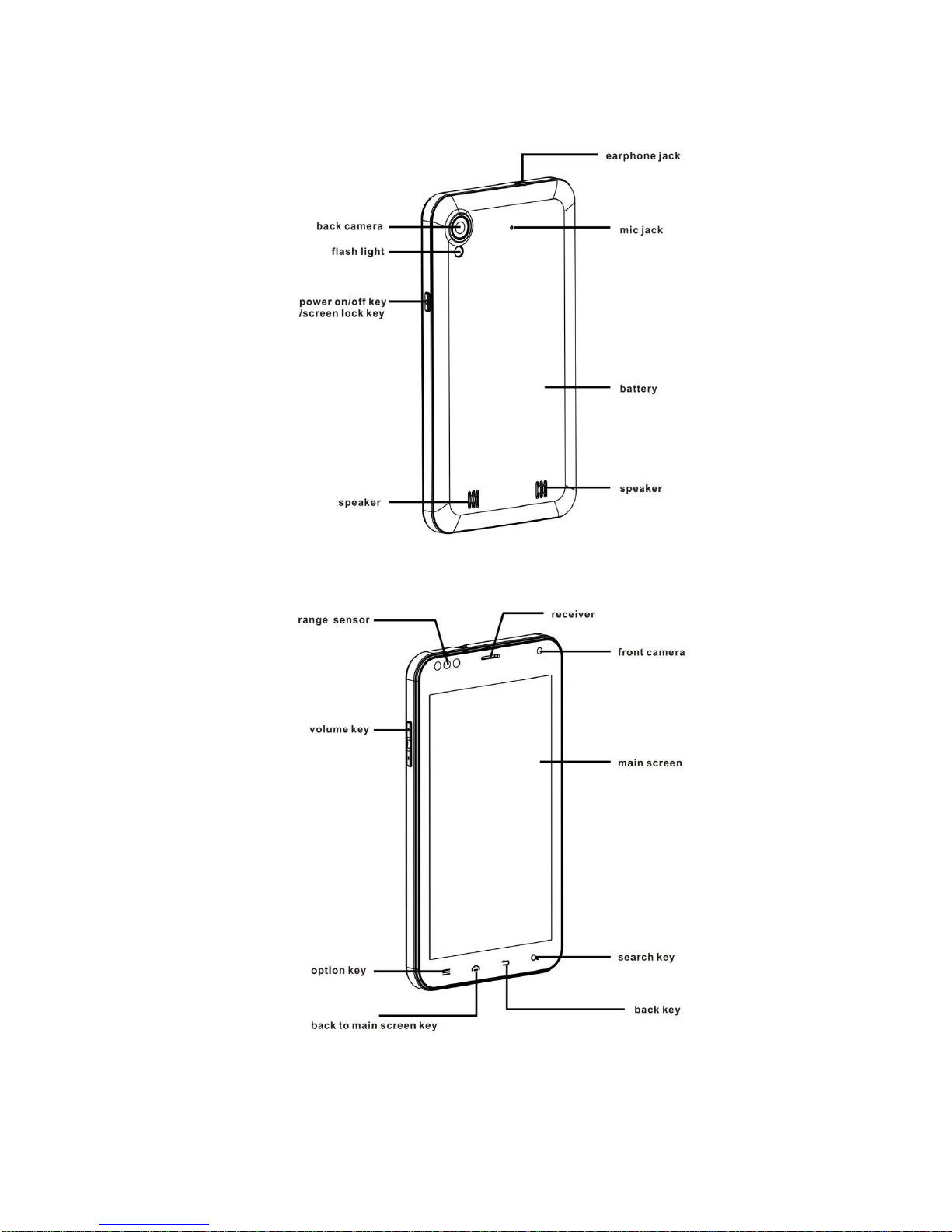
Mobile phone parts diagram
8
9
1Install
1.1 Install the SIM card or USIM card and battery
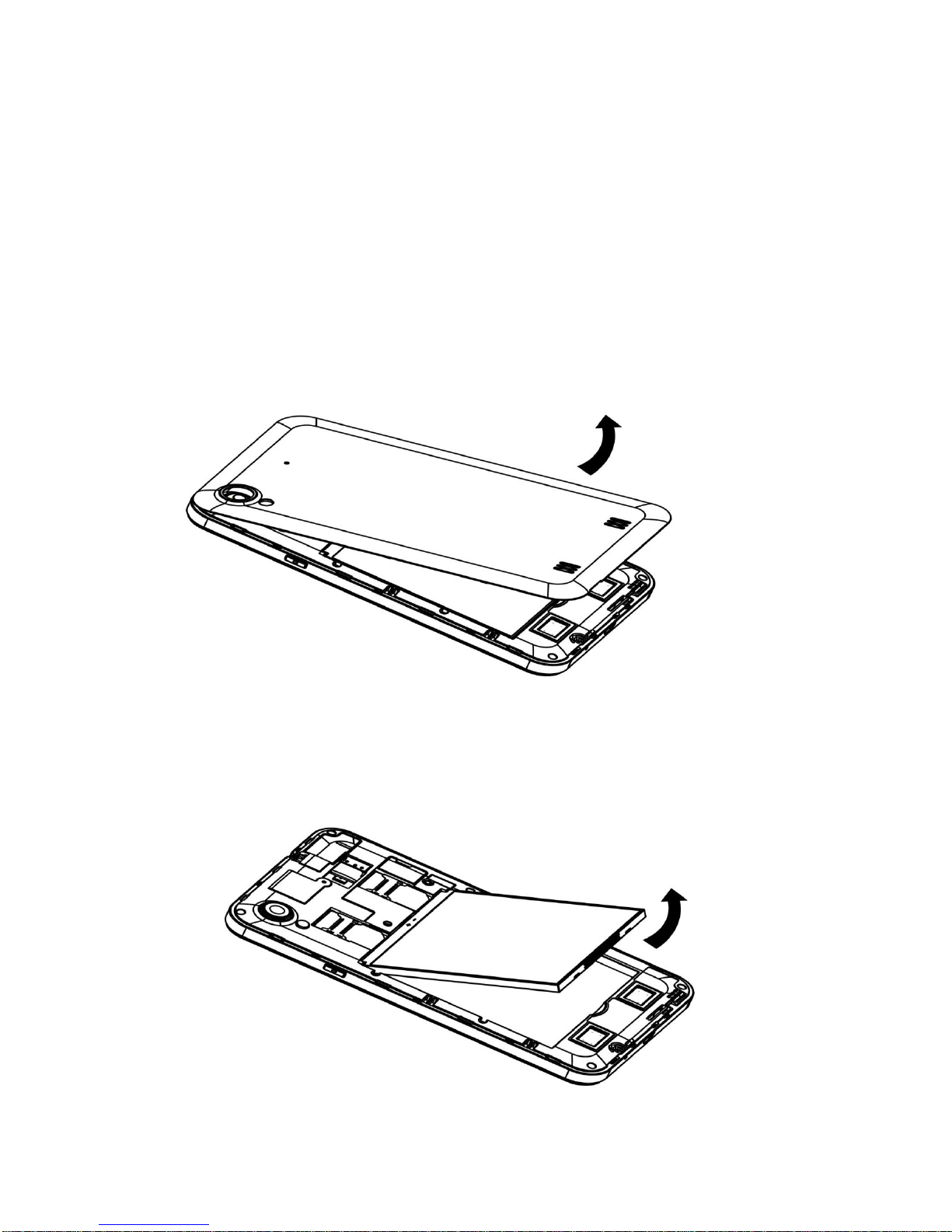
1, If the phone is on power, please turn it off, press the power
off key->choose power off->confirm to turn off the phone, take
off the battery
2, Take off the battery, put the SIM card into the corresponding
card slot

10
3, Put back the battery and battery cover
1.2 Battery charging
When using the phone at the first time, need to charge
for the phone, can use charger or connect the phone with
the computer via data cable.
The phone will issue warning tone and display electricity
shortage information when low battery, the battery icon
will turn red, moreover, the phone will turn off
automatically when electricity is too low. Need to charge
then you can use the phone.
If the battery is power off, can't turn on the phone
immediately even connect to the charger, before you turn
on the phone, please charge for several minutes.
When charging with the charger, Please put the small end
plug of the charger into the mobile phone in the
multi-function socket, put the big end into the standard
Table des matières
Autres manuels Intex Téléphone portable

Intex
Intex U-AA Power Manuel utilisateur

Intex
Intex Nano-Y Manuel utilisateur

Intex
Intex NEO-VI Manuel utilisateur

Intex
Intex IN GC5050 Manuel utilisateur

Intex
Intex Force Manuel utilisateur

Intex
Intex Aqua Wonder Manuel utilisateur

Intex
Intex Aqua i7 Manuel utilisateur

Intex
Intex AQUA Sx Manuel utilisateur

Intex
Intex Neo-Smart Manuel utilisateur

Intex
Intex Aqua I-5 Manuel utilisateur


