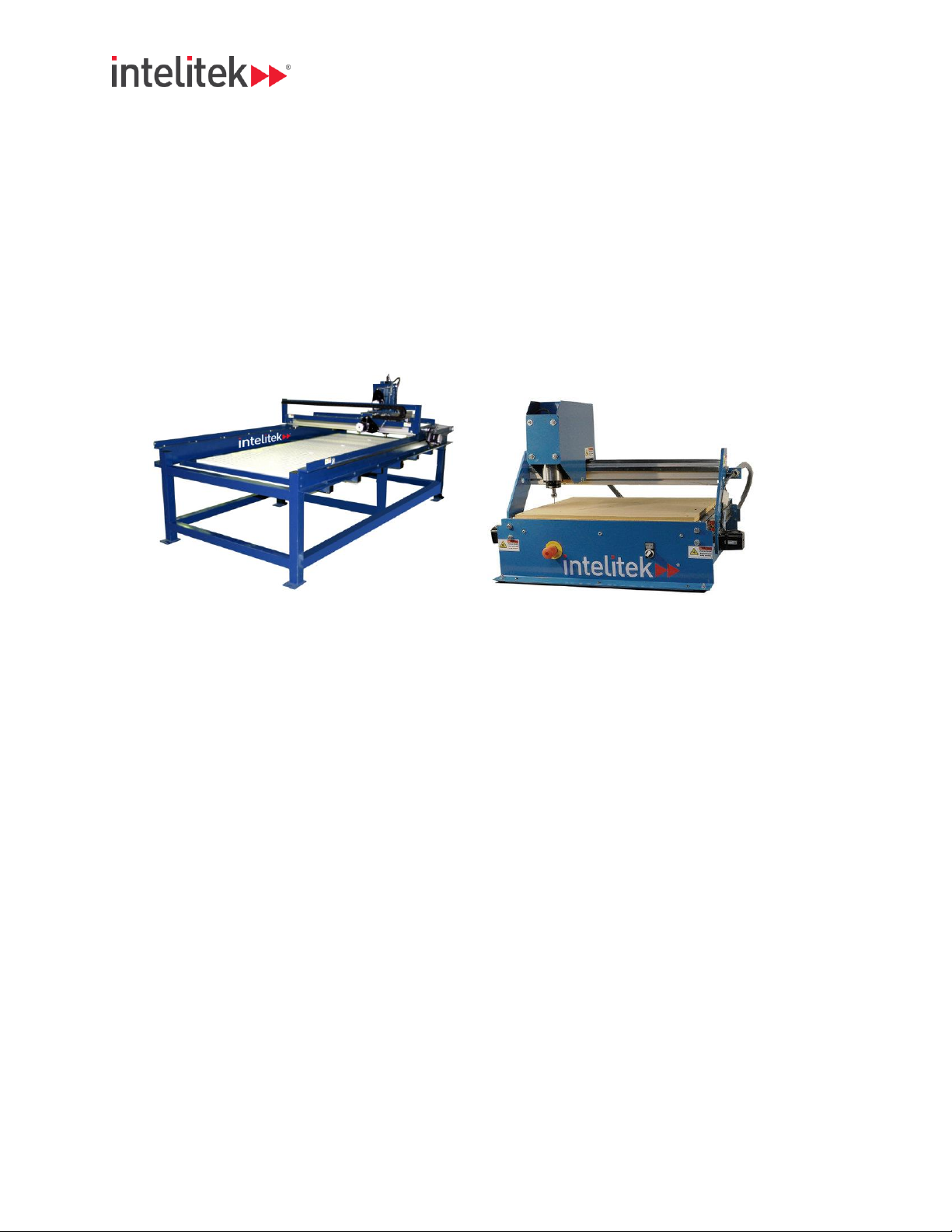
Intelitek Bench Router Manuel utilisateur

Rev A Router User Manual 1 |P a g e
Bench / Pro Router User Manual

Rev A Router User Manual 2 |P a g e
Contents
Terms and Condions....................................................................................................................................4
WARRANTY................................................................................................................................................4
DISCLAIMER OF CONSEQUENTIAL DAMAGES...........................................................................................5
Policies and Procedures................................................................................................................................5
SERVICE POLICY.........................................................................................................................................5
SHIPPING POLICY (TO CUSTOMER) ...........................................................................................................5
GENERAL SAFETY SYMBOLS: .....................................................................................................................6
Personal Safety Rules................................................................................................................................6
Work Area Safety Rules.............................................................................................................................7
System Use and Care.................................................................................................................................7
Electrical and Mechanical Service Rules ...................................................................................................7
Installing & Handling CNC Equipment...........................................................................................................9
Final Posioning of Equipment ...............................................................................................................10
Leveling CNC Equipment.........................................................................................................................11
Locaon of the Control PC ......................................................................................................................11
Computer connecons............................................................................................................................11
Connecng to Electricity.........................................................................................................................12
Connecng to Compressed Air ...............................................................................................................12
CNC System Operaon................................................................................................................................13
CNC System Start Up...............................................................................................................................13
CNC System Shut Down...........................................................................................................................13
Tesng the CNC System Operaon .........................................................................................................13
System Maintenance...................................................................................................................................14
Daily / As Needed................................................................................................................................14
Monthly:..............................................................................................................................................14
Extended Idle (Over 2 Months):..........................................................................................................14
Addional Informaon................................................................................................................................15

Rev A Router User Manual 3 |P a g e
Intenonally Le Blank

Rev A Router User Manual 4 |P a g e
Terms and Condions
The terms and condions set forth below and on the face side hereof constute a complete and
exclusive statement of the agreement between buyer and seller. All representaons, promises,
warranes, or statements by an agent or employee of seller that dier in any way from the terms and
condions hereof shall be given no force or eect, no modicaons, or addions there to shall be
binding upon seller unless expressly consented to in wring. Any conicng warranty terms and
condions in the purchase order or any other buyer's document are specically rejected by the seller. No
course of prior dealing or usage of trade shall supplement or explain any term used in this agreement.
WARRANTY
Seller warrants Goods manufactured by it will be free of material defects and will conform and funcon
consistent with the appropriate Seller specicaon(s) for a period of 1 year from the shipping date. If any
of the Goods are found by Seller to be defecve, such Goods will, at Seller's opon, be replaced or
repaired at Seller's cost. No defecve goods are to be returned without wrien authorizaon of seller.
The sole purpose of the spulated exclusive remedy shall be to provide the Buyer with free repair and
replacement of defecve Goods in the manner provided herein. This exclusive remedy shall not be
deemed to have failed of its essenal purpose so long as the Seller is willing and able to repair or replace
defecve Goods in the prescribed manner. The foregoing warranty is in lieu of all other warranes,
express or implied, including those of merchantability or tness for any purpose not expressly set forth
herein. No armaon of Seller, by words or acon, other than as set forth in this Secon shall constute
a warranty. Seller's warranty does not apply to any Goods which have been subjected to misuse,
mishandling, misapplicaon, neglect (including but not limited to improper maintenance), accident,
improper installaon, modicaon (including by not limited to use of unauthorized parts or
aachments), or adjustment or repair performed by anyone other than Seller or one of Seller's
authorized agents. When returning products to Seller packaging must be adequate or all warranty is null
and void. Buyer will pay for the cost of shipping to and from the Seller for all warranty repairs. In the
event travel is necessary for warranty repairs, Buyer will pay for the cost of all travel expenses to and
from the Seller's locaon.Any claim by Buyer with reference to the Goods sold hereunder shall be
deemed waived by the Buyer unless submied in wring to seller within the earlier of (I) thirty (30) days
following the date Buyer discovered or by reasonable inspecon should have discovered, any claimed
breach of foregoing warranty, or (ii) 12 months following the date of shipment. Any cause of acon for
breach of the foregoing warranty shall be brought within one year from the date the alleged breach was
discovered or should have been discovered, whichever occurs rst.
LIMITATION OF LIABILITY
Seller's liability (whether under the theories of breach of contract or warranty, negligence, or strict
liability) for its Goods shall be limited to repairing or replacing Goods found by Seller to be defecve, or
at Seller's opon, to refunding the purchase price of such Goods or parts thereof.

Rev A Router User Manual 5 |P a g e
DISCLAIMER OF CONSEQUENTIAL DAMAGES
In no event shall seller be liable for consequential damages arising out of or in connection with this agreement,
including without limitation, breach of any obligation imposed on seller hereunder. Consequential damages shall
include without limitation, loss of use, income or profit, or loss sustained as the result of injury (including death) to any
person, or loss of or damage to property (including without limitation property handled or processed by the use of the
goods). Buyer shall indemnify seller against all liability, cost or expense which may be sustained by seller on account
of any such loss, damage, or injury.
Policies and Procedures
RETURN PROCEDURE POLICY
Before returning any equipment in or out of warranty, the customer must first receive authorization number and
packing instructions from Intelitek. No claim will be allowed nor credit given for products returned without such
authorization. Proper packaging and insurance for shipping is solely the responsibility of the customer. Upon
receiving approval from Intelitek, the product should be returned along with statement describing problem or defect
with the Intelitek product with shipping prepaid. If upon examination by Intelitek, warranted defects exist, the product
will be repaired or replaced at no charge and returned, prepaid, to the customer. Return will be by common carrier
(e.g. UPS). Should the need for rapid, next day, or any other special shipping arise, this will be at customers’
expense, not at that of Intelitek. Should an out of warranty situation exist, the customer shall be notified of any repair
cost. At such time, the customer must issue to Intelitek a payment in full to cover the repair cost or authorize the
return shipping of product as-is to the customer. A restocking fee of 30% will be charged on items returned to stock.
SERVICE POLICY
Repairs are ordinarily done at the Intelitek facility in Derry, NH were all necessary instrumentation is available.
Service equipment is difficult to transport, and thereby limit these services to be performed at the discretion of
Intelitek. Should Services be required and provided at the sole discretion of Intelitek, any and all relevant expenses
incurred, including transportation, travel time, subsistence costs, and prevailing cost per hour (8 hour minimum) are
the responsibility of the customer.*see Technical Support policy for details.*call for current pricing.
SHIPPING POLICY (TO CUSTOMER)
Shipments to customer will be received during regularly scheduled business hours unless other arrangements are
necessary. Upon delivery to agreed customer location, it is solely the responsibility of the customer to inspect the
shipment for any damages incurred during transport. Damages to shipment must be noted on the bill of
lading at the time of delivery. Intelitek is not responsible for any damages to shipment during transport to the
customer. The full value of the shipment must be recorded on the bill of lading in order to receive full compensation
for damages incurred during transport to the customer.
TECHNICAL SUPPORT POLICY
Intelitek provides technical support service and assistance for its customers by (1) telephone (2) E-mail (4) technician
on site. Technical support is no substitute for CNC System, or software training that is purchased separately by the
customer. Technical support is provided at no charge to customer for diagnosing and assisting in the remedy (1) of
mechanical problems. (2) Of electrical problems (3) of preventative maintenance issues, up to 1 hour per incident for
any problem arising with Intelitek products which are covered by product the limited warranty. Customer will be
charged if technical support or assistance is required if the problem is not covered by product limited warranty. For
technical service by telephone the customer will be required to provide information about the Intelitek product and the
problem. The technician will ask questions concerning the (1) nature of problem. (2) Age of product or system. (3)
Type of product. Customers in need of technical service or assistance on product or system that not covered by the
limited warranty will be required to provide the technician with a valid credit card number to cover technical support or
assistance service charges. A base charge of $US (call for pricing) will be billed for the first 15 minutes of the service
call. A charge of $US (call for Pricing) / minute will be billed after the first 15 minutes of the service call. Pricing will be
explained at the time of service rendered. E-mail service will be provided without charge at the discretion of Intelitek.
If technician on site service is required for customers less than 2 hours driving distance from the Intelitek factory, the
customer will be billed a charge of $US (call for pricing) / hour. If technician on site service is required for customers
more than 2 hours driving distance from the Intelitek factory, the customer will be billed a charge of $US (call for
pricing) /day on site with a minimum of 4 hours service, and with maximum of 8 hours service for one day. All
rooming, travel, and subsistence costs + $US (call for pricing) per diem will be at the customer expense. All parts will

Rev A Router User Manual 6 |P a g e
be billed in addition to service charges.
CNC SYSTEM AND SOFTWARE TRAINING
Intelitek offers to its’ customers, training on Current Product Intelitek CNC Systems and Software. These training
sessions do NOT attend to unsupported software. Training classes are provided at the offices of Intelitek. in Derry,
NH or at the customer’s facility given the following circumstances: (1) the customer is financially responsible for all
travel expenses, included rental car, food, motel, airfare, etc. (2) The customer understands the training session is
exactly as stated, NOT equipment installation. The equipment must be in full working condition before the trainer
arrives at the facility.
General Informaon:
•This manual has been prepared by the technical staff of Intelitek exclusively for its customers and contains
reserved information. Therefore, any partial or total reproduction and/ or discloser to third parties of the
content herein are strictly prohibited without the prior written consent of Intelitek.
•This manual is supplied as an integral part of the CNC system and constitutes, at the time of printing, the
latest edition of documentation pertaining to the product.
•This manual is to be used by suitably trained personnel only. The information contained in this manual offers
no guarantee against risk. The use of the content of this manual is the sole responsibility of the user.
Intelitek cannot be held responsible or liable for any damage or injury resulting from incorrect use of this
document.
•This manual describes the procedures for correct installation of the CNC system. In the case of conflict
between these instructions and safety, electrical, or other standards/ codes, please contact L A Enterprise
CNC Inc for any corrective and or adaptive measures. Under no circumstances can the instructions
contained in this manual substitute technical, electrical, or safety standards/ codes.
GENERAL SAFETY SYMBOLS:
•Important instructions or precautions are marked with the following symbols.
Warning: Identifies situations that could lead to personal injury.
Warning: Live electrical parts.
Safety Warnings and Rules
Fully read and understand this and any manual or other instruction
provided with the CNC System. Become familiar with the function,
operation, and hazards of the CNC System, its’ parts, and accessories.
Personal Safety Rules
•Only qualied personnel should operate the CNC System.
•Stand clear of moving machinery.
•Never run CNC equipment unaended.
•Stay alert, watch what you are doing and use good sense when operang the CNC System.
•Do not use the CNC System while red or under the inuence of drugs, alcohol, or medicaon.
•Keep long hair, clothing, jewelry and gloves away from moving parts.
•Always keep body parts away from cung head.
•Always use personal protecve equipment

Rev A Router User Manual 7 |P a g e
•(PPE) as required by law including – Safety glasses, hearing protecon, dust or vapor protecon,
nonskid shoes, and hard hat.
•Remove collet wrenches before operang the CNC System.
Work Area Safety Rules
•Keep work area clean and well lit.
•Do not operate the CNC System in the presence of ammable liquids, gas, or dust.
•Keep bystanders, visitors, and children away while operang the CNC System.
•Remove unnecessary arcles from work surface before operang the CNC System.
•Observe any cauon or warning signs supplied with the CNC System.
System Use and Care
•Use clamps or other praccal way to rmly secure and support the work piece.
•Maintain the CNC System with care.
•Always use recommended cung speeds and feed rates.
•Keep all cung tools sharp and clean.
•Do not force a tool.
•Always use the correct tool for the job.
•Check for misalignment or binding of moving parts, and any other condion that may aect the
systems operaon.
•Always keep the CNC System controls clean, and free from dirt, debris, grease, and oil.
•Always know locaons of E-stop or other emergency features on the CNC System.
•Always keep cable and wire carriers clean from dust, dirt, debris, metal chips, oil, grease, water
and other materials or uids.
Warning: Some dust or fumes, created by power sanding, sawing, grinding, roung,
burning, and other construcon acvies performed on certain materials, are known to
be harmful. Personal risk from exposure to these can be signicantly reduced by working
in well venlated area, using an adequate dust or fume removal system, working with
approved safety and protecon equipment.
Electrical and Mechanical Service Rules
•Always disconnect power to the CNC System before performing any maintenance procedure.
•Repair or maintenance service must be performed only by trained, qualied, service technicians.
•Always know the locaon of service disconnect breaker.
•Always keep electrical guards and covers in place while power is supplied to the CNC System.

Rev A Router User Manual 8 |P a g e
Warning: Care must be taken not damage any exposed electrical cabling (or connector),
compressed air ng (or line), vacuum piping, dust collecon, fume extracon hoses, or
any other connecon during loading, unloading, or relocaon of CNC equipment. All
electrical cables, compressed air lines, vacuum piping, dust collecon or fume extracon
hoses must be disconnected before moving or relocang the CNC equipment.

Rev A Router User Manual 9 |P a g e
Installing & Handling CNC Equipment
Warning: Forkli or other equipment should be operated by trained, operang
personnel only with good understanding of materials handling safety policy, and
procedures. Any forkli or other equipment operator should be completely familiar with
the equipment, its operaon, and funcons before unloading or moving any CNC system
or equipment.
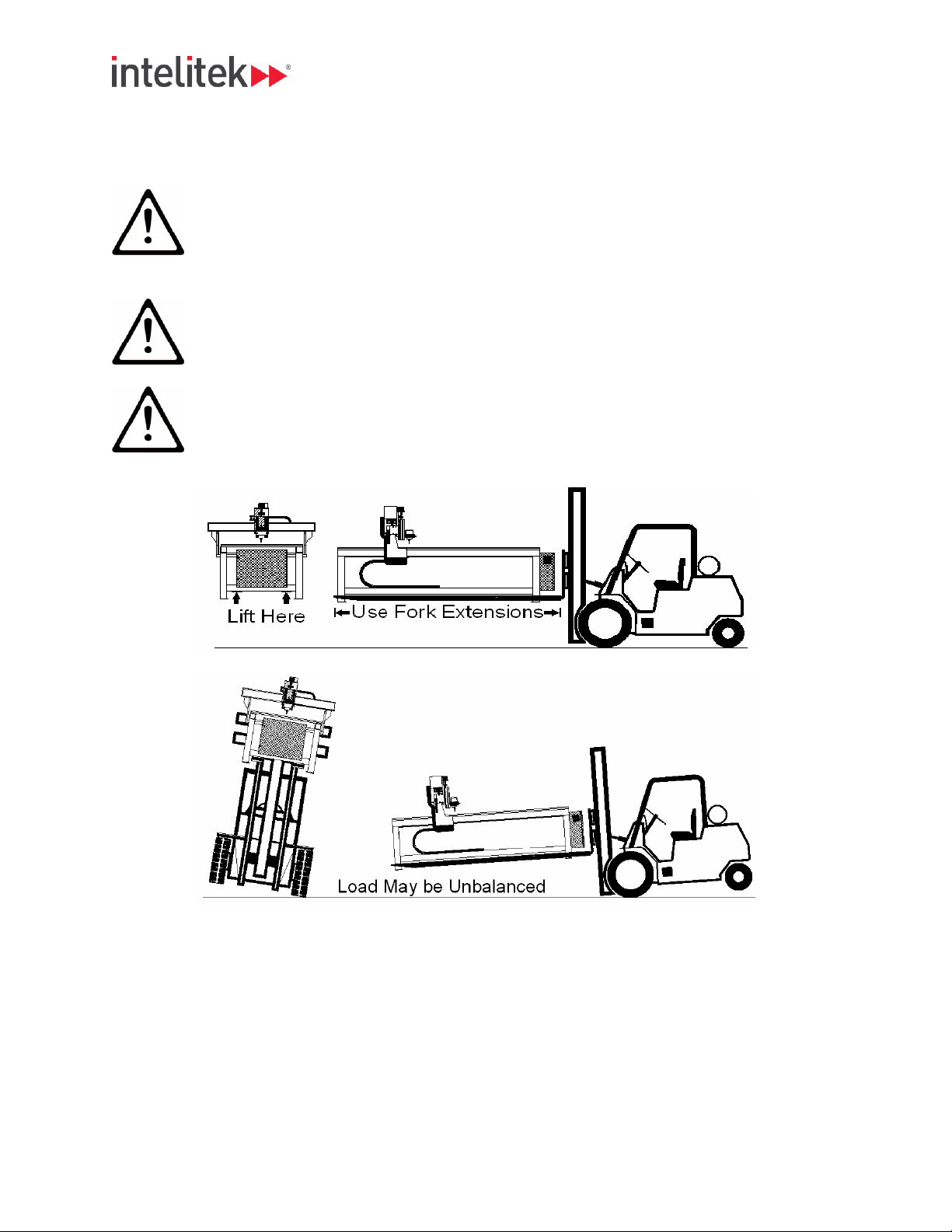
Important: Use fork li with fork extensions for unloading and moving the CNC
equipment when required. See picture.
Warning: CNC equipment may not be balanced. Use cauon when moving or unloading
so as not to damage CNC equipment, fork li, or operator. See picture.
.

Rev A Router User Manual 10 |P a g e
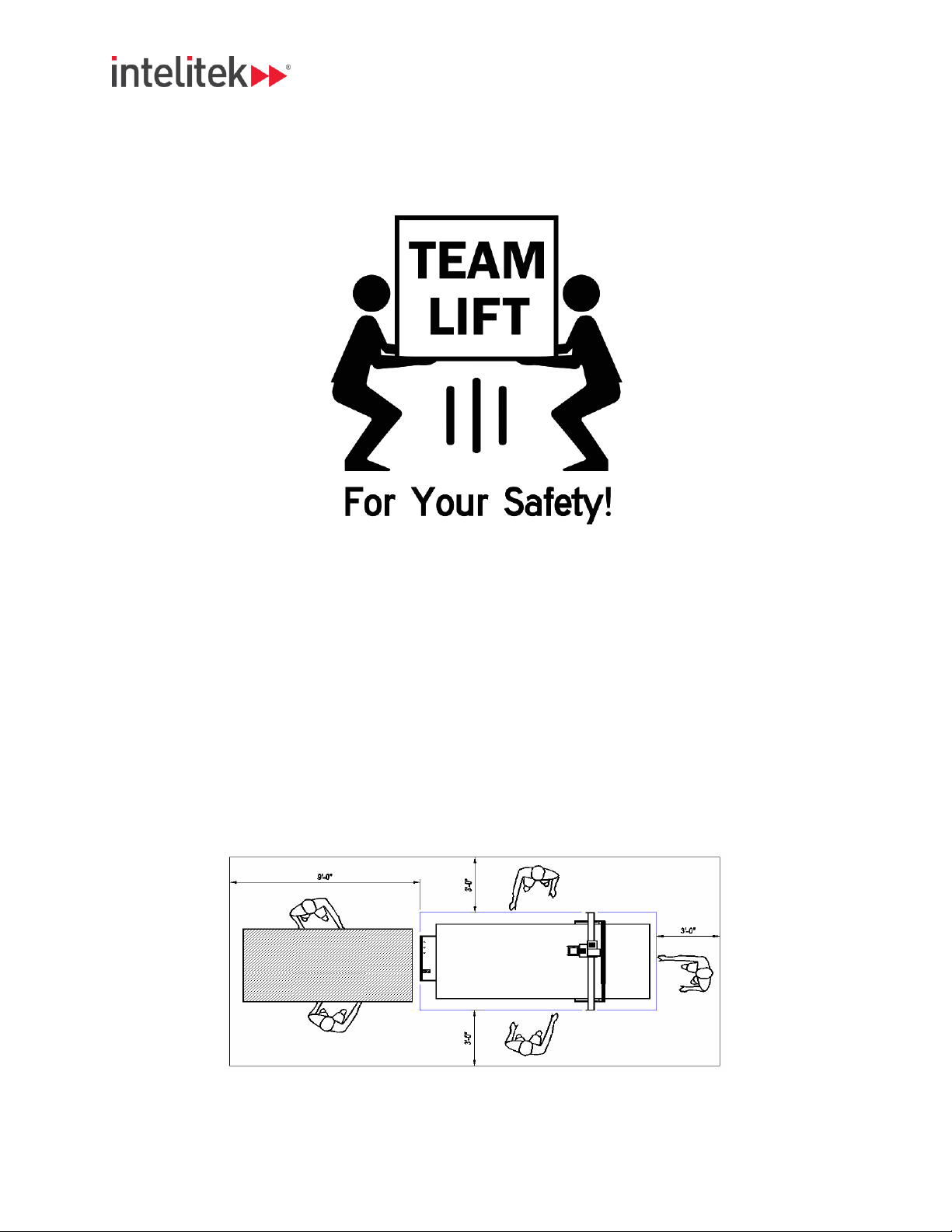
Warning: Team li desktop equipment when moving from the shipping container to and from the
tabletop. The table should be rated for 300lbs / 135kg or beer.
Final Posioning of Equipment
The nal posion of the equipment will depend greatly on customer’s locaon. Allow for adequate
spacing around the equipment for loading / unloading of materials, clamping material, access to vacuum
valves. Intelitek recommends an access path of at least 3 feet on three sides of the CNC Equipment and a
material staging area extending 8 or 9 feet from the loading end of the equipment.
•All moving parts must be clear of any obstrucon to always allow free movement during system
operaon.
•Emergency stop(s) should be always accessible during system operaon. Do not cover, block, or
obstruct access to the Emergency Stop or any system controls.
•Service disconnect (when applicable) should be always accessible during system operaon.
Service disconnect should never locked in during system operaon.
Ce manuel convient aux modèles suivants
1
Table des matières
Autres manuels Intelitek Équipement industriel