
INMO Air Manuel utilisateur


(Please use your mobile browser to scan
the QR code below to download and install)
INMOLENS APP
1.INMOLENS Assistant

2.Packing List
3.Specification
Optional Item ①Ring ②Ring charging cable ③Myopia lens
Standard Item ①Glasses ②Sunglasses lenses ③Flat lenses ④Type-C cable ⑤ Portable glasses case ⑥Glasses cloth
⑦Instructions(After-sales service includ) ⑧Myopia lens frame ⑨Nose pads
Weight: 76 grams
Dimensions: 157.30×168.60×56.40mm
Processor: Quad-core Arm Cortex-A53 @1.4GHz
RAM: 2GB; Storage: 32GB
Optical display: array optical waveguide, field of view 26°, resolution 640×400
Wi-Fi: 2.4G, IEEE 802.11b/g/n, support WIPI, support Soft AP
Bluetooth: Dual-Mode Bluetooth 4.2
Camera: FF 5 megapixels
Sensor: 3-axis accelerometer + 3-axis gyroscope + 3-axis magnetometer
Touch function: capacitive touchpad
Physical keys: 2 keys, power switch and universal key
Indicator light: battery indicator, shooting indicator
Interface: Type-C interface
Audio: Microphone × 1, Speaker × 2
System: Android 10.0 Go
3-1 Parameter(Configuration)

4.Overall Description (Function Indication)
LOGO
Power button
Speaker hole
Speaker hole
Protective silicone cushion
Indicator light
Universal button
Replaceable myopia lens
Display Module
Charging Port
Adjustable glasses
nose pads
Back Shell
Semi-transparent
front shell Camera lens
Replaceable lens

To co mp ly wit h the la ws, reg ula tio ns and oth er req uir eme nts rel at ed to the re st ric tio n o f h azar dou s s ubsta nces in el ect ron ic and el ect ric al prod uct s
in China, INMOLENS TECHNOLOGY CO., LIMITED.tests the hazardous substances in the components of this product. The statement is as follows.
This form is prepared according to provisions of SJ/T 11364-2014
O: indicates that the content of the hazardous substance in all homogeneous materials of this part is below the limit requirement specified in GB/T 26572-2011.
X: Indicates that the content of the hazardous substance in at least one of the homogeneous materials of this part exceeds the limit requirement specified in GB/T
26572-2011. The parts marked with "X" in the form cannot be replaced due to the limitation of the global technological development.
PCB *:contains PCB machine components, electronic components and others.
As the product type you purchase differs, it may not contain all of the above components.
Component name
PCB*
Battery
Data cable
Shell& accessories
Camera module
Hazardous Substance
Pb Cd Hg Cr(VI) PBB PBDE
6-1-1:Lens kit:Myopia frame with flat lenses. The user can choose lenses that match their own vision.
6.How to Wear the Glasses Properly
5.Name and content of hazardous substances
6-1 Myopia Correction (Accessories to be purchased separately)

6-1-2:We offer myopia lenses from 0-500 degrees, so you can select the appropriate myopia lenses accordingly (please consult your supplier for
the custom-tailored myopia lenses).
6-1-3:Install the lenses on the brackets separately on the left and right sides of each nose pad; attention is required to distinguish between the left
and right lens; and align them with the empty area on the frame. If possible, please wear a pair of gloves to prevent fingerprint oil contamination.
6-2-1:Put on your glasses and make sure they are turned on.
6-2-2:Fine-tune the glasses up and down, left and right, and adjust them to the position where you can see the clearest image.
6-2-3:Adjust the width of the nose pads, so the position of the glasses on your face can be adjusted up and down.
* It is not recommended for non -professionals to disassemble the lenses. If you want to replace them, please contact the after-sales hotline.
The shading lenses can be placed and removed on the frame through a buckle. Align the lenses with the buckle area,
and then press them to snap them on.
6-2 Accommodate to your comfortableness
6-3 How to remove and install the shading lenses
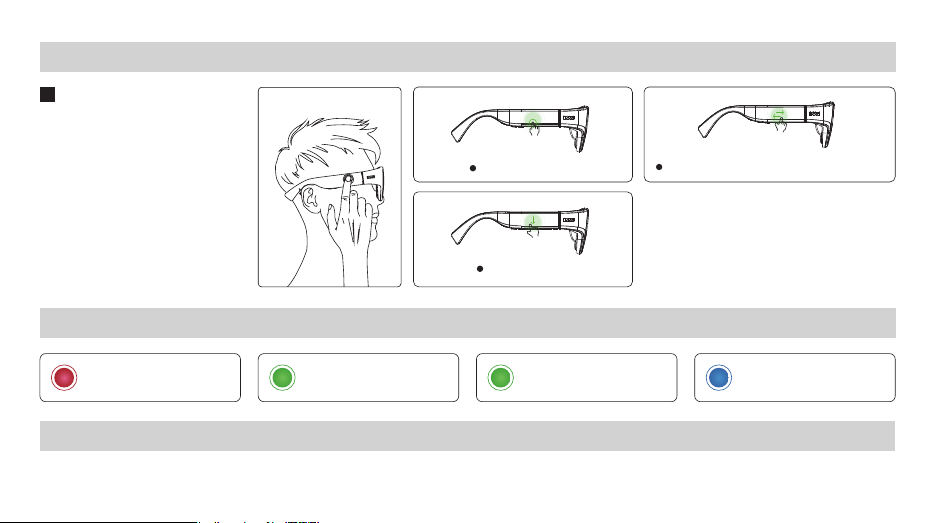
7-1-1 Head controller
7-1-2 Touchpad
7-1-3:Universal Button
Short press Back
Long press Evoke Voice Assistant
7-1-4:Power button
Long press Turn on/ Turn off
Short press Turn the screen on/Turn
the screen off
Click Enter/Confirm
Slip down Back
Horizontal slip Scroll the view you see horizontally
7.Usage
7-1 The Glasses
8.LED Indicator
Blinking red light
low battery status
Blinking green light
charging
Steady green light
charging complete
Blue light on
boot up successfully
9.Protection& Cleaning

10.Wrong Operation
11.Safety Information
Use a balloon or a soft brush to remove
dust from the inside or the gap of the
optical waveguide lens.
When storing or transporting the glasses,
please store them in the Portable glasses
case to avoid any damage.
9-2-1 How to clean the shading
lens.Wipe the shading lens with
accessory lens cloth.
9-2-2 How to clean the optical
waveguide lens
Wipe the optical waveguide
lens with accessory lens cloth.
To avoid damage to the glasses, please avoid the following actions.
· Move the temples too far to the outside, or apply any force beyond the mechanical load
· Keep it spinning or moving back and forth
· Toss it (The lens is fragile )
· Bind it with a cable
Warnings
11-1:Keep the glasses dry. Don’t wear the device in a dusty, humid or high-salt environment (such as by the sea) to avoid circuit failures.
11-2:Do not use the device during thunderstorms, which may cause device malfunction or risk of electric shock.
11-3:Use the device below 2000 meters above sea level, above 0℃ and below 40 ℃;Store the device and its accessories in the range of -20
℃ to 60℃;When the ambient temperature is too high or too low, it will shorten its life cycle or may cause other failures.
11-4:If the device needs to be charged, make sure to use the original cable for charging.
11-5:If the device needs to be connected to the USB-Type-C(I) port for charging, the user must confirm that the USB port has the
USB-Type-C logo and its performance complies with relevant USB-Type-C specifications.
9-1 Routine Maintenance 9-2 Lens Care 9-3 Storage Specification

11-6:Do not expose the device to high temperatures, or around heat-generating devices such as strong sunlight, heaters, microwaves,
ovens, or water heaters. If the device overheats, it may cause damage to the device, such as battery bulging, leaking liquid, or even
causing the battery to burst.
11-7:Do not disassemble or modify the device, insert foreign objects, or immerse it into water or other liquids as it may cause short-circu-
iting the device, battery leakage, overheating, or even fire.
11-8:Do not throw the device into a fire, as this may cause the device to catch fire and explode.
11-9:The user should dispose of the device in accordance with local regulations rather than as domestic waste, as improper disposal may
cause explosion. The user is expected to comply with relevant local ordinances and support recycling operations.
11-10:Do not allow your pets to chew on the device, as this may cause injury to them or even explosion.
11-11:Do not drop, squeeze or puncture the device, and avoid subjecting the device to high external pressure, which may cause damage,
failure, short circuit, broken lenses, or fire and explosion.
11-12:If the user uses an unapproved or incompatible adapter, power supply, or battery, it may cause a fire, explosion, or other hazards.
11-13:Since this device and its accessories may contain some small parts, the user should keep them out of the reach of children,
otherwise, children may inadvertently damage or swallow those small parts which would cause suffocation or other hazards.
11-14:The device has a non-removable built-in battery. The user should not replace the battery without authorization to avoid damage to
the battery and the device.
12.Special Instructions
* Myopia correction: 0-500 degree lenses need to be purchased separately. For the customization and purchase of myopia lenses, please
consult your supplier.
* Due to the physical and chemical properties of lithium battery materials, the battery capacity will decay to a certain extent with the increase

of the number of charge and discharge.
13.Legal Statement
*Copyright © INMOLENS TECHNOLOGY CO., LIMITED. 2021~2022. All rights reserved. This manual is for reference only and does not constitute
any form of commitment. The product (including but not limited to color, weight, size, screen display, etc.) is subject to the actual product.
* The user must respect the privacy rights of other people when shooting photos or videos, and is prohibited from using this product to conduct
any unauthorized surveillance activities, including but not limited to surveillance of other people, groups, events, performances, exhibitions or
buildings.
* Please note that in some countries and regions, although it is not for commercial purposes, if the user uses the camera to record, tape or take
pictures of other people, groups, events, performances, exhibitions, it may spark copyright disputes or violate other people’s legal rights.
Therefore, please carefully read and comply with local laws and regulations before use.
* The contents of this manual are provided on an as-is basis. Unless required by applicable law, INMOLENS TECHNOLOGY CO., LIMITED. will not
provide any direct or indirect guarantee for any contents of this manual.
* To the extent permitted by applicable laws, INMOLENS TECHNOLOGY CO., LIMITED. won’t compensate for any special, incidental or indirect
damages arising from the use of this manual and this product. We also won’t compensate for any loss of profits, data, goodwill or expectations.
* If you want to export, re-export or import this product (including but not limited to the software and technical data in this product), you shall
comply with applicable laws and regulations on import and export control.
* INMOLENS TECHNOLOGY CO., LIMITED. reserves the right to modify any information in this manual at any time without prior notice and
without any responsibility.
14.Legal Disclaimer
Ce manuel convient aux modèles suivants
1
Table des matières


