
iNetVu 3000C Manuel utilisateur

iNetVu®3000C Controller User Manual
The iNetVu®brand and logo are registered trademarks of C-COM Satellite Systems, Inc.
© Copyright 2009 C-COM Satellite Systems, Inc.
1-877-iNetVu6
www.c-comsat.com
Revision 1.1
2010-12-16

C-COM Satellite Systems Inc. Page 2 of 27
iNetVu™ 3000C Controller User Manual
This page is intentionally left blank.

C-COM Satellite Systems Inc. Page 3 of 27
Copyright © 2006. All rights reserved. C-COM Satellite Systems Inc.
This document contains information, which is protected by copyright. All rights reserved.
Reproduction, adaptation, or translation without prior written permission is prohibited, except as
followed under the copyright laws.
Both the iNetVu®and C-COM names and logos are registered trademarks of C-COM Satellite
Systems Inc.
Intel®Pentium is a registered trademark of Intel Corporation. Microsoft, Windows, Windows NT
and MapPoint are registered trademarks of Microsoft Corporation.
All other product names mentioned in this manual may be trademarks or registered trademarks of
their respective companies and are the sole property of their respective manufacturers.
iNetVu™ 3000C Controller User Manual

C-COM Satellite Systems Inc. Page 4 of 27
iNetVu™ 3000C Controller User Manual
Table of Contents
1. Introduction..............................................................................................................5
2. Specifications...........................................................................................................6
3. Physical ....................................................................................................................7
3.1. Typical 3000C Connection..................................................................................9
3.2. Manual Control Button Operation.....................................................................10
3.3. LCD Display and Power Button........................................................................13
4. Installation..............................................................................................................14
4.1. Setup ................................................................................................................14
5. APPENDICES..........................................................................................................15
5.1. LCD Display Definitions Table..........................................................................16
5.2. Firmware Update..............................................................................................20
5.3. Fuse Replacement............................................................................................27

C-COM Satellite Systems Inc. Page 5 of 27
1.Introduction
The iNetVu®3000C Hand-Held Controller gives users the freedom of operating any
iNetVu®Platform without the need to connect to a PC or iNetVu®Auto-Deploy controller.
Fig. 1: iNetVu®3000C Controller
The iNetVu®3000C Hand Held Controller is a fully functionally unit that allows for quick
and easy use when times call for it. This unit is ideal for installations, demos and
troubleshooting with the ability to raise, stow and move the iNetVu® platform(s) with out
the use of iNetVu®Controller and or PC. This handheld is compatible with all iNetVu®
Mobile and Flyaway platforms.
The iNetVu®3000C compact design features a 6 button movement control of the 3-axis
with an adjustable 10- speed operation. The unit has a Jog control feature allowing for
manual satellite search and an LCD screen for platform sensor and motor movement
feedback. The unit can run off of any 12V DC Power Supply.
iNetVu™ 3000C Controller User Manual

C-COM Satellite Systems Inc. Page 6 of 27
2.Specifications
iNetVu™ 3000C Controller User Manual
C-COM Satellite Systems Inc. Page 7 of 27
3.Physical
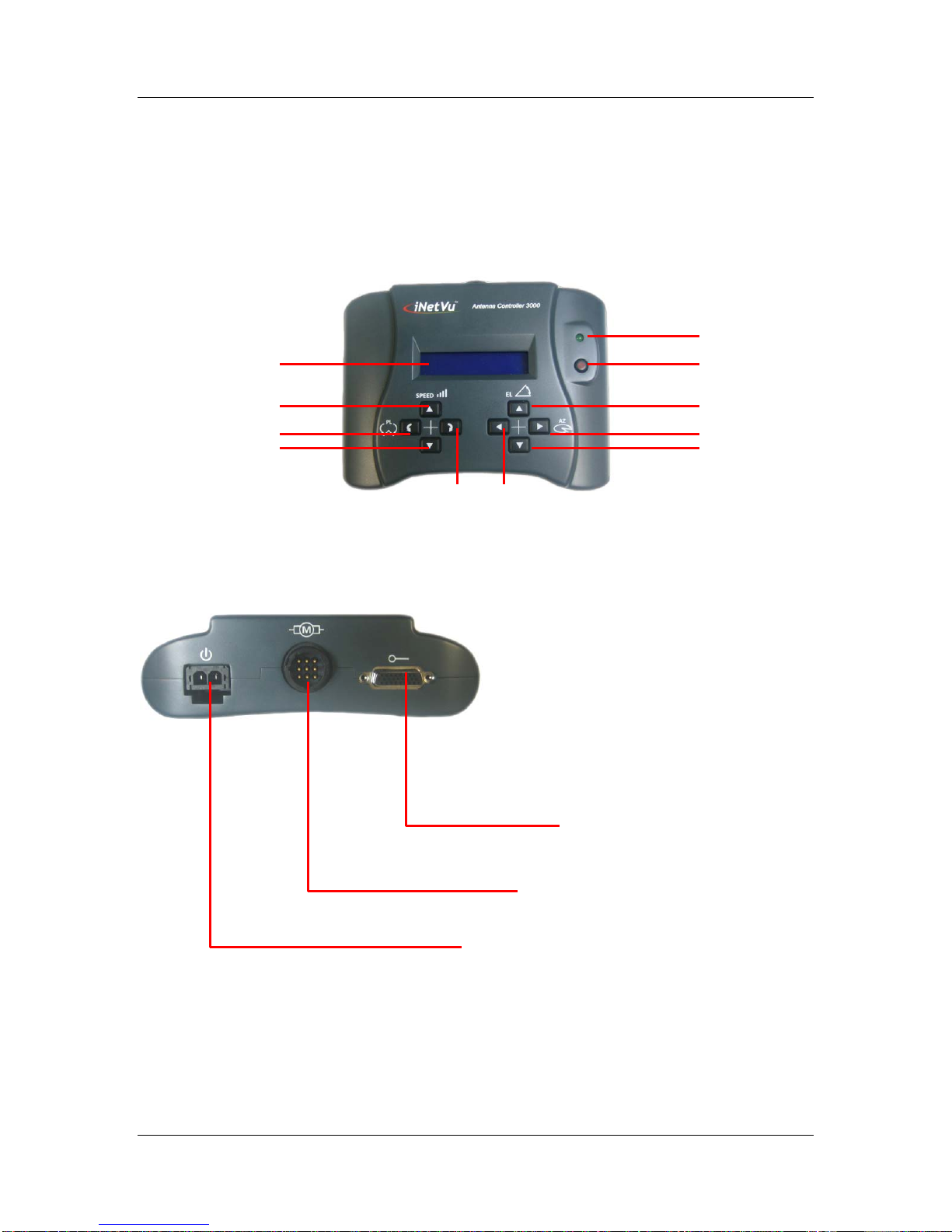
Power LED
Polarization CCW
Speed Decrease
Speed Increase
LCD Screen Power ON/OFF
Elevation Up
Azimuth Right
Elevation Down
Polarization CW Azimuth Left
iNetVu™ 3000C Controller User Manual
Motor connection port
Power connection Port
Sensor connection port
Fig. 2: Face and Back View of 3000C Antenna Controller

C-COM Satellite Systems Inc. Page 8 of 27
Serial Port
Fuse port
Fig. 3: 3000C Controller with Serial Port Option (New Version)
Fig. 4: Original 3000C Controller without Serial Port Option
iNetVu™ 3000C Controller User Manual

C-COM Satellite Systems Inc. Page 9 of 27
3.1. Typical 3000C Connection
The typical connection configuration for each iNetVu®System will be the same
regardless of Mobile or Flyway Platform.
Power Cable
Sensor Cable
Motor Control Cable
INetVu Platform
12V DC Power Supply
Power Cable
Motor Cable
Sensor Cable
Fig. 5: Typical Connection Configuration
iNetVu™ 3000C Controller User Manual

C-COM Satellite Systems Inc. Page 10 of 27
3.2. Manual Control Button Operation
1. Elevation Up / Elevation Down – To move the iNetVu® platform up or down press
and hold the required button until angle is reached. Once the desired angle is reached,
let go of the depressed button. There is an up limit switch on EL Up that will kick in once
maximum elevation is reached, this will prevent all other functions (AZ and PL) from
working except for the EL Down thus preventing the platform from sustaining damage.
There is also a down limit switch for the El Down which will appear on the LCD screen
as EL: D once a certain angle is reached (between 0and 15) during the down
operation this prevents the azimuth and or polarization movement in any direction while
the Dswitch is ON.
If moving down to stow the down button will stop responding once the Sis displayed on
the LCD screen.
***Note: Azimuth Stow Switch (AZ: S), and Polarization Stow Switch (PL: S) must
be ON in order for the Elevation Stow to function properly.
The polarization PL: S (Stow) is constantly displayed on the LCD regardless of
Azimuth or Elevation position when using handheld with iNetVu® 1200/1800
Mobile Platform.
Moves the Elevation up
Moves the Elevation down
2. Azimuth Left/ Azimuth Right - To move the iNetVu® platform left or right (this is
determined by the front and back orientation of the reflector), see Fig .6 for more details
regarding platform/reflector orientation. Facing the reflector, press and hold the desired
button to move right or left until position required is reached. Moving right will decrease
the Azimuth angle while moving left increases the angle.
Moves the Azimuth to the left
Moves the Azimuth to the right
iNetVu™ 3000C Controller User Manual
Table des matières
Autres manuels iNetVu Contrôleurs


