
Induction Dynamics SW1 Manuel utilisateur

H
A
N
D
C
R
A
F
T
E
D
I
N
A
M
E
R
I
C
A
H
A
N
D
C
R
A
F
T
E
D
I
N
A
M
E
R
I
C
A
SUBWOOFER SERIES
OWNER’S MANUAL
Rev 07.01.2019
Manufacturin Exceence™ Manufacturin Exceence™ Manufacturin Exceence™ Manufacturin Exceence™
facturin Exceence™ Manufacturin Exceence™ Manufacturin Exceence™ Manufacturin Exceence™ M
eence™ Manufacturin Exceence™ Manufacturin Exceence™ Manufacturin Exceence™ Manufacturin E
rin Exceence™ Manufacturin Exceence™ Manufacturin Exceence™ Manufacturin Exceence™ Manuf
ce™ Manufacturin Exceence™ Manufacturin Exceence™ Manufacturin Exceence™ Manufacturin Exc
Manufacturin Exceence™ Manufacturin Exceence™ Manufacturin Exceence™ Manufacturin Exceence™
facturin Exceence™ Manufacturin Exceence™ Manufacturin Exceence™ Manufacturin Exceence™ M
eence
™ Manufacturin Exceence™
Manufacturin Exceence™ Manufacturin Exceence™ Manufacturin
rin Exceence
™ Manufacturin Exceence™
Manufacturin Exceence™ Manufacturin Exceence™ Manu
ce™ Manufacturin Exceence
™
Manufacturin Exceence™ Manufacturin Exceence™ Manufacturin Exc
Manufacturin Exceence
™ Manufacturin Exceence™
Manufacturin Exceence™ Manufacturin Exceence™
facturin Exceence
™ Manufacturin Exceence™
Manufacturin Exceence™ Manufacturin Exceence™ M
eence
™ Manufacturin Exceence™
Manufacturin Exceence™ Manufacturin Exceence™ Manufacturin E
rin Exceence
™
Manufacturin Exceence
™
Manufacturin Exceence™ Manufacturin Exceence™ Manu
ce™ Manufacturin Exceence™ Manufacturin Exceence™ Manufacturin Exceence™ Manufacturin Exc
Manufacturin Exceence™ Manufacturin Exceence™ Manufacturin Exceence™ Manufacturin Exceence™
facturin Exceence™ Manufacturin Exceence™ Manufacturin Exceence™ Manufacturin Exceence™ M
eence™ Manufacturin Exceence™ Manufacturin Exceence™ Manufacturin Exceence™ Manufacturin
rin Exceence™ Manufacturin Exceence™ Manufacturin Exceence™ Manufacturin Exceence™ Manu
ce™ Manufacturin Exceence™ Manufacturin Exceence™ Manufacturin Exceence™ Manufacturin Exc

SUBWOOFER SERIES
Please read the following instructions carefully before installing your Induction Dynamics®subwoofer series. If you have any
questions regarding installation that are not answered in the following directions, please contact your local sound contractor or
the Induction Dynamics®/MSE Audio®technical support team. Contact information can be found on the back of the manual.
General Information
Your speakers and amplier come in a high quality nish that is both attractive and durable. To clean, use a soft, damp cloth. If
your drivers become dusty, dust them with a paintbrush or a brush vacuum attachment. Do not use a strong or abrasive cleaner.
The grille is covered in acoustic cloth. To keep your grille clear of debris, we recommend you use a lint roller (like you would use
on clothes).
Do not use bass or loudness contour controls. Induction Dynamics’ subwoofers produce very low frequencies without these
controls. Use of these controls will make the bass sound “boomy”, obscure higher frequencies, and possibly cause damage
due to excessive cone excursion.
Amplifer location: The A2 amplier is best located in an equipment rack or shelving with other audio and video equipment. It is
not recommended for placement behind walls or other limited access locations, where service may be restricted.
The A3 amplier is built in to the SW1, SW2, SW3 and SW4. If you chose the A3 option, make sure to place your subwoofer in
an open area with plenty of ventilation. Do NOT build in to walls or place the subwoofer in a closed area.
Speaker Wiring: Use approved wire designed for in-wall or exposed use, as appropriate for your installation. For freestanding
speakers, we recommend using high-quality speaker wire that is 12 gauge or lower, with easily visible polarity coding to make
your connections. The following chart identies minimum gauge requirements for various lengths. See your local dealer or
installation contractor for more information.
Length in Feet
Up to 18’
Up to 29’
Up to 51’
AWG Size & Stranding
14 Gauge (19/27)
12 Gauge (65/30)
10 Gauge (105/30)
Wire Length / Minimum Gauge
Requirements
New Construction Installation (For In-Wall and On-Wall Models)
In new home construction, or with walls where drywall has not been applied, it is recommended that you wait until after the
drywall application before installing the easymount boxes for the following reasons:
1. The installer gains the control to cut a neat and accurate hole, eliminating possible mistakes by drywallers.
2. Drywall around the hole is more likely to be at. This is especially true if any mudding is done in the vicinity of the hole. The
result is a cleaner nal t around the edges.
3. Possible shimming behind drywall can throw off depth calculations and nal alignment of gasket with the face of the drywall.
Drywallers sometimes shim to level out the wall where studs are out of line.
4. Mud and construction dust is kept from getting into the box.
If circumstances require the easy-mount boxes to be installed prior to drywall, then be sure the gasket on the front of the boxes
protrudes out from the edge of the wall studs by an amount equal to the thickness of the drywall plus 1/4”. Alternatively, the
outside back of the metal box should be 3 7/8” back from the nished drywall surface.
Check for Obstacles Inside Walls
Check the home’s architectural blueprints to verify that your preferred mounting location is free from obstacles including extra
wall studs, electrical wires, plumbing, and heating ducts.
Locating the Subwoofer Mounting Holes
1. To nd wall studs, use a stud nder. The in-wall and on-wall subwoofers will mount between two studs and should be
positioned so that the tweeter is at ear level.
Wall studs
Center line
pencil mark
3” hole - centered
between wall studs
Cutout - centered
between wall studs
12 9/16” W x 60” H
2. When you’ve decided on a location, cut a 3” hole in the approximate center of the
proposed cutout area. Measure the exact distances from the left and right wall studs
from the inside of the wall, to establish the horizontal center line between the wall
studs and mark this with a pencil.
3. Place the mounting hole template ush against the wall. The template should be
centered between the wall studs, making sure that the left and right channels are the
same height.
4. Using a drywall knife or keyhole saw, carefully cut along the drawn line and remove
the cutout.
5. Before installing the easy-mount box into the walls, you will need to bring the
speaker wire into the mounting hole. Be sure to leave plenty of extra wire coming
into the mounting hole, especially if you are bringing in the wire from below since the
speaker wire access holes are at the top of the easy mount box.

Installing the Easy-Mount Box Into the Wall
This section is specic to in-wall and on-wall models.
1. The in-wall and on-wall subwoofers are shipped preassembled with the faceplate attached to the easy-mount box with
bolts. In order to install the in-wall easy-mount box into the wall, you will rst need to separate the faceplate from the box. First,
remove the grille mounting anges, using the grille mounting ange driver. Note that there may be shims under some of the
grille mounting anges. You will need to save these shims to use when you reinstall the faceplate. Then unscrew the faceplate
mounting bolts using a 1/4” hex key or driver. You will later reattach the faceplate with these same faceplate mounting bolts.
2. There are two speaker wire access holes located at the top of the easy-mount box. The box comes with a solid grommet
preinstalled in the large hole and a small size grommet preinstalled in the smaller hole. The grommet hole size you will need
depends on the size of the wire you are putting through the hole. In the parts pouch you will nd a selection of large and small
grommets that have holes through them of various sizes. Use a grommet of the appropriate size to get a snug t around the
speaker wire where it enters the box. Put a solid grommet in the other hole. Make sure there is enough extra speaker wire
feeding into the box for easy handling of the loudspeaker faceplate.
3. Place the easy-mount box into the mounting hole.
4. Snug the Stud Grabber™ bolts against the left and right wall studs just enough to cause the easy-mount box to be suspended
in the cutout opening. Do not overtighten these bolts to avoid distorting the studs or box. Make all necessary adjustments to
level and position the easy-mount box in the wall. The preferred method is a small level held against the inner side of the easy-
mount box to make sure it is perfectly vertical. Upon completion, the box should be level and centered in the cutout opening
with the box gasket protruding 1/4” out from the drywall surface.
5. Tighten the Stud Grabber lock nuts with a wrench.
6. Place the 4” stud screws into the hole in the inside of the Stud Grabber bolts. Carefully pound them in about 1/4” with a
hammer to get the threads started. Tighten each of the screws with a #2 square head screwdriver until the screws are snug.
Installing the Faceplate
This section is specic to in-wall and on-wall models.
While installing the faceplate, we recommend that an assistant help hold the faceplate. Be careful working with the assembly
that you don’t damage any of the speaker components.
1. Hold the speaker faceplate up to the wall opening and attach the speaker wire to the terminal block on the back of the
faceplate, observing the proper polarity. To make the connections to the terminal block, solder or crimp with high pressure the
insulated fork terminals provided in your parts packet. Soldering is best. For in-wall, use make sure the compensator switch is
in the proper position.
2. Position the speaker faceplate over the easy-mount box. Gently move it around from side to side and up and down until
the rubber gasket slides around the faceplate mounting inserts. Screw in the faceplate mounting bolts, gently tightening each
one a little at a time, until the faceplate is approximately 1/32” from the drywall all around. DO NOT TIGHTEN THE BOLTS ANY
FURTHER. The faceplate should not contact the drywall. This avoids any vibration or distortion of the drywall.
Installing the Faceplate (cont.)
3. Install the grille mounting anges that came in the parts packet using the grille mounting ange driver. Any shims that were
removed should be replaced back under the grille mounting anges to make them level with the faceplate. The grille mounting
anges should be used even if the grilles are not, as this gives the subwoofers a nished appearance.
4. Attach the cloth grille by carefully pressing it into the grille mounting anges.
Connecting to an Amplifier
1. Be sure the amplier is turned off to avoid damage to the speakers.
2. Connect the speaker wires to the speaker outputs on your amplier. Observe proper polartity (red to red and black to black).
3. Make sure each speaker is connected to the correct amplier output (e.g. left front loudspeaker to left front output).
Installing the Subwoofer With A2 Amplifier
The A2 is designed to be used with audio/video pre-ampliers and receivers that have their own built-in low frequency crossover
circuits. These circuits typically have a low pass rolloff of 12dB/octave or 24 dB/octave. The best crossover frequency setting
is usually 60 Hz (12 dB/octave low pass) or 70 Hz (24 db/octave low pass). Ultimately, the crossover frequency setting is best
determined by consulting your own ears.
Connecting the A2 to your Amplifier / Reciever
1. Turn off the power to each piece of equipment before making any connections.
2. Using high-quality interconnect cables with RCA type terminations, connect the “SUBWOOFER OUT” on the audio/video
preamplier or receiver to “IN” on the A2. If using a single subwoofer, proceed to step 3; if using two subwoofers, skip step 3
and proceed to step 4.
3. Using high-quality speaker wire (consult the chart on page 4), connect the black binding post on the A2 to the black binding
post on the SW4.iw subwoofer and connect the red binding post on the A2 to the red binding post on the SW4.iw subwoofer.
Proceed to step 5.
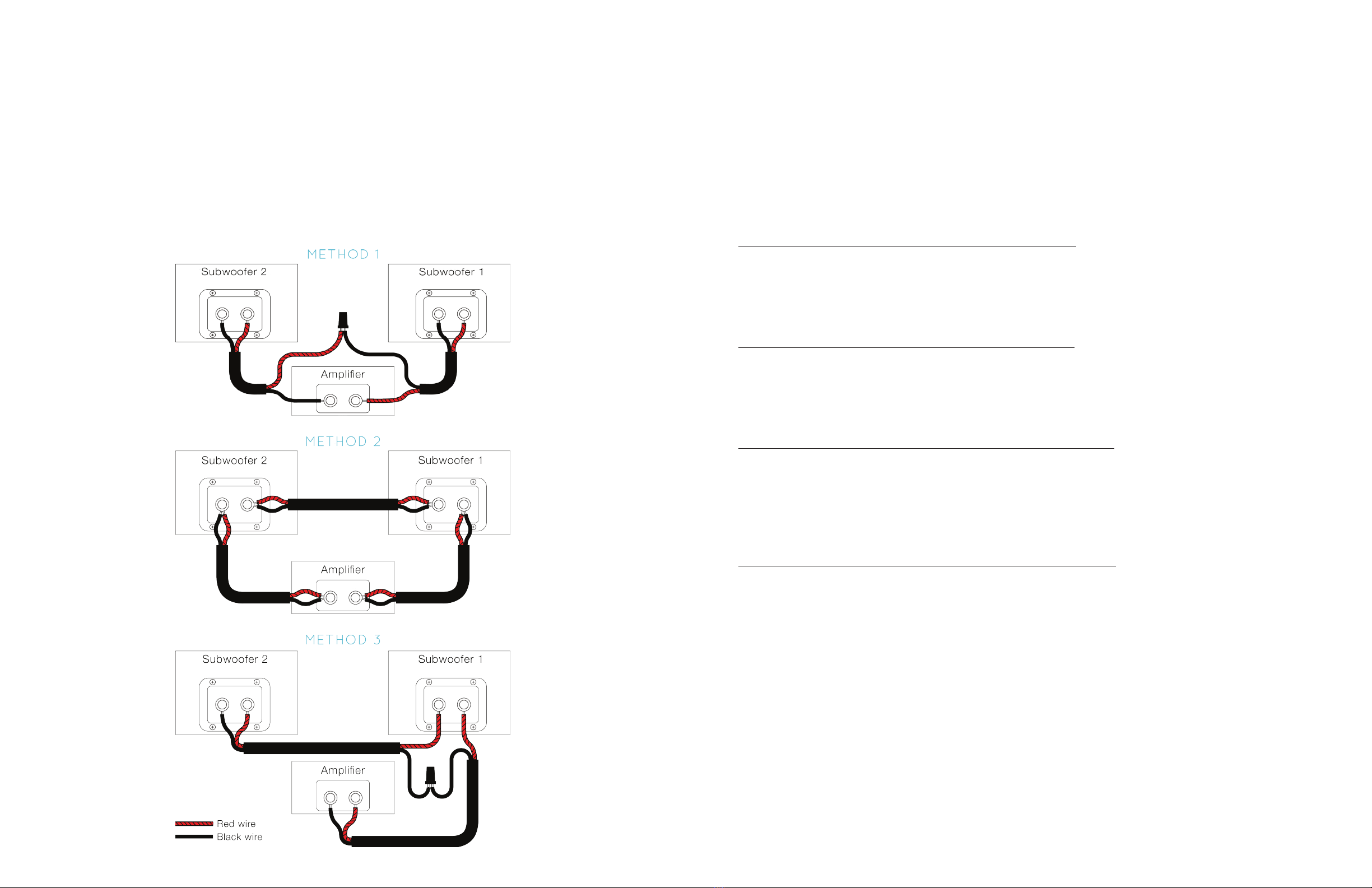
4. If using a single A2 with two subwoofers, the subs must be connected in series. In this conguration, the two 4-ohm loads
will combine to create an 8-ohm load. Connect the red binding post of the A2 amplier to the red binding post on the rst
subwoofer, and the black binding post on the A2 amplier to the black binding post on the second subwoofer. Then connect
the black binding post on rst subwoofer to the red binding post on the second subwoofer. Three subwoofer connection
methods are shown on the next page. Proceed to step 5.
5. Connect the amplier to a 120-volt, single phase, 60-Hz, grounded power supply using the power cord provided. For best
results, use a dedicated power circuit for your amplication equipment. See next page for continued steps.
Connecting the Subwoofer with the A3 Amplifier
The A3 amplier has a built-in adjustable low-pass crossover with a bypass switch on the back panel. This allows the subwoofer
to be used with audio/video pre-ampliers and receivers that have their own built-in low-frequency crossover circuits.
Connecting the A3 to your Amplifier / Reciever
The SW1, SW2, SW3 and SW4 has several connection options. Read through steps 1 - 4 and choose the applicable method
for your setup, then proceed to step 5.
1. Standard Subwoofer Connection - preamp or receiver with sub output
Using high-quality interconnect cables with RCA type terminations, connect the SUBWOOFER OUT on the audio/video
preamplier or receiver to either the L or R LOW LEVEL inputs on the back of the A3 amplier. In this conguration you will use
the built-in crossover circuits in the audio/video preamplier or receiver so the low-pass switch on the A3 amp should be in the
“out” position. This bypasses the crossover. Proceed to step 5.
2. Connecting Multiple Subwoofers - preamp or receiver with sub output
Using high-quality interconnect cables with RCA type terminations, connect the SUBWOOFER OUT on the audio/video
preamplier or receiver through a Y-connector to either the L or R LOW LEVEL inputs on the backs of both A3 ampliers. In this
conguration you will use the built-in crossover circuits in the audio/video preamplier or receiver so the low-pass switch on the
A3 amp should be in the “out” position. This bypasses the crossover. Proceed to step 5.
3. Special Low-Level Stereo Connection - preamp or receiver without sub output
Using high-quality interconnect cables with RCA type terminations, connect the RIGHT and LEFT PREAMP OUT on the audio/
video preamplier or receiver through two Y-connectors to the corresponding L IN or R IN on the A3. Then, connect the free
leg of the Y-connectors to the L and R inputs on the audio/video receiver or amplier used to power the higher frequency range
speakers. In this conguration you will use the low-pass crossover in the A3 amplier, so the low-pass switch on the A3 amp
should be in the “in” position. Proceed to step 5.
4. Special High-Level Stereo Connection - preamp or receiver without sub output
The high-level method is recommended for setups where the receiver is a long distance from the main left and right speakers
and subwoofer. Connect the L and R speaker leads from the main amp directly to the high-level terminals marked FROM
AMPLIFIER on the A3 amp. Then connect a second pair of speaker leads to your L and R main speakers. The high-level
terminals are capable of connecting leads terminated with either bare wire ends or “banana” plugs. If your leads have “banana”
plugs on them, the plastic decorative plugs may be removed from the high-level terminals on the A3 amplier. When using the
high-level terminals, be sure to verify the positive leads are connected to the red terminals and the negative leads are connected
to the black terminals on all connections. In this conguration you will use the low-pass crossover in the A3 amplier, so the
low-pass switch on the A3 amp should be in the “in” position. Proceed to step 5.
The remaining steps can be found on the next page.
Connecting the A2 to your Amplifier / Reciever (cont.)
6. Phase Check: Listen to the subwoofer(s) and higher frequency speakers together. Then, reverse the speaker wires on the
back of the subwoofer (black to red and red to black). This reverse connection is 180° out of phase with the normal connection.
One of these two arrangements will sound noticeably louder in the low-frequency range. The louder arrangement is the proper
phase alignment for your installation.
7. Volume Adjustment: The subwoofer volume level may be adjusted by using the control in the menu of the audio/video
preamplier or receiver. The subwoofer volume level may be measured using a sound level meter, a real time analyzer, or
adjusted by ear. An easy technique is to set the level just below where it starts to sound “boomy”.

Warranty
All Induction Dynamics®products come with a limited ten (10) year warranty and a limited three (3) year warranty comes on all
electronics. Products not purchased through MSE Audio or an authorized reseller may not be supported by a factory warranty.
Should your Induction Dynamics product require service, please call the MSE Audio customer service department for a return
authorization. All merchandise returned to MSE Audio without prior authorization will be refused. For your return authorization
This warranty may be registered online at www.mseaudio.com/product-registration/ or by calling the number on the back.
Please write the serial number along with the name and address of the retailer from whom you purchased the amplier(s). This
may be done at the time of purchase or before requesting repair service under this warranty.
Limits and Exclusions: There are no warranties except as mentioned above. Neither Induction Dynamics®, Inc. nor anyone else
who has been involved in the creation, production, or sale of this product shall be liable for any direct, indirect, consequential
or acidental damages arising out of the use or inability to use this product, or arising out of breach of this warranty. Induction
Dynamics®, Inc. makes no other warranties, express or implied, including without limitation warranties of merchantability or
tness for a particular purpose. There are no warranties that extend beyond the description on the face hereof.
Connecting the A3 to your Amplifier / Reciever (cont.)
5. Connect the amplier to a 120-volt, single phase, 60-Hz, grounded power supply using the power cord provided. For best
results, use a dedicated power circuit for your amplication equipment.
6. If you used connection method 3 or 4, you will need to adjust the low pass. Initially, set the low pass at the lowest frequency
specied by the manufacturer for the main speakers. For example, if the frequency response of your mains is specied as 55-
20,000 Hz, set the low pass at 55 Hz. Later, after setting volume level and checking phase, you can ne tune the low pass
setting.
7. Due to varying processor designs and possible phase switches, it is best to check the phase of your subwoofer for proper
alignment. Your subwoofer with built-in A3 amplier has a phase switch on the back panel. To test for proper phase, play some
music that has some low- frequency sound. Listen to the subwoofer and higher frequency speakers together. With an assistant
manning the phase switch, listen to the frequencies slightly above the lowest frequencies (at crossover), asking the assistant to
switch between the two positions. One of these two positions will sound noticeably louder in the crossover frequency range.
The louder position is the proper phase alignment for your installation.
8. You can adjust the subwoofer level using the gain control on the back of the A3 amplier. The gain control is precisely
stepped in 1/2 dB increments, allowing settings for various applications to be easily repeated. For exibility, a 3-position switch
is provided which allows the selection of additional gains of +10, 0, -10 dB; these gain controls are in addition to the control in
the menu of the audio/video preamplier or receiver.

Induction Dynamics®by MSE Audio®| 10661 Rene St. | Lenexa, KS 66215
913-663-5600 or 855-663-5600 | www.inductiondynamics.com
Manufacturin Exceence™ Manufacturin Exceence™ Manufacturin Exceence™ Manufacturin Exceence™
facturin Exceence™ Manufacturin Exceence™ Manufacturin Exceence™ Manufacturin Exceence™ M
eence™ Manufacturin Exceence™ Manufacturin Exceence™ Manufacturin Exceence™ Manufacturin E
rin Exceence™ Manufacturin Exceence™ Manufacturin Exceence™ Manufacturin Exceence™ Manuf
ce™ Manufacturin Exceence™ Manufacturin Exceence™ Manufacturin Exceence™ Manufacturin Exc
Manufacturin Exceence
™
Manufacturin Exceence
™
Manufacturin Exceence™ Manufacturin Exceence™
facturin Exceence
™ Manufacturin Exceence™
Manufacturin Exceence™ Manufacturin Exceence™ M
eence
™ Manufacturin Exceence™
Manufacturin Exceence™ Manufacturin Exceence™ Manufacturin
rin Exceence
™ Manufacturin Exceence™
Manufacturin Exceence™ Manufacturin Exceence™ Manu
ce™ Manufacturin Exceence
™
Manufacturin Exceence™ Manufacturin Exceence™ Manufacturin Exc
Manufacturin Exceence
™ Manufacturin Exceence™
Manufacturin Exceence™ Manufacturin Exceence™
facturin Exceence
™ Manufacturin Exceence™
Manufacturin Exceence™ Manufacturin Exceence™ M
eence™ Manufacturin Exceence™ Manufacturin Exceence™ Manufacturin Exceence™ Manufacturin E
rin Exceence™ Manufacturin Exceence™ Manufacturin Exceence™ Manufacturin Exceence™ Manu
ce™ Manufacturin Exceence™ Manufacturin Exceence™ Manufacturin Exceence™ Manufacturin Exc
Manufacturin Exceence™ Manufacturin Exceence™ Manufacturin Exceence™ Manufacturin Exceence™
facturin Exceence™ Manufacturin Exceence™ Manufacturin Exceence™ Manufacturin Exceence™ M
eence™ Manufacturin Exceence™ Manufacturin Exceence™ Manufacturin Exceence™ Manufacturin
rin Exceence™ Manufacturin Exceence™ Manufacturin Exceence™ Manufacturin Exceence™ Manu
ce™ Manufacturin Exceence™ Manufacturin Exceence™ Manufacturin Exceence™ Manufacturin Exc
SW1
SW2
SW3
SW4
Applicable Models
SW4.iw
SW4.w
SW5.w
Ce manuel convient aux modèles suivants
6
Table des matières
Autres manuels Induction Dynamics Subwoofer


