Smart home devices
GEBRAUCHSANLEITUNG
Hersteller und Importeur:
IMMAX, Pohoří 703, 742 85 Vřesina, EU | www.immaxneo.cz | www.immaxneo.com
Entworfen in der Tschechischen Republik, hergestellt in China
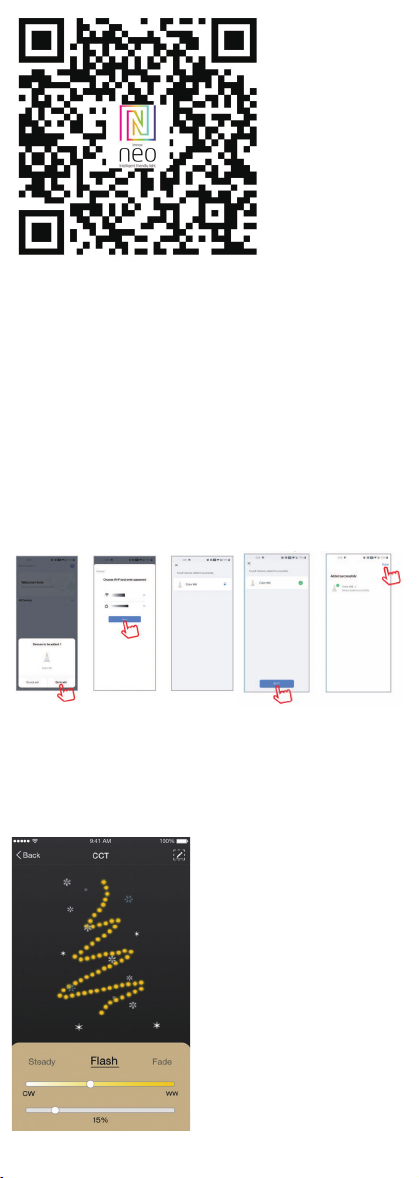
APP CONNECTION
Preparation: Power on the LED lightstring and enter the home of APP, please make
sure your mobile and the smart kits are connected to the same WIFI.
Reset the LED tree - long press the ‘ L ‘ button on the controller for more than
10 second. The WiFi LED on the controller will ash red quickly. Find the “+” (in
the corresponding room of the APP) to add devices. If your mobile have already
turned on blue tooth before connecting the LED lightstring, then no need to turn
on blue tooth again, the APP will connect to the LED lightstring automatically.
If your mobile doesn’t turn on the Bluetooth, the APP will pop up an interface
with tips to ask you to turn on bluetooth. Then please choose “Allow”, then the
bluetooth function of your mobile will be turned on. After that, the APP will pop
up tips with info of the LED lightstring, then choose “Go to add”. Will go into an
interface of Bluetooth device, choose “+” and go into next interface (Enter Wi-Fi
password). Input the password of the WIFI and choose “Conrm”, then it will go
into status of “Connecting......”, you will need to await for mobile to pair with the
controller at this step. Choose “Done” when it shows “Added successfully”, then
go into operation modes.
APPLICATION
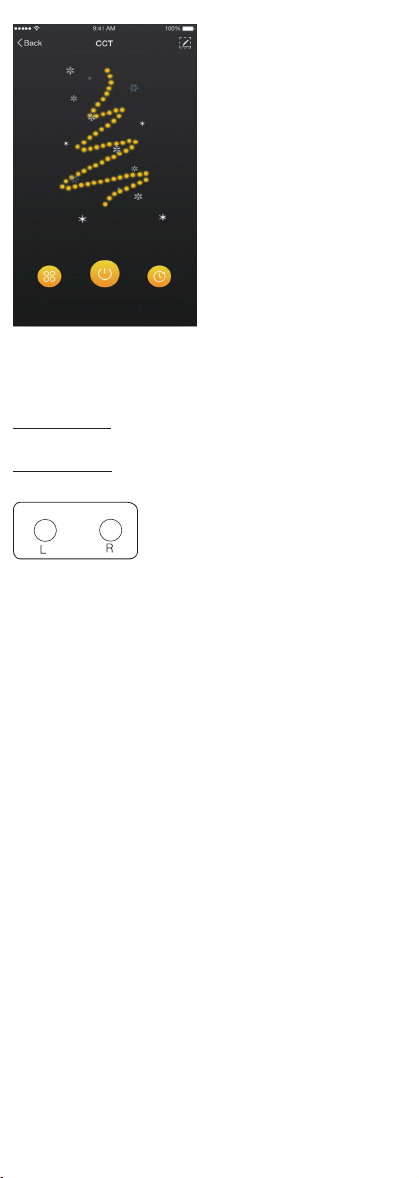
In Immax NEO PRO you can turn the LED lightstring on and off or control preset
programs and the timer.
3 PROGRAMS
You can choose from these 3 preset functions: Steady, Flash, Fade.
You can adjust color temperature and light brightness under each function.
TIMER
With Timer function, you can set the desired lighting schedule.
CONTROLLER
The L indicator light blinks RED in pairing mode
The L indicator light blinks GREEN when connecting to the Internet.
The L indicator light is steady GREEN after connected to the Network.
The L indicator light blinks GREEN when the wireless router has Network error.
Function Button ‘ L ’
- press 1 time to change function
- long press 10 seconds to reset the device
Function Button ‘ R ’
- press 1 time to change color temperature
Safety Information
CAUTION: Keep out of reach of children. This product contains small parts, which
may cause suffocation or injury if swallowed.
WARNING: Every battery has the potential to leak harmful chemicals that can dam-
age skin, clothing or area where the battery is stored. To avoid the risk of injury,
do not allow any substance from the battery to come into contact with the eyes or
skin. Every battery may burst or even explode if exposed to re or other forms of
excessive heat. Take care when handling the batteries. To reduce the risk of injury
from mishandling the batteries, take the following precautions:
- Do not use different brands and types of batteries in the same device
- When replacing the batteries, always replace all the batteries in the device
- Do not use rechargeable or reusable batteries.
- Do not allow children to insert batteries without supervision.
- Follow the battery manufacturer’s instructions for proper battery handling and
disposal.
CAUTION: The product and batteries should be disposed of at a recycling centre.
Do not dispose of them with normal household waste.
CAUTION: To ensure safe use of the product, wires must be brought at the
installation site according to valid regulations. The installation must only be carried
out by an individual with the appropriate certication in the eld of electronics.
During installation or when a fault is detected, the power cable must always be
disconnected from the socket (in the case of direct connection, the relevant circuit
breaker must be switched off). Improper installation can damage the product and
cause injury.
CAUTION: Do not disassemble the product, electric shock may occur.
CAUTION: Use only the original power adapter provided with the product. Do not
operate the device if the power cord shows signs of damage. CAUTION: Follow
the instructions in the enclosed manual.
Maintenance
Protect the device from contamination and soiling. Wipe the device with a soft
cloth, do not use rough or coarse materials.
DO NOT USE solvents or other aggressive cleaners or chemicals.
Technical specications:
Protocol: Wi
Frequency: 2400 MHz~2483.5 MHz
Maximum RF output power: Wi: 20 dBm
Intelligenter LED-Weihnachtsbaum
INSTALLATION
1. verwenden Sie nur das Netzteil mit einer Ausgangsspannung von DC 24V.
2. bitte klappen Sie den LED-Baum aus, um Überhitzung zu vermeiden. Bitte
verbinden Sie die Kabel des LED-Baums mit der richtigen Position auf dem
Controller. Testen Sie die APP, um zu prüfen, ob sie den LED-Baum richtig steuern
kann. Wenn alles gut geht, gehen Sie zum nächsten Schritt.
Überprüfen Sie, ob die Stromversorgung, das Steuergerät und der LED-Baum
richtig angeschlossen sind.
ACHTUNG
1. Legen Sie kein Metall um das Steuergerät, das das WiFi-Signal blockieren
könnte.
2. Vergewissern Sie sich, dass die Stromversorgung und das Steuergerät richtig
angeschlossen sind.
3. Die Ausgangsspannung des Netzteils sollte mit der Betriebsspannung des LED-
Baums übereinstimmen.
4. Decken Sie nichts auf der Oberäche des Netzteils, des Controllers und des
LED-Baums ab.
5. Vergewissern Sie sich vor dem Einschalten, dass die Verbindung korrekt ist.
DIAGRAMM DER PRODUKTFUNKTIONEN
DOWNLOAD UND REGISTRIERUNG
Scannen Sie den QR-Code, um die “Immax NEO PRO” APP herunterzuladen. Oder
suchen Sie “Immax NEO PRO” im App Store oder bei Google Play, um die APP zu
installieren. Öffnen Sie die “Immax NEO PRO” APP, tippen Sie auf “Registrieren”,
um ein Konto mit Ihrer Telefonnummer oder E-Mail zu erhalten. Melden Sie sich
bei der APP an.
APP-VERBINDUNG
Vorbereitung: Schalten Sie den LED-Baum ein und rufen Sie die APP auf. Verge-
wissern Sie sich, dass Ihr Handy und die Smart Kits mit demselben WIFI verbunden
sind.
Setzen Sie den LED-Baum zurück - drücken Sie die Taste ‘ L ‘ auf dem Controller
für mehr als 10 Sekunden. Die WiFi-LED auf dem Controller wird schnell grün
blinken. Suchen Sie das “+” (in dem entsprechenden Raum der APP), um Geräte
hinzuzufügen. Wenn Ihr Handy bereits vor dem Verbinden des LED-Baums die
Blauzahnfunktion eingeschaltet hat, brauchen Sie die Blauzahnfunktion nicht erneut
einzuschalten, die APP wird sich automatisch mit dem LED-Baum verbinden. Wenn
Ihr Handy Bluetooth nicht aktiviert hat, wird die APP ein Fenster mit Hinweisen
öffnen, um Sie aufzufordern, Bluetooth zu aktivieren. Wählen Sie dann bitte “Zulas-
sen”, dann wird die Bluetooth-Funktion Ihres Handys eingeschaltet. Danach wird
die APP Tipps mit Informationen über den LED-Baum anzeigen, dann wählen Sie
“Go to add”. Sie gelangen zu einer Schnittstelle für Bluetooth-Geräte, wählen Sie
“+” und gehen Sie zur nächsten Schnittstelle (Wi-Fi-Passwort eingeben). Geben Sie
das WIFI-Passwort ein und wählen Sie “Bestätigen”, dann wird der Status “Verbin-
den......” angezeigt, und Sie müssen warten, bis das Handy mit dem Controller
gekoppelt ist. Wählen Sie “Fertig”, wenn “Erfolgreich hinzugefügt” angezeigt wird,
und gehen Sie dann in den Betriebsmodus.
ANWENDUNG
Im Immax NEO PRO können Sie den LED-Baum ein- und ausschalten oder vorein-
gestellte Programme und den Timer steuern.
3 PROGRAMME
Sie können aus diesen 3 voreingestellten Funktionen wählen:
Dauerlicht, Blitzlicht, Überblendung
Bei jeder Funktion können Sie die Farbtemperatur und die Helligkeit des Lichts
einstellen.
ZEITSCHALTUHR
Mit der Timer-Funktion können Sie den gewünschten Beleuchtungsplan einstellen.
40m