
iDROID Fit Manuel utilisateur

IDROID FIT

Table of Contents
Compatibility............................................................................................................................................................................... 3
Quick Start Guide ........................................................................................................................................................................ 3
Screen Touching.......................................................................................................................................................................... 5
Pairing ......................................................................................................................................................................................... 5
SYNC Data........................................................................................................................................................................ 7
Sleep monitor.................................................................................................................................................................. 7
Auto sleeping mode ........................................................................................................................................................ 7
Looking mobile phone..................................................................................................................................................... 7
Sedentary reminder........................................................................................................................................................ 7
Alarm clock...................................................................................................................................................................... 8
Camera remotecontroller............................................................................................................................................... 8
Calling and message reminder........................................................................................................................................ 8
OTA Upgrade.................................................................................................................................................................... 9

IDROID Fit UserManual
Compatibility
The Smart Wristband only supports the following selected mobile devices:
IOS: OS must be IOS 7.0 or later, Bluetooth 4.0; Such as, iPhone 4S,iPhone5,iPhone5S, iPhone6, iPhone6Plus,
iPodtouch5,etc.
Android: OS must be Android4.3 or later, Bluetooth 4.0; Such as, Samsung S4, Note3,etc.
Time: 00:00
Calories:
Steps :
Alarm clock:
Distance:
Sleep monitor:
Move Alert:
Call ID Display:
Message Push:
Bluetooth:
Remotecamera
Bluetoothbroadcast:
Quick Start Guide
You should charge the iDroid Fit for 30mins before using it. Pull out the host as shown below, Insert the host
to a 5V/1A USB port for charging. The indicating light stops flashing when it is full charged for 30minutes.

Install APP: Go to App store or play store, download this APP: “Zeroner” and install it. Touse Zeroner APP,
make sure your mobile device connected with internet via Wi-Fi or3G.
Account set-up: Open the “Zeroner” App. Login if you have an account, or register a new account.
IDroid Fit OperationInstruction.
You can use the iDroid Fit by “wrist gesture” or “screen touching”. It is
convenient to check the time by “wristgesture”.
Keep the iDroid Fit screen
horizontally.
Then turn wrist over. The iDroid Fit will be turned on
automatically, then time shows up.

Screen Touching
Function
Operation
Starting-up
Long press the iDroid Fitscreen
Light up
the screen
Click the screen or turn the wrist over
Shutdown
Swipe left and right to the interface then switch Long press the
screen to turn off thedevice
Switch
function
Swipe left and right
Flip-Over
Click the screen
Confirm
Long press the screen
PS: Function may be changed and upgraded according to the iDroid Fit hardware’s update. For further information,
please refer to “Help” option onAPP.
Pairing
Keep your phone with Bluetooth and WIFI “on” for this step. Keep the screen lighting and the fitness band show
icon of radar.

Login the App Zeroner, and the
system shows the main page. Tap
the left corner button or slide the
screen from left to right, andclick
【Device Connection】
Double press the button on the iDroid
Fit, the radar icon ”shows up on the
iDroid Fit, Tap the button
【Searching device】on APP, select
your right ID from the device list, and
wait for 1-2seconds
Android device will pop up
【Confirm pair with “right
ID”】,and it will be connected.
IOS device will pop up【PairDevice
Success】,【Bluetooth Pairing
Request】,click ”pair”, and finish paring.

If the pairing pop-up do not appear within 1 minute,repeat the above steps.There would be a Bluetooth icon instead
of the Radaricon
SYNC Data
The iDroid Fit SYNC data automatically after connected with phone by APP (Zeroner), the iDroid Fit time will
be calibrated same as the time of phone. SYNC data includes: steps, calorie, and distance. You can check out if
the data SYNC is completed successfully on the APP. First SYNC data takes 1-2 minutes. SYNC data can be
done manually by clicking the refresh button on APP. Where unable to be data synchronous, disconnected the
Bluetooth, try connection again and start data synchronization.
Sleep monitor
Turn on Sleep Mode Slide to the moon , long press the icon till the band shakes, then it pop up and shows
time and moon, it means under sleepingmode.
Exit the sleep mode Long press the screen to light-on the screen, long press once more till it shakes, then the
moon icon will disappear and back to the original that shows, it means sleeping-mode exit.
Auto sleeping mode
Turn on the sleeping-mode by, the band will check if you are under sleeping-mode during 8:00p.m.-
9:00a.m.
Looking mobile phone
Long press the looking phone icon till in the searching mobile will ring if it is under ringing
mode, will shakes one time if it under vibration mode.
Sedentary reminder
Open the Sedentary rem and settle the time quantum by the
Sedentary reminder setting, the time settling should be a valid time quantum, like 9:00-17:00 instead of 9:00-5:00,
then it under Sedentary reminder mode The band will shakes and
shows sedentary icon if keep motionless for an hour.

Alarm clock
Add alarm by the Alarm, when it comes to t h e settled ,the band
will shake to make a reminder and shows alarm icon
Camera remotecontroller
Open the camera by APP, the band will show camera icon , Camera remote
controller realized by long pressing the icon.
Calling and message reminder
Check the push reminder and open all the notification items, for IOS, it shows like the picture 12-1, for
Android, it shows like the picture 12-2 and you need to reset your SMS notification and choose Message as
the picture shows like the picture 12-3 and 12-4, when you are going to open the Message Notify.
If it is unable to get notifications when the band is connected with mobile phone, disconnected the band with
mobile phone and shut down the notification function, then re-open it up.
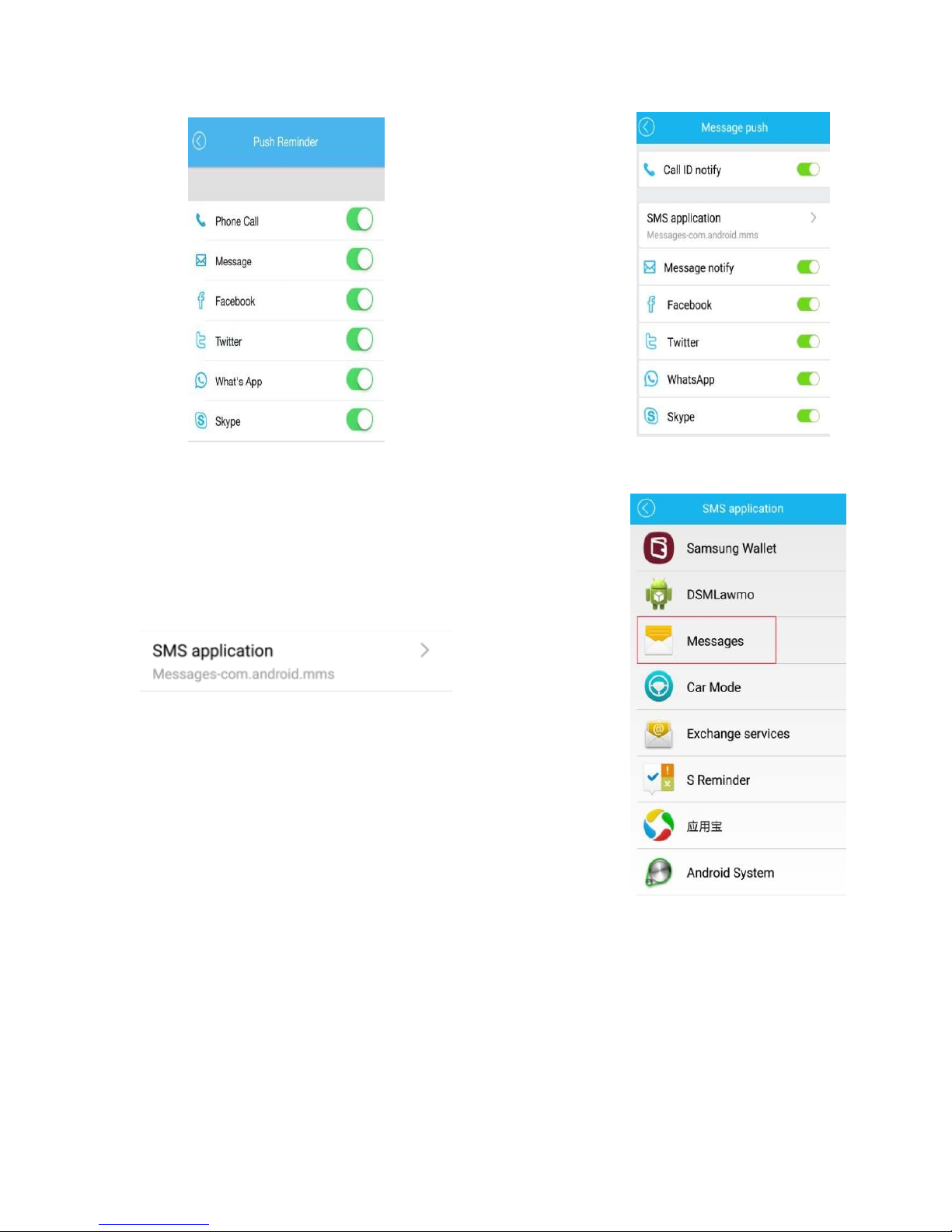
(12-1) (12-2)
(12-3)
(12-4)
OTA Upgrade
Attention: the phone screen must be kept lighten when using this function in this process, the APK, APP can’t
be hidden in thebackstage.

When a new iDroid Fit firmware uploaded to the server, there will be a upgrade reminder in APP, APK, take the
following steps:(13-1 to13-6)
(13-1)(13-2)
(13-4)(13-3)
Table des matières
Autres manuels iDROID Montre


