
IBM 47AE - 410168 Manuel utilisateur

Infoprint Server for iSeries V5
Session 47AE - 410168
Mira Shnier
Senior IT Specialist, Printing Systems Division, IBM Canada Ltd.
SCS
Archive
Overlays
Fonts
Psegs
Page &
Form defs
Output
queue
iSeries Output Architecture
Web,
network
images
PDF
Subsystem
Create
AFP
Data
PF
IFS
OS/400
PSF/400
Printer file
iSeries native
applications
E-mail
PDF
Web
PRTAFPDTA
GIF to AFP
JPEG to AFP
TIFF to AFP
PDF
PCL
IPDS
Infoprint Designer
Client, network, and
iSeries ASCII
applications
PCL to AFP
PS to AFP
PDF to AFP
DDS
CVTLINDTA=*YES
Client Access AFP Viewer
or
AFP Viewer Plug-in
COMMON 410168 47AE Infoprint Server Denver.PRZ
1-2 10/11/02

E-business is changing the face of business communications
Traditional information methodology has been "print and
distribute"
Networks, Internet, and electronic documents are transforming
this methodology
Electronic documents mean:
Tie to pre-printed form is broken
Flexibility in content
Flexibility in delivery
Networks and Internet drives e-business process re-engineering
Printing, if required, must take place later in the flow
Electronic documents and reports can flow as the process
requires
The output of e-business - "E-output"
Ability to create fully electronic pages of information and deliver
them to the desired destination in the desired format
Enabling "e-output"
Infoprint Server
for iSeries
e-business
enablement of
output, client and
network transforms,
ERP ASCII data
stream support,
digital output
distribution,
integrated e-mail of
output, PDF,
web-ready AFP
Integrated Applications
Client Access, Facsimile Support, ImagePlus, OnDemand, Content Manager
Common Server, AFP plug-in, plus third party tools
Infoprint Designer for iSeries
Integrated document composition
including image, overlay, and full
application layout
Output Enablers
Advanced Print Utility (APU), Page Printer
Formatting Aid (PPFA), AFP Toolbox, AFP
Utilities, plus third party tools
Print Services Facility for OS/400
AFP Systems Management, IPDS Printer Driver, Integrated e-mail of iSeries output
OS/400
SCS, AFP, Transforms, TCP/IP, Client Access, DDS, Printer File, Finishing, Color,
Network Print Server, Virtual Print, Host Print Transform, SNMP, National
Language, DBCS, IPP Server, Java XML, Java AFP, Unicode, Page Definition to
AFP
iSeries Print Version 5
COMMON 410168 47AE Infoprint Server Denver.PRZ
3-4 10/11/02

Focus of Infoprint Server
Electronic Distribution of output
iSeries management of network print
iSeries support for PDF
Transform services for any iSeries
standard output (AFP, IPDS, SCS, even
OV/400)
PDF output to e-mail, IFS, or PDF
printer
High-function PDF Server
Segmentation - "Electronic Burst and
Bind"
Integrated e-mail of output
PDF output can be automatically
e-mailed
Multiple e-mails based on segmentation
Exits for customization
iSeries as a network print server
PCL, Postscript, and PDF to AFP
Postscript and PDF transform is
IBM-Adobe full-function Level 3
Portable, web-ready AFP
Add external resources to AFP data for
portability and browser view
Add indexing for navigation and report
segmentation
Image transforms
GIF, TIFF, and JPEG transforms to
IOCA
Windows-based
Infoprint Server for iSeries
Using Infoprint Server
Learning by example
Scenarios illustrating a business needs
How Infoprint Server can help
How it works
What you need to do to make it happen
COMMON 410168 47AE Infoprint Server Denver.PRZ
5-6 10/11/02

1. Publish to the Web
Scenario - monthly
reports sent out to
departments in hard copy
Customer would prefer
these went on the
company Intranet (or
Internet)
Publish to the Web - solution
1. An OS/400 application creates the data and puts it on
the spool.
2. Use the IPDS to PDF conversion function to store the
data in the iSeries IFS.
3. Access the data from a web application or using
Client Access.
COMMON 410168 47AE Infoprint Server Denver.PRZ
7-8 10/11/02

Archive
Overlays
Fonts
Psegs
Page &
Form defs
Output
queue
Architecture: PDF Web publishing
PDF
Device
Description
IFS
OS/400
PSF/400
Printer file
iSeries native
applications
PDF
Company
Intranet
PDF
DDS
PSF
Configuration
Object
PDF subsystem setup
Device Description:
Virtual *IPDS/AFP printer on *LAN
Loopback address (127.0.0.1)
Unique Port number
USRDFNOBJ Points to PSF Configuration object
PSF Configuration object
Select PDFGEN(*MAIL/*STMF/*SPLF)
Single or Multiple
Destination: Outq, IFS directory, or e-mail
E-mail mapping program
Default SENDER
Data queue
PDF device type (Recommend: *IP40300)
Paper size
Include PDF fonts Y/N
COMMON 410168 47AE Infoprint Server Denver.PRZ
9-10 10/11/02
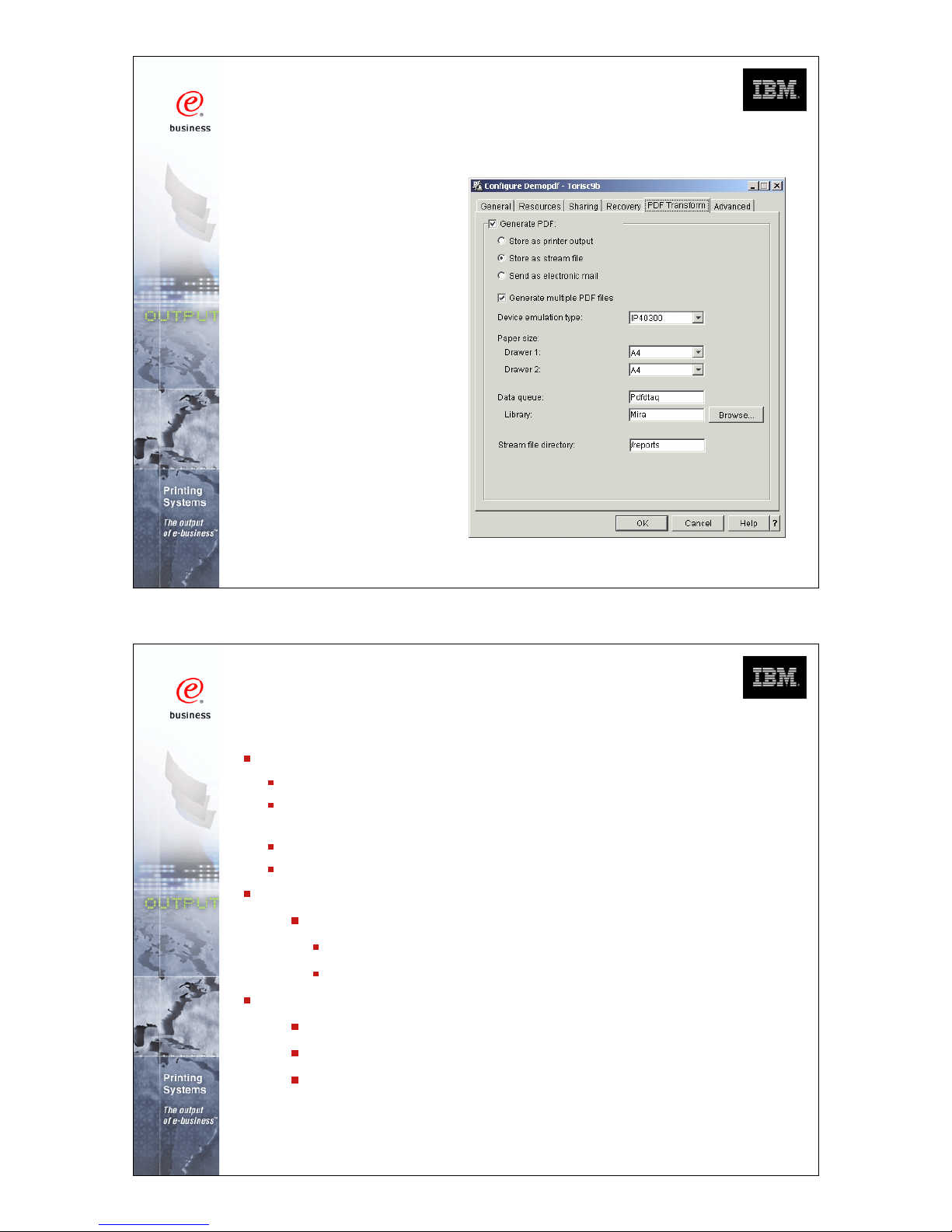
Using iSeries Navigator to create a
PSF Config. Object
The same
object can be
build using the
CRTPSFCFG
or
CHGPSFCFG
commands.
PDF transform enables:
Re-engineering of output distribution
Soft copy repositories for "demand pull" information
dissemination
Printing directly to PDF-capable printers
Integrate with custom e-mail applications
PDF files in ASCII, full text format
Full text output
SBCS raster and outline fonts
DBCS raster fonts
Output PDF to:
Dynamic e-mail
Integrated File System
Output queue
PDF Output
COMMON 410168 47AE Infoprint Server Denver.PRZ
11-12 10/11/02

Target Directory and File Name
If you specify a Root File System directory name, the file will be
stored as:
/PDF-directory-name/job-name/job-user-name+
/job-number_file-number_spooled-file-name_date_sequence-number.PDF
In this example the target was specified as '/reports'
COMMON 410168 47AE Infoprint Server Denver.PRZ
13-14 10/11/02

Target Directory and File Name
If you specify a directory name in the QDLS System, the file will
be stored as:
/QDLS/folder-name/job-name/job-number/job-user-name/file-number+
/spooled-file-name/date/sequence-number.PDF
In this example the target was specified as '/QDLS/EMAILS'
More on Target Stream Files
If you select "Generate multiple PDF files" the separate
files will have sequence number 00001.PDF,
00002.PDF etc.
File(s) will be generated as owned by the spooled file
owner with public authority of *EXCLUDE
Any directories that do not already exist are created by
the PDF subsystem, are owned by QSPLJOB, and
have a public authority of *RX
COMMON 410168 47AE Infoprint Server Denver.PRZ
15-16 10/11/02

iSeries Access for WEB
PDF support
Use 5722-XH2
iSeries Access for WEB - view PDF
COMMON 410168 47AE Infoprint Server Denver.PRZ
17-18 10/11/02

2. Electronic Report Distribution
Scenario - monthly sales
reports are printed,
manually separated and
mailed to regional office
managers
Customer would like to
automatically distribute
and send the relevant
reports to specific
managers
1. Use DDS keywords to insert Group tags in *AFPDS
spooled file.
2. Original spooled file converted to multiple PDF files
3. User exit program converts department name to e-mail
address.
4. Each PDF file sent to appropriate regional office as
e-mail attachment
V5R1 uses SNDDST
V5R2 you can use SNDDST or any SMTP server.
Electronic Report Distribution - solution
(Other methods of segmenting and addressing
the file will be discussed later.)
COMMON 410168 47AE Infoprint Server Denver.PRZ
19-20 10/11/02
Table des matières
Autres manuels IBM Serveur d'impression


