
i4Technology BugHunter Professional BH-03 Expert Manuel utilisateur


2
CONTENTS
1 Specification and operation ................................................................................................................5
1.1 Application area...........................................................................................................................5
1.2 Technical features........................................................................................................................6
1.3 Device components.......................................................................................................................7
1.4 Internal design and operating.......................................................................................................7
2 Correct use.........................................................................................................................................10
2.1 Operating restrictions..................................................................................................................10
2.2 Before operating..........................................................................................................................10
2.3 Intended usage ............................................................................................................................10
3 Maintenance.......................................................................................................................................22
4 Troubleshooting.................................................................................................................................22
5 Package and transportation...............................................................................................................23
6 Acceptance certificate........................................................................................................................24
7 Manufacturer’s warranty ...................................................................................................................24
8 Warranty Card ...................................................................................................................................25

3
Main advantages of BugHunter BH-03 over similar devices
1. The declared and real characteristics of the device are in strict conformity.
2. It covers the entire range of wireless “bugs” working frequencies (from 10 to 3500 MHz).
3. High sensitivity (throughout all the frequencies of the claimed frequency range).
4. Extended dynamic range.
5. It detects both analog and digital wireless bugs (that work on the principle of fast pulses).
6. Automatic adjustment to background radiation levels.
7. OLED-display to provide the visual image of the received signal type and the history of
changes within the last 45 seconds.
8. Switchable filters that exclude frequency ranges of base cellular communication stations
(GSM900/1800, 3G, 4G, CDMA450), and Wi-Fi (provides successful “bug” hunting in modern city
environment, highly contaminated by radio interference). Unique!
9. Vibroindication (switchable) and the possibility to connect the earphones to get the implicit
warnings of wireless "bugs".
10. Operating in different modes (sound indication, sound feedback, mute).
11. The possibility to use rechargeable batteries or built-in charger.
12. Search and security operating modes.
13. An additional extendable antenna (to increase the sensitivity).
14. Low battery indicator.
15. Self-diagnosis.
16. The possibility to detect the killers of cellular and other frequencies.
17. Design and manufacturing are made in Russia. Only high-quality components are used during
production.

4
Attention!
Read carefully and follow the rules, restrictions and instructions contained in this manual to
increase the lifespan of the equipment and to use it more effectively.
The manufacturer's warranty will become invalid prematurely if the user of the equipment does
not follow the storage and transportation instructions.
Attention!
After storing the product in a cold place or transporting in winter the device should be kept at
room temperature for two hours before operating.
Attention!
Please request to perform functional testing before purchase. Also make sure that the warranty
sticker placed into the battery compartment is not damaged. Check the delivery set against article 1.3.1
of this manual. Ensure the warranty card is signed, dated and stamped.

5
1 Specification and operation
1.1 Application area
1.1.1 This device allows users to monitor the signal strength ranging from 10 to 3500 MHz
and can also be used to detect transmitting devices, such as “bugs”, wireless microphones, wireless spy
cams, portable radio sets, working cellphones, cellular signal killers and suppressors, etc., within the
area nearby.
1.1.2 Device software provides:
-specially designed algorithm of measuring the digital and analog signal strength and displaying
its average and peak values on the time curve;
- sensitivity adjustment (selection of the sensing element’s output characteristics for providing
the most convenient detection of local signal peak);
-possibility to work in “security” mode (which includes the adaptation to the ambient
background, switching to the standby mode and further exit from the standby mode after when signal
sources have been detected, accompanied with sound, visual and vibro indicating);
- displaying of the time based diagram of radio environment;
-minimized impact of the isolated signal sources (such as base cellular communication stations,
Wi-Fi access points) on the process of radio transmitting equipment detecting;
-sound indication of the receiving signal’s level;
-vibroindication of exceeding the preset threshold by the average signal (with the vibration
intensity control);
-current time indication;
- battery charge level indication.
1.1.3 Device is intended to use at the temperature ranging from -10 to +40°С, the relative
moisture below 98% at the temperature of +25°С and at the atmospheric pressure of 84-106,7 kPa.

6
1.2 Technical features
1.2.1 The Picture 1 below illustrates the physical configuration of the product.
Pic. 1. Physical configuration
1.2.2 The table below gives the information about technical features of the product.
Description
Value
Dimensions, mm, not more than
105х58х18,5
Weight with batteries, kg, max
0,11
DC supply voltage (two AAA batteries), V
from 2,2 to 3,2
Power consumption, W, max
0,6
Working frequency range, MHz
from 10 to 3500
Responsivity with filers switched off, mV / m, min
50
Dynamic range, dB, min
70
Detection range of a radio transmitter with the power of
5 mW, under a quiet radio background, m, min
5
Detection range of an operating cell phone, under a
quiet radio background, m, min
50

7
Frequency ranges of built-in filters, MHz
-Wi-Fi
-4G
-3G
-GSM
-CDMA
more than 2400
from 832 to 862 and from 2620 to 2690
from 2110 to 2170
from 925 to 960 and from 1805 to 1880
from 463 to 467,5
Strength loss of output by built-in filters within the preset
frequency range, dB, min
15
Continuous work duration (with sound and vibro
indication switched off), min:
- from 2 alkaline batteries of AАА type GP Ultra
- from 2 accumulators of ААА type (2400 mA/h)
400
500
1.3 Device components
1.3.1 The table below gives the information of components of the product and the delivery set.
№
Description
Quantity
Note
1
BugHunter Professional BH-03
1
2
Accumulator of ААА type
2
installed
3
Charging unit
1
4
Power cord
1
5
Earphones
6
Shipping box
1
7
User manual INTK.411153.006 RE
1
1.4 Internal design and operating
1.4.1 Bug Hunter BH-03 is a portable device that has an autonomous power supply. The case
made of impact-resistant ABS plastic (item 1) has a battery compartment (item 2) with a battery cover
(item 3).There also membrane keyboard with 9 push-buttons (item 4), OLED-display (item 5) and

8
micro-USB connector (item 6) for the charging unit are placed in the case. Picture 2 illustrates the main
parts scheme.
Pic. 2. Scheme of main components
1.4.2 Picture 3 illustrates the display in the “search mode”
During the measurement process, the average (item 1) and peak (item 2) values of the received
signal strength are being constantly displayed on the screen. The displaying is performed in logarithmic
notation, on a selected sensitivity range scale, and as a graph of values for the last 3 seconds. The graph
of the average values history for the last 45 seconds (item 3), selected sensitivity level (item 4),
vibroindication engagement threshold (item 6) on a scale of a current level of a received signal’s
strength (item 5) are also displayed on the screen.
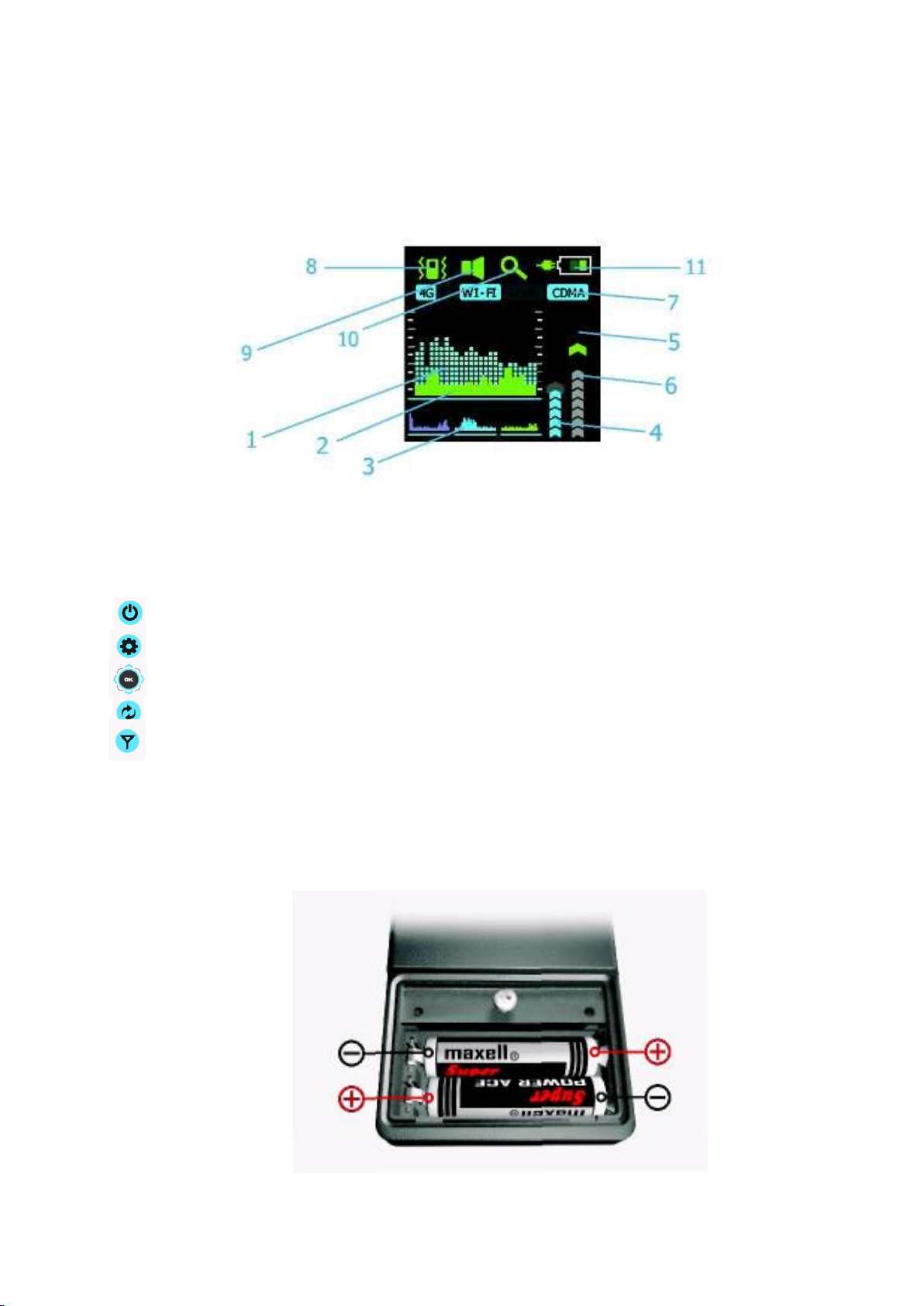
9
At the same time the device displays on the screen the filter state (switched on/off, item 7),
vibroindication state (switched on/off, item 8), adjusted sound mode (mute, sound indication or
feedback, item 9), current operating mode (“search” or “security”, item 10), and the selected type of
power supply (item 11).
Pic. 3. Screen in the “search” mode
1.4.3 The control buttons are used to:
-turn the device on/off (by holding), and exit from a menu (by short pressing);
-switch to the main settings menu and back (by short pressing);
-navigate through the menu and select values;
-switch between operating modes (by short pressing) and sound modes (by holding);
- gain a quick access to the filter selection menu.
You can learn more about the functions of control buttons below.
1.4.5 The device is powered by two AAA type batteries or two accumulators of the same type.
How to install the batteries into the case you can see on the battery compartment’s bottom or in the
Picture 4.
Pic. 4. Batteries installation scheme

10
2 Correct use
2.1 Operating restrictions
2.1.1 Keep the battery compartment and battery contacts clean.
2.1.2 Change discharged batteries and recharge accumulators on time.
2.1.3 Before recharging accumulators installed into the product’s case, ensure that there are
rechargeable batteries not the galvanic batteries installed. It’s prohibited to charge the galvanic
batteries, you must renew them.
2.2 Before operating
To prepare the device for working you should:
- loosen the screw and remove the battery compartment’s cover (Pic. 2, item 3);
- install the batteries respecting polarities (Pic.4);
- place the battery compartment’s cover back and fasten it with screw.
2.3 Intended usage
2.3.1 Turning the device on/off. To turn the device on, press and hold button for 2 seconds.
When the device turns on, you’ll hear a beep and see the screen saver (Pic. 5).
Pic. 5. Screen saver
The device will switch to the “search” mode and the screen will look like in the Pic. 6.
Press and hold button for 2 seconds again to turn the device off.
Autres manuels pour BugHunter Professional BH-03 Expert
1
Table des matières
Autres manuels i4Technology Capteur de sécurité

i4Technology
i4Technology Bughunter dVideo Manuel utilisateur

i4Technology
i4Technology Bughunter TM DVIDEO NANO Manuel utilisateur

i4Technology
i4Technology BugHunter Professional CR-01 Manuel utilisateur

i4Technology
i4Technology BugHunter Professional BH-04 Manuel utilisateur

i4Technology
i4Technology BugHunter Professional CR-01 Manuel utilisateur

i4Technology
i4Technology BugHunter Professional BH-02 Rapid Manuel utilisateur

i4Technology
i4Technology BugHunter Professional BH-03 Expert Manuel utilisateur

i4Technology
i4Technology Bughunter dVideo BDV-01 Manuel utilisateur


