
HP mp200 Manuel utilisateur

mp200
HD Media Player
User Manual
使用者手冊

i

i
English English
Content
STATEMENT.................................................................................. 1
INTRODUCTION............................................................................ 2
PACKAGE CONTENTS................................................................. 3
PRODUCT OVERVIEW ................................................................. 4
Front Panel .............................................................................................. 4
Back Panel................................................................................................ 4
Remote Control......................................................................................... 6
Connect .................................................................................................... 8
Setup ........................................................................................................ 10
Initial setup............................................................................................................. 10
Setup Menu .............................................................................................. 12
Playback Multimedia................................................................................. 20
Playback media files using an external DVD-ROM or USB storage device........... 20
Rename or Delete media files................................................................................ 34
NETWORK PLAYER ..................................................................... 48
Setup the IP Address ............................................................................................. 48
Check your PC’s computer name and workgroup.................................................. 50
Setup your PC to share folders.............................................................................. 52
Setup your home server or NAS to share folders .................................................. 53
Browse and play media from your PC or home server’s shared folder.................. 53
My Shortcuts .......................................................................................................... 56
UPNP PLAYER .............................................................................. 60
Windows Media Player 11 Setup (on Windows XP/Vista) ........................ 60
Import media files to Windows Media Player 11 .................................................... 62
Browse through UPnP............................................................................................ 62
NAS FUNCTION ............................................................................ 65
Enabling the NAS function........................................................................ 65
Accessing the NAS function................................................................................... 65
BITTORRENT (BT) DOWNLOAD ................................................. 67
Settings..................................................................................................... 68
Add new torrent ........................................................................................ 68
Status page............................................................................................... 69

ii
1
TROUBLESHOOTING................................................................... 70
Reset the device ....................................................................................... 70
Power on/Standby time............................................................................. 70
Battery ...................................................................................................... 70
Black screen ............................................................................................. 70
Can’t use the Photo Thumbnail function................................................... 70
Can’t see subtitle through UPnP playback ............................................... 71
Smooth playback through Ethernet/Wireless LAN.................................... 71
TV Overscan issue ................................................................................... 71
Error message displayed while playing DVD-Video ................................. 71
SPECIFICATION............................................................................ 72

ii
1
English English
Statement
Manufactured under license under U.S. Patent #’s: 5,451,942; 5,956,674; 5,974,380;
5,978,762; 6,487,535 & other U.S. and worldwide patents issued & pending. DTS and
the Symbol are registered trademarks, & DTS 2.0+ Digital Out and the DTS logos are
trademarks of DTS, Inc. Product includes software. © DTS, Inc. All Rights Reserved.

2
3
Introduction
The HP mp200 HD Media Player allows you to enjoy your videos, photos and music
on your TV and stereo system. It can playback high denition multimedia content up
to 1080p using les stored on a USB ash drive, USB hard drive, or even across your
home network. Now you can nally get those les that have been stored on your PC for
years and watch them on your HDTV screen.
Feature Highlights:
Decode and output High Denition videos and photos (up to 1080p resolution).•
Support a wide variety of HD video formats.•
Connects to your TV using HDMI 1.3, Component or Composite connections.•
The built-in Ethernet port allows the media player to access content across the•
network using Universal Plug and Play protocols, as well as le sharing protocols
such as SMB (Samba).
High performance video playback with special playback control such as zoom out/in,•
picture panning, fast forward, fast reverse, slow-motion, and more.
Fully supports multiple subtitle formats. Dynamically change the subtitle display by•
remote control.
Photo playback in high denition. Supports 16X zoom in, and 3-direction rotation.•
Slide show mode includes 8 kinds of transition effects. Background music playback •
is supported.
Supports a wide range of music encoding formats to playback high quality music•
les. The music playback function includes fast forward, fast reverse, repeat, shufe
and shufe repeat.
The USB 2.0 port allows for the connection of a USB Flash Drive, USB Hard Disk •
Drive, USB Card Reader, USB DVD-ROM Drive.
Supports multiple types of le systems, including NTFS, FAT, and ext3.•
Easy to use interface and remote control.•

2
3
English English
Package Contents
Please check the parts in the package, and contact the distributor if something is
missing.
HP mp200 HD Media Player Remote Control
Two AAA batteries Component Cable
Composite AV Cable HDMI Cable
Power Adapter Quick Installation Guide
User’s Manual Warranty Card
4
5
Product Overview
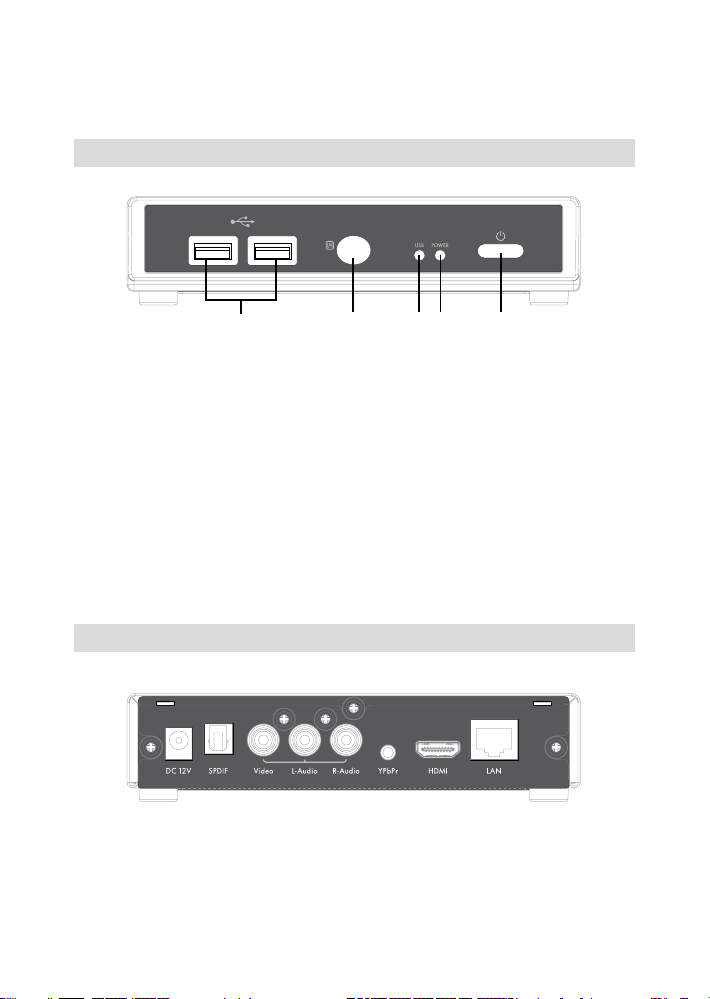
Front Panel
123 4 5
LED/button/connector:
USB port:1. These two USB 2.0 type A sockets can be used to connect an external
USB Flash Drive, USB Hard Drive, USB DVD-ROM, or USB Flash Card Reader.
IR sensor:2. This is the port that receives commands from the remote control. Please
make sure not to block the port.
USB indicator:3. When plugging in a USB device, it may take up to 5 seconds for it
to become ready.
Power indicator:4. Lights up when the power is plugged in, and the device is turned
on.
POWER STANDBY:5. Press this button to put the mp200 into standby or to wake it
up from standby.
Back Panel
Video connection: Please select one of the following connections in order to connect
the mp200 video to your TV set.
HDMI output: This high denition port can be used to connect the mp200 with your

4
5
English English
HDMI receiver or HDMI TV set. This is the preferred connection method.
Component This high denition port is sometimes referred to as the YPbPr port. In
the case where your TV does not support HDMI, or if you do not have a free HDMI
port, you can use this to connect your media player to your TV or stereo receiver. Use
the bundled cable in order to make this connection.
Composite Video (CVBS): This type of video connection only supports standard
denition video playback. Only use this port if your TV does not have high denition
playback capabilities.
Audio connection: Please select one of the following connections in order to connect
the mp200 audio to your TV set or S/PDIF capable receiver.
HDMI output: HDMI can carry audio as well as video information. If you connect
using HDMI, then you may not need to connect a separate audio connection.
AUDIO L/R: These ports provide the analog stereo audio channels to your TV set or
stereo receiver.
S/PDIF: This is the TOSLINK (optical) digital audio output connection to connect your
mp200 to your audio receiver.
Ethernet port: This is the Ethernet port for accessing content through your Local
Network.
DC IN: This connects to the DC output of the Power Adapter. The power requirement
is 12Vdc, 1.5 A.

6
7
Remote Control
1
3
8
10
16
20
22
27
28
15
45
2
6
9
17
21
24
11
18
13
12
7
14
19
22
25
26
29
30
Autres manuels pour mp200
2
Table des matières
Autres manuels HP Lecteur multimédia


