HP StorageWorks 700ux Manuel utilisateur

Setup Guide
hp StorageWorks
700ux/1100ux Optical Jukebox
First Edition (September 2004)
Part Number: AA962-96002
This guide describes procedures for unpacking, installing, configuring, and troubleshooting
installation issues for the HP StorageWorks 700ux/1100ux Optical Jukebox.

© Copyright 2004 Hewlett-Packard Development Company, L.P.
Hewlett-Packard Company makes no warranty of any kind with regard to this material, including, but not limited to,
the implied warranties of merchantability and fitness for a particular purpose. Hewlett-Packard shall not be liable for
errors contained herein or for incidental or consequential damages in connection with the furnishing, performance,
or use of this material.
This document contains proprietary information, which is protected by copyright. No part of this document may be
photocopied, reproduced, or translated into another language without the prior written consent of Hewlett-Packard.
The information contained in this document is subject to change without notice. The only warranties for HP products
and services are set forth in the express warranty statements accompanying such products and services. Nothing
herein should be construed as constituting an additional warranty.
Microsoft®, MS-DOS®, MS Windows® and Windows® are U.S. registered trademarks of Microsoft Corporation.
UNIX® is a registered trademark of The Open Group.
Hewlett-Packard Company shall not be liable for technical or editorial errors or omissions contained herein. The
information is provided “as is” without warranty of any kind and is subject to change without notice. The warranties
for Hewlett-Packard Company products are set forth in the express limited warranty statements for such products.
Nothing herein should be construed as constituting an additional warranty.
Printed in the U.S.A.
HP StorageWorks 700ux/1100ux Optical Jukebox Setup Guide
First Edition: September 2004
Part Number: AA962-96002
Regulatory Model Number: LVLDC-0451

3HP StorageWorks 700ux/1100ux Optical Jukebox Setup Guide
Contents
Contents
About this Guide. . . . . . . . . . . . . . . . . . . . . . . . . . . . . . . . . . . . . . . . . . . . . . . . . . . .5
Related documentation . . . . . . . . . . . . . . . . . . . . . . . . . . . . . . . . . . . . . . . . . . . . . . . . . . . . . . . 6
Conventions . . . . . . . . . . . . . . . . . . . . . . . . . . . . . . . . . . . . . . . . . . . . . . . . . . . . . . . . . . . . . . . 6
Document conventions. . . . . . . . . . . . . . . . . . . . . . . . . . . . . . . . . . . . . . . . . . . . . . . . . . . . 6
Text symbols . . . . . . . . . . . . . . . . . . . . . . . . . . . . . . . . . . . . . . . . . . . . . . . . . . . . . . . . . . . 7
Getting help . . . . . . . . . . . . . . . . . . . . . . . . . . . . . . . . . . . . . . . . . . . . . . . . . . . . . . . . . . . . . . . 7
HP technical support . . . . . . . . . . . . . . . . . . . . . . . . . . . . . . . . . . . . . . . . . . . . . . . . . . . . . 7
HP storage web site . . . . . . . . . . . . . . . . . . . . . . . . . . . . . . . . . . . . . . . . . . . . . . . . . . . . . . 8
HP authorized reseller . . . . . . . . . . . . . . . . . . . . . . . . . . . . . . . . . . . . . . . . . . . . . . . . . . . . 8
1 Unpacking . . . . . . . . . . . . . . . . . . . . . . . . . . . . . . . . . . . . . . . . . . . . . . . . . . . . . . . .9
Selecting an installation site . . . . . . . . . . . . . . . . . . . . . . . . . . . . . . . . . . . . . . . . . . . . . . . . . . 10
Removing the packing materials . . . . . . . . . . . . . . . . . . . . . . . . . . . . . . . . . . . . . . . . . . . . . . 12
2 Installation . . . . . . . . . . . . . . . . . . . . . . . . . . . . . . . . . . . . . . . . . . . . . . . . . . . . . . .15
Identifying product components. . . . . . . . . . . . . . . . . . . . . . . . . . . . . . . . . . . . . . . . . . . . . . . 16
Identifying panel features. . . . . . . . . . . . . . . . . . . . . . . . . . . . . . . . . . . . . . . . . . . . . . . . . . . . 18
Front panel features and descriptions. . . . . . . . . . . . . . . . . . . . . . . . . . . . . . . . . . . . . . . . 18
Back panel features and descriptions. . . . . . . . . . . . . . . . . . . . . . . . . . . . . . . . . . . . . . . . 19
Getting connected. . . . . . . . . . . . . . . . . . . . . . . . . . . . . . . . . . . . . . . . . . . . . . . . . . . . . . . . . . 20
3 Configuration . . . . . . . . . . . . . . . . . . . . . . . . . . . . . . . . . . . . . . . . . . . . . . . . . . . . .25
Using the jukebox on your host system . . . . . . . . . . . . . . . . . . . . . . . . . . . . . . . . . . . . . . . . . 26
Connection to Windows 2000 and 2003 Server versions (32- and 64-bit systems) . . . . 26
Connection to HP-UX (11.x) . . . . . . . . . . . . . . . . . . . . . . . . . . . . . . . . . . . . . . . . . . . . . . 27
Obtaining HP-UX patches. . . . . . . . . . . . . . . . . . . . . . . . . . . . . . . . . . . . . . . . . . . . . 27
Installing the schgr driver . . . . . . . . . . . . . . . . . . . . . . . . . . . . . . . . . . . . . . . . . . . . . 27
Formatting and mounting UDO rewritable disks . . . . . . . . . . . . . . . . . . . . . . . . . . . 28
Connection to Sun Solaris, IBM AIX, Tru-64, and Linux. . . . . . . . . . . . . . . . . . . . . . . . 29
Loading UDO media. . . . . . . . . . . . . . . . . . . . . . . . . . . . . . . . . . . . . . . . . . . . . . . . . . . . . . . . 30

Contents
4 HP StorageWorks 700ux/1100ux Optical Jukebox Setup Guide
4 Troubleshooting Installation. . . . . . . . . . . . . . . . . . . . . . . . . . . . . . . . . . . . . . . . . . .33
Resolving installation issues. . . . . . . . . . . . . . . . . . . . . . . . . . . . . . . . . . . . . . . . . . . . . . . . . . 34
Using HP StorageWorks Library and Tape Tools . . . . . . . . . . . . . . . . . . . . . . . . . . . . . . . . . 36
Glossary. . . . . . . . . . . . . . . . . . . . . . . . . . . . . . . . . . . . . . . . . . . . . . . . . . . . . . . . .37
Index . . . . . . . . . . . . . . . . . . . . . . . . . . . . . . . . . . . . . . . . . . . . . . . . . . . . . . . . . . .39

5HP StorageWorks 700ux/1100ux Optical Jukebox Setup Guide
About This
Guide
About this Guide
About this Guide
This setup guide provides information to help you:
■Unpack the jukebox
■Install and configure the jukebox
■Load media
■Troubleshoot installation issues
“About This Guide” topics include:
■Related documentation, page 6
■Conventions, page 6
■Getting help, page 7

About this Guide
6 HP StorageWorks 700ux/1100ux Optical Jukebox Setup Guide
Related documentation
In addition to this guide, HP provides corresponding information:
■
HP StorageWorks Optical 700ux/1100ux Jukebox User’s Guide
■
HP StorageWorks Optical 700ux/1100ux Jukebox Getting Started Poster
■
HP StorageWorks Optical 700ux/1100ux Jukebox Service Manual
Conventions
Conventions consist of the following:
■Document conventions
■Text symbols
Document conventions
This document follows the conventions in Table 1.
Table 1: Document conventions
Element Convention
Cross-reference links Blue text: Figure 1
Key and field names, menu items, buttons, and
dialogue box titles Bold
File names, application names, and text
emphasis Italics
User input, commands and directory names,
and system responses (output and messages) Monospace font
COMMAND NAMES are uppercase monospace
font unless they are case sensitive
Variables <monospace, italic font>
Web site addresses Blue underlined sans serif font text
(
http://www.hp.com
)

About this Guide
HP StorageWorks 700ux/1100ux Optical Jukebox Setup Guide 7
Text symbols
The following symbols may be found in the text of this guide. They have the
following meanings:
WARNING: Text set off in this manner indicates that failure to follow
directions in the warning could result in bodily harm or death.
Caution: Text set off in this manner indicates that failure to follow directions
could result in damage to equipment or data.
Note: Text set off in this manner presents commentary, sidelights, or interesting points
of information.
Getting help
If you still have a question after reading this guide, contact an HP authorized
service provider or access our web site:
http://www.hp.com
.
HP technical support
Telephone numbers for worldwide technical support are listed on the following
HP web site:
http://www.hp.com/support/
.
Note: For continuous quality improvement, calls may be recorded or monitored.

About this Guide
8 HP StorageWorks 700ux/1100ux Optical Jukebox Setup Guide
Be sure to have the following information available before calling:
■Technical support registration or contract number (if applicable)
■Product serial numbers
■Product model names and numbers
■Applicable error messages
■Operating system type and revision level
■Detailed, specific questions
■HP StorageWorks Library & Tape Tools support ticket (if applicable)
HP storage web site
The HP web site has the latest information on this product. Access storage at:
http://www.hp.com/country/us/eng/prodserv/storage.html
. From this web site,
select the appropriate product or solution. You can also visit
http://www.hp.com/go/udo
.
HP authorized reseller
For the name of your nearest HP authorized reseller:
■In the United States, call 1-800-345-1518
■In Canada, call 1-800-263-5868
■Elsewhere, see the HP web site for locations and telephone numbers:
http://www.hp.com
.

Unpacking
10 HP StorageWorks 700ux/1100ux Optical Jukebox Setup Guide
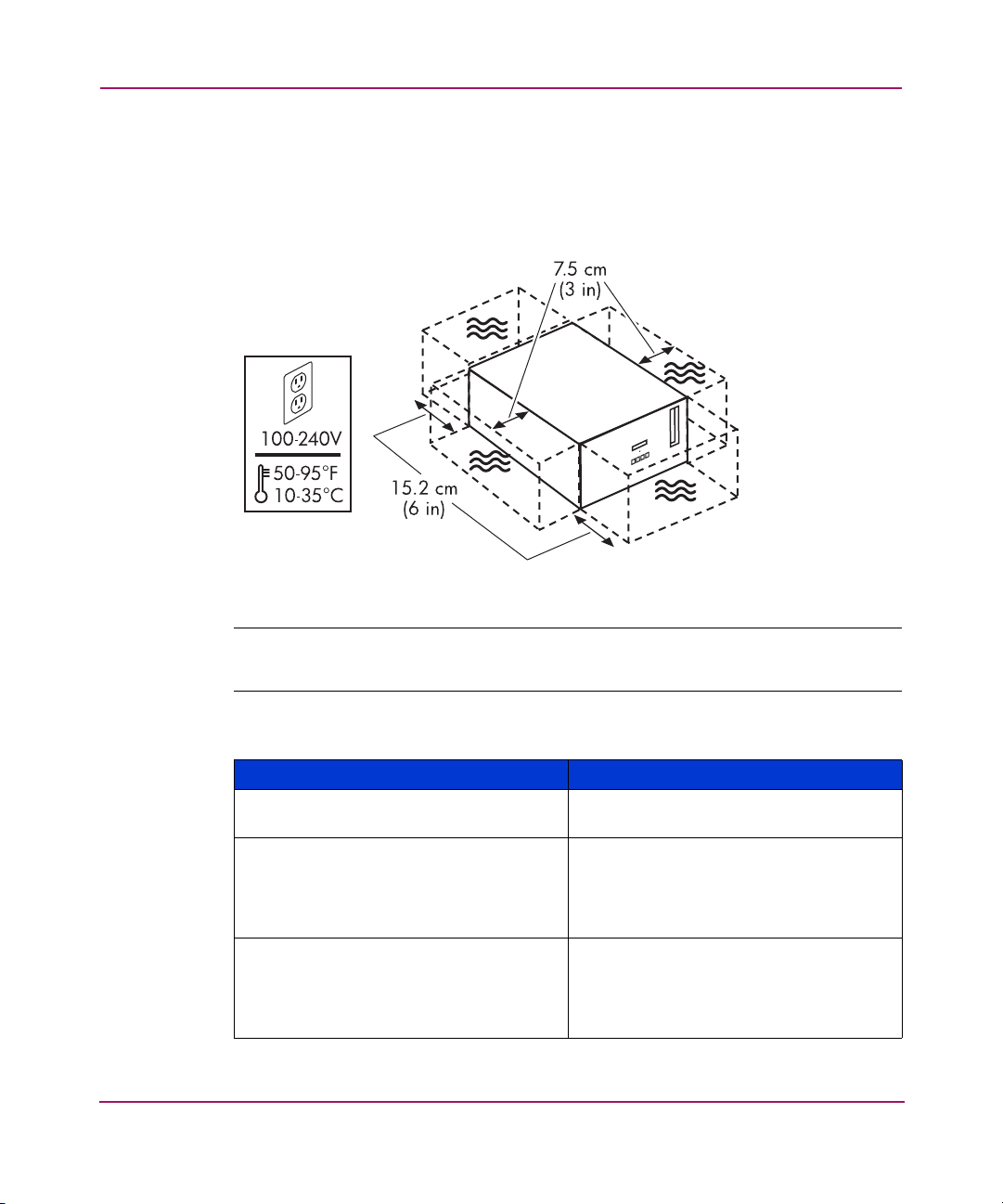
Selecting an installation site
Select an installation site, noting the environmental considerations (see Figure 1
and Table 2). Sufficient clearance is necessary for installation access.
Figure 1: Environmental considerations
Note: Locate the AC outlet near the jukebox. The AC power cord is this product’s main
AC disconnect device and must be easily accessible at all times.
Table 2: Location criteria
Specification Description
Clearance Enough room to comfortably insert disks
in the mailslot and for service access.
Power requirements ■Line voltage: 100 to 240 VAC
■Line frequency: 50 to 60 Hz
■Power consumption:
560 W maximum
Temperature:
■Operating temperature
■Non-operating temperature (without
media)
■10ºC to 35ºC (50ºF to 95ºF)
■-40ºC to 60ºC (-40ºF to 140ºF)
Ce manuel convient aux modèles suivants
1
Table des matières
Autres manuels HP Juke-box

HP
HP SureStore 220mx Mode d'emploi

HP
HP SureStore 220mx Manuel utilisateur

HP
HP Surestore 160ex - Optical Jukebox Manuel utilisateur

HP
HP SureStore 220mx Manuel utilisateur

HP
HP StorageWorks 1000ux Manuel utilisateur

HP
HP SureStore 220mx Manuel utilisateur

HP
HP StorageWorks 3800ux Manuel utilisateur

HP
HP Surestore 125ex - Optical Jukebox Manuel utilisateur

HP
HP Surestore 80ex - Optical Jukebox Manuel utilisateur

HP
HP Surestore 330fx - Optical Jukebox Manuel utilisateur