
HP 53131A Manuel utilisateur

Operating
Guide
HP 53131A/132A 225 MHz
Universal Counter


HP 53131A/132A 225 MHz
Universal Counter
Operating Guide
This guide describes how to use the HP 53131A/132A 225 MHz Universal
Counter. The information in this guide applies to instruments having the
number prefix listed below, unless accompanied by a “Manual Updating
Changes” package indicating otherwise.
SERIAL PREFIX NUMBER: 3313A to 3736A (HP 53131A)
3352A to 3736A (HP 53132A)
Hewlett-Packard Company 7.NC.NL.A.11.03.97.R1.P.CW6FC
Santa Clara Division
5301 Stevens Creek Boulevard
Santa Clara, California 95052-8059
Copyright Hewlett-Packard
Company 1999
All Rights Reserved.
Reproduction, adaptation, or
translations without prior
written permission is
prohibited, except as allowed
under the copyright laws.
Printed: May 1999
Printed in USA
Manual part number
53131-90055
Certification
and Warranty
Certification
Hewlett-Packard Company
certifies that this product met
its published specification at the
time of shipment from the
factory. Hewlett-Packard
further certifies that its
calibration measurements are
traceable to the United States
National Institute of Standards
and Technology (formerly
National Bureau of Standards),
to the extent allowed by the
Institute’s calibration facility,
and to the calibration facilities
of other International
Standards Organization
members.
Warranty
HP warrants HP hardware,
accessories and supplies against
defects in materials and
workmanship for a period of
three years from date of
shipment. If HP receives notice
of such defects during the
warranty period, HP will, at its
option, either repair or replace
products which prove to be
defective.Replacement products
may be either new or like-new.
HP warrants that HP software
will not fail to execute its
programming instructions, for
the period specified above, due
to defects in material and
workmanship when properly
installed and used. If HP
receives notice of such defects
during the warranty period, HP
will replace software media
which does not execute its
programming instructions due
to such defects.
For detailed warranty
information, see back matter.
Safety Considerations
General
This product and related
documentation must be
reviewed for familiarization
with this safety markings and
instructions before operation.
Before Cleaning
Disconnect the product from
operating power before
cleaning.
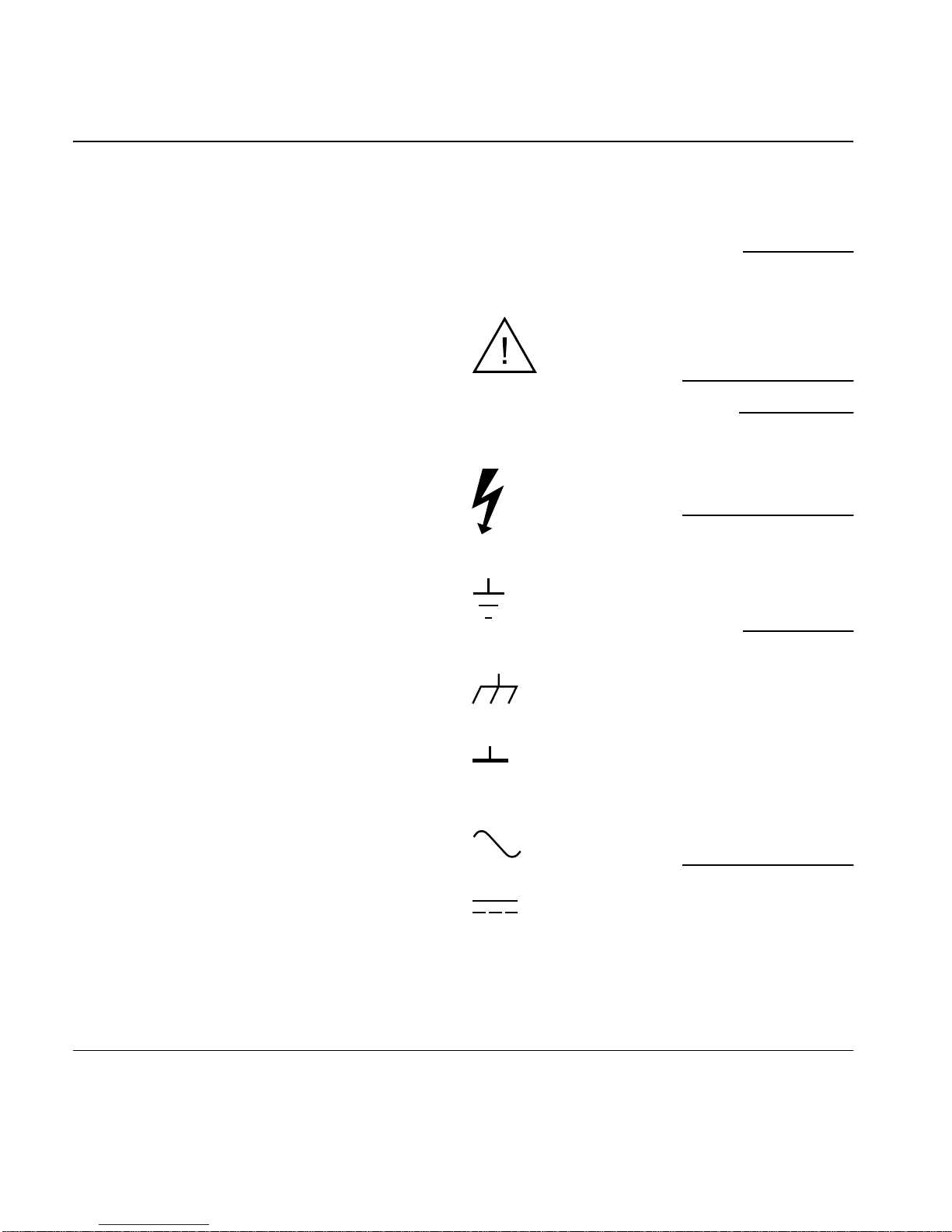
Warning Symbols That May
Be Used In This Book
Instruction manual symbol; the
product will be marked with
this symbol when it is necessary
for the user to refer to the
instruction manual.
Indicates hazardous voltages.
Indicates earth (ground)
terminal.
or
Indicates terminal is connected
to chassis when such connection
is not apparent.
Indicates Alternating current.
Indicates Direct current.
Safety Considerations
(contd)
WARNING
BODILY INJURY OR DEATH
MAY RESULT FROM
FAILURE TO HEED A
WARNING. DO NOT
PROCEED BEYOND A
WARNING UNTIL THE
INDICATED CONDITIONS
ARE FULLY UNDERSTOOD
AND MET.
CAUTION
Damage to equipment, or
incorrect measurement data,
may result from failure to
heed a caution. Do not
proceed beyond a CAUTION
until the indicated conditions
are fully understood and met.
Safety Earth Ground
An uninterruptible safety earth
ground must be maintained
from the mains power source to
the product’s ground circuitry.
WARNING
WHEN MEASURING POWER
LINE SIGNALS, BE
EXTREMELY CAREFUL AND
ALWAYS USE A
STEP-DOWN ISOLATION
TRANSFORMER WHICH
OUTPUT IS COMPATIBLE
WITH THE INPUT
MEASUREMENT
CAPABILITIES OF THIS
PRODUCT. THIS PRODUCT’S
FRONT AND REAR PANELS
ARE TYPCIALLY AT EARTH
GROUND.
THUS,NEVERTRY
TO MEASURE AC POWER
LINE SIGNALS WITHOUT AN
ISOLATION TRANSFORMER.
For additional safety and
acoustic noise information, see
back matter.

Contents
Operating Guide iii
In This Guide
Contents and Organization xii
Related Documents xiii
Types of Service Available if Your Instrument Fails xiv
Standard Repair Services (Worldwide) xiv
Express Repair/Performance Calibration Service
(USA Only) xiv
Assembly-Level Service Guide xiv
Repackaging for Shipment xv
Description of the 225 MHz Universal Counter xvi
Options xviii
Hardware xviii
Support xviii
Accessories Supplied and Available xix
Accessories Supplied xix
Accessories Available xix
Supplied Manuals xix
Differences Between Prior and Current Revisions of the
HP 53131A/132A xx
HP 53131A Containing Firmware Revisions (3317, 3335, or
3402) xx
Calibrations xxi
Measurements xxi
Statistics xxii
HP-IB Commands xxii
HP 53132A Time Interval Delay Arming xxii

Contents
iv Operating Guide
HP 53131A/132A Quick Reference Guide xxiii
1 Getting Started
The Front Panel at a Glance 1-2
The Front Panel Indicators at a Glance 1-3
The Front Panel Indicators at a Glance (Cont.) 1-4
The Front Panel Menus at a Glance 1-5
The Front Panel Menus at a Glance (Cont.) 1-6
The Front Panel Menus at a Glance (Cont.) 1-7
The Front Panel Menus at a Glance (Cont.) 1-8
The Display Annunciators at a Glance 1-9
The Display Special Character at a Glance 1-10
The Limit Test Graph Characters at a Glance 1-10
The Rear Panel at a Glance 1-11
Making Measurements 1-12
To Measure Frequency 1-13
To Select Input Coupling and Impedance 1-15
Selecting Input Coupling 1-15
Selecting Input Impedance 1-16
To Set Input Channel Trigger Level/Sensitivity 1-17
Changing Trigger Mode 1-17
Modifying Input Trigger Level 1-17
Selecting Input Trigger Slope 1-18
Selecting Input Sensitivity 1-19
Starting the Measurement 1-19
To Select Scale and Offset 1-19
Entering the Scale Value 1-20
Entering the Offset Value 1-21
Displaying the Math Results 1-22
Disabling Math 1-22
To Set Limits of Measurements 1-23
Setting the Upper Limit 1-24
Setting the Lower Limit 1-26

Contents
Operating Guide v
Setting the Counter to Flag and Stop Measuring On
Out-of-Limit Measurements 1-28
Setting the Counter to Flag On Limits But Continue
Measuring 1-29
Disabling Limit Testing 1-30
Disabling Math 1-30
To Perform Statistics on Measurements 1-31
Selecting the Type of Statistics (Stats) 1-31
Computing Stats on Filtered Data Only 1-32
Displaying Stats After Filtering Data of Input
Signal 1-34
Disabling Stats and Math 1-35
To Control Measurement 1-36
2 Operating Your Universal Counter
Introduction 2-2
Chapter Summary 2-2
Where to Find Some Key Working Examples 2-3
How this Counter Works for You 2-4
Using the Measurement Control Keys (Run and Stop/
Single) 2-5
Overview of the Measurement Control Keys 2-5
To Use the Measurement Control Keys 2-6
Using Entry/Select (Arrow) Keys 2-8
To Use During Numeric Entry 2-8
To Use When Sequencing Through the Measurement
Function Menus (Freq & Ratio, Time & Period, Other Meas)
and the Recall Menu 2-8
To Use During State Changing (ON/OFF, LO/MED/HI,
etc.) 2-9
To Use on Prompted Event Messages (SET OFFSET ?, CAL:
OFFS n ?, TEST: ALL?, etc.) 2-9
To Use on Prompted Help Messages (MATH HELP ?,
PRINT HELP ?) 2-9

Contents
vi Operating Guide
Using the MEASURE Menu Keys 2-10
Overview of the MEASURE Menus 2-10
To Measure Frequency 2-11
To Measure Frequency Ratio 2-12
To Measure Time Interval 2-13
To Measure Period 2-13
To Measure Rise/Fall Times 2-13
To Measure Positive/Negative Pulse Widths 2-14
To Measure Duty Cycle 2-14
To Make Totalize Measurements 2-14
To Make Phase Measurements 2-15
To Measure Positive/Negative Voltage Peaks 2-15
Using the Gate & External Arm Menu Key 2-16
Overview of Gate/External Arming Functions 2-16
Gate/External Arming Capabilities 2-16
AUTO Arming 2-16
EXTERNAL Arming 2-17
TIME Arming 2-17
DIGITS Arming 2-17
HP 53131A (and HP 53132A With S/N Prefix Below
3646) Time Interval DELAY Arming 2-17
HP 53132A (With S/N Prefix 3646 and Above) Time
Interval DELAY Arming 2-20
To Use the Gate and External Arm 2-24
Example Procedure for Gate and External Arm 2-24
Example Procedure for Changing the Number of
Digits of Resolution Displayed for More
Precise Measurements 2-25
Using the MATH Menu Keys 2-27
Overview of Scale/Offset Math Menu 2-27
To Use the Scale/Offset Math Menu 2-28
Example Procedure for Scale Function 2-28
Example Procedure for Offset Function 2-29

Contents
Operating Guide vii
Example Procedure for Turning Off Math Mode 2-30
Example Procedure for Setting the Offset From
the Last Measurement Value 2-31
Overview of Statistics (Stats) Menu 2-32
To Use the Stats Menu for Automatic and Continuous
Statistical Analysis 2-33
Example Procedure for Computing Stats 2-33
Example Procedure for Easy Viewing of Stats 2-34
Example Procedure for Filtering Data (Using Limits)
During Stats 2-35
Example Procedure for Configuring SINGLE to Initiate
N Measurements 2-36
Example Procedure for Turning Off Stats Mode 2-36
Using the LIMITS Menu Keys 2-37
Overview of Limits Menus 2-37
To Set and Use Automatic Limit Testing 2-38
Limits Testing Example 1—Flag and Stop Measuring
On Limits 2-38
Limits Testing Example 2—Flag On Limits but
Continue Measuring 2-40
Limits Testing Example 3—Use Analog Graph
Display While Adjusting Input Signal 2-40
Limits Testing Example 4—Selecting Filtering
Conditions of Stats Computation 2-42
Limits Testing Example 5—Sending the Limit-Detect
Output to the RS-232 Serial Port 2-43
Using CHANNEL 1 and CHANNEL 2 Input
Conditioning Keys 2-44
Overview of Trigger/Sensitivity Menu 2-44
To Use the Trigger/Sensitivity Keys to Adjust Counter’s
Triggering Level 2-48
Example Procedure for Setting Trigger Voltage and
Sensitivity Levels 2-48

Contents
viii Operating Guide
Example Procedure for Using Common 1 to Make Time
Interval (TI) Measurements on a Single Signal 2-51
Overview of Input Conditioning Toggle Keys 2-51
Using the Save and Recall Menus 2-52
Overview of Save and Recall Functions 2-52
To Use the Save Function 2-53
To Use the Recall Function 2-54
To Unsave a Measurement Setup 2-55
Using the Print Menu 2-56
Overview of the Print Menu 2-56
To Use the Print Menu 2-56
Using the Utility Menu 2-57
Overview of the Utility Menu 2-57
To Set the HP-IB Address 2-58
Selecting Operating Mode (Talk/Listen, Talk-
Only) 2-58
Setting the HP-IB Address 2-58
To Choose the Timebase Source 2-59
To Run the Self-Test Routines 2-59
Overview of the Self-Test Routines 2-59
Example Procedure for Running the Self Test 2-61
To Configure the RS-232 Serial Port for Printing 2-61
Setting the Hardware Pacing 2-62
Setting the Baud Rate 2-62
Setting the Parity 2-63
Setting the Software Pace 2-63
To Configure the RS-232 Serial Port for Sending
Limit-Detect Output 2-64
To Select the Numerical Convention for the Display 2-65
To Connect the Counter to a Serial Printer via the RS-232
Port 2-65
To Connect the Counter to a Printer via HP-IB 2-66
To Select the HP-IB Talk-Only Mode for Printing 2-66
Ce manuel convient aux modèles suivants
1
Table des matières
Autres manuels HP Caisse enregistreuse


Manuels Caisse enregistreuse populaires d'autres marques


Cashmaster
Cashmaster Sigma 105 Manuel utilisateur

Agilent Technologies
Agilent Technologies 53151A Manuel utilisateur

Cashmaster
Cashmaster Sigma 105 Manuel utilisateur

Tellermate
Tellermate TY Manuel d'utilisation et d'entretien

HYOSUNG
HYOSUNG MX-4000W Manuel utilisateur

Cashmaster
Cashmaster Sigma 105 Manuel utilisateur


