
Hopeland CL7206B6A Manuel utilisateur

CL7206B6A
Integrated Fixed Reader
User Manual (V1.0.2)
Shenzhen Hopeland Technologies Co., Ltd

Welcome to be Hopeland’s user.
Thanks for choosing Hopeland’s Integrated Fixed Reader CL7206B6A. We believe our device will
bring convenience for your work.

CONTENTS
1 Technical specifications..................................................................................................................................................... 5
1.1 Product features....................................................................................................................................................... 5
1.2 Main functions & technical specifications.............................................................................................................. 5
1.2.1 The main function....................................................................................................................................................5
1.2.2 Performance Parameters....................................................................................................................................... 5
1.2.3 Work Environment.................................................................................................................................................. 6
2 Physical structure.............................................................................................................................................................. 7
2.1 Physical structure........................................................................................................................................................7
2.2 Weight........................................................................................................................................................................ 8
2.3 Interface definition................................................................................................................................................. 8
3 Installation description................................................................................................................................................... 10
3.1 Precautions................................................................................................................................................................ 10
3.2 Installation conditions............................................................................................................................................. 10
3.3 Device connection................................................................................................................................................... 10
3.3.1 Connect the power adapter................................................................................................................................10
3.3.2 Connecting a PC...................................................................................................................................................10
3.4 Installation.................................................................................................................................................................11
3.5 Installation steps...................................................................................................................................................... 11
3.5.1 Horizontal pole installation................................................................................................................................. 11
3.5.2 Vertical pole installation....................................................................................................................................12
3.6 Acceptance............................................................................................................................................................... 13
3.6.1 checking physical installation.............................................................................................................................. 13
3.6.2 checking reader performance............................................................................................................................13
4 Common failure phenomenon.....................................................................................................................................14

4.1 Daily maintenance................................................................................................................................................... 14
4.2 Common failure analysis & resolutions............................................................................................................... 14
5, Packaging, accessories, transportation & storage................................................................................................... 15
5.1 Packaging:................................................................................................................................................................. 15
5.2 Accessories............................................................................................................................ 错误!未定义书签。
5.3 Storage requirements............................................................................................................................................. 16
6. After-sale service........................................................................................................................................................... 17

1 Technical specifications
1.1 Product features
CL7206B6A is a high performance UHF RFID device integrated 9dBi circular antenna and reader all in one.
Supports ISO18000-6C/6B protocols. The work frequency includes China standard dual frequency 920MHz ~
925MHz and 840MHz~845MHz, FCC 902MHz ~ 928MHz and ETSI 865MHz ~ 868MHz.
Output power from 18 ~ 25dBm optional, with long identification distance, strong anti-interference ability,
good protection performance and easy installation
1.2 Main functions & technical specifications
1.2.1 The main function
Air interface protocol: supports all mandatory commands ISO18000-6C
Rich communication interfaces (serial, RS485)
Support tag data filtering
RF output power adjustable
Operating modes: fixed frequency / hopping optional
Support online upgrade
I / O interface: 1 optcoupler input, 1 pair 5V relay output or wiegand output (wiegand output is shared
with 5V relay output)
1.2.2 Performance Parameters
Working frequency: GB 920MHz~925MHz, GB 840MHz~845MHz,
FCC 902MHz~928MHz, ETSI 865MHz~868MHz
RF output power (Port): 25dBm ± 1dB (MAX)
Output power adjustment: 1 dB step-by-step
Read the label from the 0 to 6 m (and tag antenna and the use of environment-related)
Channel bandwidth: <200KHz
Built circularly polarized antenna VSWR: ≤1.2: 1
Built-in circularly polarized antenna gain: ≥8dBi
RS232 serial communication rate: 115200bps (default), 19200 bps, 9600bps
RS485 interface communication rate: 115200bps (default), 19200 bps, 9600bps
Support: Wiegand 26, 34, 66 interfaces

Power (power adapter): AC input 100V ~ 240V, 50Hz ~ 60Hz
DC output 24V±1.5V/2.5A
High degree of protection: IP65
1.2.3 Work Environment
Operating temperature range: -20 ℃ ~ + 70 ℃
Relative humidity: 5% RH ~ 90% RH (+ 25 ℃)
2 Physical structure
2.1 Physical structure
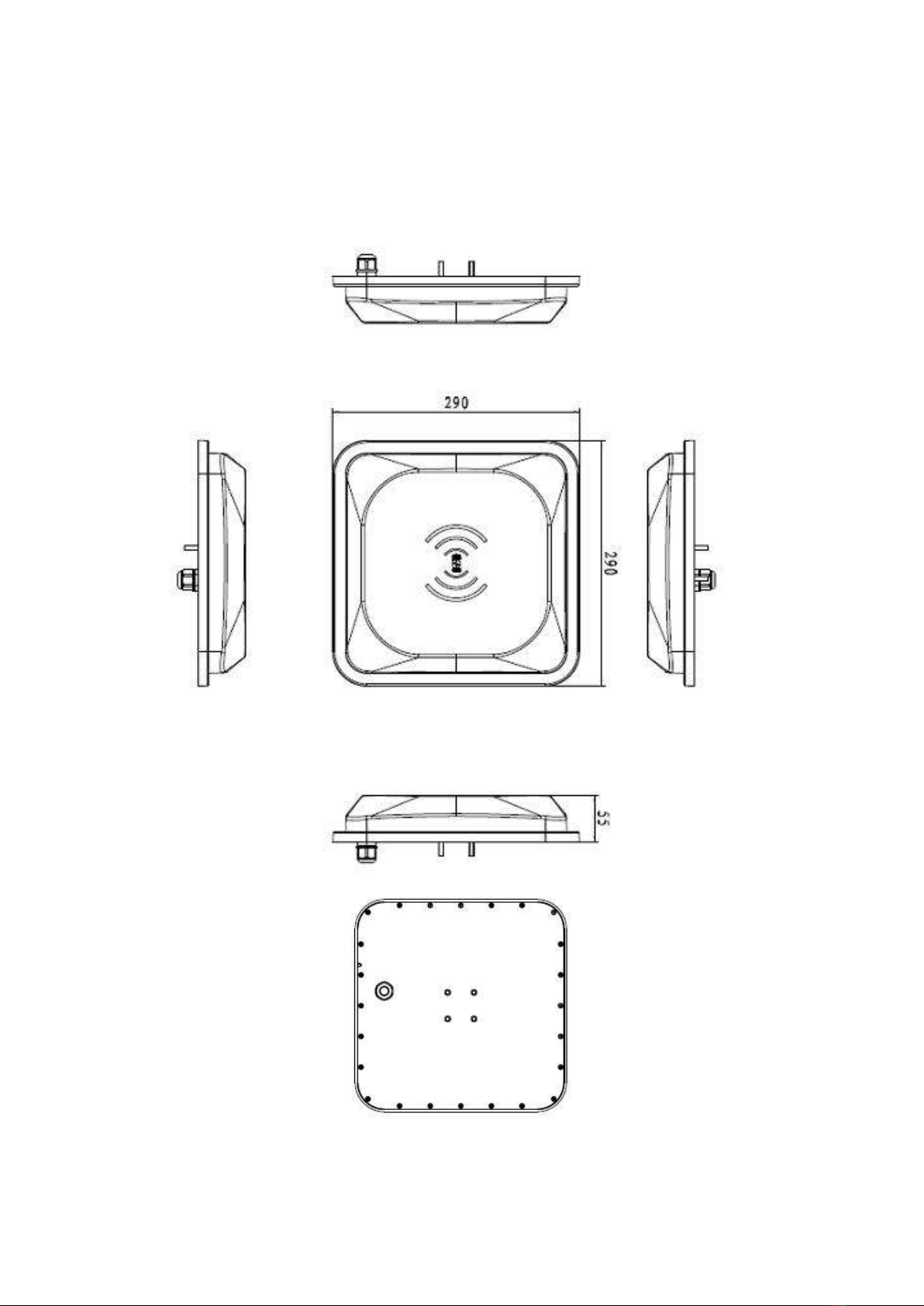
Pic 2- 1 CL7206B6A physical structure
CL7206B6 reader size

290mm×290mm×55mm(accessories not included)
2.2 Weight
1.6kg(accessories not included)
2.3 Interface definition
This reader use 14 cores cable for power support and data communication. Detailed definitions as in
following table:
No.
Color
Definition
1
Black
GND
2
Brown
GND
3
Red
24V
4
Orange
GPO2/wiegand 1
5
Yellow
GPO1/ wiegand 0
6
Green
GPI
7
Blue
N/A
8
Purple
N/A
9
Grey
N/A
10
White
N/A
11
Light blue
RS485 -
12
Light green
RS485 +
13
Brown white
Serial port receive (RXD)
14
Black white
Serial port transmit (TXD)
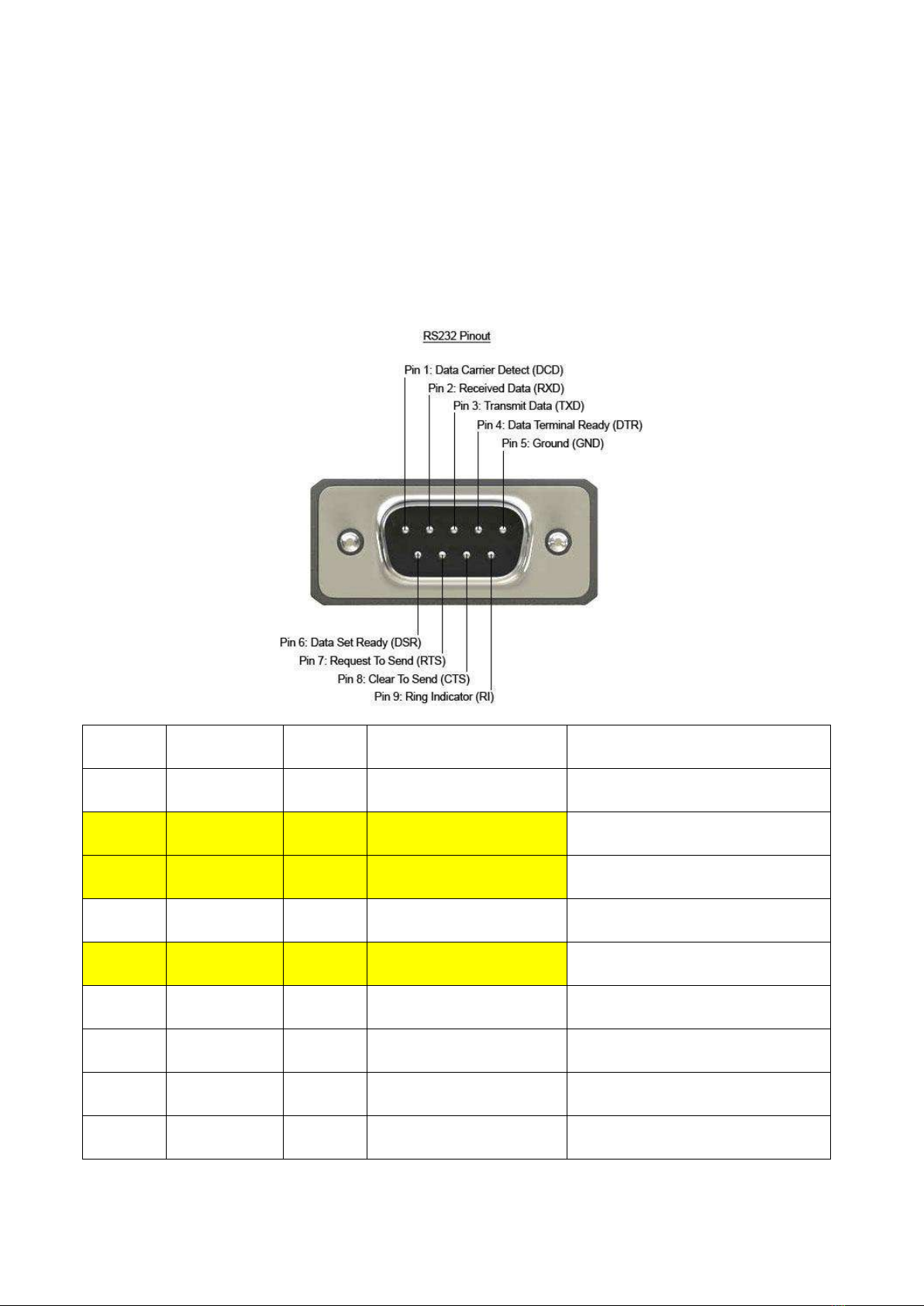
For reader RS232 wire connection, please refer to below information:
Below is the pin-out of a typical standard male 9-pin RS232 connector, this connector type is also referred to
as a DB9 connector.
A computer's serial COM port (DTE) is usually a male port as shown below, and any peripheral devices you
connect to this port usually has a female connector (DCE).
Pin
Signal Name
Dir
Description
Connect to reader
1
DCD
In
Data Carrier Detect
2
RXD
In
Receive Data
14 - Black/white
3
TXD
Out
Transmit Data
13 - Brown/white
4
DTR
Out
Data Terminal Ready
5
0V/COM
一
0V or System Ground
1 - Black
6
DSR
In
Data Set Ready
7
RTS
Out
Request to Send
8
CTS
In
Clear to Send
9
RI
In
Ring Indicator

3 Installation description
3.1 Precautions
In order to ensure normal and stable operation of the equipment and your personal and property safety,
please carefully read the following notes before installing CL7206B6A reader device:
1. First check whether the outlet is connected to the ground, and check if the local power supply voltage meet
reader voltage requirements;
2. Check if the device is connected tightly;
3. Pay attention to the serial cable type selection and length restrictions;
Serial port cable length 5m maximum.
RS485 length 80m maximum.
4. When installing multiple readers, the antenna position and the antenna spacing should be appropriate to
avoid interference with each other.
5. Please test & ensure the reader can work normally before using it.
3.2 Installation conditions
Before installing the reader, please carefully check and confirm the product is intact, the accessories are
complete, if there are any damages or shortage, please contact your supplier.
3.3 Device connection
3.3.1 Connect the power adapter
Connect power adapter to AC power socket, and tighten the other end to reader’s power port.
3.3.2 Connecting a PC
☆ Reader cable interface includes all signal cords in the interface definition table.
☆RS-232 interface is used for short-range communication (less than 5m), can be connected to a PC via DB9
connector for communication.
Table des matières
Autres manuels Hopeland Lecteur de cartes


