
HELVAR uSee Web Browser User Interface Instructions de montage

1
Helvar uSee Installation and Set-Up Guide
1. Mount to wall
Mounting dimensions
The Helvar uSee Web Browser User Interface is a hardware and software platform that when used in
conjunction with a Helvar Router system, allows the user to view the system, select scenes, programme
new scene levels, apply alternate scene and group names, and monitor energy use.
The uSee interface provides both wired and wireless connectivity to all popular web browsing devices,
such as an iPad, and provides an easy to use, intuitive graphical means of control of the lighting system.
Mounting, Environmental and Clearance Requirements
Mounting
• Mount the unit on a flat surface.
• Use No.8 or No. 10 screws with a head diameter between 6 mm and 9 mm.
• Use wall plugs if necessary.
• Refer to the ’Mounting Dimensions’ diagram below.
Environment
• The ambient temperature must be between 0ºC and 40ºC.
• Air humidity must be between 0% and 90% (non-condensing).
• The area must be adequately ventilated.
• Do NOT install this product in a damp location.
Clearance
• Leave sufficient clearance (at least 100 mm) to allow cables to be connected.
Chassis mounting
hole dimensions
R3
R4.5
14
27959
217
219
234
Helvar uSee Web Browser User Interface
Installation and Set-Up Guide

2Helvar uSee Installation and Set-Up Guide
2. Electrical installation
WARNING: BEFORE COMMENCING ANY ELECTRICAL WORK, ISOLATE THE
ELECTRICITY SUPPLY AT THE MAIN DISTRIBUTION BOARD.
2.1. Remove the cover
1. Remove the two screws securing the cover.
2. Tilt the cover and slide it backwards
2.2. Attach the cable gland
1. Attach the (supplied) cable gland for the mains cable.

3
Helvar uSee Installation and Set-Up Guide
WARNING: THE SUPPLY INPUT EARTH MUST BE CONNECTED.
2.3. Connect the mains supply
1. Pass the wire through the cable gland
2. Strip the cable
3. Connect the L, N and Earth as shown
3. Pull back any excess cable through the grip
4. Tighten the cable grip to retain the wire
E
N
L

4Helvar uSee Installation and Set-Up Guide
3.1. Connect the Helvar ‘Lighting Router’ network
1. Plug the Ethernet cable from the Helvar ‘Lighting Router’ network into ‘Port 1’ on the uSee unit
2. Push the cable into the rubber grommet as it exits the enclosure
3. Leave sufficient clearance around the uSee unit to give enough space to ensure the cables are not crushed or bent
in a manner that may affect their performance.
LAN
port 1
Rubber
grommet
To Helvar Lighting
Network Router
3. Connection to Lighting Network

5
Helvar uSee Installation and Set-Up Guide
To access and control the uSee unit, connect using a web browser on an external device, such as a laptop or tablet PC.
You can connect either via:
- a direct wired Ethernet network connection or
- a wireless LAN connection (802.11b/g)
4.1. Connecting to a direct wired Ethernet network (optional)
1. Plug the Ethernet cable from the local computer network in to ‘LAN Port 2’ on the uSee unit.
2. Push the cable into the rubber grommet as it exits the enclosure.
3. Leave sufficient clearance around the uSee unit to give enough space to ensure the cables are not crushed or bent
in a manner that may affect their performance.
LAN
port 2
To Local
Computer Network
Rubber
grommet
4. Connecting to uSee from a browser

6Helvar uSee Installation and Set-Up Guide
4.2. Connecting the external antenna for wireless networking (recommended)
1. Screw the external antenna cable in to the socket of the uSee unit
2. Push the cable into the rubber grommet as it exits the enclosure
3. Screw the antenna into the base. The base is magnetic for secure mounting on ferrous materials
4. Leave sufficient clearance around the uSee unit to give enough space to ensure the antenna cable is not
crushed or bent in a manner that may affect performance.
Siting the antenna: recommendations
These recommendations will help in optimizing the performance and reliability of the wireless connection:
1. Set up your router as close as possible to the centre of the area you want to provide wireless networking for.
2. Keep the antenna away from objects that cause wireless interference. Large metal objects, fluorescent or halogen
lights, microwaves, cordless phones and their base stations, and wall ducting or vents can block or interfere with
wireless signals.
3. Place the antenna in an elevated location.
4. Point the top of the antenna upwards if it is positioned below the coverage area. Point the top of the antenna down
if it is positioned above the coverage area, e.g., if it is wall-mounted near the ceiling.
Wireless antenna
connector, RP-SMA
Rubber
grommet
7
Helvar uSee Installation and Set-Up Guide
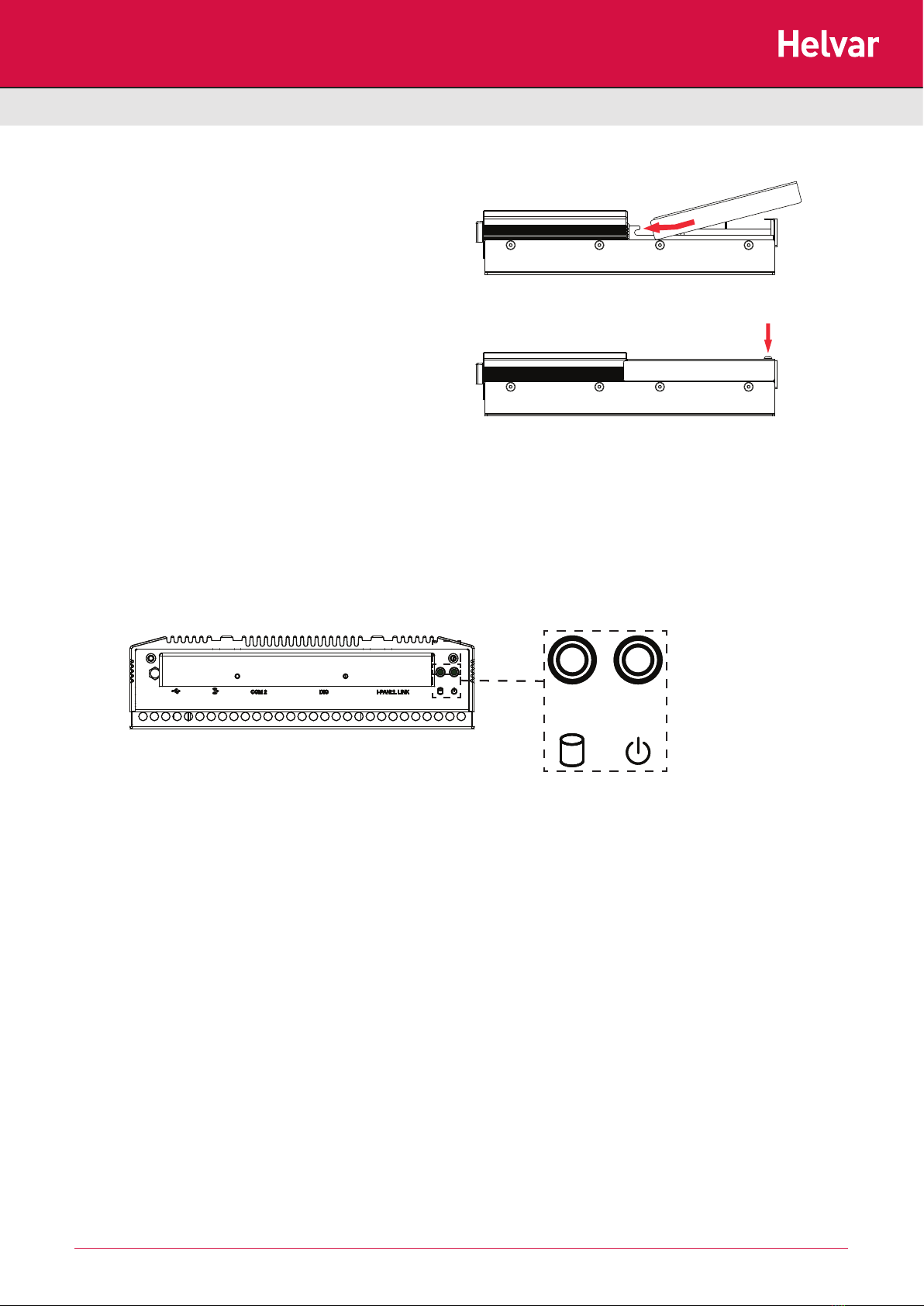
5.1. Replace the cover
1. Tilt the cover so the front pegs locate in to the slots
and slide it forwards.
2. Push the bottom of the cover downwards and secure
it with the two retaining screws.
5.2. Switch on mains power supply and check operation
1. Switch on the mains power supply.
2. Check that 12 V power is being supplied: the PWR and HDD LEDs at the top of the unit should be on (PWR) and
flashing (HDD).
With the unit powered on, you can now configure the uSee unit: see the next section for details.
Diagram: HDD and PWR indicatorsDiagram: HDD and PWR indicators
5. Replace cover and switch unit on

8Helvar uSee Installation and Set-Up Guide
6. Configuring the uSee Unit
The uSee unit is best configured using wireless access and a web browser.
If a wireless connection is not possible, use the ‘Direct connection’ option.
Note 1: It is possible to connect to the uSee unit using a standard browser, running on many different operating systems.
Note 2: Minimum display screen resolution is 1024 x 768.
Web browser, wireless Ethernet
Connect via wireless Ethernet to the uSee
unit using a PC, tablet PC or smartphone
(any device running a web browser).
See section 6.1 for configuration instructions.
Direct control
(keyboard, mouse, monitor)
Operate the uSee unit directly, using a
keyboard, mouse and monitor/display.
See section 6.2 for configuration instructions.

9
Helvar uSee Installation and Set-Up Guide
6.1. Initial access to the uSee unit: Wireless Ethernet
6.1.1. Open ‘Network Connections’ window
1. Click the Windows logo.
2. Access ‘ncpa.cpl’ from the Windows Search box.
(On Windows XP, use the Start > Run... dialogue box)
The Network connections window can also be accessed via the
Windows Control Panel.
6.1.2. Access Wireless Network Adapter properties
1. Right-click the wireless network adapter
2. Select ‘Properties’

10 Helvar uSee Installation and Set-Up Guide
6.1.3. Access Internet Protocol properties
1. Select the ‘Internet Protocol item. If more than one is listed,
select the IPv4 item.
2. Click the ‘Properties’ button: the ‘Internet Protocol (TCP/IP) Properties window opens.
6.1.4. Set the PC’s IP address and subnet mask
. Click ‘Obtain an IP address automatically’
2. Click ‘Obtain DNS server address automatically’
3. Click ‘OK’
4. Click ‘Close’ in the ‘Wireless Network Connections
Properties’ window
Table des matières
Autres manuels HELVAR Équipement d'enregistrement


Manuels Équipement d'enregistrement populaires d'autres marques


Strymon
Strymon NIGHTSKY Manuel utilisateur

Mitsubishi Electric
Mitsubishi Electric 16CH DIGITAL RECORDER DX-TL5000U Manuel utilisateur

Tews Technologies
Tews Technologies TPMC465 Manuel utilisateur

Honeywell
Honeywell Excel 50 Manuel utilisateur

SeaLevel
SeaLevel COMM+8.LPCI Manuel utilisateur

Arturia
Arturia AUDIOFUSE STUDIO Manuel utilisateur


