
Hayes ACCURA Manuel utilisateur

ACCURA USB
ISDN Terminal
Adapter
Installation Guide

ISDN USB TA Installation Guide
ii
Regulatory Compliance Information
Declaration of Conformity
The manufacturer declares under sole responsibility that this
equipment is compliant to Directive 1999/5/EC (R&TTE Directive)
via the following:
Standards Directives Test Reports Issued
EN 60950 73/23/EEC – Low
Voltage electrical safety
EN 50082-1 89/336/EEC – EMC EMC-immunity
EN 50081-1 89/336/EEC – EMC EMC-emissions
The product is CE Marked.
Additional Test Information
This product also meets the requirements of the following:
European Harmonized Standard: CTR 3
CE/EMC Restriction of Liability
The product described in this handbook was designed, produced and
approved according to the EMC-regulations and is certified to be
within EMC limitations. If the product is used with an uncertified
PC, Zoom Telephonics, Inc. undertakes no warranty in respect to the
EMC limits. The described product in this handbook was
constructed, produced and certified so that the measured values are
within EMC limitations. In practice and under special circumstances,

iii
it may be possible, that the product may be outside of the given
limits if it is used with a PC that is not produced under EMC
certification.
Electrostatic Discharge Statement:
The unit or the PC may require resetting after a severe electrostatic
discharge event.
Important Safety Instructions
1. Read these instructions carefully; save them for future reference.
2. Follow all warnings and instructions marked on the product.
3. Do not use this product near water.
4. Do not place this product on an unstable cart, stand, or table.
The product may fall, causing serious damage to the product.
5. The openings should never be blocked by placing the product on
a bed, sofa, rug, or other similar surface. This product should
never be placed near or over a radiator or heat register, or in a
built-in installation unless proper ventilation is provided.
6. Do not attempt to service this product yourself. Refer all
servicing to qualified service personnel.


Table of Contents
CHAPTER 1 1
Introduction
1.1 An Overview of the ISDN USB TA 1
1.1.1 What is ISDN? 1
1.1.2 What is USB? 2
1.1.3 The ISDN USB TA 2
1.2 Package Contents 4
1.3 ISDN USB TA Features 4
CHAPTER 2 6
Installation
2.1 Before Installing 6
2.2 The Front Panel LEDs 8
2.3 Installing the ISDN USB TA 9
2.4 ISDN Utility Installation 14
2.5 The Diagnostic Program 15
2.6 Using Multilink PPP 16
2.7 Uninstalling the ISDN USB TA 22
CHAPTER 3 23
Troubleshooting


Chapter 1
Introduction
1.1 An Overview of the ISDN USB TA
1.1.1 What is ISDN?
ISDN is an abbreviation for Integrated Services Digital Network.
ISDN transfers information digitally and integrates all
telecommunication services (such as telephone, teletext, videotex,
etc.) into a single network. Using ISDN, you can transfer text, voice,
data files, images, and even video.
Before the use of ISDN, telecommunications operated using analog
devices, which limited the quality of telecommunication transfers.
With ISDN technology, the telephone lines can transmit data
digitally with much greater speed and clarity of transmission than
with analog transmissions. The ISDN is capable of transmitting all
kinds of information at greatly accelerated rates. A typical modem
transmission has a rate of 33.6Kbps (kilobits per second or thousand
bits per second). ISDN digital technology allows transfer rates of up
to 128Kbps.
Because ISDN transmits data digitally, the data is virtually error
free, and the transmission is much clearer, with fewer interruptions

ISDN USB TA Installation Guide
2
and slowdowns in facsimile transmissions. With ISDN devices
implemented throughout the world, a truly digital network will
emerge, allowing everyone fast and easy access to the global
information highway.
1.1.2 What is USB?
USB is an abbreviation for Universal Serial Bus. It is a new
peripheral bus employing a single connector type for all low-speed
and medium-speed devices, such as keyboard, mouse, monitor,
floppy drive, printer, scanner, digital camera, modem and ISDN TA.
It brings plug-and-play of computer peripherals outside the box,
eliminating the need to install cards into dedicated computer slots
and reconfigure the system. PCs equipped with USB allow computer
peripherals to be automatically configured as soon as they are hot
attached, without the need to reboot. USB also allows multiple
devices, up to 127, to run simultaneously on a computer. Some
peripherals, such as monitors and keyboards, can act as additional
plug-in hubs to make it easy for users to manage peripherals on the
desktop. USB does offer unprecedented peripheral expandability and
ease of use for PC users.
With better throughput of 12Mbps (megabits per second or million
bits per second), USB is expected rapidly to become the preferred
means of connecting ISDN TAs, though it will not replace the
traditional PC ports (COM and LPT) overnight.
1.1.3 The ISDN USB TA
The ISDN USB TA is ideally suited to give your PC access to the
world of the Integrated Services Digital Network. It is easy to install,
and easy to configure because it is fully plug-and-play compatible.
The Windows 98 or 2000 operating system automatically installs
and configures the ISDN USB TA.
Chapter 1 — Introduction
3
With the ISDN USB TA, you can have an answering machine, file
transfer, videotex, G3/G4 Fax functions, and Internet access. This
brings you more versatility and efficiency in the ISDN era.
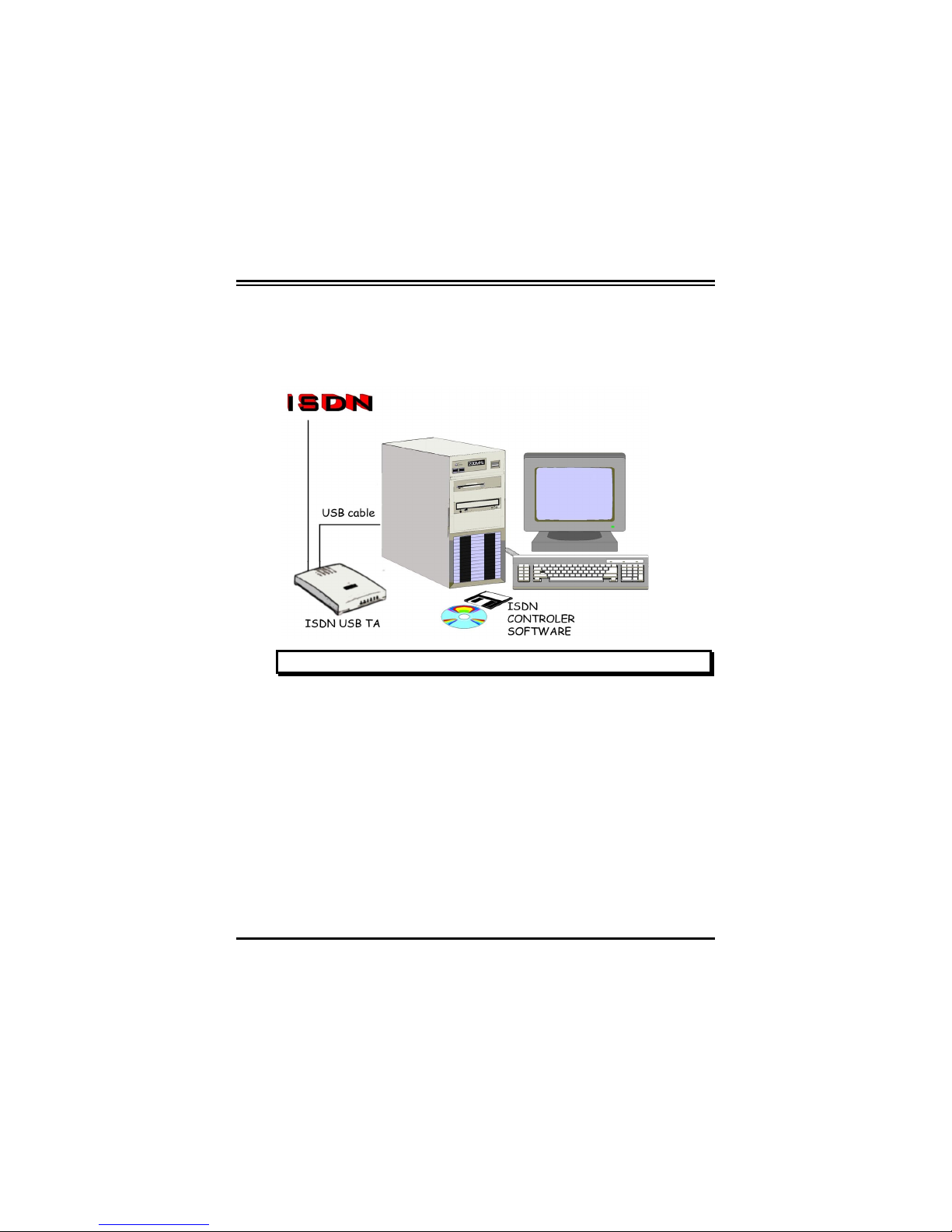
FIGURE 1-1: THE ISDN SYSTEM

ISDN USB TA Installation Guide
4
1.2 Package Contents
The product package comes with the following accessories:
1. The ISDN USB TA
2. The ISDN USB TA installation CD
3. The CD for the bundled application software programs
4. One RJ-45 cable
5. One USB cable
1.3 ISDN USB TA Features
The ISDN USB TA supports many standard and enhanced features,
including the following:
♦It is fully plug-and-play compatible.
♦It hot-attaches and detaches without rebooting the PC.
♦It is bus-powered, with no extra power adapter.
♦It provides telephony functions with a headset (optional).
♦It supports both 16-bit and 32-bit CAPI drivers.
♦It supports TAPI and NDIS WAN miniport drivers.
♦It supports Multilink PPP (MP) for 128Kbps (two B channels)
Internet access and data transfer.
♦It supports X.75, T.70NL, ISO8208, T.90, and HDLC
transparent protocols on the B channel for T-Online, AOL,
CompuServe, BTX, BBS, Eurofile transfer, and G4 Fax.
Autres manuels pour ACCURA
1
Table des matières
Autres manuels Hayes Adaptateur


