
hanshow Nebular Series Manuel utilisateur
Hanshow Nebular Series Product Manual
IHanshow Copyright Reserved ©
Hanshow Technology Co., Ltd.
STATEMENT
This document and all its contents contained remain the proprietary material of
Hanshow Technology Co., Ltd. (Hanshow) and are protected by Chinese laws and
applicable international conventions on copyrights. Any reproduction, transmission,
disclosure, revision, modification or use otherwise of this document or the whole or part
of its contents, in whatever form and by whatever means, is not permitted without prior
express written authorization from Hanshow. Offenders will be liable for any and all
damages caused by their offence hereof and will be subject to all remedies that
Hanshow is entitled to seek under applicable laws.
Hanshow Nebular Series Product Manual
II Hanshow Copyright Reserved ©
Hanshow Technology Co., Ltd.
ABOUT THE MANUAL
This document describes Nebular series, including features, specification, package and
precautions, etc.
Please read this manual carefully before using the device in first, retain the manual for
subsequent use or for the next owner. If the instructions contained in this manual are
insufficient to resolve issues that occur during device operation or maintenance, please
contact Hanshow Technical Customer Service Center (China: 400-0365-305;
Netherlands: 0800-022-5037; Belgium: 0800-71-335; France: 0800-91-7602; Thailand:
1800-011-185) directly, we will provide you with multi-channel technical services.
TARGET USERS
This document provides engineers with necessary data and related guidelines of
Nebular series. Users have to master the basic knowledge on communication and
network and so on. This manual is applicable for the below engineers:
Testing Engineer
Technical Support Engineer
After Sales Engineer
Installation Engineer
Hanshow Nebular Series Product Manual
III Hanshow Copyright Reserved ©
Hanshow Technology Co., Ltd.
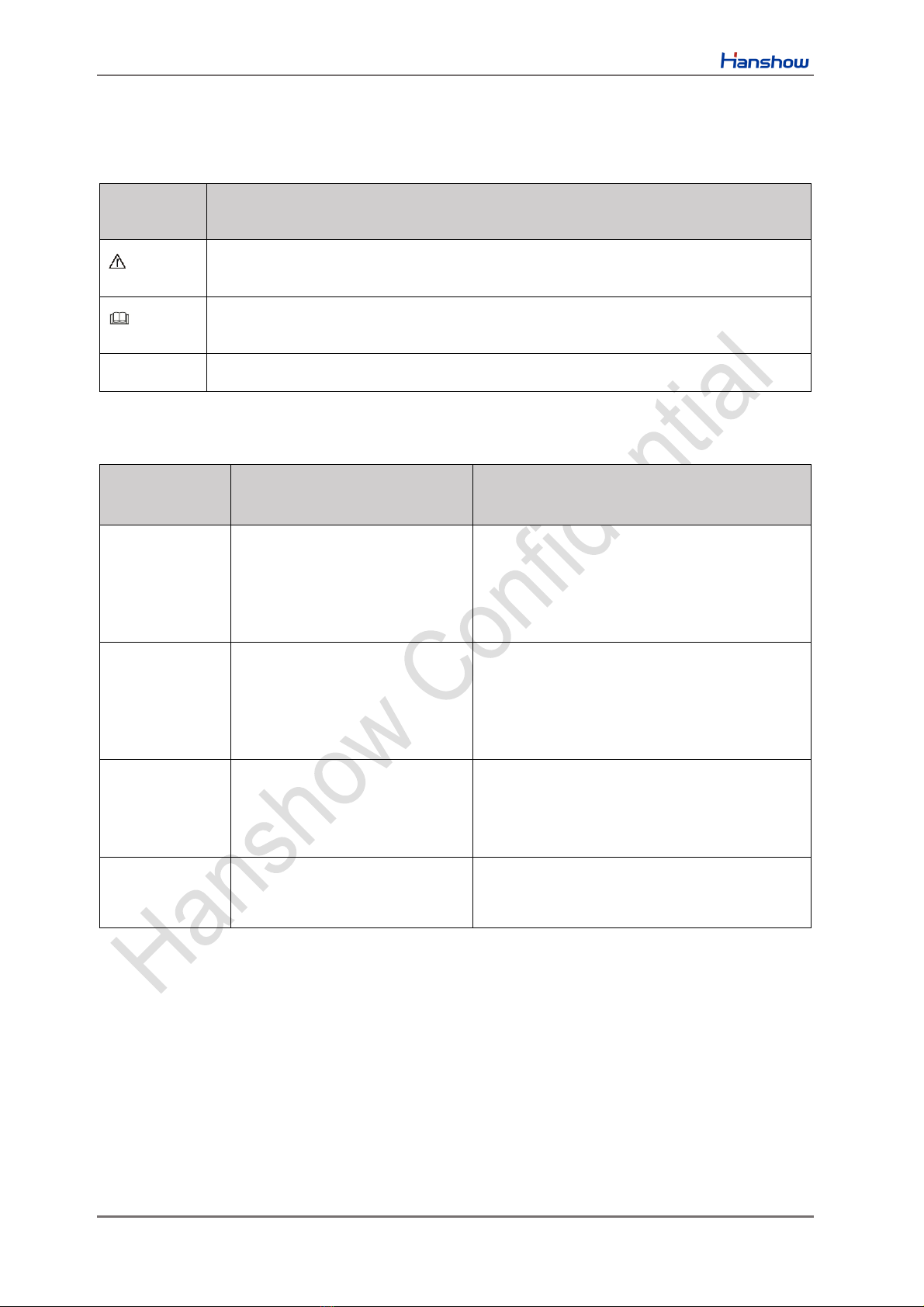
SYMBOL DESCRIPTION
Icon
Description
Information indicated with this icon should be paid special attention and attached
great importance by the reader.
Information indicated with this icon is the explanation on the formal text for the
readers to comprehend the text better.
[X-X]
It means special noun definition is provided here.
EXPLANATION OF TERMS
Acronym
Expanded form
Description
PriSmart
PriSmart Smart Retail System
Manage all store product data and issue
price update command, as well as support
multi-store management.
ESL-Working
ESL-Working System
Manage all the APs and ESLs in store, and
ESL-Working 3.0 and above supports multi-
store management.
ESL Controller
ESL Controller
Also called AP that is used for data
interaction between ESL-Working and ESL
Controller.
ESL
Electronic Shelf Label
Used for displaying product information like
promotion information, price and grade, etc.
Table of Contents
IV Hanshow Copyright Reserved ©
Hanshow Technology Co., Ltd.
Table of Contents
1 Overview .................................................................................................................................................1
1.1 System architecture..........................................................................................................................1
1.2 Features ...........................................................................................................................................2
2 Product view............................................................................................................................................3
2.1 Product appearance.........................................................................................................................3
2.2 Mechanical drawing..........................................................................................................................5
3 Hardware performance ...........................................................................................................................9
3.1 Specifications ...................................................................................................................................9
3.2 NFC specification ...........................................................................................................................11
3.3 Product naming rules......................................................................................................................11
3.4 Product nameplate .........................................................................................................................12
4 Package and accessories.....................................................................................................................13
4.1 Product packaging..........................................................................................................................13
4.2 Product accessories.......................................................................................................................14
5 Application scenarios............................................................................................................................15
6 Precautions ...........................................................................................................................................16
6.1 Transportation consideration..........................................................................................................16
6.2 Precautions for use.........................................................................................................................16
7 FCC ID warning.....................................................................................................................................17
7.1 Warning for nameplate...................................................................................................................17
7.2 Warning for product manual...........................................................................................................17
Hanshow Nebular Series Product Manual
1 Hanshow Copyright Reserved ©
Hanshow Technology Co., Ltd.
1 Overview
Nebular series are an Electronic Shelf Label (ESL) researched and developed
independently by Hanshow. They adopt E-ink and communicate with ESL Controller
based on 2.4GHz frequency band to achieve pricing, page switch, flashing and others.
Nebular series have highlights of ultra-thin, long life and high-definition visual effects,
widely serving traditional retail, new retail, apartment store and fashion, medicare,
culture and entertainment, etc.
1.1 System architecture
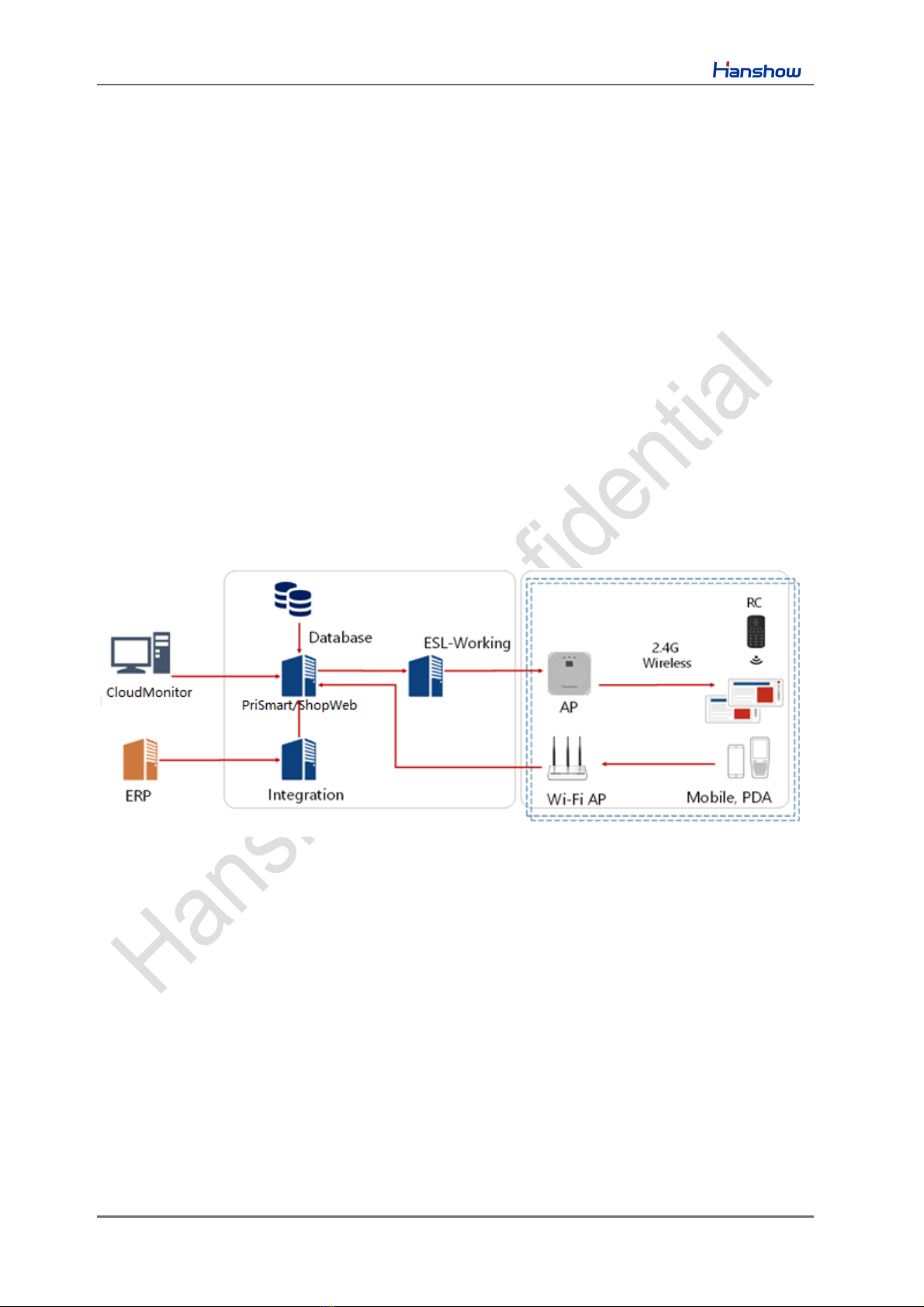
Hanshow ESL system includes ESL, ESL Controller, ESL-Working, PriSmart/ShopWeb,
Database, Integration, CloudMonitor and Hand-hold Terminal (PDA), as shown in
Figure 1-1. Specifically, ESL is an integral part of Hanshow ESL system, which is
responsible for displaying production information like name, price, place, unit, grade,
phone number, barcode, QR code and so on.
Figure 1-1 Hanshow ESL system architecture
Hanshow Nebular Series Product Manual
2 Hanshow Copyright Reserved ©
Hanshow Technology Co., Ltd.
1.2 Features
Nebular series have the features below:
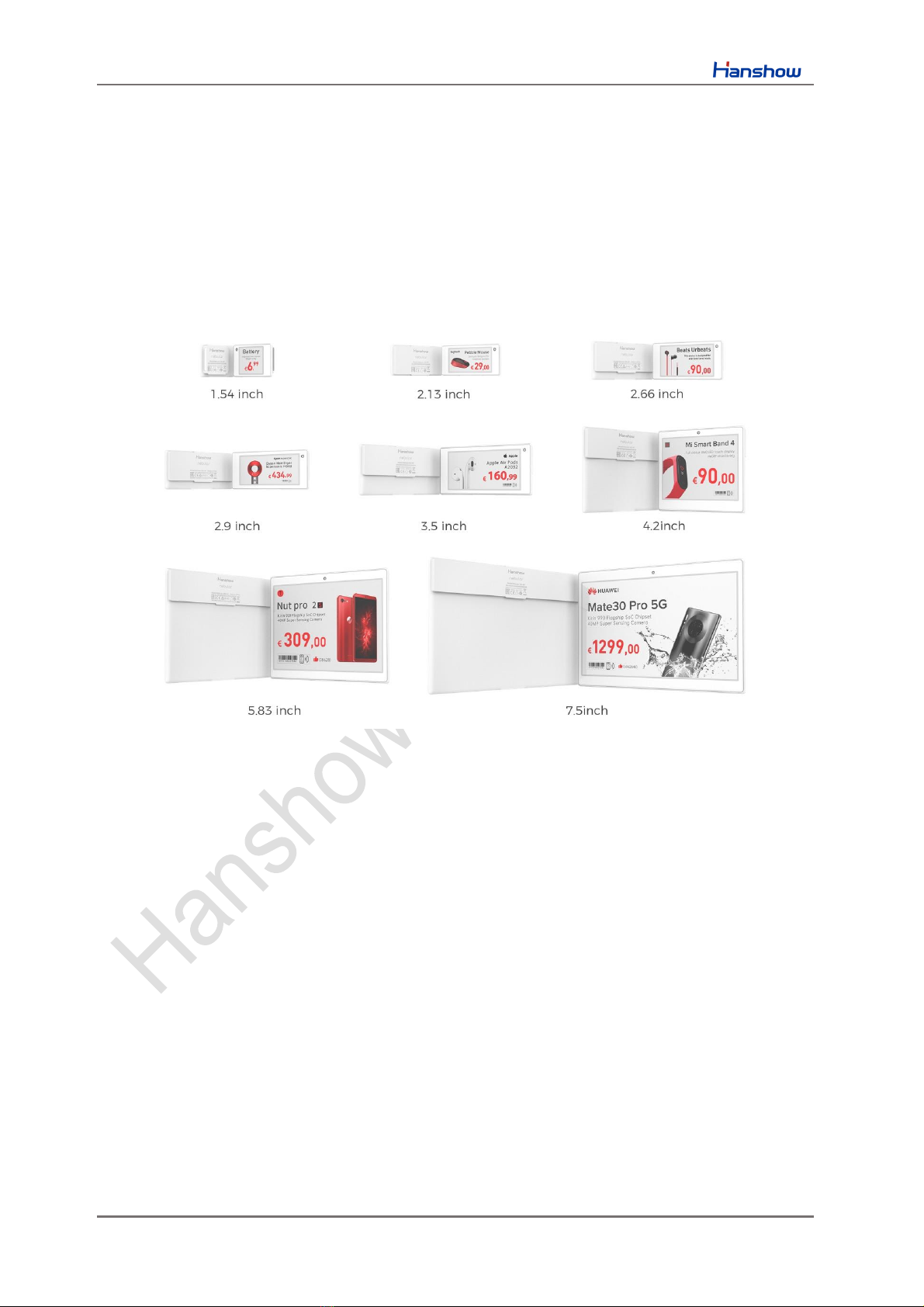
Support for 8 sizes: 1.54”, 2.13”, 2.66”, 2.9”, 3.5”, 4.2”, 5.83”and 7.5”.
Full series support tricolor display involved Black-White-Red (BWR) and Black-
White-Yellow (BWY), but only support Black-White for freezer ESLs.
Operating frequency band is 2402MHz ~ 2480MHz.
IP68 waterproof and dustproof design.
Embedded LED indicator that can display 7 colors, to assist in realizing product
search, promotion reminder, low stock reminder, power reminder, etc.
Embedded NFC chip that supports NFC devices like mobile phone, PDA and
remote control to implement ESLs operations directly, realizing Bind/Unbind,
Flashing and Page switch, etc.
Freezer ESLs with 2.13” and 2.66” support low temperature environment (-25℃~
0℃).
Support multiple business functions, including Bind/Unbind, Update, Fast-flashing,
Multi-page storage, Page switch, Geolocation, Temperature acquisition, NFC
function and so on.
Support AES-128 encryption.
Support wireless upgrade.

Hanshow Nebular Series Product Manual
4 Hanshow Copyright Reserved ©
Hanshow Technology Co., Ltd.
Each area of Nebular and its description is shown in Figure 2-2 and Table 2-1.
Figure 2-2 Key area of Nebular
Table 2-1 Each area description of Nebular
No.
Name
Description
1
LED indicator
Supports 7 colors flashing.
2
Active screen area
Uses E-ink that supports display effect of BWR or BWY.
Flexible display information such as text, digit, images,
barcode, QR code and others.
All product information involved such as name, price, place,
unit, grade, phone number, barcode, QR code, etc. And
support custom display position and settable font-size.
Supports 8 pages for storage content and page switch
feature.
3
Nameplate
Product information mark, including Model, S/N and certifications.
4
Barcode area
18 digits barcode used for product binding and maintenance.
Hanshow Nebular Series Product Manual
5 Hanshow Copyright Reserved ©
Hanshow Technology Co., Ltd.
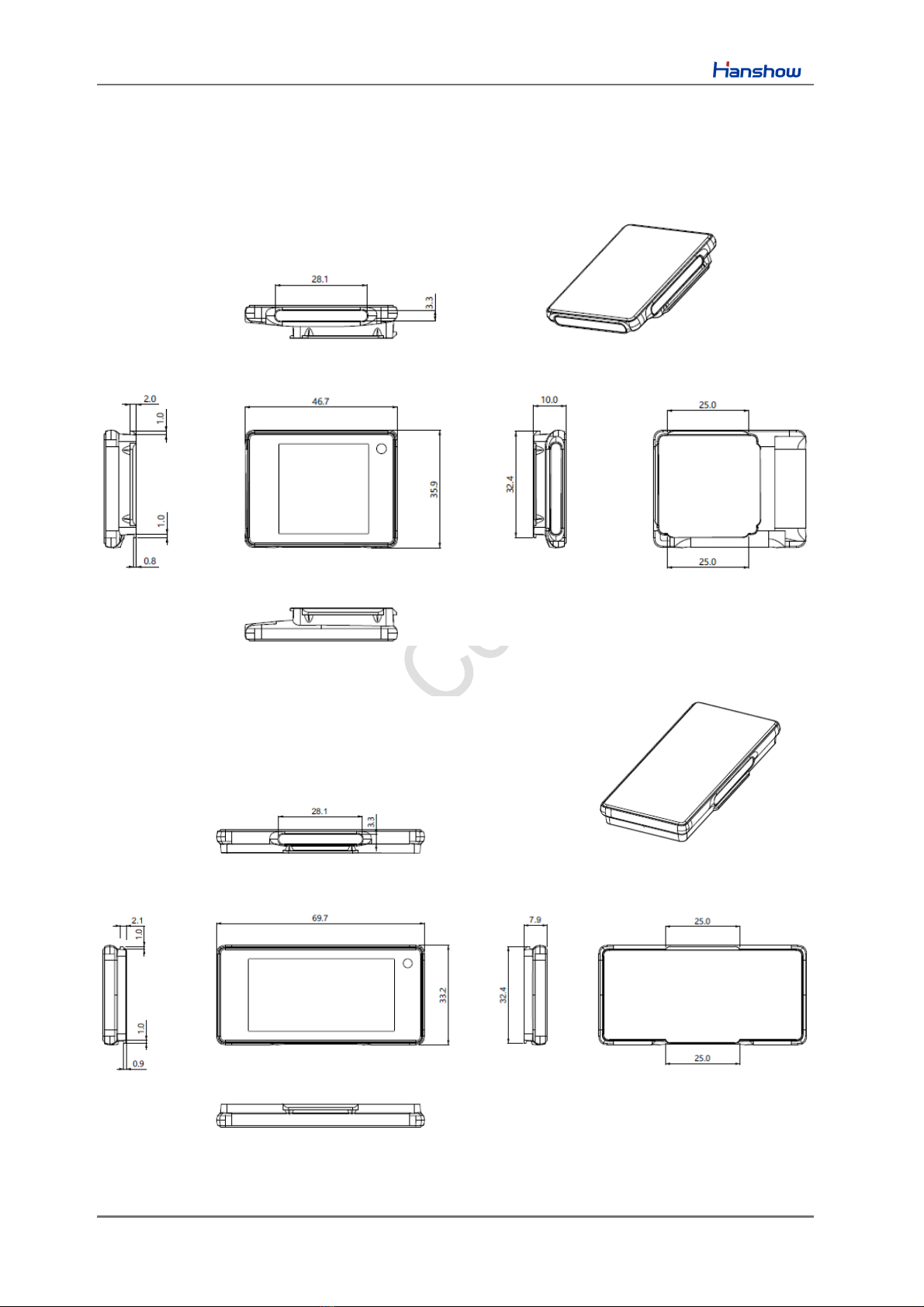
2.2 Mechanical drawing
This chapter describes Nebular series’ mechanical drawing.
Figure 2-3 Mechanical drawing for 1.54”
Figure 2-4 Mechanical drawing for 2.13”
Autres manuels pour Nebular Series
3
Table des matières
Autres manuels hanshow Affichage numérique

hanshow
hanshow Stellar-XL E31P Series Manuel utilisateur

hanshow
hanshow Lumina Aqua-1010 Series Manuel utilisateur

hanshow
hanshow Stellar-L E31 Series Manuel utilisateur

hanshow
hanshow Nebular Plus Manuel utilisateur

hanshow
hanshow HS-AT2311 Manuel utilisateur

hanshow
hanshow Nebular Series Manuel utilisateur

hanshow
hanshow Nebular Series Manuel utilisateur

hanshow
hanshow HS-AT3701 Manuel utilisateur

hanshow
hanshow Nebular Series Manuel utilisateur

hanshow
hanshow HS-AT3511 Manuel utilisateur


