
HAIDEN Control D Manuel utilisateur

HAIDEN
Control D
Blood Glucose Monitoring System
User Manual
Log using Mobile AppCONTROL D
www.controld.in
Subscribe on


Important Information
Control D Blood Glucose Monitoring System ............................................
Important Health-Related Information ......................................................
Alternate Test Site.........................................................................................
Control D Glucometer and Blood Glucose Test Strips
Control D Glucometer and How It Works...................................................
Control D Glucometer Display.....................................................................
Control D Blood Glucose Test Strips ...........................................................
Testing Your Blood Glucose
Preparng to Testing Your Blood Glucose.... ..............................................
Performing a Blood Glucose Test ...............................................................
Obtain a blood sample ...............................................................................
Applying blood to the Control D Blood Glucose Test Strips ...................
Strip Ejection
Strip Ejection .................................................................................................
Table of Contents
1.
2.
3.
4.
1
1
2
3
4
5
6
6
7
7
8
Lancing device handling procedure
Lancing device handling procedure ........................................................
Low and Hi Readings
Low Readings .......................................................................................... ....
Hi Readings ..................................................................................................
Meter Maintenance
Replacing the battery ...............................................................................
Technical Specifications
Technical Specifications ............................................................................
Explanation of Symbols ..............................................................................
Log book tables ..........................................................................................
5.
6.
7.
8.
9
12
12
13
Caring for your meter .................................................................................
System Troubleshooting ............................................................................
Troubleshooting ...........................................................................................
14
14
15
16
17
19

1. Important information
Control D (Blood Glucose Monitoring System)
The Control D Blood Glucose Monitoring System is intended use
to determine the quantitative measurement of glucose in whole
blood. The device is for shelf testing in vitro diagnostic use only.
Important health-related information
Severe dehydration and excessive water loss may cause false low results.
If you believe you are suffering from severe dehydration, consult your
physician or doctor immediately.
Test results below 70 mg/dL mean low blood glucose (hypoglycemia).
Test results greater than 180 mg/dL mean high blood glucose
(hyperglycemia).
If you get results below 70 mg/dL or above 180 mg/dL and do not have
symptoms of hypoglycemia or hyperglycemia, repeat the test. If you
have symptoms or continue to get results that fall below 70 mg/dL or
above 180 mg/dL, follow the treatment/advice of your healthcare
professional.
If you are experiencing symptoms that are not consistent with your blood
glucose test and you have followed all instructions described in the
Control D owner's booklet, consult your healthcare professional.
01
The Control D Blood Glucose Monitoring System is used for measuring
blood glucose (also known as blood sugar) from the samples taken from
the fore arm, upper arm, hand, thigh, calf or fingers.
Note : The Control D Glucometer should only be used with Control D Blood Glucose
test strips. Using other test strips with this meter can produce inaccurate results.
Do use the Control D Blood Glucose Monitoring System for :
Warning :
The Control D Blood Glucose Monitoring System contains small parts that may
be dangerous if swallowed.
Caution :Please read all the instructions provided in this manual and practice the testing
procedure before using the Control D Blood Glucose Monitoring System. Blood
glucose monitoring should be done with the guidance of a health care professional.
Testing Blood Glucose
Testing only with fresh capillary whole blood sample
Control D HAIDEN

Warning:
We recommend that you test on your fingers for better results.
The human figure above shows the areas where you can test with the
Control D Blood Glucose Monitoring System. Avoid moles, veins,
bones, and tendons.
Alternate Test Sites
02
Control D Blood Glucose Monitoring System uses 0.5 µL
sample. So you can test on a variety of locations shown
above.
Note :
Control D HAIDEN
Upper arm
Forearm
Hand
Fingertips
Thigh
Calf
Suggested Test
Areas for the Hand

This screen always appears when the meter
is turned ON, so that you can make sure the
display is working properly. Do not use the
meter if the system check screen does not
match the example here.
2. Control D Glucometer & Blood Glucose Test Strip
03
Control D Glucometer and how it works
Control D HAIDEN
Test Strip Port
Insert the top end of
a new Control D test
strip here. The meter
powers on when you
insert the test strip.
Displa ys your tes t
r e s u l t s a n d o t h e r
important information.
Display Screen
Previous Readings.
Strip Ejector
Press this button to
release the used
strip after testing.
Apply blood to
sample area at
end of the strip
only.
Exit
(NO) Button (Yes) Button
Sample Area
Note: For the description see page No.5
1. Sample Area/
Absorbent Channel
3. Test Strip Handle
4. Contact Bars
2. Confirmation Window

Control D Glucometer Display
04
Indicates unit of
measurement.
Blood Drop Symbol
Strip Symbol
Test Result Area
Displays test results.
8.8.8.
Battery Symbol
This symbol works with
s t r i p s y m b o l i n a n
animation to tell you
when the meter is ready
to apply blood.
This symbol works with
Blood Drop symbol in an
animation to indicate that
the meter is ready to apply
blood.
mg/dL (U.S. Standard)
Control D HAIDEN
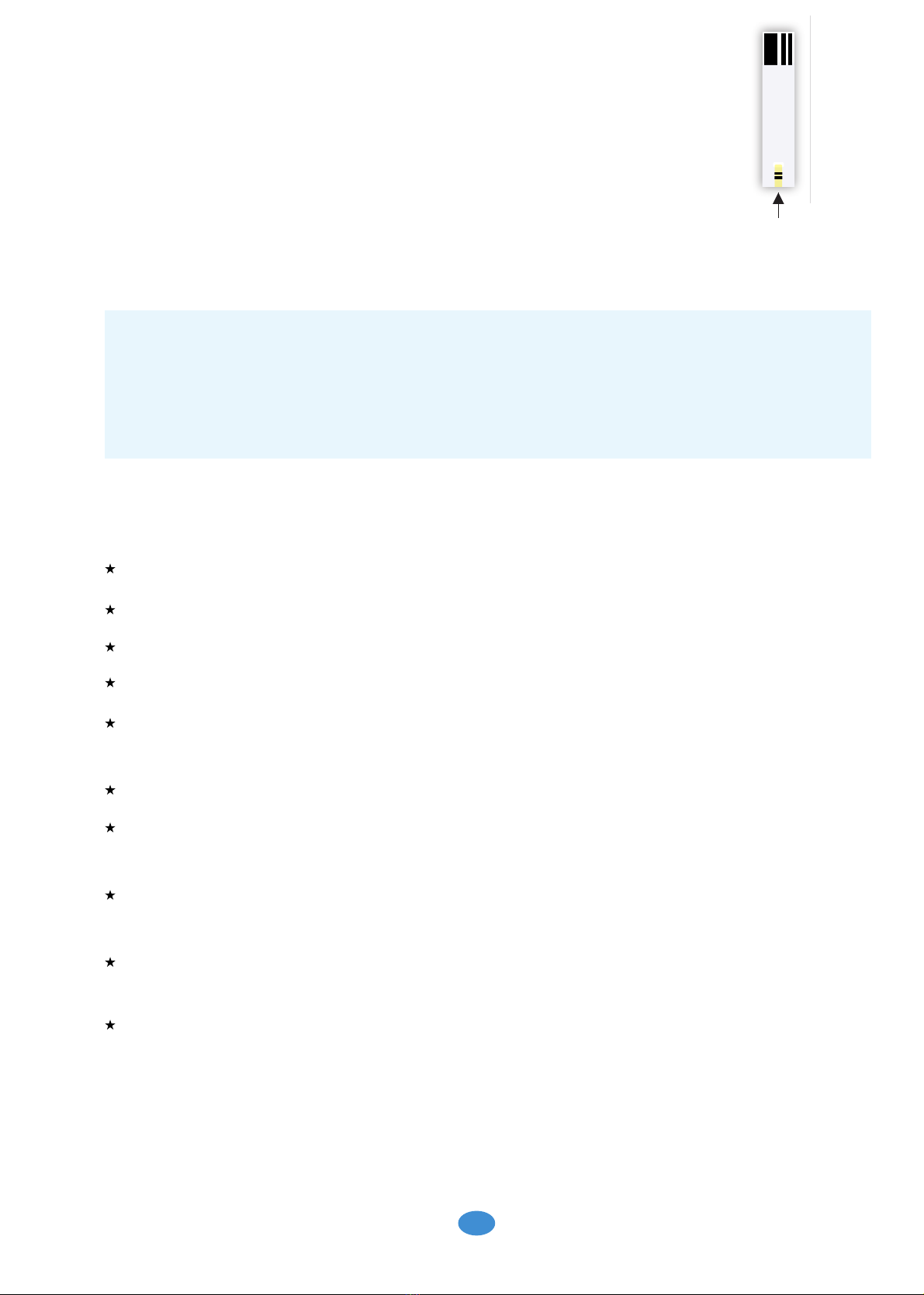
Apply blood to strip sample area per test.
Important Test Strip Information
Note: For further information, refer to the Control D Blood Glucose test strips
package insert.
The Control D Blood Glucose Test Strip has an operating at 2° to 50°C.
The Blood Glucose Test Strips stored at 0° to 50°C.
Use test strips only within the system operating temperature range.
Keep away from direct sunlight and heat.
Store your test strips in their original vial only; never transfer them to
another vial or any other container.
Never store individual test strips outside the vial.
After removing a Control D Blood Glucose test strips from the vial,
immediately close the vial cap tightly.
With clean, dry hands, you may touch the test strip anywhere when
removing it from the vial or inserting it into the meter.
Do not use test strips beyond the expiration date. This may cause
inaccurate results.
Do not bend, cut, or alter Control D Blood Glucose test strips.
Control D Blood Glucose Test Strip
05
* Testing with Control D Glucometer requires a very small sample
size 0.5 µL of blood.
* Test Strips should be used only once. Discard the used test strips.
* After getting the blood drop, fill the test strip within 60 seconds.
1. The cap or vial contains drying agents that may be harmful if inhaled or swallowed
and may cause skin or eye irritation.
Note :
2. The Control D Glucometer should only be used with Control D Blood Glucose
test strips, using other test strips with this meter can produce inaccurate results.
Control D HAIDEN
Test Strip
Sample Area

Performing a blood glucose test
Insert test strip to turn ON the meter
Insert and slide a Control D Blood Glucose
test strips into the meter till it allows. The meter
turns ON.
When the meter powers on, this screen will
appear so that you can make sure the
display is working properly.
System check screen
The blood drop and test strip symbols will
appear on the display screen. Your meter is
now ready to apply blood sample.
Times when you may be checking for low blood glucose include:
When you are feeling symptoms such as weakness, sweating,
nervousness, headache, or confusion.
When you have delayed a meal after taking insulin.
When your healthcare professional advises you to do so.
06
Check the following items are present in the kit for your glucose test:
* Your Control D Glucometer with battery
* The Control D Blood Glucose test strips
* A lancing device to obtain blood using lancets.
Note:
To ensure accurate results, wash your hands and test site
(for example, your fingers) with soap and water. Make sure there is
no cream or lotion on the test site. Thoroughly dry your hands and test site.
3. Testing your Blood Glucose
Preparing to test your blood glucose,
Blood Drop and
Test Strip Symbols
System Check
8.8.8.
Control D HAIDEN

Select a test site. There are differences in testing on fingers versus other
alternative sites. Use your lancing device to obtain a blood sample. Refer
to the detailed instructions on how to use the Control D lancing device.
( Page 9 to 11 )
Obtain a Blood Sample
Applying blood to the Control D Blood Glucose test strips
Note
We recommend that you test on your fingers for better results.
07
Flashing Blood Symbol on the Meter:
A test strip symbol and a flashing blood drop symbol
appears on the screen. You are now ready to
apply the blood sample.
Lance your finger tip to obtain blood using lancing
device. Bring the Control D Blood Glucose test
strips to the blood sample at a slight angle
Lance your fingertip:
Note: Gently squeeze or massage your fingertip to
obtain a drop of blood.
The Control D Blood Glucose test strips acts like a
sponge and pulls the Blood into the strip through the
sample area. When the meter detects the blood,
you can hear a beep sound
Apply Blood Sample to the Strip
The test will be finished in 5 seconds.
your blood glucose results appears on the display
Displays result on the screen
Your results are saved automatically in the meter
Control D HAIDEN
1 02
mg/dL
Table des matières
Manuels lecteur de glycémie populaires d'autres marques

ReliOn
ReliOn Prime Manuel de l'opérateur

AgaMatrix
AgaMatrix Presto Manuel utilisateur
Polymer Technology Systems
Polymer Technology Systems A1C Now Self Check Manuel utilisateur

Medisana
Medisana GlucoDock Manuel utilisateur

Arkray
Arkray ASSURE PLATINUM Manuel utilisateur

Dexcom
Dexcom G4 Professional Manuel utilisateur


LabStyle
LabStyle Dario Manuel utilisateur

ACONLABS
ACONLABS ON CALL EXPRESS Manuel utilisateur

Higi Technology
Higi Technology iGlucose Manuel utilisateur

Bayer HealthCare
Bayer HealthCare CONTOUR NEXT Manuel utilisateur

Accu-Chek
Accu-Chek ADVANTAGE Manuel utilisateur

Sanofi-aventis
Sanofi-aventis BG STAR Caractéristiques techniques