GWC HE3130 Manuel utilisateur

1
USB 3.0 3-port Hub
With Gigabit Ethernet Adapter
User’s Manual

2
ABOUT THIS MANUAL
This manual is designed for use with the
USB 3.0 3 Port Hub with Gigabit Ethernet Adapter.
Information in this document has been carefully checked for accuracy; however, no guarantee is
given to the correctness of the contents. The information in this document is subject to change
without notice. The manufacturer does not make any representations or warranties (implied or
otherwise) regarding the accuracy and completeness of this document and shall in no event be
liable for any loss of profit or any commercial damage, including but not limited to special,
incidental, consequential, or other damage.
SAFETY INSTRUCTIONS
Always read the safety instructions carefully:
Keep this User’s Manual for future reference
Keep this equipment away from humidity
If any of the following situation arises, get the equipment checked by a service technician:
•
The equipment has been exposed to moisture.
•
The equipment has been dropped and damaged.
•
The equipment has obvious sign of breakage.
•
The equipment has not been working well or you cannot get it to work according to the
User’s Manual.
COPYRIGHT
This document contains proprietary information protected by copyright. All right are reserved. No
part of this manual may be reproduced by any mechanical, electronic or other means, in any
form, without prior written permission of the manufacturer.
TRADEMARKS
All trademarks and registered trademarks are the property of their respective owners or
companies.

3
Table of Contents
1. Introduction........................................................................................4
Features...................................................................................................... 5
Package Contents....................................................................................... 5
System Requirements................................................................................. 6
2. Installation..........................................................................................7
Hardware Connection ................................................................................ 7
Driver Installation...................................................................................... 8
On Windows
®
XP/ Windows
®
Vista/ Windows
®
7 / Windows
®
8.......... 8
On Mac OS
X v10.6-10.8........................................................................ 9
Verifying the Driver Installation.............................................................. 13
On Windows
®
XP/ Windows
®
Vista/ Windows
®
7 / Windows
®
8........... 13
On Mac OS
X v10.6-10.8...................................................................... 14
3. Specifications...................................................................................16
4. Regulatory Compliance...................................................................17
FCC Conditions........................................................................................ 17
CE............................................................................................................. 17
WEEE Information .................................................................................. 17

4
1. Introduction
USB 3.0 3-Port hub with Gigabit Ethernet adapter is compliant with USB2.0
specification. It is two applications in the product. You can be through USB
interface to access USB 3.0 Hub and Giga Ethernet at the same time. Stylish
design and slim type make you easy hand carry.

5
Features
USB3.0 Giga Lan with 3 ports USB 3.0 HUB
Small design make users easy hand carry.
Support wake-on-lan function
Support Green Ethernet
Support IEEE 802.3az(Energy Efficient Ethernet)
Support IPV4/IPV6 pack Checksum Offload Engine(COE) to reduce CPU
loading
Support USB 3 ports hub with BC1.2 compatible.
It works with Window
®
XP, Windows
®
Vista, Windows
®
7, Windows
®
8,
Mac
®
Bus power or self power with power adapter 5V/2.5A
Package Contents
USB 3.0 3-port Hub with Gigabit Ethernet
Adapter
x1
Power adapter (option)
CD (Driver & User’s Manual)
x1
x1
Quick Installation Guide
x1

6
System Requirements
PC with RJ-45 and USB port.
Laptop with RJ-45 and USB port.
One of the following operation systems: Windows
XP, Windows
Vista,
Windows
7, Windows
®
8 & Mac OS
10.6-10.8

7
2. Installation
Hardware Connection
General instructions for installing the USB 3.0 3-port Hub with Gigabit Ethernet adapter
are provided below. Since the design of system may vary, refer to your system’s
reference manual for further information, if needed.

8
Driver Installation
On Windows
®
XP/ Windows
®
Vista/ Windows
®
7 /
Windows
®
8
Caution: DO NOT connect the Ethernet adapter to your computer before you install
the provided driver. You will be instructed to do so later.
1. Insert the provided CD into your disc drive. Then locate and double-click the
setup.exe file under x:\Driver\Windows where x is your disc drive letter.
2. When you click setup.exe, you could see the screen as below

9
3. Click Finish to complete Ethernet Driver.
Now the installation is completed. You can connect the adapter to a network
device by an Ethernet cable:
1. Connect an Ethernet cable to the Ethernet port on the adapter.
2. Connect the other end of the Ethernet cable to your network hub, switch or
router.
The Link LED should light up green to indicate a proper physical connection
between the adapter and the network. If the Link LED doesn’t light up, please
verify the cable connections between all the network devices.
On Mac OS
X v10.6-10.8
1. Insert the provided driver CD into your CD-ROM drive. Double-click
<AX88179….pkg> to launch the setup procedure

10
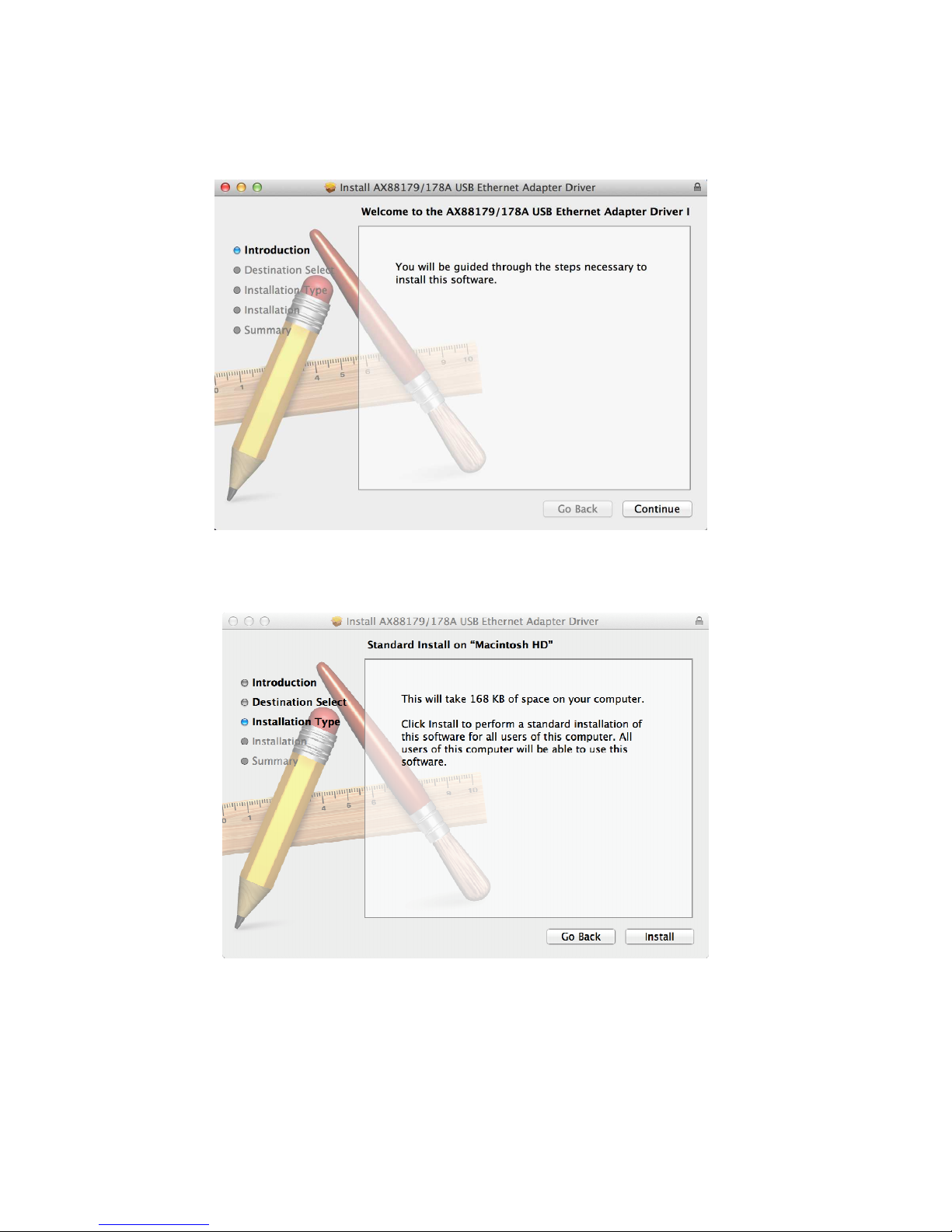
2. When the Install AX88179/178A USB Ethernet Adapter Driver screen
appears, please select Continue.
3. When the screen below appears, please click Install to install
Table des matières
Autres manuels GWC Adaptateur