GW Instek ASR-002 Manuel utilisateur

Three Phase Power Controller
ASR-002
USER MANUAL
ISO-9001 CERTIFIED MANUFACTURER

This manual contains proprietary information, which is protected by
copyright. All rights are reserved. No part of this manual may be
photocopied, reproduced or translated to another language without
prior written consent of Good Will company.
The information in this manual was correct at the time of printing.
However, Good Will continues to improve products and reserves the
rights to change specification, equipment, and maintenance
procedures at any time without notice.
Good Will Instrument Co., Ltd.
No. 7-1, Jhongsing Rd., Tucheng Dist., New Taipei City 236, Taiwan.

Table of Contents
3
Table of Contents
SAFETY INSTRUCTIONS .................................................. 4
GETTING STARTED.......................................................... 7
ASR-002 Overview ...................................................7
Front Panel ..............................................................8
Rear Panel ............................................................. 10
OPERATION .................................................................. 12
Basic Operation..................................................... 13
Advance Setting..................................................... 15
Phase Angle Setting............................................... 17
Voltage Ramp Setting ............................................ 18
Frequency Sweep Setting ....................................... 19
Unit Setting Value Display ..................................... 20
Wire Connection & Accessories ............................. 23
APPENDIX ..................................................................... 25
ASR-002 Dimension ............................................... 25
Using the Rack Mount Kit ...................................... 26
Command List ....................................................... 28
ASR-002 Error Messages........................................ 29

ASR-002 Series User Manual
4
SAFETY INSTRUCTIONS
This chapter contains important safety
instructions that you must follow during
operation and storage. Read the following before
any operation to ensure your safety and to keep
the instrument in the best possible condition.
Safety Symbols
These safety symbols may appear in this manual or on the
instrument.
WARNING
Warning: Identifies conditions or practices that
could result in injury or loss of life.
CAUTION
Caution: Identifies conditions or practices that
could result in damage to the ASR-002 or to other
properties.
DANGER High Voltage
Attention Refer to the Manual
Protective Conductor Terminal
Earth (ground) Terminal

SAFETY INSTRUCTIONS
5
Do not dispose electronic equipment as unsorted
municipal waste. Please use a separate collection
facility or contact the supplier from which this
instrument was purchased.
Safety Guidelines
General
Guideline
CAUTION
Do not place any heavy object on the ASR-002.
Avoid severe impact or rough handling that leads to
damaging the ASR-002.
Do not discharge static electricity to the ASR-002.
Use only mating connectors, not bare wires, for the
terminals.
Do not block the cooling fan opening.
Do not disassemble the ASR-002 unless you are qualified.
If the equipment is used in a manner not specified by the
manufacturer, the protection provided by the equipment
may be impaired.
Power
Supply
WARNING
AC Input voltage range:
230 ~ 240 Vac
Frequency: 50/60 Hz
To avoid electrical shock connect the protective grounding
conductor of the AC power cord to an earth ground.
Cleaning the
ASR-002
Disconnect permanently connected power input before
cleaning.
Use a soft cloth dampened in a solution of mild detergent
and water. Do not spray any liquid.
Do not use chemicals containing harsh material such as
benzene, toluene, xylene, and acetone.

ASR-002 Series User Manual
6
Operation
Environment
Location: Indoor, no direct sunlight, dust free, almost non-
conductive pollution (Note below)
Relative Humidity: 20%~ 80%, no condensation
Altitude: < 2000m
Temperature: 0°C to 40°C
Storage
environment
Location: Indoor
Temperature: -10°C to 70°C
Relative Humidity: ≤90%, no condensation
Disposal
Do not dispose this instrument as unsorted municipal waste.
Please use a separate collection facility or contact the supplier
from which this instrument was purchased. Please make sure
discarded electrical waste is properly recycled to reduce
environmental impact.
Certification of Compliance
----------------------------------------------------------------------------------
The product is in conformity with the directive: EN 61010-1 /
EN 61326-1 / WEEE / RoHS

GETTING STARTED
7
GETTING STARTED
This chapter describes the ASR-002 power
controller in a nutshell, including its main
features and front/rear panel introduction.
ASR-002 Overview ..............................................................7
Front Panel .........................................................................8
Rear Panel ........................................................................ 10
ASR-002 Overview
ASR-002, which is a three-phase power controller, is able to controll
up to 3 single phase power supply units (ASR series only).
It effectively makes AC output conformed to 1P3W/3P4W that
generally unit requires, and also turns output into 3P3W via
designated wire method.
When the select single phase power is greater than the capacity of
2kVA, it is suggested that output should be connected to external
terminal for safety consideration.

ASR-002 Series User Manual
8
Front Panel
Section
Figure
Description
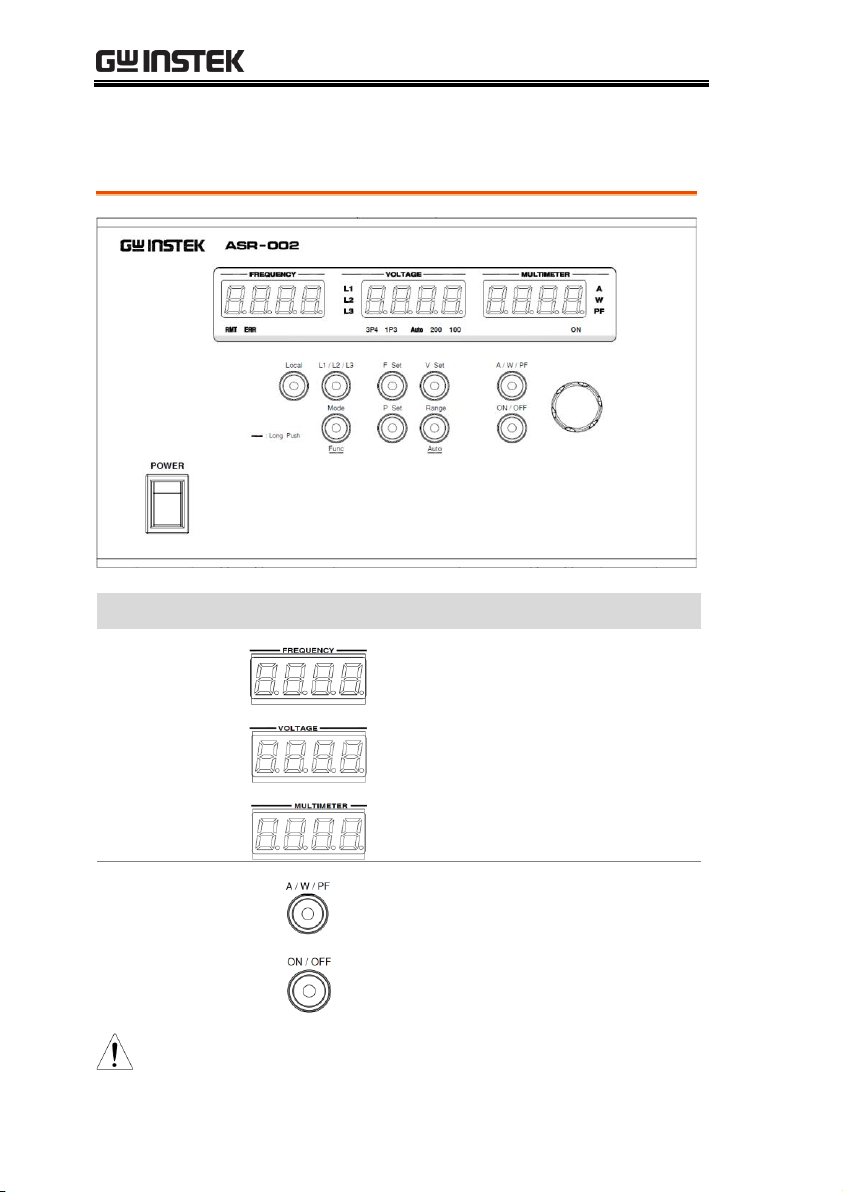
Header Displays
FREQUENCY: It displays frequency.
VOLTAGE: It displays voltage.
MULTIMETER: It displays A current /
W power / PF power factor.
Function Keys
It changes header display A W
PF.
ON: Output on.
OFF: Output off.
Note
It can be operated when connected to ASR series only.

GETTING STARTED
9
V Set: It configures voltage.
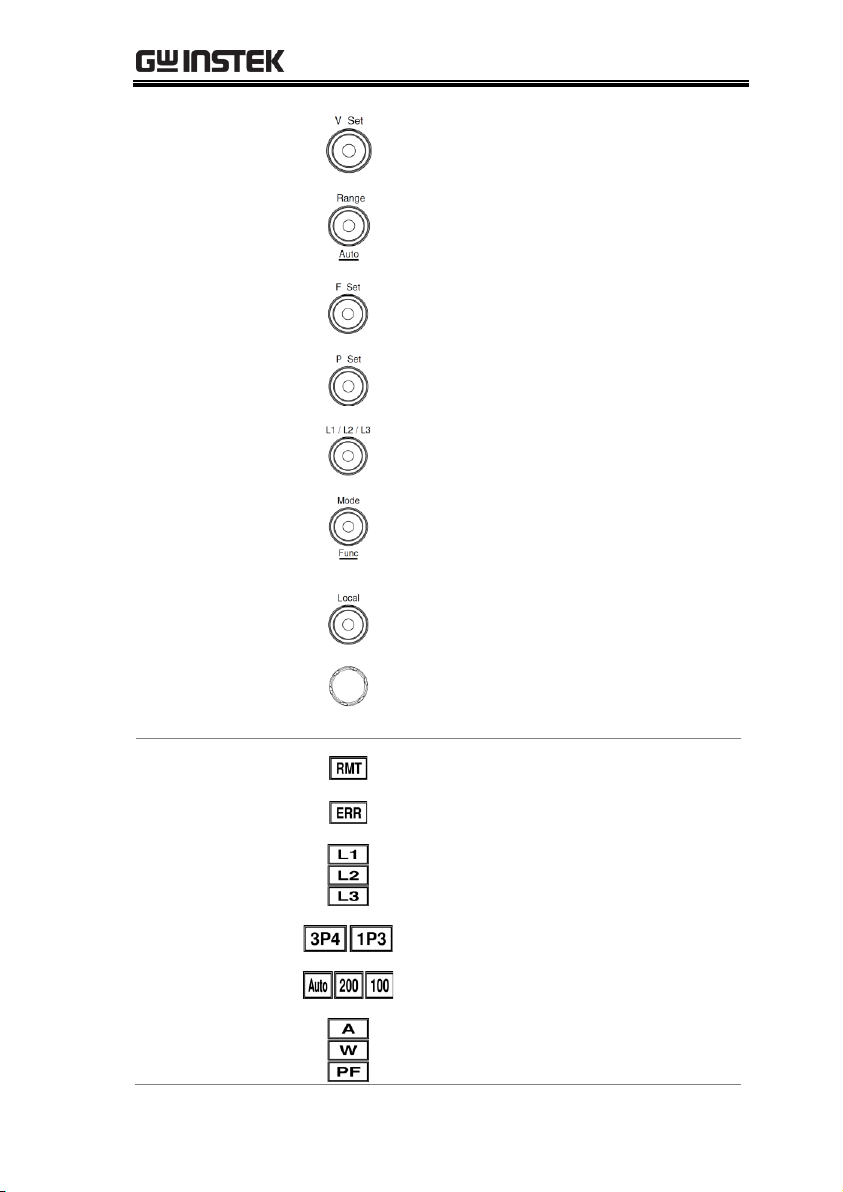
Range: It toggles between 100V and 200V.
Auto: It enters Auto range by long press.
F Set: It configures frequency.
P Set: It configures L2 / L3 phase.
L1 / L2/ L3: It changes among L1
L2 L3.
Mode: It toggles between 1P3W3P4W.
Func: It configures advance setting by
long press.
Local: It cancels connection and
enters the local opeation mode.
Knob Key: It adjusts value by scroll.
Also, it switches input adjustion
position by press.
Display Icons
It indicates remote control mode.
It indicates that error of control occurs.
It indicates output phase.
It indicates output mode.
It indicates output range.
It indicates measurement unit display.

ASR-002 Series User Manual
10
Rear Panel
Section
Figure
Description
USB Port
USB B-type port for remote control.
RS232C Port
RS232C port for remote control.
SIG OUT
SIG OUT for phase control signal
output.
Phase Terminal
The phase terminals for L1/L2/L3.
Warning: Input Voltage 400VAC Max.
Autres manuels pour ASR-002
1
Table des matières
Autres manuels GW Instek Contrôleurs