
Gtech GL-6000L Series Manuel utilisateur

PORTABLE ELECTRONIC SCALE
Service Manual
GL-6000L
■
Please read this manual before using.
■
Keep this manual in safe location after reading
Series

2

3
INDEX
Introduction ..................................................................................................................................................................................4
1Safety Precaution .............................................................................................................................................................4
2Name of Each Part and Product Size ......................................................................................................................7
2.1 Name of Each Part ...............................................................................................................................................7
2.2 Product Size............................................................................................................................................................8
2.3 Display and Keys...................................................................................................................................................9
2.4 Key Functions...................................................................................................................................................... 10
3Test Mode........................................................................................................................................................................... 11
3.1 How to Enter Test Mode................................................................................................................................. 11
3.2 Description of Test Mode............................................................................................................................... 11
4Calibration Mode ............................................................................................................................................................ 11
4.1 How to Enter Calibration Mode................................................................................................................... 11
4.2 Description of Calibration Mode................................................................................................................. 11
5Gravity Acceleration Setting Mode ....................................................................................................................... 13
5.1 How to Enter Gravity Acceleration Setting Mode ............................................................................... 13
6General Setting Mode .................................................................................................................................................. 13
6.1 How to Enter General Setting Mode......................................................................................................... 13
7User Setting Mode......................................................................................................................................................... 16
7.1 How to Enter User Setting Mode ............................................................................................................... 16
7.2 Description of User Settings........................................................................................................................ 16
8Communication Interface (RS-232C) .................................................................................................................. 20
8.1 RS-232C Pin Arrangement and Connection ......................................................................................... 20
8.2 Signal Format...................................................................................................................................................... 20
8.3 Data Format......................................................................................................................................................... 20
9How to Download Program ....................................................................................................................................... 22
9.1 Downloader Connection................................................................................................................................. 22
9.2 How to Download .............................................................................................................................................. 23
9.3 Setting Default Unit ......................................................................................................................................... 27
10 Error Messages & Trouble Shooting Guide ....................................................................................................... 28
11 How to Sealing............................................................................................................................................................... 29
12 GL6000L Series –MS EXPLODED ............................................................................................................................ 30
13 Specification..................................................................................................................................................................... 32

4
Introduction
Thank you for purchasing G-Tech Portable Electronic Scale GL-6000N Series. This product
has passed strict QC test and guarantees excellent performance. Please read this manual
carefully before using the product to understand the characteristics of the product and
how to use it.
1Safety Precaution
It is important to handle this product in the right way. If it is not used properly, it may cause
unexpected accidents resulting in personal injury or property damage.
- In this manual, possible hazardous situations are informed in order to prevent any
accident. Such situations are displayed in different categories.
( Warning, Caution and Notice ).
(1) Unauthorized duplication of this manual in part or in whole is prohibited.
(2) The contents of this manual are subject to change without notice.
(3) If there is any incorrect or missing information in this manual, or if you have any
questions, please contact the place of purchase or your nearest dealer.
(4) Please be informed that G-Tech does not accept any liability for loss or claim for loss due
to the operation of this device regardless of (2) and (3).

5

6

7
2Name of Each Part and Product Size
2.1 Name of Each Part
①Display: Displaying the current weight on the platform
②Platform: Placing an object to be weighted
③Level: Checking if the product is level
④Handle: Convenient when moving the product
⑤Limit Bolt: Load Cell Limit Bolt
⑥ Battery : C SIZE 1.5V 4 EA
⑦Adjust Foot: Used to level the product
⑧Communication Port: RS-232C type, (RJ11 Connector) ⑨Adapter Jack

8
2.2 Product Size

9
2.3 Display and Keys
Symbol
Description
Stabilization
display lamp
It is turned on when the weight is stable.
ZERO
Zero
display lamp
It is turned on when the weight is “0”.
NET
Tare
display lamp
It is turned on while net weight is displayed
(when tare function works).
Ib/kg
Measurement unit
display lamp
It displays measurement unit.
Remaining battery
display lamp
It displays remaining battery.
(3 stages)
10
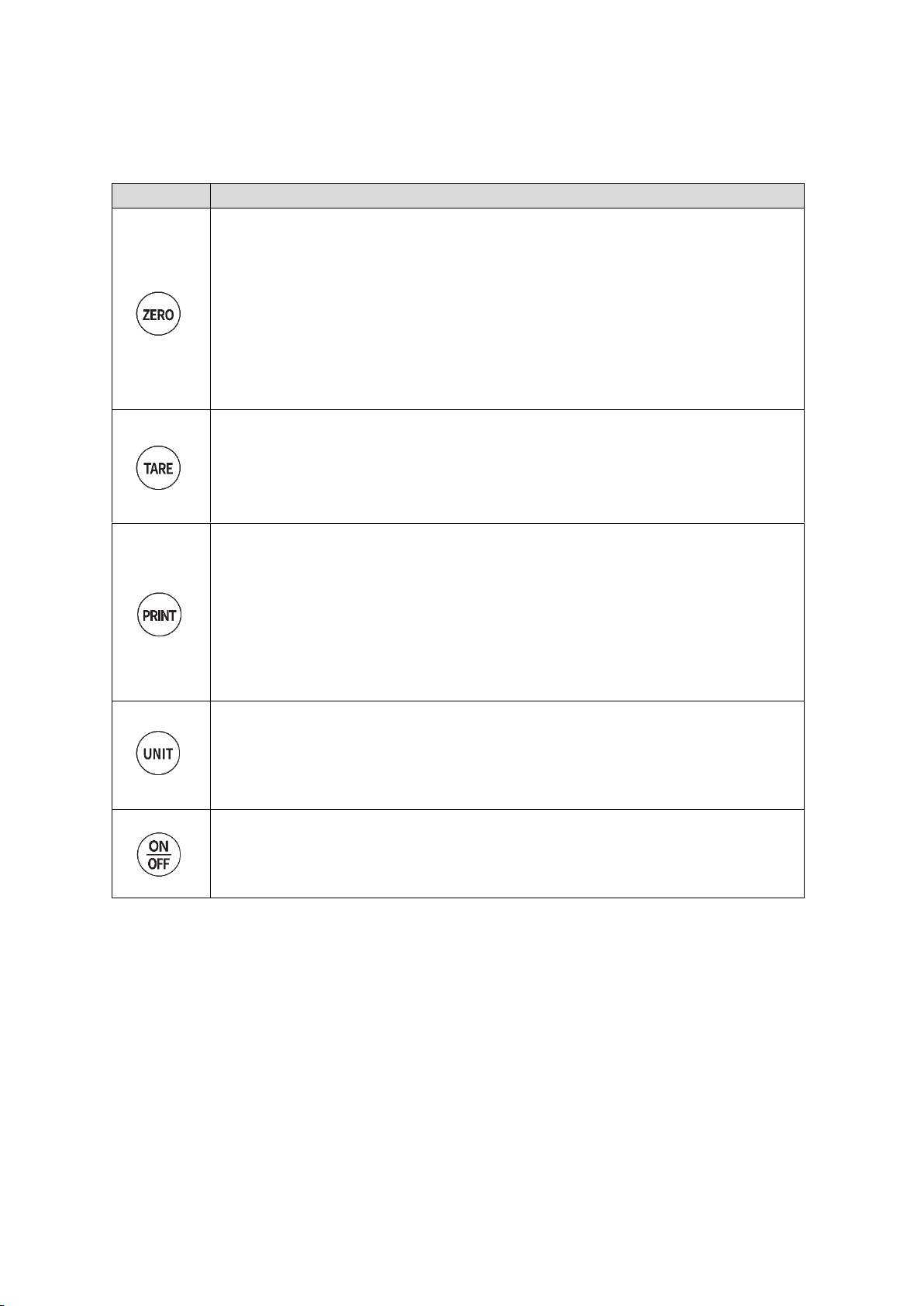
2.4 Key Functions
Key
Description
1) It sets the current weight “0” within a certain degree of the
maximum weight.
2) When the ‘Zero’ Key is long pressed, the direction of
LCD display is reversed.
1) It is used to set / release tare function.
2) When the Key is long pressed, you can adjust the upper
Limit / lower limit of value.
1) When the ‘PRINT’ Key is pressed after placing an object on the platform,
the current weight is transmitted via communication port.
2) When the ‘PRINT’ Key is pressed without an object on
the platform, the total amount of weight is printed out.
(when printer output is used)
1) When pressed short, measurement unit changes.
2) When pressed long, the upper limit/lower limit function is
turned ‘ON/OFF’.
1) It turns ‘ON/OFF’ the power.
Table des matières
Autres manuels Gtech Échelle


